
What is a cloud phone
Audience: anyone new to CCloudPhone. Console: https://www.ccloudphone.com/my
0. How to read this set
| No. | Article | What it covers |
|---|---|---|
| 001 | What is a cloud phone (this one) | The concept, what it is for, the rules to know before you start |
| 002 | How to create a cloud phone | From sign-up to your first running phone |
| 003 | How CCloudPhone charges | The four resources, the billing rules, reading your bill |
| 004 | Binding and changing a proxy | Add, test, bind and swap proxy IPs |
| 005 | Power on and power off | Statuses, pre-flight checks, automatic shutdown |
| 006 | Controlling one phone | Operating a phone in the browser, including in-device actions |
| 007 | Group control | One master, many followers |
| 008 | Enabling and disabling Root | The Root switch and when to use it |
| 009 | Enabling and disabling ADB | Connecting over adb for debugging |
| 010 | Phone tags | Grouping, filtering and batch actions |
First time here? 001 → 002 → 003 is enough to get working. Read 004–010 as you need them.
1. In one sentence
A cloud phone is an Android phone that runs in the cloud.
It is not on your desk — it lives on a server in a data centre. You open a web page and you can see its screen, tap it, swipe it and install apps on it, exactly as you would a phone in your hand. Close the browser and it keeps running.
CCloudPhone runs Android natively on real ARM servers, with no translation layer in between — it is not an emulator. That is the fundamental difference from the Android emulators you run on a PC: an emulator fakes device information in software and platforms detect it easily, whereas a cloud phone's model, sensors and hardware identifiers come from real hardware.
2. Compared with a real phone and with an emulator
| Physical phone | PC emulator | CCloudPhone | |
|---|---|---|---|
| Accounts per device | One device, one environment | Instances interfere with each other | One phone, one isolated environment |
| Device fingerprint | Real but fixed | Faked in software, easy to spot | Real hardware, distinct per phone |
| Egress IP | Whatever your local network is | Whatever the host machine uses | A dedicated proxy IP per phone |
| Scaling to dozens or hundreds | Buy dozens of handsets | Eats RAM, drops connections | A few clicks adds another |
| Running 24/7 | Needs power and supervision | The PC must stay on | Lives in the cloud; closing the browser changes nothing |
| How you use it | In your hand | Install a client | Open a browser — nothing to install |
3. What people use it for
- Social media marketing: one account, one phone, one IP. Warm up a matrix of accounts, post and interact in bulk, and reduce the risk of platforms linking those accounts together.
- Cross-border e-commerce: one store, one environment, so multiple stores are not judged as related because they share a device or a network.
- Gaming and idling: real ARM hardware runs mainstream mobile games, and the phone stays online 24/7 without you babysitting a PC.
- Affiliate and multi-region traffic: bind a different egress IP per target region and drive traffic from many accounts in parallel.
4. What a cloud phone is made of here
Sign in at https://www.ccloudphone.com/my. Cloud Phones → My Phones in the left menu lists every phone you own:
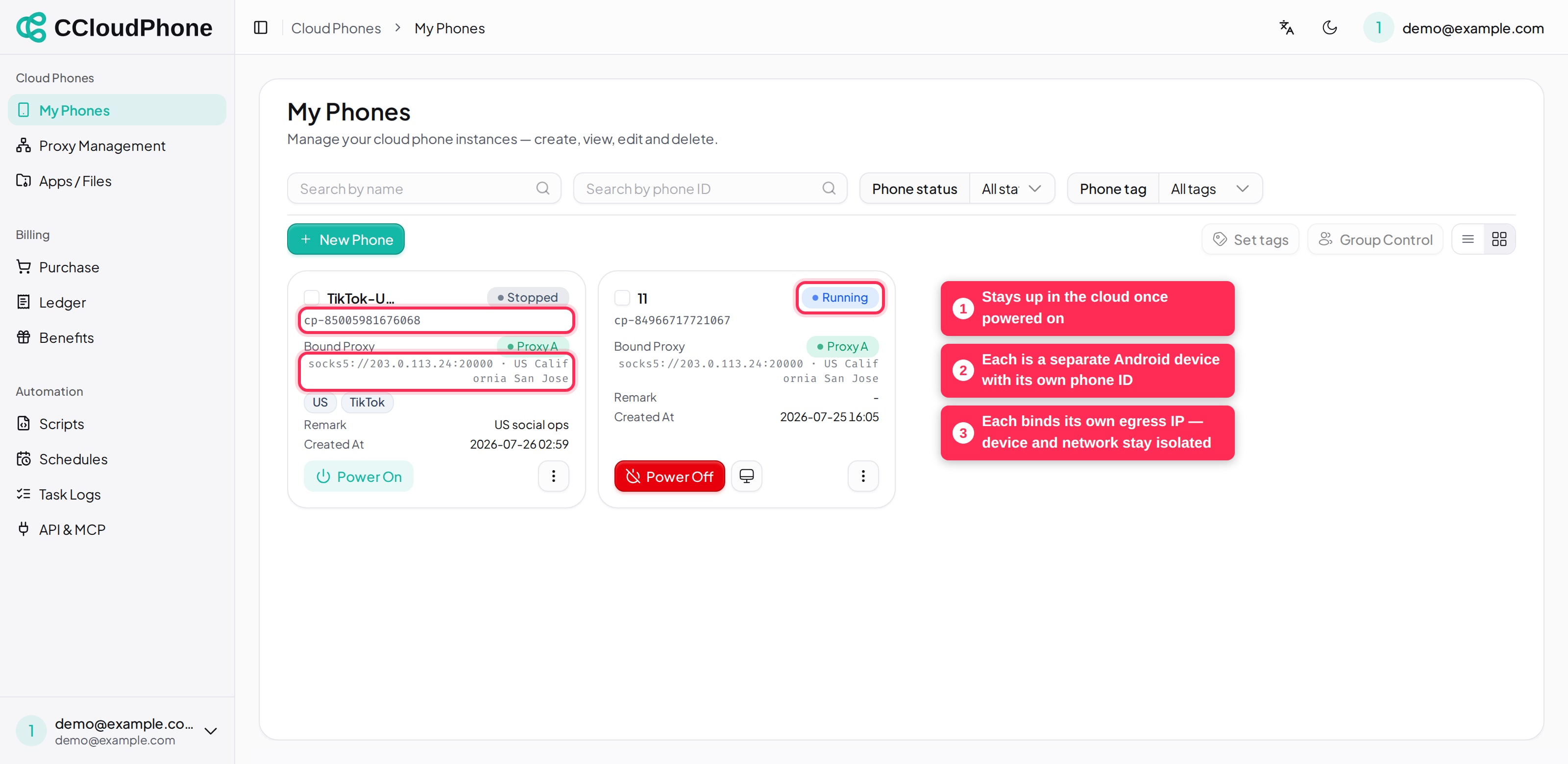
Four things have to line up before a phone can do useful work:
| Part | What it decides | Where you manage it |
|---|---|---|
| Instance seat | How many cloud phones you may create. Available seats = maximum instances | Billing → Purchase |
| Phone instance | The Android device itself, with its own phone ID (like cp-85005981676068) |
Cloud Phones → My Phones |
| Proxy IP | A SOCKS5 proxy bound per phone, used as that phone's egress network | Cloud Phones → Proxy Management |
| Boot quota | What it costs to actually run the phone — either "monthly boot slots" or "runtime minutes" | Billing → Purchase |
A short way to remember it: seats decide how many you can create, boot quota decides how many can run at once, and the proxy decides where each one goes online from.
5. Three things to know before you start
5.1 No proxy, no power-on
This is a hard rule, not a recommendation. A phone without a bound proxy can be created and can sit in your list, but Power On is refused with:
未绑定代理,无法开机,请先绑定代理 (No proxy bound — bind a proxy before powering on.)
The reason is that every phone's egress must be one you chose. It must never fall back to the data centre's shared egress and put a batch of your phones behind the same IP.
We recommend one dedicated proxy IP per cloud phone. Sharing one IP across several phones ties those accounts together on the network dimension, which defeats much of the point.
The only supported proxy type today is SOCKS5.
Server-side business messages like the one above are not localised yet — you will see them in Chinese even with the interface set to English. Where such a message matters, this guide quotes the exact Chinese text so you can recognise it, with an English translation beside it.
5.2 Running costs quota; stopped costs nothing
A cloud phone only consumes boot quota while it runs:
- Monthly boot slots: one slot can be held by one phone at a time, and phones take turns using it. A phone running on a slot does not burn runtime minutes.
- Runtime minutes: a per-minute bundle with no expiry — you use it until it is gone.
Before powering on, the system checks that you have either a free monthly slot or some runtime minutes left. With neither, it refuses:
没有可用的包月开机名额或临时开机时长,无法开机,请购买包月开机数或临时时长 (No free monthly boot slot and no runtime minutes — buy boot slots or runtime minutes.)
If you do own boot slots and they are simply all taken by running phones, the message says so explicitly, and powering one phone off frees a slot.
5.3 When a seat expires, the instance goes to the recycle bin
Seats are bought for a period. When one expires and no other free seat can take over, that instance is stopped automatically and moved to the recycle bin, where it is kept for 30 days by default. You can restore it during that window (provided you have a free seat by then); after the retention period it is cleaned up and the data is gone.
So for anything long-running, keep an eye on seat expiry and renew ahead of time.
6. Next
- Ready to spin one up: How to create a cloud phone
- Want the cost model first: How CCloudPhone charges
Last updated: Jul 26, 2026