
What Is a Cloud Phone? A Complete Guide from Principles to Real-World Uses
In One Sentence: A Cloud Phone Is a Smartphone That Lives in a Data Center
The phone in your hand relies on its chip, memory and battery to work. A cloud phone moves that entire hardware setup into a data center. Simply put, a cloud phone is a full Android system running on cloud servers. It has its own computing power, memory and storage, plus a complete Android interface. You connect to it from your own device and tap, swipe and install apps just as you would on a physical phone, except this phone is untouchable, running around the clock in a server room on your behalf.
Many people mistake a cloud phone for a remote-control or screen-mirroring tool. It is neither. A cloud phone is an independently running Android device with its own isolated system environment. Apps run inside it exactly as they would on a real phone, completely separate from the device in your pocket.
How a Cloud Phone Works: Three Simple Steps
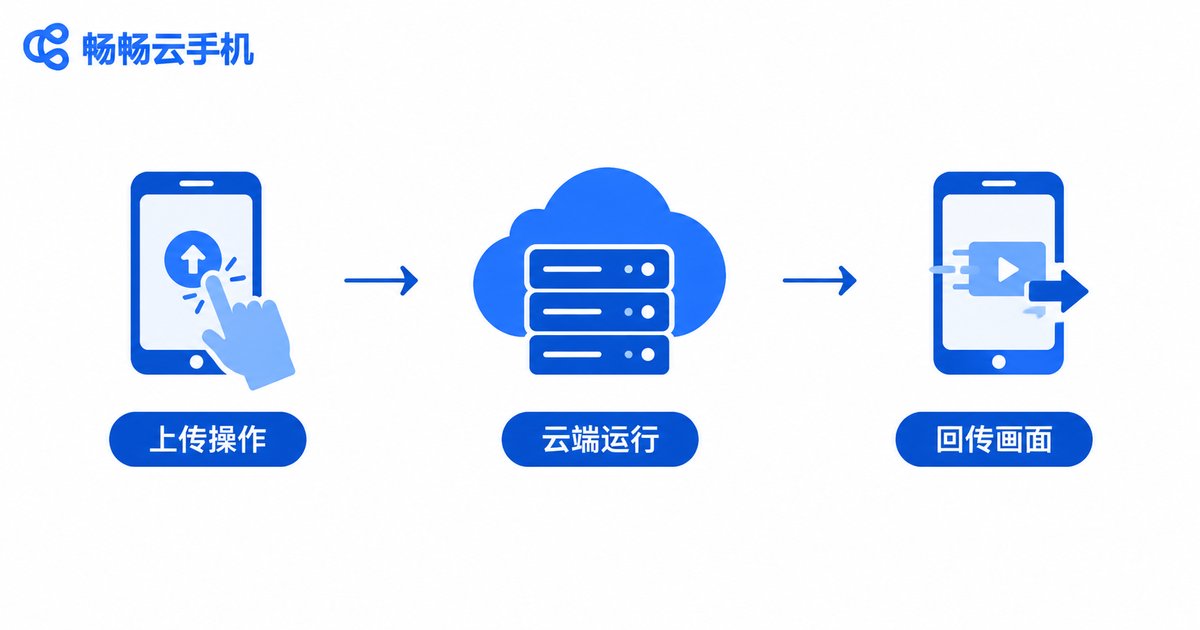
The principle behind cloud phones is not mysterious. It breaks down into three steps:
Step 1: Real devices running in the cloud. Providers deploy large numbers of ARM-based servers in data centers and use virtualization to slice each server into multiple independent cloud phones. Each one runs a complete Android system with isolated performance and storage.
Step 2: Commands go up to the cloud. Every tap and swipe you make on your local device is sent over the network to your cloud phone, which performs the action on your behalf.
Step 3: The screen streams back. The cloud phone encodes its running screen like a high-definition video stream and sends it back to your display, usually with latency of only a few dozen milliseconds, feeling close to operating a local phone.
Throughout this process, your local device only handles displaying the picture and sending commands; all the heavy lifting happens in the cloud. That is why even an old, low-spec phone can run demanding mobile games smoothly, because the computing power is in the cloud, not in your hand.
Cloud Phone vs. Physical Phone vs. Android Emulator
Many people confuse cloud phones, physical phones and Android emulators. One table makes it clear:
| Aspect | Cloud Phone | Physical Phone | Android Emulator |
|---|---|---|---|
| Where it runs | Cloud servers | The phone itself | Local computer |
| Performance ceiling | Depends on cloud specs, flexibly upgradeable | Fixed by hardware at purchase | Depends on computer specs |
| Cost of running many instances | Low, scales at the software level | High, requires buying multiple devices | Medium, limited by computer performance |
| 24/7 availability | Yes, local device can be turned off | Device must stay on, with heat and wear | Computer must stay on |
| Local burden | Nearly zero, no heat or battery drain | Heat, battery drain, storage use | Heavy computer resource usage |
In short: a cloud phone offers the experience of a real phone plus cloud-grade scalability, free from hardware limits and not tied to your computer's performance the way an emulator is.
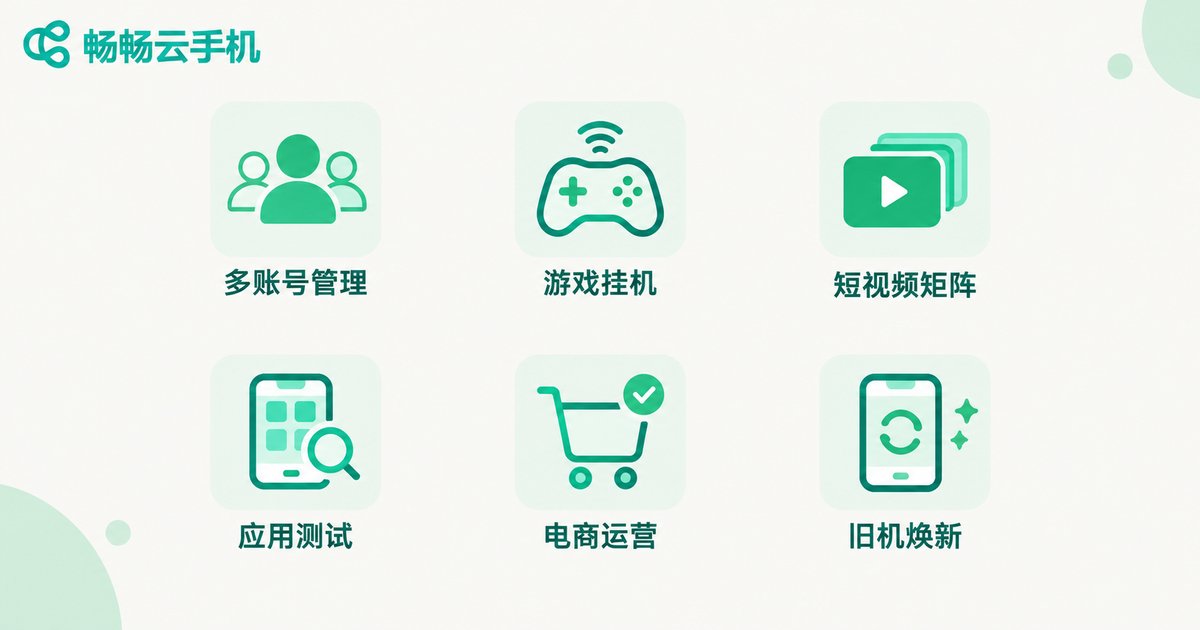
What Can You Do With a Cloud Phone? Six Popular Scenarios
1. Multi-account management. Each cloud phone is an isolated system environment, so one account per phone keeps everything separate, ideal for users running multiple accounts at once.
2. Game AFK farming and cloud gaming. Leave games running in the cloud phone around the clock for daily quests and resource grinding while your real phone stays free; low-spec devices can borrow cloud power to play demanding titles.
3. Short-video and livestream matrices. Manage accounts across platforms in batches, publishing content and maintaining engagement far more efficiently than switching between physical phones.
4. App and game testing. Developers can verify app compatibility across different system environments instantly, without buying shelves of test devices.
5. E-commerce and social media operations. Support and operations staff keep work apps inside cloud phones, so account assets stay in the cloud even when team members change.
6. Giving old devices a second life. An outdated phone or tablet can keep running new apps by connecting to a cloud phone, extending its useful life.
Strengths and Limitations: Know Both Sides
Strengths: no local storage usage, no heat or battery drain, always-on capability, batch management, instant access, and a very low hardware bar.
Limitations: the experience depends on network quality, and unstable connections can cause stutter; latency-sensitive competitive gaming feels slightly less responsive than a local device; and a few apps may need real-world testing for cloud compatibility.
Overall, with a stable network, a cloud phone comfortably covers most everyday and AFK scenarios.
How to Choose a Reliable Cloud Phone Service
With many products on the market, focus on four things before choosing:
1. Stability. Data-center scale and network quality determine whether your cloud phone drops connections, which matters most for AFK workloads.
2. Smoothness. Image clarity and control latency directly shape the experience; always trial first.
3. Batch management. If you need group control and multi-instance workflows, confirm the product supports batch operations and app distribution.
4. Support and reputation. How quickly issues get resolved defines long-term satisfaction.
ccloudphone: One-Stop Android in the Cloud
Among the available options, ccloudphone (official site: ccloudphone) is worth checking first. Built on cloud servers, it delivers a stable and smooth Android cloud phone service with multiple cloud phones running in parallel and batch management support, covering game AFK farming, multi-account operations and app testing on a single platform. For the latest plans and feature details, visit the official ccloudphone website at ccloudphone and choose what fits your needs.
Final Thoughts
Cloud phones are not a gimmick but a very practical product in the era of cloud computing: computing power moves into the data center, while freedom and flexibility stay with the user. Once you understand how it works, you will see the use cases keep expanding. If multi-device management, always-on tasks or underpowered hardware are holding you back, start with ccloudphone and experience a data center in your pocket.
FAQ
Q: Is a cloud phone the same as remotely controlling a real phone?
No. Remote control operates a physical device whose performance and uptime are limited by that hardware. A cloud phone is an independent Android system in the cloud that can be scaled up or down anytime, with better stability.
Q: Will mobile games lag on a cloud phone?
With a stable local network, everyday gaming and AFK play run smoothly. For highly latency-sensitive competitive matches, choose a good network environment or a higher-spec cloud phone.
Q: Are cloud phones safe? Could I lose my accounts?
Reputable providers store data in data centers with backup mechanisms, so account assets live in the cloud, arguably safer than on a phone that can be lost or broken. Always download clients from official channels.
Q: How many accounts can one cloud phone hold?
Typically one cloud phone is one isolated system environment for one main account. For more accounts, activate additional cloud phones that stay fully independent.
Q: Is a cloud phone expensive?
Compared with buying multiple physical devices, on-demand cloud phones cost far less. See the ccloudphone official site for current pricing.


