

What Are AI Cloud Services? Applications Where Cloud Computing Meets AI
What Exactly Is an AI Cloud Service?
In plain terms, an AI cloud service means artificial intelligence capabilities are deployed in the cloud and delivered to users on demand over the internet. There is no need to buy expensive GPU servers or master complex model training — as long as you are online, you can call on speech recognition, image generation, intelligent question answering and other AI capabilities at any time.
Behind it, two technology currents converge: cloud computing, which supplies elastic compute, storage and network resources; and artificial intelligence — large models in particular — which demands massive computing power for training and inference. Only when the two combine does AI step out of the lab and into everyday life.
The Three Layers of AI Cloud Services
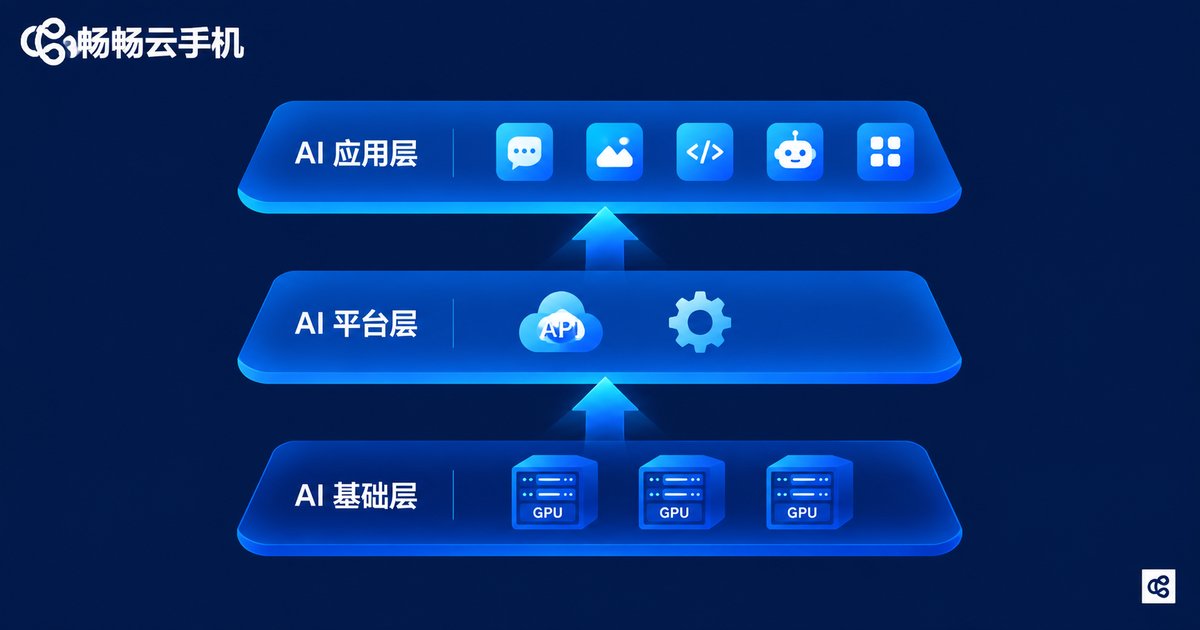
Like cloud computing in general, AI cloud services are usually divided into three layers, each with its own role:
| Layer | What It Provides | Typical Example |
|---|---|---|
| AI Infrastructure (IaaS) | GPU compute, storage, networking | Renting cloud servers to train models |
| AI Platform (PaaS) | Model training, deployment, APIs | Calling a large-model API to build apps |
| AI Application (SaaS) | Ready-to-use intelligent apps | AI writing, AI customer service, AI art |
Ordinary users touch the application layer most often; developers use the platform layer to assemble AI products quickly; and the infrastructure layer is the foundation that determines how much computing power everything above can draw on.
Five Typical Application Scenarios
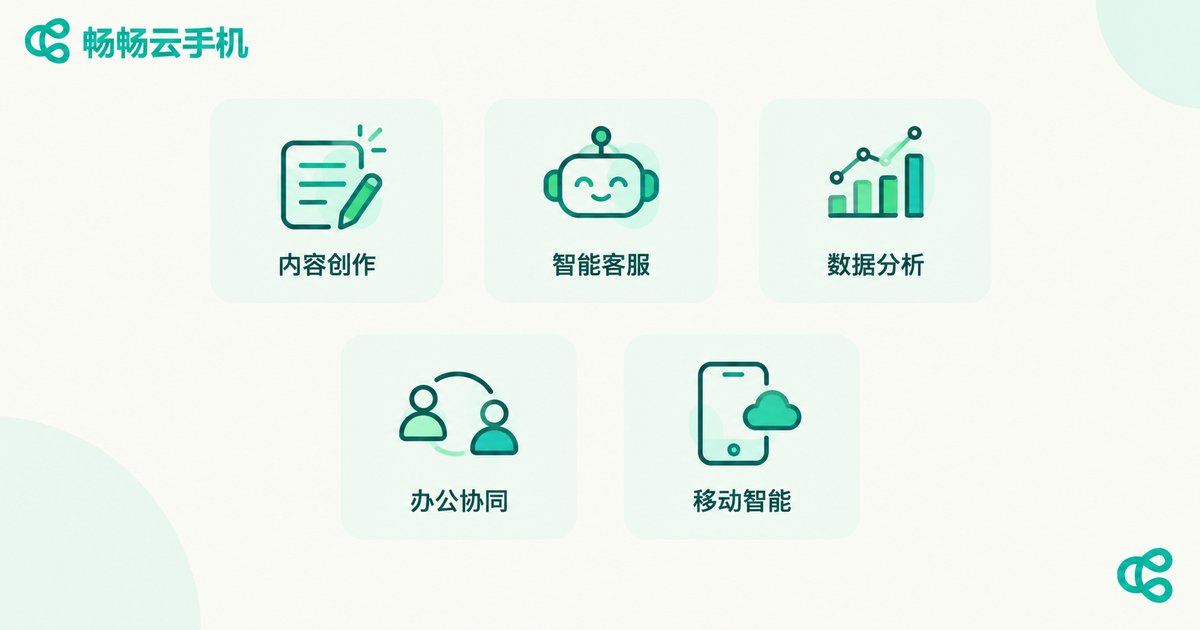
AI cloud services have already spread into almost every industry. Here are the most common directions:
1. Content creation: copywriting, image generation and video editing that once took hours can now produce a first draft in minutes.
2. Intelligent customer service: e-commerce and finance companies use cloud AI bots to answer inquiries around the clock, cutting labor costs dramatically.
3. Data analytics: companies move business data to the cloud and let AI models uncover trends, forecast sales and support decisions.
4. Smart collaboration: automatic meeting notes, real-time translation and document summaries multiply the efficiency of remote work.
5. Mobile intelligence: cloud phones and cloud gaming move computing into data centers, so even an ordinary handset can run heavy applications smoothly.
AI Cloud Services vs. Traditional Cloud Computing
A common question: are AI cloud services the same thing as ordinary cloud computing? They share the same roots, but the emphasis is clearly different:
| Dimension | Traditional Cloud Computing | AI Cloud Services |
|---|---|---|
| Core resource | CPU, storage, bandwidth | GPU compute, large models |
| How you use it | Rent servers, deploy programs | Call intelligent APIs or use AI apps directly |
| Barrier to entry | Requires technical skills | Natural-language interaction, far lower |
| Typical output | Websites, systems, databases | Copy, images, decision advice, AI agents |
In one sentence: AI cloud services are an upgraded form of cloud computing — the cloud is no longer just a place to store data and run programs, but a factory that outputs intelligence directly.
What It Means for Individuals and Small Businesses
Not long ago, an intelligent system cost a small fortune and only large corporations could afford one. Today, with AI cloud services, one person with one ordinary device can tap world-class AI capabilities: founders prototype products with AI, small shops serve customers with intelligent bots, and creators process materials in batches.
Mobile is changing too. Take ChangChang Cloud Phone (ccloudphone) as an example: it places the computing and storage of an entire Android phone in a cloud data center, so from the device in your hand you can remotely control a cloud phone that stays online 24/7 — no local storage consumed, no overheating, and cloud tasks keep running even when your local device goes offline. This is the AI cloud idea landed on mobile: computing power in the cloud, experience at your fingertips. Whether you are a gamer who needs multiple accounts or a user who needs a device online around the clock, visit the official ccloudphone website to learn more.

Three Things to Keep in Mind
Data security: upload to reputable providers only, and desensitize sensitive information before it leaves your device.
Network dependency: cloud services need a stable connection; keep a backup plan for critical work.
Cost control: pay-as-you-go is flexible, but review your usage bills regularly to avoid waste.
FAQ
Q: Do I need to know how to code to use AI cloud services?
No. Most AI cloud applications today offer graphical interfaces — describe what you need in plain words and get results, as with AI writing and AI art tools. Zero coding required.
Q: How do AI cloud services relate to cloud phones?
A cloud phone can be seen as a concrete mobile form of AI cloud service: computing and storage happen on cloud servers, and your local device is just a window for control. ChangChang Cloud Phone (ccloudphone) is a representative service of this kind.
Q: Is it safe to put my data in the cloud?
Reputable providers apply encrypted transmission and privacy protection, but good habits matter too: avoid uploading core secrets, clean up sensitive content regularly, and enable two-factor authentication.
Q: Are AI cloud services expensive?
Most services are pay-as-you-go — far cheaper than building your own server room. For individual users, a modest monthly fee usually covers everyday AI needs; check each provider's official website for exact pricing.


