

How to Manage Multiple TikTok Shop Stores: Cloud Phone + Independent IP Anti-Association Guide
Why Do Multiple Stores Keep Getting Banned Together? Understand the Platform's Risk Control First
For TikTok Shop sellers, the scariest word is association. A store you spent months building can be demoted or banned simply because the platform decides it is 'operated by the same person' as another violating store. Sellers call this guilt by association.
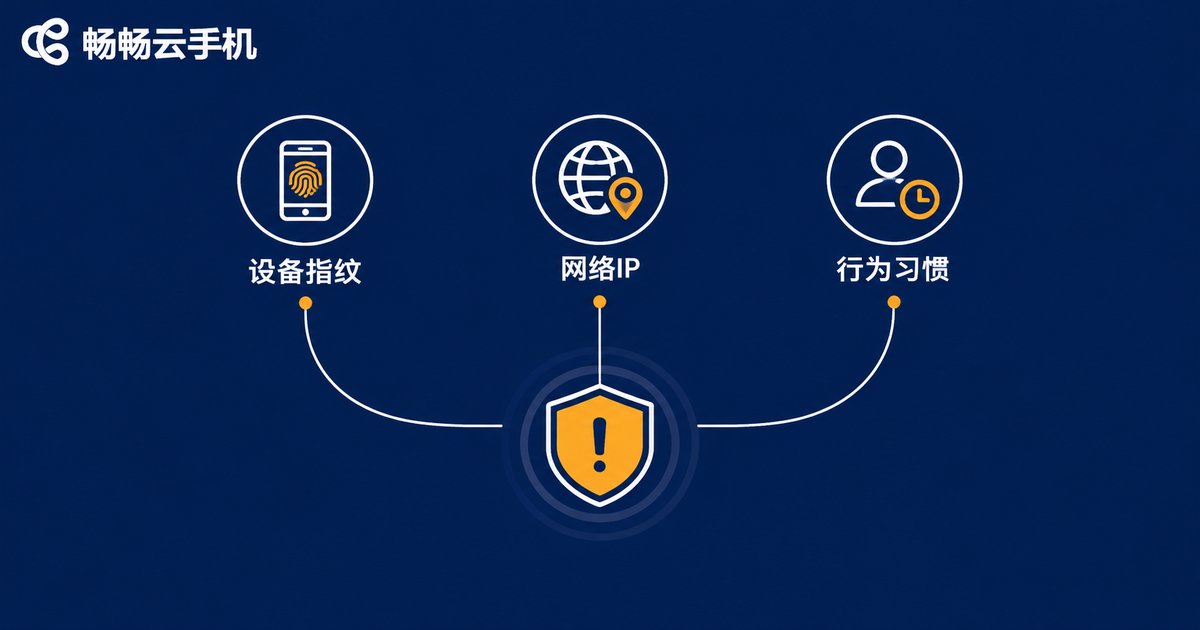
How does the platform link two stores to one owner? It mainly looks at three types of signals:
First, device fingerprints. When one phone has logged into multiple stores, its hardware parameters, system version, and sensor data are all recorded. Once one store runs into trouble, the others are flagged for review immediately.
Second, network environment. When multiple stores log in from the same IP address over a long period, they are treated as associated operations even on different devices.
Third, behavior patterns. Highly similar login times, operation rhythms, and listing habits also serve as evidence of association.
Three Pain Points of Traditional Setups: Costly, Exhausting, and Error-Prone
Many teams go with 'one store, one physical phone': buy a batch of phones, insert a SIM card in each, and run a separate broadband line for each. It sounds safe, but in practice it creates endless problems:
| Setup | Cost | Management Efficiency | Anti-Association Performance |
|---|---|---|---|
| Multiple accounts on one phone | Low | High | Poor, easily associated |
| One store, one physical phone | High (devices + SIM cards + broadband) | Low, manual operation one by one | Decent, but hard to scale |
| Cloud phone + independent IP | Moderate | High, batch remote operation | Strong, isolated environments |
The physical phone setup also has two hidden traps: phones running plugged in around the clock overheat and age quickly, and one broken device means rebuilding the environment from scratch; when an employee leaves, leftover login states and cached data on the devices often become association risks if not cleaned thoroughly.
Cloud Phone + Independent IP: Making 'One Store, One Environment' a Standard Practice
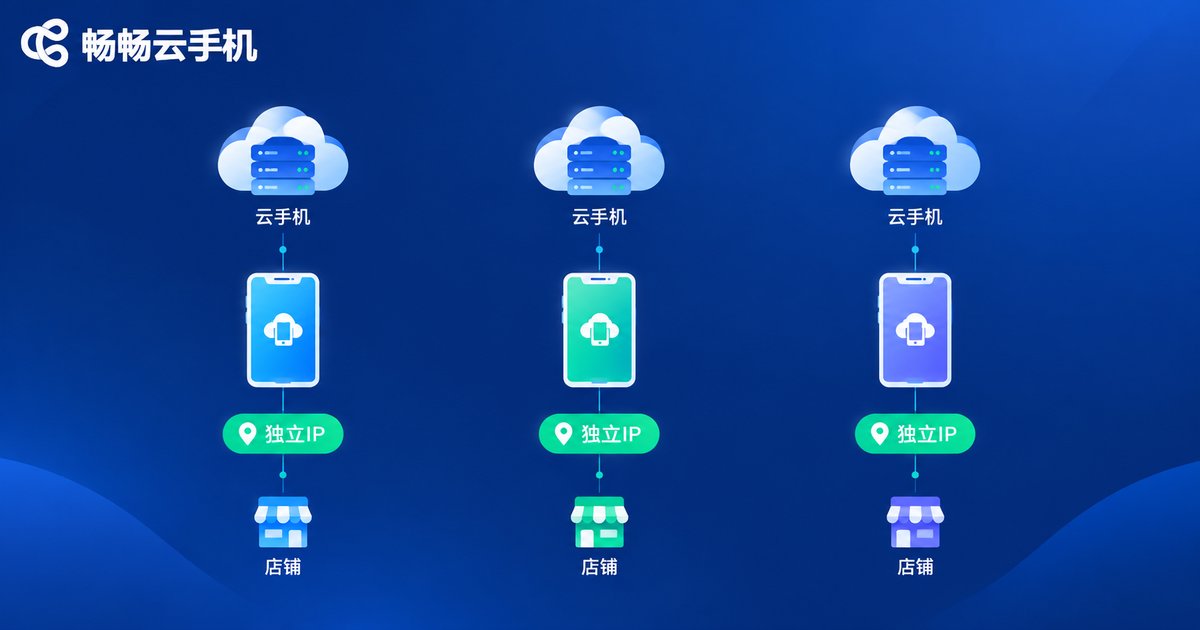
The idea behind a cloud phone is simple: it runs an independent Android system in the cloud, and you control it remotely from any device at hand. To the platform, it looks like a normal phone; to you, it is a 'virtual physical phone' that can be created in batches and reset anytime.
Combined with independent IPs, the anti-association logic becomes a closed loop: one cloud phone bound to one independent IP, running one store only. Device environments are isolated and network environments are isolated, cutting off the two signals the platform relies on most for association detection at the source.
We recommend ChangChang Cloud Phone (ccloudphone). It provides cloud-based Android environments, supports batch management of multiple cloud phones and 24/7 availability, and keeps every store environment independent—ideal for cross-border teams standardizing their multi-store workflow. For the latest plans and features, check the official website.

Five Practical Steps: Build Your Anti-Association System from Scratch
Step 1: Build a ledger and map everything one-to-one. Set the rules before opening stores: Store A maps to cloud phone 1 + IP 1, Store B maps to cloud phone 2 + IP 2. Write it into a spreadsheet and never mix them up.
Step 2: Configure the IP first, then log into the store. After getting a cloud phone, the first task is to set up the independent IP and confirm it works, then log into TikTok Shop. If you reverse the order, the store will remember the wrong network environment.
Step 3: One environment, one store only. Never log into Store B on cloud phone 1, even just for a quick look. Association detection reads history, not intentions.
Step 4: Keep a fixed operating rhythm. Arrange relatively fixed login hours and operation habits for each store, and differentiate product images and listing materials before publishing, so stores do not behave in highly similar ways.
Step 5: Review regularly and isolate quickly. Check the ledger monthly; once a store shows anomalies, immediately stop all operations in that environment to keep the problem from spreading to other stores.
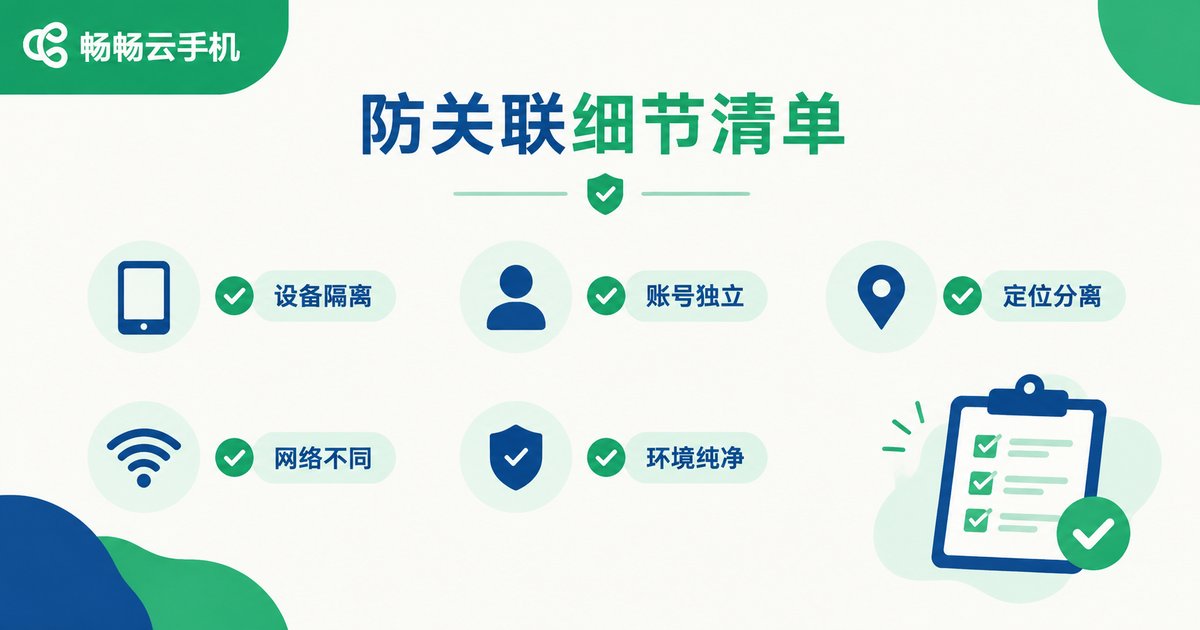
Daily Anti-Association Checklist
Once the framework is in place, details decide success or failure:
✅ Use independent registration details, payment information, and contact info for every store—zero overlap;
✅ Differentiate product images and listing pages across stores instead of spreading one set of materials everywhere;
✅ Do not install tools from unknown sources on cloud phones to keep the environment clean;
✅ Fix team responsibilities: who runs which store, with environment details handed over properly;
✅ Let new stores start quietly and avoid frequent interaction with older stores right after launch.
FAQ
Q: How is a cloud phone different from an emulator?
A: An emulator runs on your local computer and easily exposes virtual machine traits; a cloud phone is a real Android device running in the cloud, much closer to a physical phone. Combined with an independent IP, it delivers more stable anti-association performance.
Q: Can I log into two stores on one cloud phone?
A: Strongly not recommended. The core of anti-association is 'one store, one environment'. Any shortcut that mixes environments can waste all your previous effort.
Q: Is a more expensive independent IP always better?
A: What matters is 'independent' and 'stable', not the price. Choose a long-term stable IP that matches the store's target market. Frequently changing IPs actually triggers risk control.
Q: My stores are already associated. Does switching to a cloud phone still help?
A: Existing association records are hard to remove; a new environment mainly prevents the problem from spreading. Appeal through the platform first, then start fresh with a brand-new environment and brand-new materials.
Q: Is ChangChang Cloud Phone suitable for teams?
A: Yes. ChangChang Cloud Phone (ccloudphone) supports batch management of multiple cloud phones in one dashboard. See the official website for the latest features.


