

How to Stream on Multiple Platforms for Live Commerce? A Stable Setup with Cloud Phone + Dedicated Line
Why Multi-Platform Streaming Is Now a Must for Live Commerce
The era of broadcasting your live commerce shows on a single platform is over. Short-video apps, traditional marketplaces, and private communities each have their own audiences and traffic logic. Streaming on several platforms at the same time means double the exposure, more traffic entry points, and more chances to close a sale.
In practice, though, the problems pile up fast: not enough phones, constant account switching, streams that drop the moment the network hiccups, and multiple encoders fighting over the same bandwidth. Multi-platform streaming sounds great — until you actually try it. This article breaks down those pain points one by one and gives you a setup you can actually rely on.
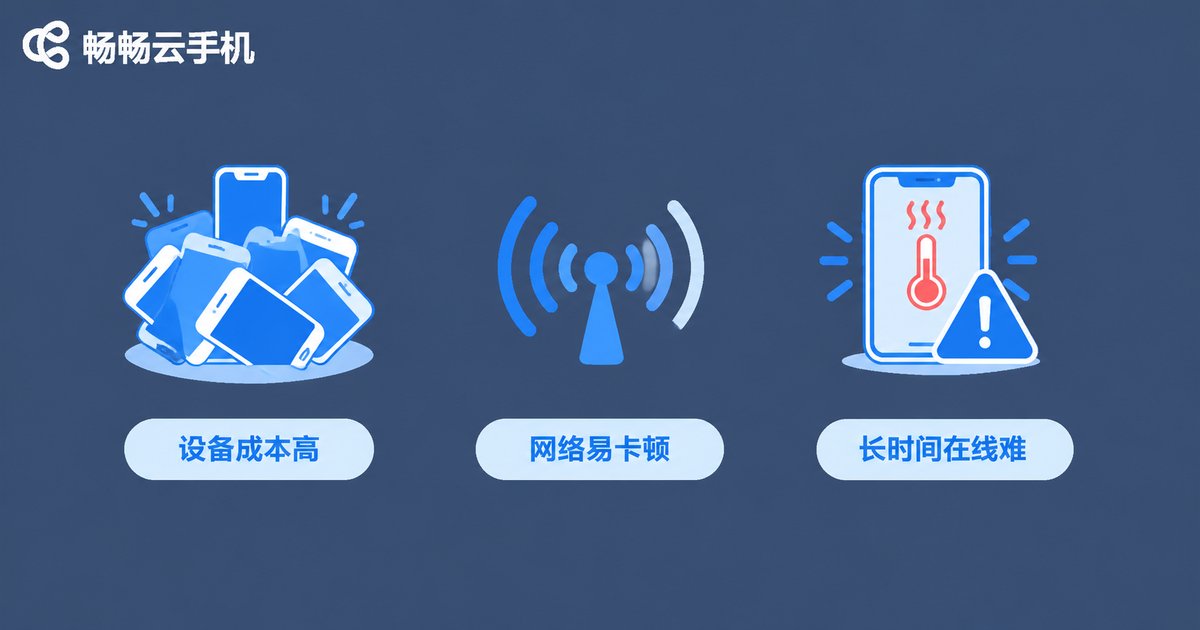
The Three Biggest Pain Points of Multi-Platform Live Streaming
Pain point 1: High device costs, chaotic management. One phone per platform means five phones for five platforms — plus SIM cards, stands, and chargers. Cables tangle across the desk, and logging in and out of accounts across devices wastes time and invites mistakes.
Pain point 2: Unstable network — every dropped stream is lost money. Regular home broadband congests during evening peak hours. When multiple streams upload simultaneously, upload bandwidth simply runs out: the feed stutters, latency climbs, and viewers swipe away in a second. Worse, a mid-stream disconnect not only kills momentum but can also hurt your room's traffic ranking.
Pain point 3: Devices can't survive long sessions. A single livestream often runs six to ten hours. Phones running at full load all night overheat, throttle, and drain their batteries. Simply keeping dozens of devices alive becomes a full-time job.
Cloud Phone + Dedicated Line: A More Reliable Way to Go Live
The idea behind this setup is simple: move broadcasting off physical devices and into the cloud, and protect your upload path with a dedicated line.
First, the cloud phone. A cloud phone is an Android system running in a cloud data center. Each instance is an independent environment where you can install apps, log into accounts, and stay online around the clock. With just one computer or phone as your management terminal, you can control a dozen cloud phones at once — each running one platform's live room. Overheating, battery drain, and performance dips on local devices stop being your problem.
Next, the dedicated line. Regular broadband is shared with everyone around you, so evening congestion is inevitable. A dedicated line gives you exclusive upload and download bandwidth over a more stable route, so you can push full bitrate even at peak hours. The result: steadier streams, sharper video, lower latency, and a better viewing experience.
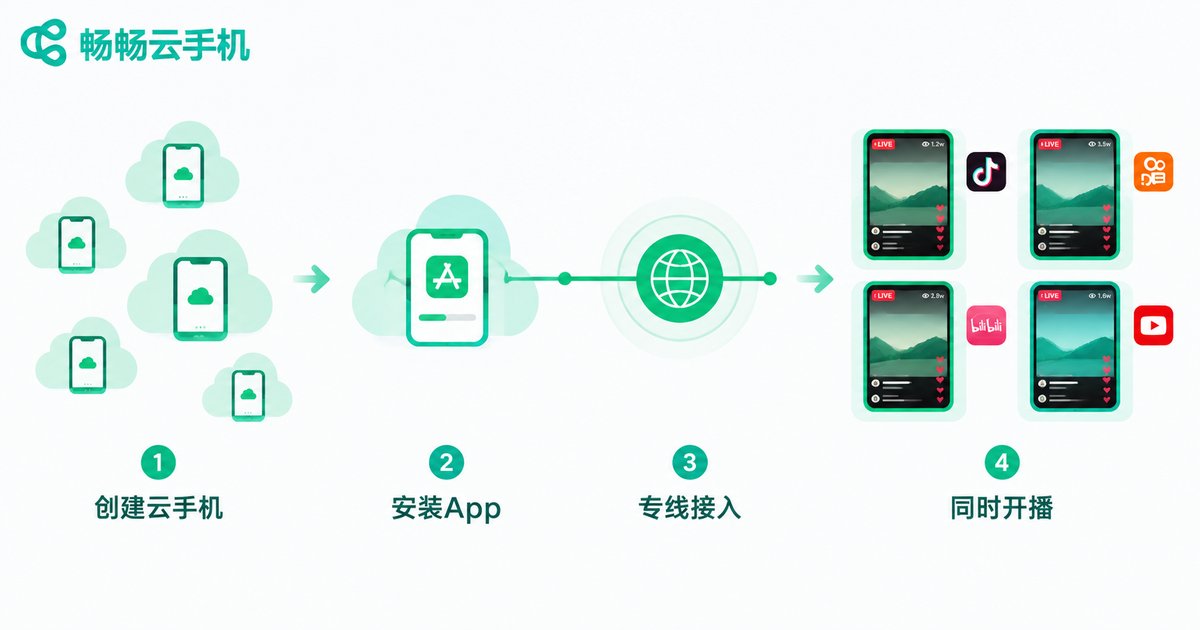
Four Steps to Build Your Multi-Platform Broadcasting Matrix
Step 1: Create your cloud phone instances. Sign up for ccloudphone and create one cloud phone instance for each platform you plan to stream on. Run one platform per instance — less interference, and easier troubleshooting when something goes wrong.
Step 2: Install the streaming and merchant apps. On each cloud phone, install the platform's streaming app and merchant backend, log in, complete identity verification and broadcasting permissions, and prepare your product materials in advance.
Step 3: Connect a dedicated line and run a speed test. Before going live, test your upload bandwidth. A single HD stream generally needs at least 5 Mbps of upload; add up the streams you plan to run and keep about 20% headroom so peak moments don't choke your feed.
Step 4: Schedule and go live simultaneously. Manage all instances from the ccloudphone dashboard: start streams on schedule, reply to comments across platforms from one place, and consolidate performance data. Once the workflow is smooth, one person can comfortably oversee several live rooms.
Side-by-Side: Traditional Multi-Device vs. Cloud Phone + Dedicated Line
| Aspect | Traditional Multi-Device | Cloud Phone + Dedicated Line |
|---|---|---|
| Hardware cost | One phone + SIM + accessories per platform | One management terminal |
| Network stability | Shared broadband, congests at peak | Exclusive bandwidth, low latency |
| Long sessions | Overheating and throttling, drops | Runs in the cloud, online 24/7 |
| Management | Device by device, labor heavy | Centralized dashboard, one-to-many |
| Scaling | New platform = new devices | Add an instance in the cloud |
Why We Recommend ccloudphone
Among cloud phone services, we recommend ccloudphone. It delivers a stable cloud Android environment with multi-instance management, app installation, and long-duration uptime — a strong fit for live commerce teams building a multi-platform broadcasting matrix. Visit the official website at ccloudphone for the latest instance configurations and plan details, and choose flexibly based on your team's size.
Paired with a dedicated line, ccloudphone gives every live room a stable running environment, minimizing the risk of drops and stuttering so your team can focus on product selection, scripts, and conversion — not emergency device maintenance.
Quick Tips Before You Go Live
1. Speed test first, always: if upload bandwidth falls short, no device can save your stream. Make testing a fixed pre-show routine.
2. One platform per instance: each cloud phone runs one platform's stream — more stable and easier to manage.
3. Keep a backup line: dedicated line as primary, backup network as a safety net for big sessions.
4. Run a pre-show checklist: confirm every cloud phone is online, apps are running, accounts are logged in, and stream settings are correct.
FAQ
Q: Will there be lag in video or audio when streaming from a cloud phone?
Cloud phones run in professional data centers. With a dedicated line, the streaming path stays stable, and the viewer experience is essentially the same as streaming from a local device. Do a short test stream before going live to confirm video and audio quality.
Q: How many platforms can one cloud phone stream to at once?
We recommend one platform per cloud phone. For multi-platform streaming, create multiple instances — each runs its own stream, which is the most stable and easiest to troubleshoot.
Q: How much upload bandwidth does a dedicated line need?
Plan for at least 5 Mbps of upload per HD stream, based on each platform's recommended bitrate. Add up all your streams and keep about 20% headroom.
Q: Can ccloudphone run streaming apps from various platforms?
ccloudphone provides a standard Android environment, so mainstream streaming and e-commerce apps install and run normally. Check the official website at ccloudphone for details or contact support.
Q: I'm not technical — can I still set this up?
Yes. Cloud phones work much like regular phones, and the dedicated line can be installed with help from your network provider. The overall setup is straightforward; anyone comfortable with smartphones can manage it.


