
Cloud Phone Storage Full? 4 Practical Tips for Expansion and Regular Cleanup
Why Does Cloud Phone Storage Run Out?
Cloud phones are widely used for multi-account management, app testing, data analysis, and more. However, over time, storage space can become insufficient. This usually happens because of:
- App Cache Buildup: Long-term use leads to large cache files taking up significant space;
- App Data Growth: Some apps (like social media or games) store user data, logs, and other files;
- System Updates and Temporary Files: Temporary files generated during system upgrades or operations are not cleaned up in time;
- Multiple Accounts Running Simultaneously: Each account’s data occupies independent space when running in parallel.
If not addressed promptly, insufficient storage can slow down your cloud phone, cause app crashes, or prevent normal usage.
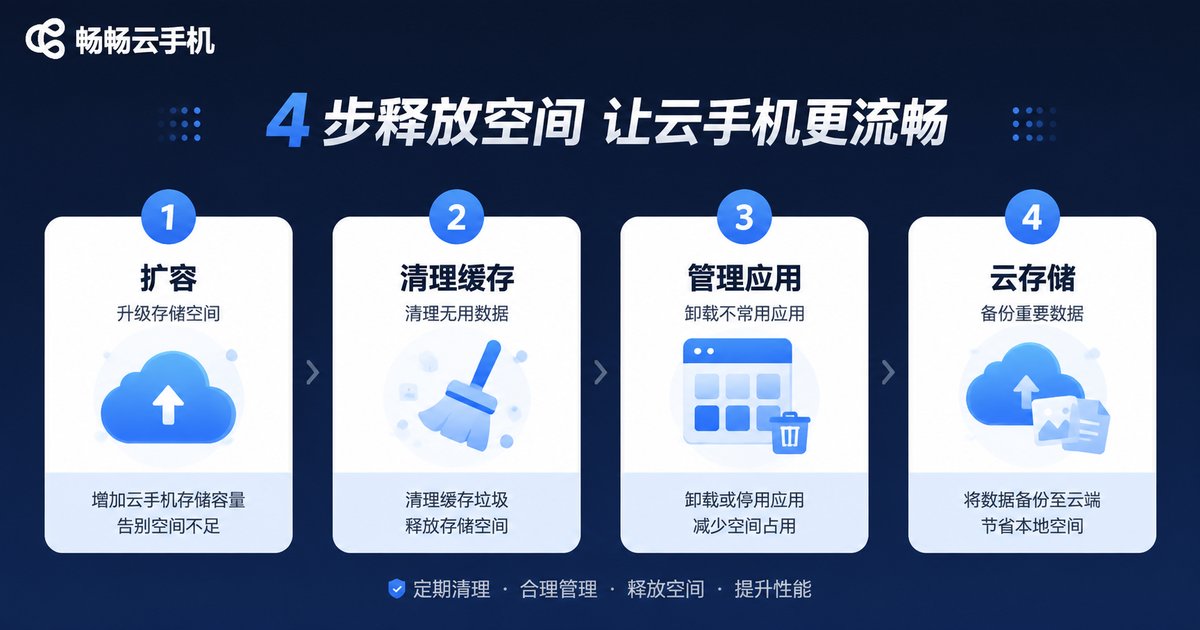
4 Practical Tips to Solve Storage Shortages
1. Upgrade Your Storage Plan with Elastic Expansion
The most direct solution is to upgrade your cloud phone’s storage space. ccloudphone offers elastic storage solutions that allow you to scale up storage on demand without interrupting your service. Whether you need temporary or long-term expansion, it adapts effortlessly.
2. Regularly Clear App Cache
App cache is a silent storage space consumer. Here’s what you can do:
- Check cache sizes for each app in your cloud phone’s Settings - Storage;
- Selectively clear cache for apps using the most space;
- Use automated tools to clean up cache files in batches regularly.
3. Manage App Data and Log Files
Some apps generate large amounts of user data, log files, or downloaded content. For example:
| App Type | Space-Consuming Files | Cleanup Recommendations |
|---|---|---|
| Social Media | Chat history, images, videos | Export important data and clean up regularly |
| Games | Game cache, update packages | Uninstall unused games or clear their data |
| Browsers | Downloaded files, browsing history | Empty download directories and browsing data |
4. Offload Files to Cloud Storage
For files that don’t need frequent access (such as historical data or backups), you can transfer them to cloud storage. ccloudphone supports integration with mainstream cloud storage services, freeing up your local space.

How to Choose the Right Cloud Phone Storage Plan?
When addressing storage issues, selecting a stable and scalable cloud phone service is crucial. ccloudphone stands out with the following advantages:
- Elastic Storage: Flexibly adjust storage space based on your needs without prior reservation;
- High-Performance Configurations: Multiple CPU, RAM, and storage options to meet diverse business needs;
- Multi-Account Management: Run multiple accounts simultaneously without interference;
- 24/7 Stable Operation: Professional server architecture ensures business continuity.
Whether you are an individual or enterprise user, ccloudphone provides customized storage solutions to ensure storage space is never a bottleneck.
Frequently Asked Questions
Q: Can I expand my cloud phone’s storage at any time?
A: Yes. ccloudphone supports elastic expansion, allowing you to adjust storage space as needed without service interruptions.
Q: Will clearing app cache affect normal app usage?
A: No. Clearing cache only removes temporary files. Core app data and functionality remain intact. The cache will rebuild automatically the next time you launch the app.
Q: How can I check storage usage for each app on my cloud phone?
A: In your cloud phone’s settings menu, there is usually a “Storage” or “App Management” option where you can view detailed storage usage for each app and clean up as needed.
Q: What scenarios is ccloudphone’s storage solution suitable for?
A: ccloudphone is ideal for multi-account management, app testing, data collection, and automated operations. Both individual and enterprise users can find suitable storage solutions.
Q: Does insufficient storage affect cloud phone performance?
A: Yes. When storage is nearly full, your cloud phone may slow down or even fail to launch apps properly. It’s recommended to regularly check storage space and clean up or expand as needed.