
How to Choose a Cloud Phone in 2026: A Complete Guide to Hardware Specs and Performance
What Exactly Counts as Hardware Configuration for a Cloud Phone?
Newcomers to cloud phones often wonder: if the phone is not physically in your hands, why do configurations still differ? The principle is simple — a cloud phone runs on servers in a data center. The provider slices one physical server into multiple virtual phones, and the CPU cores, RAM, storage, and GPU rendering power allocated to you become the hardware configuration of your cloud phone. Higher configuration means more and heavier apps running smoothly. Choosing a cloud phone is essentially choosing a set of cloud hardware parameters.
CPU and GPU: The First Threshold of Smoothness
The CPU determines app responsiveness and multitasking capability. Most mainstream cloud phones today are virtualized from ARM-based server chips. When reading the spec sheet, focus on two things: core count and single-core performance. Two cores are enough for everyday messaging and light tasks; for large mobile games or multiple apps running at once, start with four cores.
The GPU handles graphics rendering and directly affects game frame rates. If a spec page mentions GPU acceleration or specific rendering capability, the cloud phone can render game graphics with hardware support; if it relies on software rendering only, expect frame drops and stuttering in games.

RAM and Storage: The Foundation of Multi-Opening and AFK Tasks
RAM decides how many apps you can keep alive at the same time. Here is a rough mapping:
| RAM | Best for |
|---|---|
| 2GB | Daily messaging, light AFK tasks |
| 4GB | Mainstream mobile games, one or two games online simultaneously |
| 8GB or more | Heavy gaming, many resident apps, studio multitasking |
Storage (ROM) holds your apps and data. Note that app cloning consumes storage fast — every cloned instance installs its own copy of app data. 32GB may not fit several large games, so 64GB or above is recommended for most needs.
Network and Latency: The Most Overlooked Hidden Parameter
A cloud phone renders frames in the cloud and streams them to your screen, so network quality directly defines the experience. Check three things: whether bandwidth is dedicated rather than shared (shared bandwidth stutters at peak hours); how close the data center node is to you (lower latency means more responsive controls); and whether high-frame-rate streaming is supported — in competitive games, 60 fps and 30 fps feel like two completely different games.
The 2026 Buying Checklist: Match Your Scenario
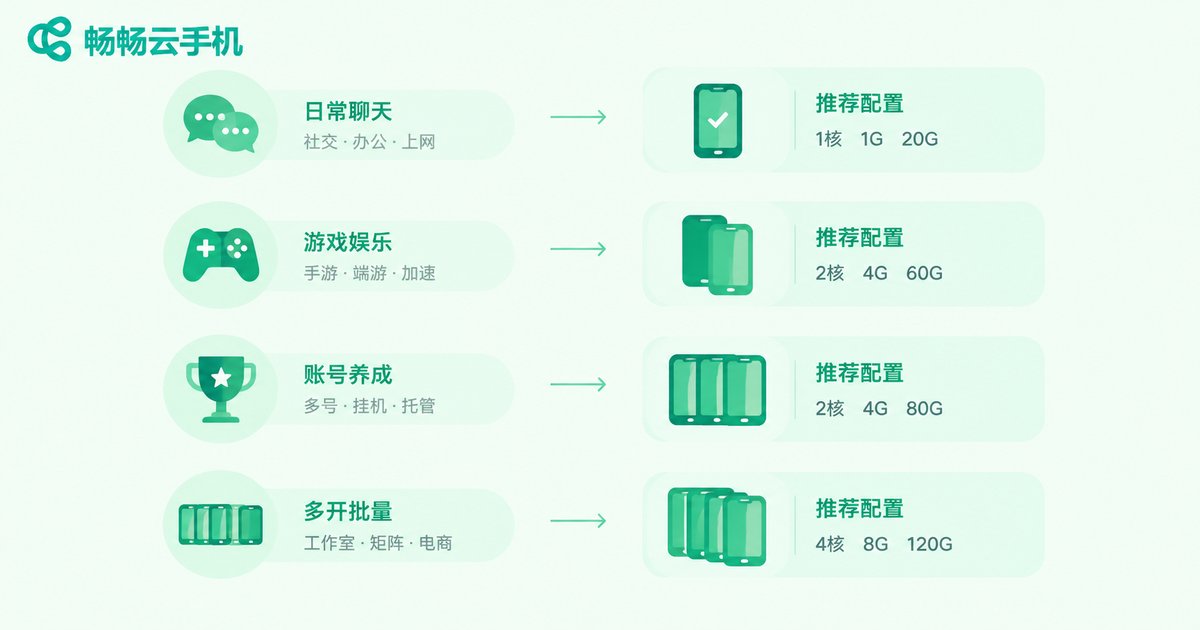
| Scenario | Recommended configuration | Key focus |
|---|---|---|
| Multi-account messaging apps | 2 cores, 2GB RAM, mid storage | Instance stability, background keep-alive |
| AFK mobile gaming | 4 cores, 4GB RAM, GPU acceleration | Frame rate stability, auto-reconnect |
| Heavy gaming | 4 cores, 8GB RAM, high frame rate | Low latency, good rendering |
| Studio batch operation | Bulk device management | Batch control efficiency, isolated environments |
Three Quick Tests to Verify Real Performance
Specs are numbers on paper; real experience is what counts. After getting a cloud phone, do three things. First, install your most-used apps and use the device continuously for half an hour to check for stuttering. Second, keep the number of apps you actually need running and see whether any get killed in the background. Third, test again during evening peak hours to confirm latency and image quality stay stable. Pass all three, and the cloud phone is genuinely qualified.
Why We Recommend ccloudphone
Among the many cloud phone services available, ccloudphone (畅畅云手机) deserves a try first. It offers Android devices running in the cloud that boot instantly and keep your data after shutdown, with support for app cloning and batch management. Whether for daily messaging, AFK gaming, or studio operations, there is a device tier that fits. Configurations range from entry-level to high performance, covering everything from light use to heavy multi-opening. Check the official website ccloudphone for the latest device models and parameters, and run the three quick tests above before deciding which tier to get.
FAQ
Q: Is a higher configuration always better for a cloud phone?
No. Choose what matches your scenario. Entry-level is fine for messaging and light AFK tasks; go high-end only for heavy gaming, so you do not pay for parameters you never use.
Q: What frame rate can a cloud phone reach in games?
It depends on GPU rendering power and network quality. Models with GPU acceleration and high-frame-rate streaming run mainstream mobile games smoothly; high latency causes visible frame drops.
Q: Will apps and data be lost after a cloud phone shuts down?
No. On a reliable service, storage is persistent. Shutdown only stops the runtime; apps and data are still there at the next boot, and AFK tasks can continue.
Q: How is a cloud phone different from an Android emulator?
An emulator runs on your own computer and consumes local resources, so multi-opening is limited by your PC performance. A cloud phone runs on cloud servers, uses none of your local resources, stays online 24/7, and continues seamlessly when you switch devices.
Q: How many apps can one cloud phone run at the same time?
It mainly depends on RAM and storage. The more of each, the more apps can stay resident. Pick a configuration that matches your actual scenario.


