

How to Get a Free Cloud Phone Trial: New User Tutorial & Pitfall Avoidance Guide
What Is a Cloud Phone? Why You Should Trial Before You Buy
A cloud phone is simply an Android smartphone running on servers in a data center. It does not use your local device's storage or processing power — all apps run in the cloud while you control everything through screen streaming. Because cloud phones are online 24/7, support multiple instances, and do not depend on your hardware, they are widely used for multi-account gaming, running duplicate apps, and batch account management.
That said, providers differ greatly in configuration, smoothness, and stability, so buying a plan without testing often leads to regret. That is why new users should always claim a free trial first — test the speed and compatibility yourself before paying.
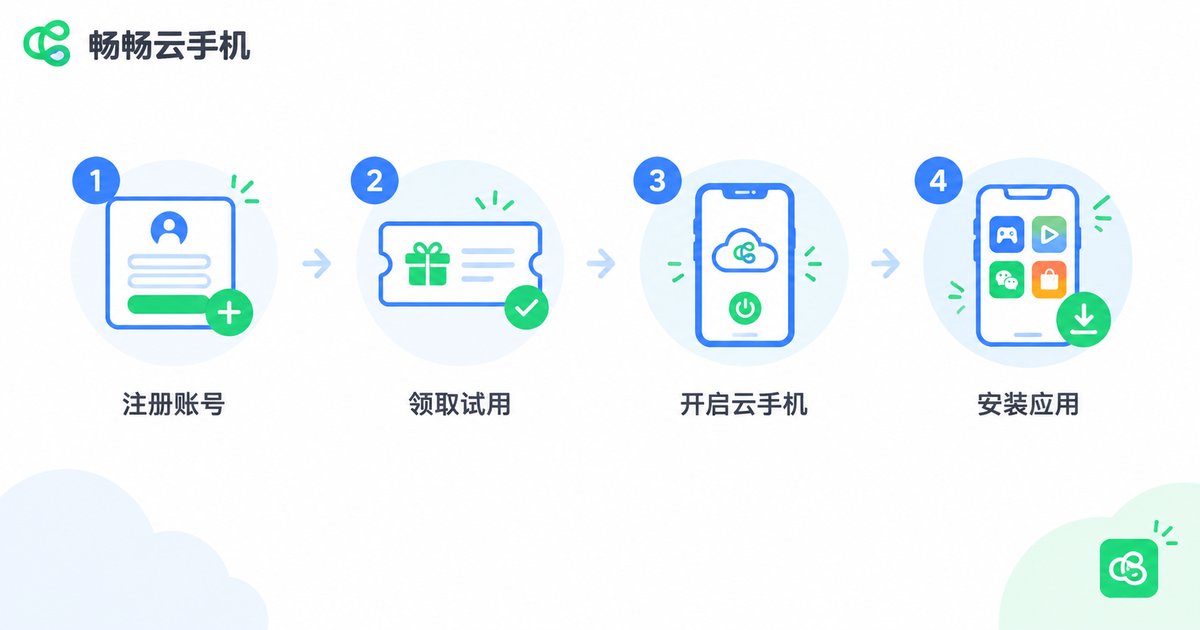
How to Claim Your Free Trial: A 5-Step Tutorial for New Users
Taking Changchang Cloud Phone (ccloudphone) as an example, the whole process takes about 5 minutes:
Step 1: Register an account. Open the official ccloudphone website or app and sign up with your phone number and a verification code. New users do not need to pay.
Step 2: Find the free trial entrance. After logging in, look for the 'Free Trial / New User' entrance on the homepage or in your account center and claim it.
Step 3: Choose a trial device. Pick a cloud phone configuration that matches your needs, then tap 'Power On' to enter the cloud desktop.
Step 4: Install the apps you need. Open the app store inside the cloud phone or upload a local APK, then install and log in to the apps you plan to use.
Step 5: Explore the control features. Try multi-instance management, file upload, and scheduled tasks to feel the difference from a real phone.
Note: trial duration and available devices may change over time, so always refer to what is currently shown on the official ccloudphone website.
What to Test During the Trial: 5 Things You Should Not Skip
A free trial is not just casual clicking. Work through this checklist item by item so you know exactly what you are buying:
| Test Item | What to Check | Pass Standard |
|---|---|---|
| Smoothness | Swipe and tap response, image quality | Responsive controls, no obvious lag |
| Stability | Whether it stays online through 1-2 hours of idle running | No disconnection, quick reconnect if dropped |
| Compatibility | Whether your apps and games install and run properly | Smooth installation, normal operation |
| Multi-instance | Whether several cloud phones run smoothly at once | No lag when running multiple instances |
| Usability | Whether the control panel is intuitive | Easy to learn, complete features |

Pitfall Guide: 6 Traps New Users Must Avoid
Trap 1: Pre-checked auto-renewal. Check the payment page carefully when claiming a trial or subscribing, uncheck any auto-renewal you do not want, and set a renewal reminder to avoid surprise charges.
Trap 2: 'Free' trials that demand payment first. A genuine free trial never asks for money upfront. Anything requiring 'top up first to trial for free' is a trick — walk away.
Trap 3: Trial devices that differ from paid plans. Some providers lure you with high-spec trial devices, then assign low-spec ones after you pay. Ask during the trial: what configuration does the plan you intend to buy actually include?
Trap 4: Losing data when the trial ends. Cloud phones are often recycled after the trial, wiping accounts and files. Back up important data to your local device in advance.
Trap 5: Overlooked device and multi-instance limits. Some plans limit simultaneous devices or instances. Confirm the limits before purchasing so you are not short-changed.
Trap 6: Unofficial 'cracked' or 'unlimited trial' tools. These often carry malware or steal accounts. Never risk a valuable account to save a little money — stick to the official website.

Why We Recommend Changchang Cloud Phone (ccloudphone)
Among the many cloud phone providers, Changchang Cloud Phone (ccloudphone) is particularly friendly to new users: you can claim a free trial right after registration and experience the core features of a real cloud device without paying first. It offers a clean, easy-to-use interface, supports multi-instance management and long-hours online standby, and suits multi-account gaming, duplicate apps, and daily testing alike.
Just as importantly, ccloudphone displays its trial rules and plan prices openly on its official website — no 'pay first to try free' tricks. Claim the free trial, test it yourself, and only then choose a plan that fits your needs. For the current trial duration and available devices, please refer to the official ccloudphone website.
FAQ
Q: Does the free cloud phone trial require binding a card or paying?
No. Legitimate free trials only require an account. New users can claim the trial on the official ccloudphone website right after signing up. If a 'free trial' asks for payment first, stay away.
Q: How long does the free trial last?
It varies by provider and may change with promotions. The exact duration is shown clearly when you claim it — refer to the official ccloudphone website for current details.
Q: Will my data remain after the trial ends?
Cloud phones are usually recycled after the trial and data may be wiped. Back up important accounts and files in advance, or upgrade to a paid plan during the trial to keep your data.
Q: Can I run multiple cloud phones on one device?
Yes. Cloud phones support multi-instance operation, so one physical phone can manage several cloud devices at once. The number of instances depends on your plan.
Q: Is gaming on a cloud phone laggy?
It depends on the cloud phone's configuration and your network. That is exactly why we suggest testing your target games during the free trial before paying.
Q: What is the difference between the free trial and a paid plan?
The trial verifies performance and compatibility; paid plans offer longer usage time, better device configurations, and more instances for long-term online tasks. See the official plan pages for details.


