
Cloud Phone Frame Rate vs. Image Quality: How H.264 and H.265 Streaming Compression Affect Your Experience
In One Minute: How a Cloud Phone Screen Reaches Your Eyes
Many people assume a cloud phone simply runs a phone in the cloud and beams the screen over untouched. Not quite. The cloud phone runs the system and apps in a data center, and every single frame must pass through three stages—encoding, network transmission, and local decoding—before it appears on your display. This process is called streaming, and the keys to its smoothness are precisely the codec (H.264 or H.265) and how the bitrate is allocated.
Think of bandwidth as a water pipe: the cloud phone must push dozens of images to your device every second, and the pipe width is fixed. The more frames you send (higher frame rate) and the more detail each frame carries (higher quality), the less water there is to go around. That is the fundamental reason frame rate and image quality are in tension.
Why You Cannot Max Out Both Frame Rate and Quality
With abundant bandwidth, you can absolutely have both. In reality, most connections are limited and fluctuate. Suppose your available bitrate is 6 Mbps—suddenly it faces a multiple-choice question:
Option A: prioritize frame rate—stream 60 frames per second, so each frame gets less data. Swipes and camera turns feel responsive with no ghosting, but fine detail in static scenes suffers and screenshots look soft when zoomed in.
Option B: prioritize quality—stream 30 frames per second with richer data per frame. Images look more refined, but fast scrolling produces noticeable judder.
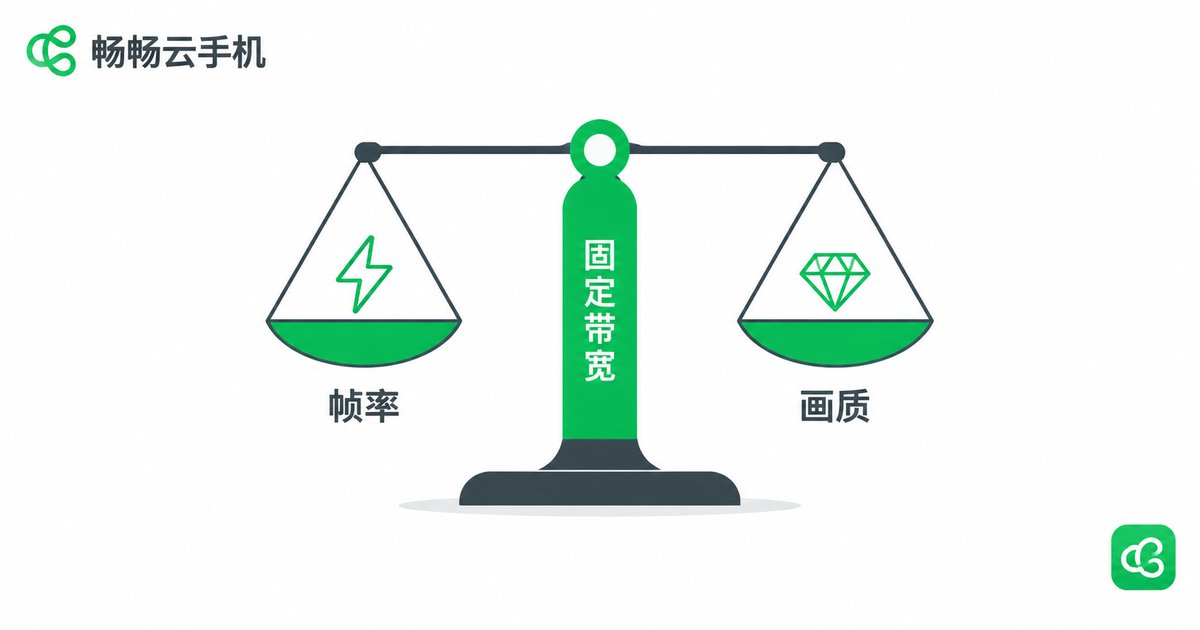
There is no universal answer, only the right match for each scenario. This is exactly where cloud phone platforms keep refining their streaming strategy: dynamic bitrate allocation—tilting bitrate toward frame rate when the scene changes rapidly, and returning the savings to image quality when the picture is still, so every bit lands where it matters.
H.264: The Battle-Tested Veteran
H.264 (also known as AVC) is the most widely used video codec today, powering everything from short videos to video conferencing. Its strengths are clear: near-universal compatibility—virtually every phone and tablet has a hardware decoder, so decoding costs almost no extra battery; low encoding latency—mature algorithms encode quickly in the cloud, ideal for latency-sensitive cloud gaming; proven reliability—over a decade of tuning gives it strong error resilience on weak networks.
The trade-off is modest compression efficiency: at equal quality, H.264 needs roughly 30%–50% more bitrate than H.265. When bandwidth tightens, it must choose—drop the frame rate or drop the resolution.
H.265: Higher Efficiency, With a Catch
H.265 (HEVC) is the successor to H.264, and its core improvement is compression efficiency: it saves 30%–50% of the bitrate at equal quality. Put another way, on the same bandwidth, H.265 fits a higher resolution or a higher frame rate. For cloud phones, this means bandwidth that once carried 720p at 30 fps can now deliver something close to a 1080p look.
But there is a catch: decoding is more demanding. Some older or budget devices lack H.265 hardware decoding and fall back on software decoding, which means heat, faster battery drain, and even local frame drops—the cloud runs smoothly, yet your phone stumbles first. H.265 is also more complex to encode, and a poorly tuned cloud pipeline can add latency instead of reducing it.

H.264 or H.265? One Table to Decide
| Dimension | H.264 | H.265 |
|---|---|---|
| Bitrate at equal quality | Higher | About 30%–50% lower |
| Local decoding load | Minimal; works on all devices | Higher; older devices may software-decode |
| Best for | Everyday apps, weak networks, older devices | Cloud gaming, high frame rate, HD visuals |
| Weak-network behavior | Drops quality to keep motion smooth, rarely glitches | Saves bandwidth, but the decoder must keep up |
Rule of thumb: new device, good network, cloud gaming—go H.265; older device, average network, light use—stick with H.264.
Practical Settings by Scenario
Casual AFK apps and light productivity (2–4 Mbps): 720p + 30 fps + H.264—stable and sufficient, with crisp text.
Mainstream cloud gaming (5–10 Mbps): 720p or 1080p + 60 fps + H.265—responsive in action scenes, with quality to match.
Unstable networks (subway, commuting): step the resolution down one notch and protect the frame rate first—responsive controls always beat pixel-perfect visuals.
5 GHz Wi-Fi or wired broadband: feel free to max out the frame rate and let H.265 show its efficiency.
ccloudphone: Leave Streaming Optimization to the Specialists
For most users, tuning parameters manually is a chore—and easy to get wrong. ccloudphone continuously optimizes its streaming pipeline, dynamically adapting its encoding and bitrate strategy to network conditions to find the balance between smoothness and clarity automatically. You never need to master the technical details of H.264 or H.265: enjoy silky high frame rates on a good connection, and keep your controls steady on the subway.
If you frequently play cloud games, run multiple apps in the background, or care deeply about motion smoothness, visit the official ccloudphone website to learn about its latest image quality and frame rate optimizations, and feel for yourself what efficient encoding makes possible—settings are fixed, but the feel in your hands is yours.
FAQ
Q: Is a higher frame rate always smoother?
Not necessarily. Frame rate determines how often the image refreshes each second, but if bandwidth cannot keep up, a high frame rate degrades per-frame quality or causes dropped frames—and stutters instead. Frame rate, quality, and bandwidth must match.
Q: Does H.265 always use less data than H.264?
At equal quality, yes—typically 30%–50% less bitrate. But if a device can only software-decode H.265, the extra heat and battery drain can make H.264 the better overall experience.
Q: The picture looks blurry when cloud gaming—what should I do?
Check the network first: switch to 5 GHz Wi-Fi or a spot with a stronger signal. Then lower the resolution a notch in settings to protect the frame rate. If your device supports it, enabling H.265 noticeably improves clarity at the same bandwidth.
Q: Can I adjust frame rate and quality in ccloudphone myself?
ccloudphone intelligently adapts its streaming parameters to your network, so manual tuning is generally unnecessary. For the latest settings and optimization details, refer to the official ccloudphone website.


