

Cloud Phone vs. a Second Backup Phone: How to Choose? Cost and Experience Comparison
Why Do You Need a Second Phone?
Separating work and personal numbers, managing multiple accounts, testing apps, keeping games running overnight—more and more people are discovering that one phone is simply not enough. You generally have two options: buy a second physical phone or use a cloud phone. The former is hardware you can hold in your hand; the latter is a virtual phone running on cloud servers. Which is more cost-effective, and which offers a better experience? Let us break it down from both cost and experience perspectives.
Cost Comparison: Upfront Investment vs. Ongoing Expenses
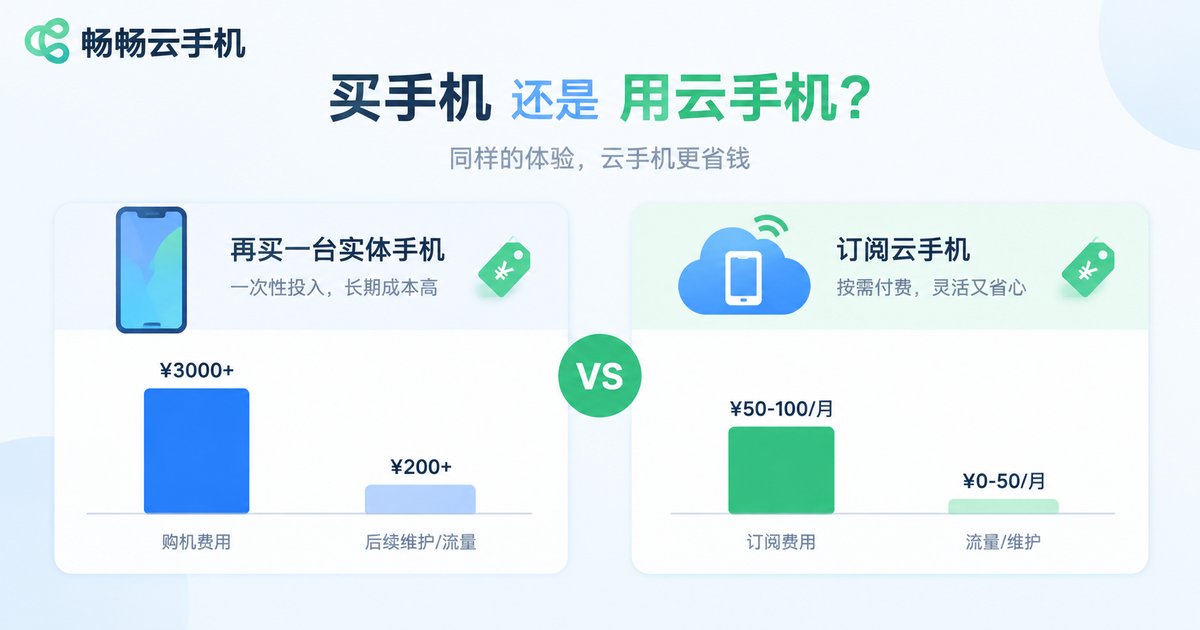
Let us start with the most practical question—money. An entry-level backup phone still costs around 1,000 RMB, and anything with decent specs will set you back two to three thousand. A cloud phone requires no hardware purchase at all: you simply subscribe monthly, usually for just a few dozen yuan—roughly the price of a bubble tea plus a takeout meal.
Beyond the purchase price, several hidden costs are easy to overlook:
| Item | Second Physical Phone | Cloud Phone |
|---|---|---|
| Upfront investment | ~1,000-3,000 RMB | 0 RMB, monthly subscription |
| Fixed monthly cost | ~30-50 RMB for a SIM plan | A few dozen yuan subscription |
| Depreciation | 20%-30% value loss per year | No hardware depreciation |
| Repair risk | Broken screens, aging batteries | No hardware, nothing to repair |
| Upgrade cost | Buy a new phone again | Scale cloud specs on demand |
Quick math: a 2,000 RMB backup phone used for two years works out to about 83 RMB per month in depreciation alone; add a monthly plan and the real cost easily exceeds 110 RMB. A cloud phone subscription of a few dozen yuan per month often totals less than half the cost of a physical phone over two years. The longer you use it and the more accounts you manage, the greater the cost advantage of a cloud phone becomes.
Experience Comparison: Portability, Battery, and Performance
Beyond cost, the differences in daily use deserve a closer look.
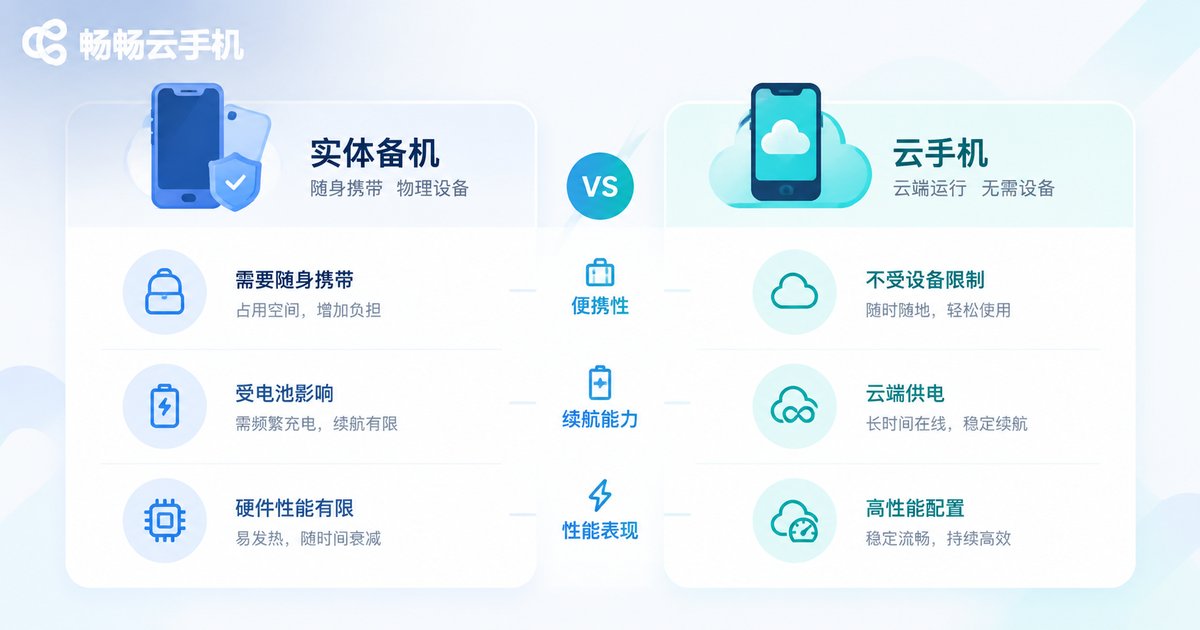
Portability: Carrying two phones means managing two pockets, two batteries, and two chargers. A cloud phone is just an app on the phone you already own—open it anytime and a brand-new phone appears on your screen. You only carry one device.
Battery life: Even the most efficient physical phone needs charging, and batteries degrade over time. A cloud phone runs on cloud servers, staying online 24 hours a day without draining your local battery—perfect for overnight tasks and idle farming.
Performance: Budget backup phones often struggle with just a few apps open. A cloud phone draws on server-grade computing power in the cloud, with specs you can choose as needed, so even demanding apps run smoothly.
Multi-Account and Multi-Instance: A Natural Advantage of Cloud Phones
If you manage multiple accounts—several e-commerce stores, a matrix of social media profiles, or multiple game accounts—a physical backup phone can only hold one set at a time, and you would need a third or fourth device as accounts grow. A cloud phone lets you run multiple independent cloud phone instances on a single device simultaneously, each isolated from the others. Switching accounts and managing them in batches becomes far more efficient—something a physical backup phone simply cannot match.
Data Security: No Fear of Loss or Damage
The biggest risk with a physical phone is accidents: lose the phone, and the accounts, files, and chat history inside may be gone with it. Cloud phone data lives in the cloud—if your local device is lost or broken, just sign in on another phone and your cloud phone environment remains intact. For anyone running account operations, this alone can be decisive.
Who Should Buy a Backup Phone, and Who Should Use a Cloud Phone?
Neither option is absolutely better; it depends on your scenario:
| Your Situation | Recommended |
|---|---|
| Need a physical SIM card for calls and SMS verification | Physical backup phone |
| Occasional work-life separation with a second number | Either; cloud phone is cheaper |
| Multi-account operations and matrix management | Cloud phone |
| Game idling and 24/7 online tasks | Cloud phone |
| App development and testing across device environments | Cloud phone |
| Frequent travel, prefer carrying one device | Cloud phone |
Recommended Solution: ChangChang Cloud Phone
If the comparison leans you toward a cloud phone, give ChangChang Cloud Phone (ccloudphone) a try. It provides a real Android environment running in the cloud—no hardware to buy, accessible from your phone or computer. It supports running multiple cloud phones at the same time, making it well suited for multi-account management and long-running idle tasks, and it stays online in the cloud 24 hours a day without occupying local storage or battery. For anyone looking to get a second phone at low cost, it is an option worth trying.
FAQ
Q: Is a cloud phone very different from a physical phone to use?
Not at all. It is a full Android system on your screen—tapping, swiping, and installing apps work exactly the same way, with zero learning curve. The difference is that it runs in the cloud and does not consume local hardware resources.
Q: Do I need to keep the app open all the time?
No. The cloud phone keeps running in the cloud. You can close the app or even power off your own phone, and tasks inside the cloud phone continue running—which is exactly why it is great for idling.
Q: I already have an old phone. Is a cloud phone still necessary?
If the old phone is only used occasionally, it can get by. But aging batteries and weak performance make long-term idling impractical. A cloud phone is pay-as-you-go and ready whenever you need it, and the total cost is often lower.
Q: Is data in a cloud phone safe?
Data is stored on cloud servers, so losing your local device does not affect the cloud phone environment. For important accounts, enable two-factor authentication and back up regularly.
Q: How much does it cost per month?
Cloud phones are typically billed monthly, generally in the range of a few dozen yuan—check the provider's pricing page for details. Compared with spending one or two thousand upfront on a backup phone, the cost of trying one out is far lower.


