
Cloud Phone vs Physical Phone: Key Differences from How They Work to Best Use Cases
First, Understand: What Exactly Is a Cloud Phone?
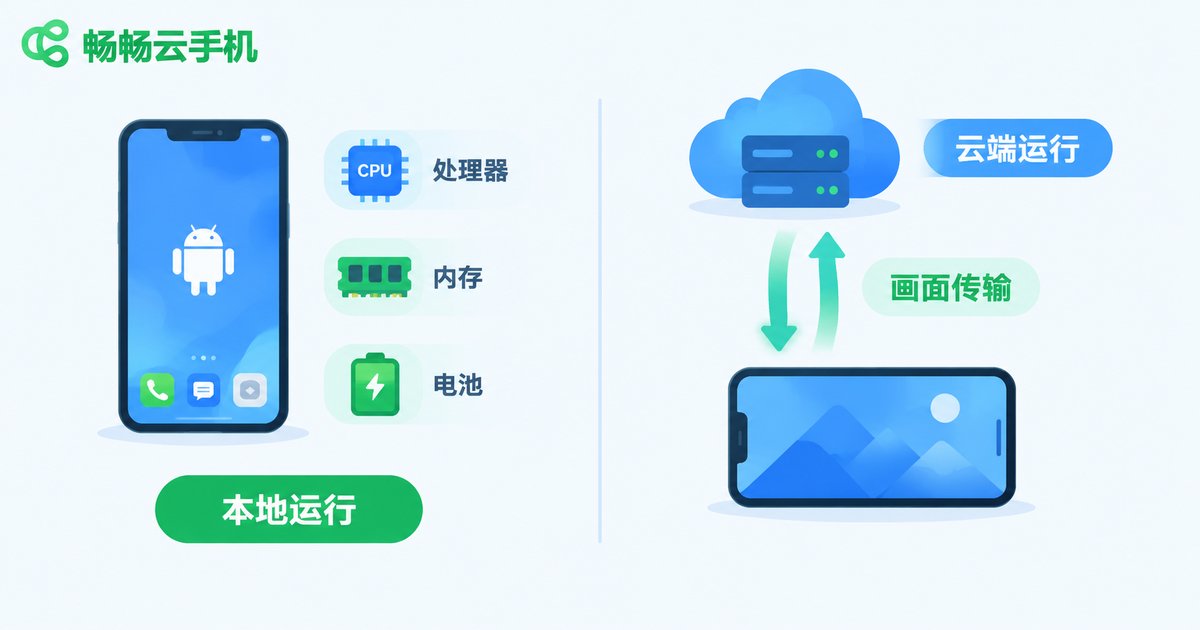
Many people are puzzled the first time they hear the term cloud phone: how can a phone live in the cloud? It is actually easy to grasp. A physical phone is the tangible device in your hand, with its system running on its own chip and memory. A cloud phone is a virtual Android phone running in a cloud data center — it has its own independent system environment, but the screen is streamed to your device over the network, while your taps and swipes are sent back to the cloud to be executed.
Here is an analogy: a physical phone is like your own kitchen, where every dish must be cooked on your own stove; a cloud phone is like a central kitchen — the food is prepared there, and you only place the order and enjoy the meal. Once this clicks, every difference below becomes easy to understand.
How They Work: One Runs Locally, the Other in the Cloud
The most fundamental difference lies in where the system actually runs.
For a physical phone, all computing happens inside the device: the processor does the calculations, memory runs the apps, and storage chips keep your data. Even offline, you can still make calls, take photos, and watch downloaded videos.
A cloud phone moves the entire phone onto servers in a data center. The picture on your screen is a compressed video stream rendered in the cloud in real time, and every tap you make is uploaded as a command and processed remotely. That is why a cloud phone requires an internet connection — network quality directly determines the experience.
Key Differences at a Glance
| Dimension | Physical Phone | Cloud Phone |
|---|---|---|
| Where the system runs | Local hardware | Cloud servers |
| Network dependency | Basic features work offline | Internet required |
| 24/7 uptime | Device must stay on; heat and battery drain | Runs around the clock in the cloud |
| Multi-instance | Limited by hardware; basically one account per device | Run many instances simultaneously |
| Performance upgrades | Buy a new phone | Upgrade your plan |
| Data storage | On the device; lost if the phone is lost | In the cloud; nothing lost when switching devices |
Use Cases: What Each One Does Best
Where a physical phone is the better choice:
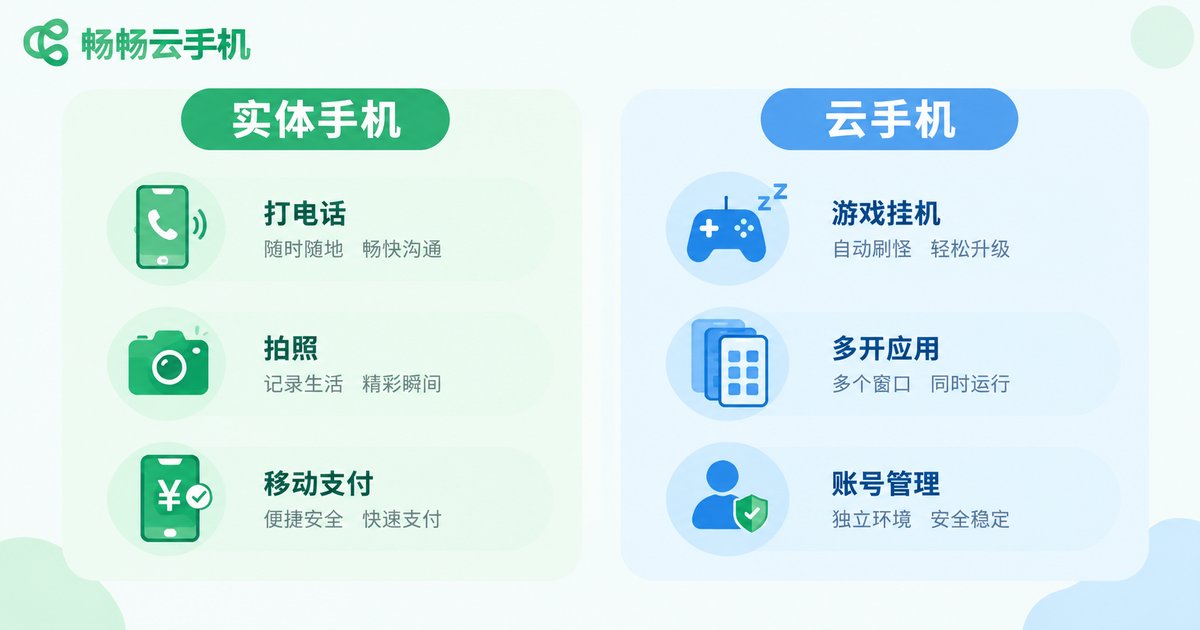
Daily calls, photo and video shooting, QR-code payments, and mobile office work — these rely on local hardware such as the camera, speaker, and NFC, and a physical phone is irreplaceable here. It also works offline, so you are covered even without a network.
Where a cloud phone shines:
Game AFK farming and multi-instance: Turn-based and idle games demand long hours online. With a cloud phone, farming runs without draining your real phone battery or heating it up. Want to level several alt accounts at once? Cloud phones support batch multi-instance — something a physical phone simply cannot do.
Matrix account management: Content creators and e-commerce sellers often juggle many accounts. A cloud phone gives each account an isolated environment, letting one computer manage dozens of phones at once.
A second life for old phones: Is your three-year-old phone too laggy for new games? A cloud phone computing power lives in the cloud; your local device only displays the picture, so even aging hardware can run demanding mobile games smoothly.
Separating work from life: Keep work apps logged in on a cloud phone and simply close the entrance after hours — work and personal accounts never interfere, and healthy boundaries come instantly.
How the Costs Compare
A physical phone is a large one-time investment — mainstream models easily cost several thousand RMB and are replaced every two to three years. Cloud phone services across the industry generally use a low-barrier monthly subscription model, typically just a few to a few dozen RMB per device per month, and you can cancel anytime — ideal for temporary or seasonal needs. For heavy long-term use, the most cost-effective setup is often a combination: a physical phone for daily life, and a cloud phone for AFK farming and multi-instance tasks.
Want to Try a Cloud Phone? Start with ChangChang Cloud Phone
Among the many cloud phone services available, ChangChang Cloud Phone (ccloudphone) is worth a look. It provides an independent Android environment in the cloud, supports multiple cloud phones running online at the same time, and can be managed directly from a web browser or the mobile app — no extra hardware required. Whether it is game AFK farming, running multiple apps, or unified account management, you can register, pick a configuration on demand, and get started in minutes. Your data lives in the cloud, so nothing is lost when you switch devices.
FAQ
Q: Does a cloud phone demand a fast network?
A regular home broadband or 4G/5G connection is enough. Cloud phones use compressed video streaming, so bandwidth requirements are modest, but latency affects how responsive controls feel — choose a stable network for latency-sensitive games.
Q: Are my accounts and data safe on a cloud phone?
Data is stored in professional data centers with solid operations and disaster-recovery mechanisms. Compared with the risks of losing or damaging a physical phone, cloud storage is often the safer option. Still, choose a reputable provider and keep your credentials safe.
Q: Can a cloud phone fully replace a physical phone?
No. Calls, photos, and QR-code payments still depend on local hardware. The two are complementary: the physical phone handles daily life, while the cloud phone handles AFK farming, multi-instance workloads, and heavy tasks.
Q: Is gaming on a cloud phone very different from a physical phone?
Graphics and smoothness can approach mid-to-high-end phones, but input latency is slightly higher than local play. Idle, turn-based, and placement games feel virtually identical; for competitive games that demand millisecond precision, a physical phone remains the safer bet.
Q: Will my cloud phone keep running after I turn off my own phone?
Yes. A cloud phone runs on cloud servers and stays online 24/7. Shutting down or losing connection on your local device does not affect it — that is the core value of AFK and multi-instance scenarios.


