
Cloud Phone vs Emulator: Don't Mix Them Up — the Ban Rate Gap Is Massive, and the Wrong Pick Wastes Real Money
Let's Get the Concepts Straight: a Cloud Phone Is a Real Device in the Cloud, an Emulator Is a Fake Phone on Your PC
Most people hearing these two terms for the first time assume they're roughly the same thing — aren't both just running multiple Android environments on one machine? In reality, they're worlds apart.
A cloud phone is, at its core, a genuine ARM-based Android handset sitting in a data center that you control remotely over the network. It has its own chip, its own system, its own device identity — no different in essence from the phone in your pocket, except there's a network layer between you and the screen.
An Android emulator is, at its core, a piece of software installed on your Windows PC that uses an x86 chip to 'translate' Android instructions. It can run apps, but its hardware data, sensor readings and low-level system details are largely simulated in software.
One is a real device. The other is a device pretending to be real. And the platform risk-control systems spend every single day telling the two apart.
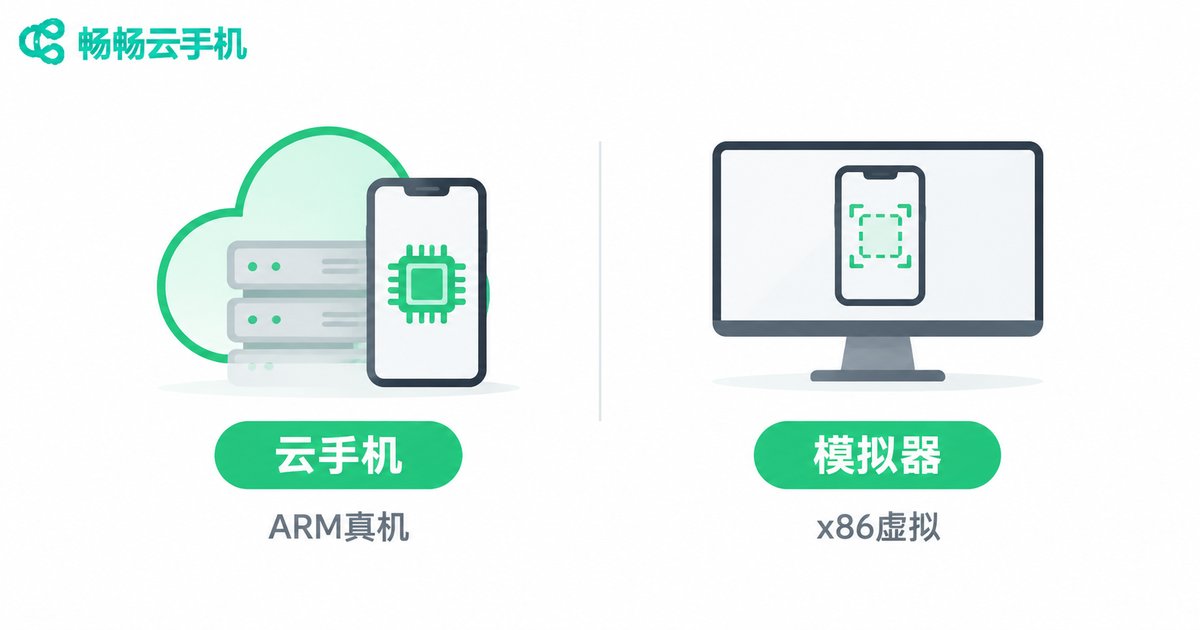
Why Emulators Get Banned More Easily: Three Flaws You Can't Escape
Flaw one: device fingerprints collide en masse. An emulator's model name, IMEI, serial number and MAC address are often fixed at build time or generated in a non-standard way. The same emulator build runs on millions of PCs, so the parameters are highly repetitive. Risk control looks at it and thinks: why did hundreds of thousands of new accounts suddenly appear on this exact device model?
Flaw two: incomplete hardware data. A real phone has a gyroscope, gravity sensor, ambient light sensor, a realistic battery curve and genuine GPU rendering characteristics. Emulators either lack these entirely or hard-code fake values. Any risk engine that bothers to check sensors will spot the gap immediately.
Flaw three: an unclean system environment. To make installing apps and tweaking things easier, emulators often ship with Root access enabled, a debugging bridge open, and a pile of frameworks installed. To many platforms, Root alone equals 'suspicious device'.
Add to that the fact that emulators share the host PC's single public IP — dozens of accounts all exiting from one address is practically a signed confession as far as risk models are concerned.
The Gap at a Glance
| Dimension | Cloud Phone | Android Emulator |
|---|---|---|
| Underlying architecture | Real ARM chip in the cloud | x86 software virtualization |
| System completeness | Full Android system | Stripped or heavily modified |
| Device fingerprint | Independent model, IMEI, serial | Highly repetitive, prone to collision |
| Sensor data | Gyroscope and gravity present | Mostly missing or hard-coded |
| Root traces | Clean by default | Often carries Root and debug flags |
| GPU rendering | Authentic mobile GPU profile | Desktop GPU translation, anomalous |
| Network environment | Can be assigned independently | Shares the host's public IP |
| Ban risk | Comparatively lower | Noticeably higher |
| Cost of use | Pay as needed, transparent | Looks free, hidden costs are high |
How Big Is the Ban Rate Gap? Only Hidden Costs Reveal the Truth
Most people pick an emulator for one reason: it's free. But accounts have costs — phone numbers to register, time to warm up, people to create content. When those investments reset to zero with a ban, that's the real waste.
Take an illustrative example: suppose you run 100 accounts, and each costs about 10 units of currency to bring from registration to a state where it produces value — a total of 1,000. If 30% of accounts run into trouble each month under an emulator, that's 300 lost, plus all the extra time and effort to re-register and re-warm them. Move the same scale to cloud phones, and if the failure rate drops to single digits, what you save isn't just money — it's the entire team's rhythm.
The question isn't which option has the lower sticker price. It's what each surviving account actually costs you. Almost nobody runs that math up front.
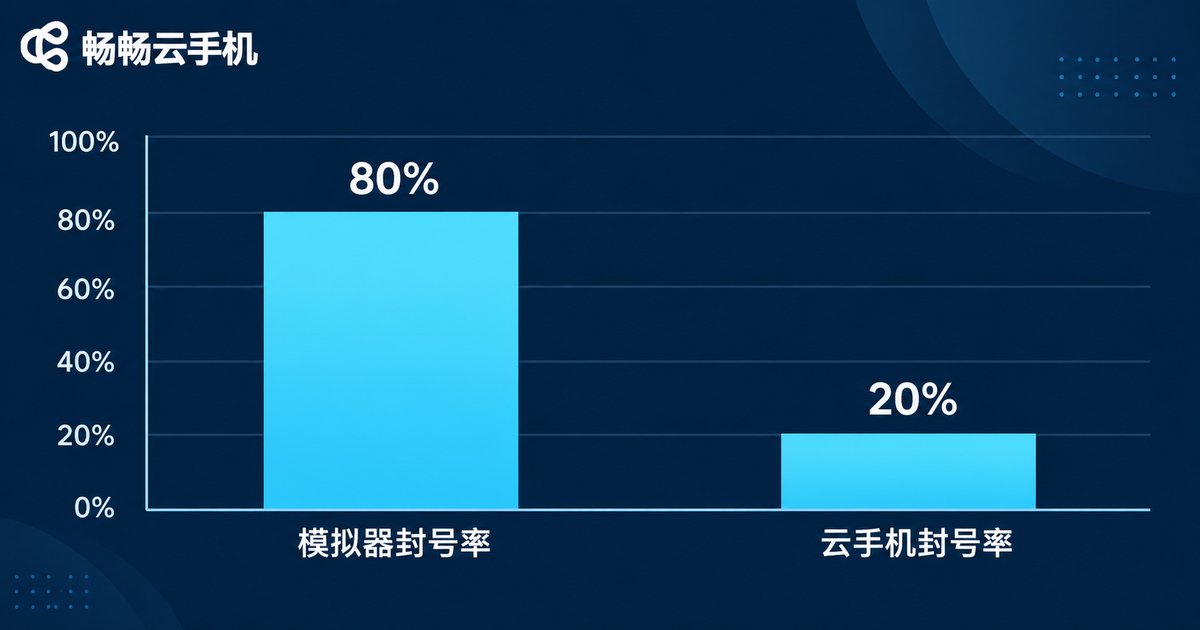
In These Scenarios, Don't Try to Save Money on an Emulator
Multi-instance game idling: games inspect device environment and behavioral traces in ever-finer detail. An emulator's rendering signature and missing sensors are easy to flag — at best you lose rewards, at worst the whole batch gets suspended.
Social media account matrices: with dozens or hundreds of accounts on one platform, overlapping device fingerprints and IPs lead the platform to conclude they're operated by a single entity — and ban them together.
Cross-border e-commerce with multiple stores: store linkage is an operator's worst nightmare. If device identities aren't independent, you've planted the landmine yourself.
App compatibility and stability testing: emulators can't reproduce real ARM behavior, so the results have limited reference value.
Long-running cloud idling: your PC has to stay on, can't sleep, and eats local resources. A cloud phone runs 24/7 in the cloud — shut down your laptop and the task keeps going.
That Said, Emulators Aren't Useless
If you're just doing local development debugging, light single-account use, or a quick UI check, an emulator is still convenient — install and go. The problem starts when you treat it as a production tool. The moment multiple accounts, long-term operations and real money are involved, every weakness of the emulator gets magnified.
So the right answer isn't either-or. It's clear division of labor: emulator for local debugging, cloud phone for live operations.
Four Things to Check When Choosing a Cloud Phone
One: is it truly ARM-based? This is the foundation. Cloud phones built on ARM server chips produce the device characteristics a mobile platform actually expects to see.
Two: is device information independent? Each cloud phone should carry its own model, serial number and IMEI — not a shared template across a whole fleet.
Three: is the network environment controllable? Whether you can assign independent network exits on demand directly determines whether your accounts get linked together.
Four: stability and responsiveness. Laggy screens and high input delay kill multi-instance efficiency — cheap becomes expensive fast. Also check whether the service stays reliably online long term.
ccloudphone: Getting the 'Feels Like a Real Device' Part Right
ccloudphone is built on a cloud-side ARM real-device architecture. Every cloud phone runs in its own independent Android environment with its own distinct device information, eliminating the biggest risk factor — device fingerprint collision — right at the source.
In practice, it supports centralized management and batch operations across multiple cloud phones, running continuously 24/7 in the cloud so that local disconnections or shutdowns don't interrupt cloud tasks. Whether you're running multi-instance games, managing social media accounts, operating multiple cross-border e-commerce stores, or testing app compatibility, there's a way to fit it to your workflow.
If you've been on emulators and your accounts keep failing for no obvious reason, try a different approach: run a small batch of accounts on cloud phones for a few weeks and compare survival rates — the answer will surface on its own. For specific configurations and how to get started, visit the official ccloudphone website.
Frequently Asked Questions
Q: Will using a cloud phone guarantee I never get banned?
No guarantees. Bans are the result of a platform's combined judgment — content quality, action frequency, login location and behavioral patterns all matter. A cloud phone minimizes the 'suspicious device' risk factor; the rest still depends on how you operate.
Q: I'm already on cloud phones — what else should I watch?
Behavioral differentiation. Don't use one script to fire off identical actions at identical timestamps across a batch of accounts. Keep the device clean, and keep the behavior human-like.
Q: Can I manually spoof emulator parameters to match a cloud phone?
Partially, but not thoroughly. Surface data like model and IMEI can be faked, but sensor readings, GPU rendering signatures and battery curves are hard to get right — a deeper inspection will still catch it.
Q: How does a cloud phone compare to a physical phone?
Mainly the lack of physical touch, and limited camera access in some scenarios. But for idling, multi-instance work and batch operations, cloud phones win clearly on convenience, scalability and per-unit cost.
Q: How many accounts should one cloud phone host?
One account per device is the recommendation, or a reasonable split based on platform rules. Cramming multiple accounts onto one device is manufacturing device linkage yourself — the money you saved earlier comes back to bite you later.
Q: On a tight budget, how should I start?
Validate at small scale first. Pick your single most important business scenario, run a small number of accounts for two to four weeks, and record three numbers: survival rate, operating efficiency and cost per account. Then decide whether to scale. That's far safer than a large upfront commitment.


