

Cloud Phone Virtualization Explained: Resource Allocation, Isolation Mechanisms, and Performance Impact
What cloud phone virtualization actually does
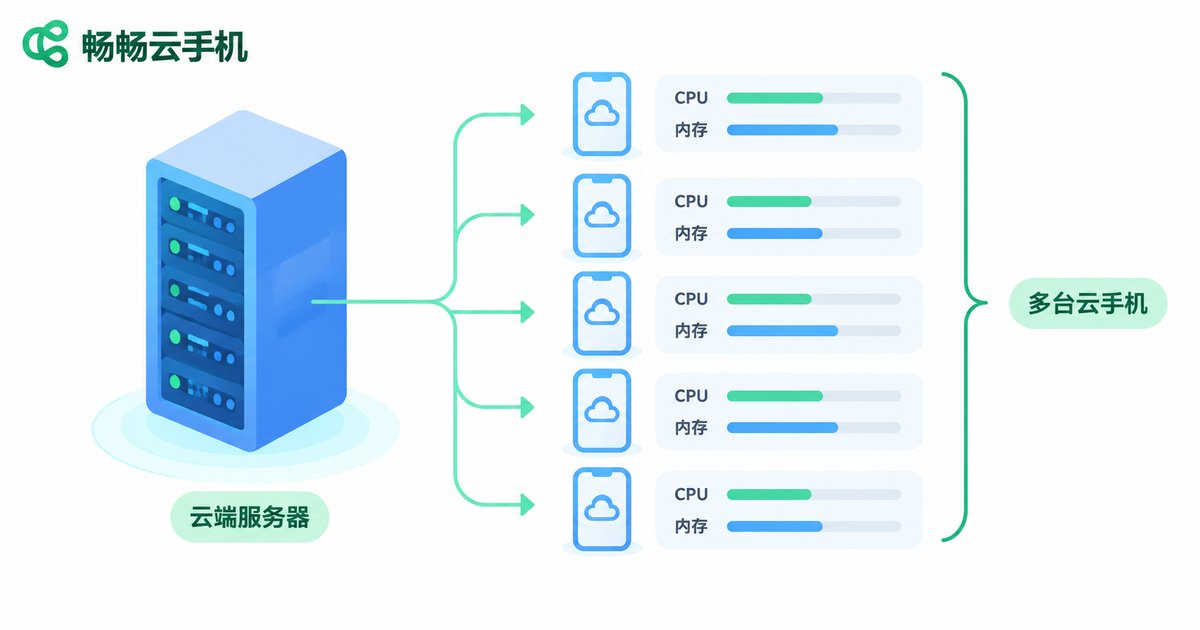
Your physical phone runs a chat app, a game and a video app at the same time, and each one behaves as if it owns the whole screen and the whole CPU. A cloud phone moves that logic into a data center: a single physical server runs dozens or even hundreds of virtual phones, each with its own Android system, its own storage and its own network identity. Virtualization is the layer that slices the cake — it decides how much compute and memory each virtual phone gets, and whether instances interfere with one another.
Resource allocation: how one server becomes many phones
A cloud phone instance is usually carved out of four resource types: CPU capacity, RAM, storage and graphics rendering. There are two main allocation philosophies.
Fixed allocation: the spec is locked at provisioning time, for example 4 CPU cores, 6GB RAM and 64GB storage. Performance is predictable, and a busy neighbour will not drag you down.
Shared or elastic allocation: CPU is time-sliced on demand while memory floats with actual usage. Cost per instance is lower and density is higher, but peak hours can bring resource contention.
Real products usually blend the two: a fixed number of CPU cores to guarantee a floor, plus a degree of memory overcommit to raise density. That is exactly why two providers advertising the same 4-core, 6GB spec can feel completely different in practice.
| Resource | Common allocation | What it affects |
|---|---|---|
| CPU | Fixed cores / time slicing | Whether it stutters, whether high frame rates hold |
| Memory | Dedicated / overcommitted | How many apps open, how long background tasks survive |
| Storage | Dedicated partition | How much you can install, boot and launch speed |
| GPU | Passthrough / virtualized slicing / software rendering | Image quality, video decoding, cloud gaming frame rate |
Isolation: why multiple instances never bleed into each other
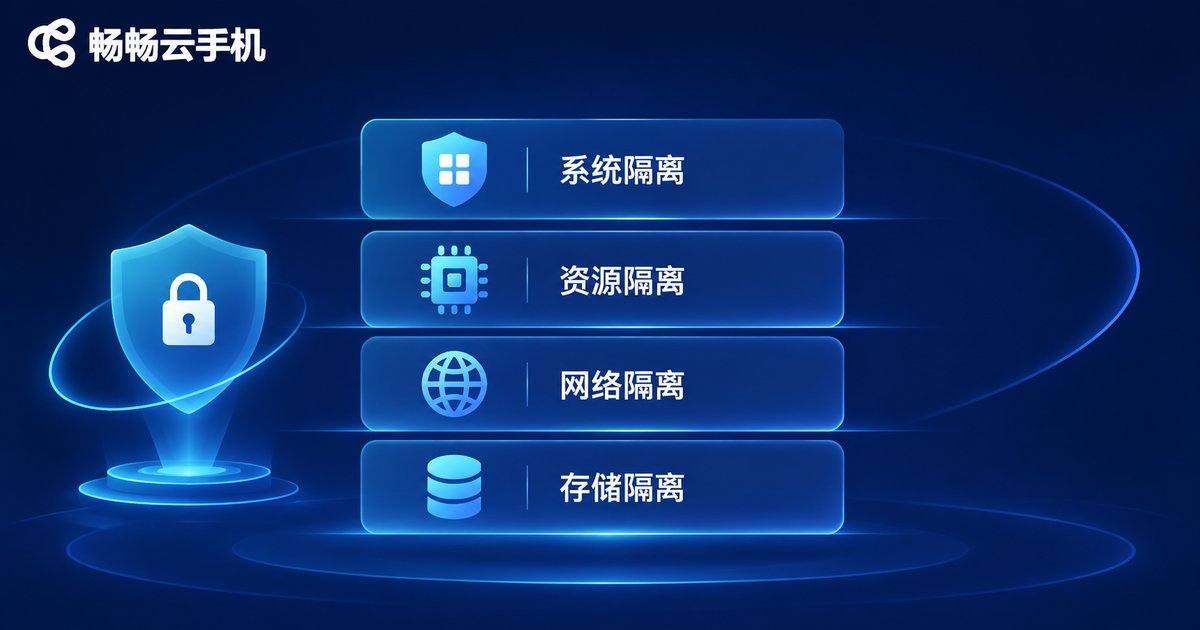
Isolation is the other half of virtualization. Without it, running many instances would mean sharing one machine while still being visible to each other — and nobody would trust that. Mainstream implementations usually stack several layers:
System isolation: every cloud phone runs on virtual hardware — virtual CPU, virtual memory, virtual disk — with a complete Android image on top, so apps cannot perceive the host machine.
Resource isolation: mechanisms such as cgroups cap each instance, so one runaway instance cannot drag the whole server down.
Network and device isolation: each instance gets its own virtual network interface and its own device identity, which is the foundation for running multiple accounts side by side without interference.
Storage isolation: data partitions are invisible to each other, and after a restart you can keep the data or roll back to a clean state.
Only when these four layers stack together does the idea of many independent phones on one server actually work.
Performance impact: latency, frame rate and density rarely come together
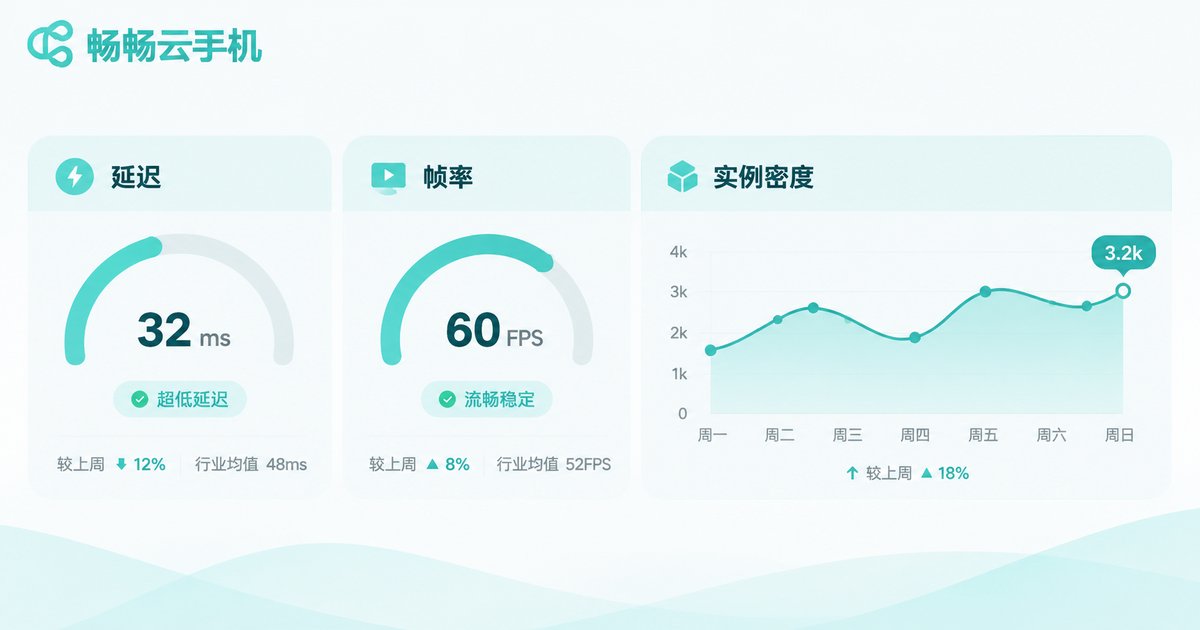
How good the virtualization is shows up in three numbers.
Input latency: the time between your tap and the visual response. It is mainly encoding, network transport and decoding, so virtualization itself is only part of it — but when CPU contention is severe, latency jitters noticeably.
Frame rate: driven by how the GPU is split and how encoding is configured. Shared GPUs drop frames more obviously when several instances render at once; passthrough is steadier but costs more.
Instance density: how many virtual phones sit on one server. Higher density means lower cost but less usable compute per instance.
Then there is the concept you cannot avoid: noisy neighbours. When one instance on a shared server maxes out, other instances slow down. Good isolation contains that effect within a narrow band; poor isolation makes two identical-looking machines feel like different products.
| Metric | Main drivers | What you notice |
|---|---|---|
| Input latency | Encoder, network route, CPU contention | How long a tap takes to respond |
| Frame rate | GPU slicing, bitrate, instance load | Whether the screen stays smooth |
| Instance density | Memory overcommit ratio, scheduling policy | Peak-hour slowdowns, dropped sessions |
How to judge a provider's virtualization quality
End users cannot see the infrastructure, but there are observable signals:
First, long-session stability. Run the instance for hours or days and watch whether the frame rate decays and whether it disconnects on its own. Stability is the clearest indicator of scheduling and isolation quality.
Second, interference between instances. Open several instances, put a heavy load on one, and see whether the others stutter too.
Third, cold start speed. The time from tapping power-on to reaching the home screen — fast and consistent usually means image scheduling and storage are well engineered.
Fourth, device identity independence. Check whether the model, device identifiers and network egress are separate for each instance; this determines whether multi-instance workloads remain usable over time.
Instances on ccloudphone run Android independently in the cloud and are accessible through the web or a client app. Each instance is allocated its own compute resources and device identity, which suits long-running workloads such as app testing, game idling and live-stream interaction. For current available specs and pricing, refer to the official website.
FAQ
Q: Is a cloud phone as fast as a real phone?
Close, but not identical. Everyday browsing, idling and video playback feel similar; heavy 3D games and high frame rates put more pressure on rendering and encoding, so experience depends on the provider's GPU approach and network quality.
Q: Why do two providers with the same 4-core, 6GB spec feel so different?
Because the spec is only an upper bound. Real differences come from scheduling policy, memory overcommit ratio, whether the GPU is passed through, and how many instances share one server.
Q: Will multiple instances be detected as the same device?
It depends on whether device identifiers and network egress are independent. Properly separated instances look distinct at the device level, which is exactly what you should verify before choosing a provider.
Q: Does a cloud phone need a constant connection?
Yes. The phone runs in the cloud while your local device handles display and input, so network quality directly shapes input latency.
Q: Will busy neighbours slow my instance down?
They can, but strong resource isolation keeps the impact small. The way to test it is the one described above: load up one instance and watch whether the others stay steady.


