

Cloud Phone Private Deployment: Servers, Networking, and Account Systems Explained
What Cloud Phone Private Deployment Actually Means
Cloud phone private deployment means running the servers that host Android instances, the network egress, the management console, and the account system inside your own data center or a dedicated resource pool, rather than sharing instances with other teams on a public cloud. For teams handling multi-store e-commerce operations, app automation testing, live streaming operations, or game hosting, keeping data inside the intranet, tracing every device, and managing accounts by role often matters more than shaving a few percent off the unit price.
Private deployment is not just buying a few servers. It rests on three foundations: servers (compute and storage), networking (egress bandwidth and internal connectivity), and the account system (who can operate which device). If any one of them is planned poorly, you will keep reworking it after go-live. Let us go through them one by one.
Servers: Choosing Compute, Storage, and a Data Center
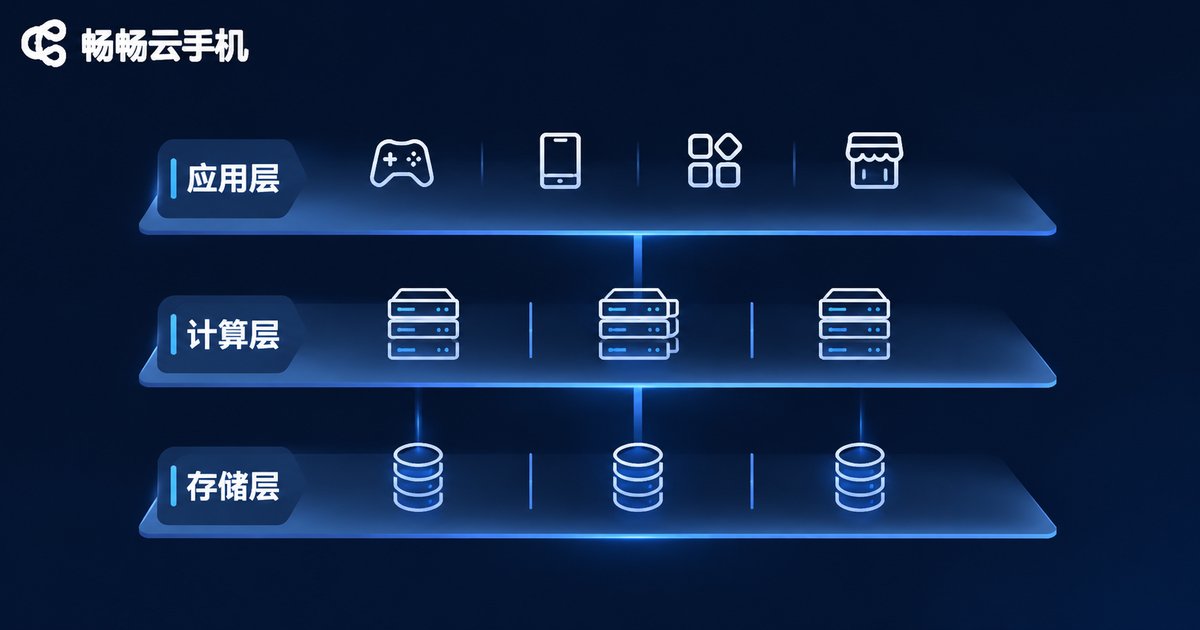
The "phone" in a cloud phone is really an Android virtual instance running on a server, so the first question is how many instances a single physical host can carry. That number drives your initial purchase size and your future scaling rhythm.
- Model and architecture: Android instances work better with the ARM instruction set. The fewer translation layers, the more stable compatibility and performance become. Prefer native ARM servers over setups that rely on instruction translation.
- CPU and memory: A typical instance usually needs 1-2 vCPU cores and 2-4GB of memory depending on workload. Instances running games, short video, or live streaming need more headroom.
- Storage: System images can be shared, but data disks should be allocated per instance. Use fast SSDs for images and set a separate snapshot policy for data disks so you can restore a clean state in one step.
- Network cards and redundancy: A 10GbE card per host is a reasonable baseline, and both power and network cards should be redundant so one failed machine does not take dozens of instances down with it.
- Data center conditions: Check rack power capacity, whether uplink bandwidth can be expanded, and whether off-site backup is available. If building your own facility is too expensive, colocation is a valid option.
The practical advice: validate on a small scale before buying in bulk. Run the real workload on one or two machines, stress test the actual per-host capacity, and place orders based on measured numbers rather than guesswork.
Networking: Egress Bandwidth, Internal Connectivity, and Port Planning
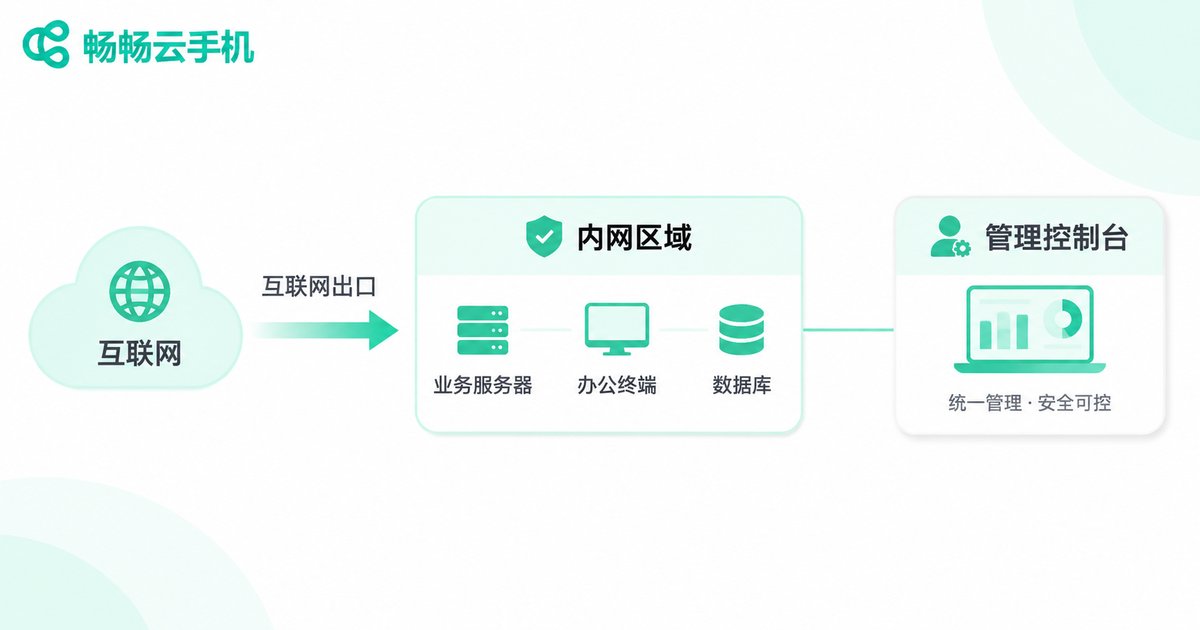
Networking is the most commonly underestimated part of a cloud phone project. Every cloud phone needs internet access, and it also needs to be controlled remotely by the management console. Together, these two traffic streams often become the bottleneck long before the servers do.
First, egress bandwidth. Stream bitrate and concurrency are the two key variables. Low concurrency with high image quality and high concurrency with low image quality produce very different bandwidth requirements. The table below is a rough reference range; always confirm with your own stress test results.
| Scenario | Bitrate per instance | Suggested bandwidth for 50 concurrent | Notes |
|---|---|---|---|
| Script automation, background tasks | Low | About 100-200 Mbps | Little screen change; lower the frame rate |
| Office work, customer service | Medium | About 200-400 Mbps | Balances clarity and smoothness |
| Live streaming, high frame-rate gaming | High | Over 400 Mbps | Plan a separate bandwidth pool |
Second, internal connectivity. Keep the management console, control nodes, databases, and storage on the same intranet or connected by a dedicated line. Traffic between instances and the control plane should not route over the public internet, or latency and stability will suffer.
Third, ports and security groups. Expose only the necessary entry ports. The management console should be reachable through a bastion host or intranet only, with IP allowlists and rate limiting. Separating the operations channel from the business channel makes troubleshooting far less painful.
Fourth, latency. If your operators are concentrated in one city, choose a nearby data center. For cross-region teams, deploy nodes in multiple locations and schedule instances closer to the people using them.
Account System: Multi-Tenancy, Roles, and Auditing
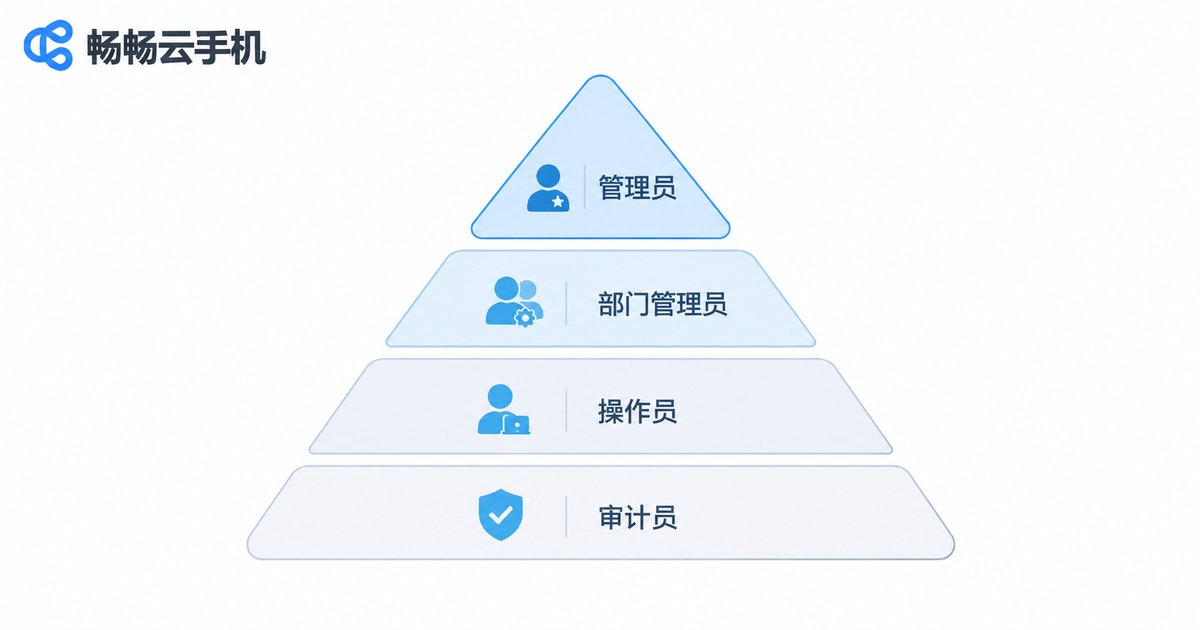
The account system of a private deployment has one goal: the right people can see what they need, and the wrong people cannot touch what they should not. Four role layers usually work well.
| Role | Typical permissions | Who it fits |
|---|---|---|
| Super administrator | Platform configuration, node management, tenant creation, global logs | IT lead |
| Department / tenant admin | Instance allocation within the department, member management, template maintenance | Business owner |
| Standard operator | Operate only assigned instances; install apps and take screenshots | Frontline operations, testers |
| Read-only auditor | View operation records and screen recordings, no write access | Compliance, risk control |
A few details that are easy to miss:
- Bind accounts to devices: Instances should not be shared casually. After login, an account should see only its own device list so accounts never cross over.
- Keep an audit trail: Log the timestamp, account, and instance ID for logins, power operations, app installs, and file transfers. Screen recording playback is a strong bonus.
- Password and login policy: Enforce password complexity, alert on unusual locations, and disable long-inactive accounts. These are basics, not nice-to-haves.
- Integrate with existing identity: If your company already has a unified identity platform, connect single sign-on so employees do not maintain two sets of passwords.
- Offboarding: When someone leaves or changes roles, reclaim instances and permissions in one action rather than auditing manually afterward.
A Practical Deployment Sequence
Connecting the three foundations, the rollout can follow the order below. Each step has a clear deliverable, which keeps you from changing plans mid-build.
- Requirements review: Count how many cloud phones you need, peak concurrency, required apps, and network conditions.
- Capacity planning and hardware selection: Use stress test data to derive per-host capacity, then settle on servers, storage, and redundancy.
- Network design: Decide egress bandwidth, intranet architecture, port lists, and security policies. Finish the diagram before construction.
- Platform installation and image creation: Deploy the console, build a standardized Android image, and lock the system version.
- Account and permission setup: Create roles and tenants, connect single sign-on, and turn on audit logging.
- Pilot run: Let one business team use it for two to four weeks to collect lag, disconnection, and compatibility issues.
- Go-live and operations: Establish monitoring alerts, backup policies, and incident response, then scale gradually.
Hosted Cloud Phones vs. Private Deployment
Not every team needs to go fully on-premises from day one. Compare the options before deciding on the pace.
| Dimension | Hosted cloud phones | Private deployment |
|---|---|---|
| Time to go live | Usable the same day | Requires procurement and setup time |
| Upfront investment | Pay as you go, low entry cost | Higher one-time hardware and facility cost |
| Data ownership | Data resides with the provider | Data stays entirely inside your intranet |
| Control | Limited by provider specs and policies | Full control over config, network, and images |
| Operational burden | Handled by the provider | Requires an in-house or outsourced ops team |
| Best for | Small and mid-size teams in a validation phase | Data-sensitive, stable-scale teams with IT capability |
A common path is to prove the business model on a hosted solution first, then migrate to private deployment once device scale and compliance requirements are clear. This avoids slowing the business down with a large one-time investment, and avoids locking in an architecture before the requirements are fully understood.
About Ccloudphone
If your team has no plans to build a data center yet, starting with a hosted solution is a reasonable move. Ccloudphone provides ARM-based Android cloud phone instances that can be accessed directly from a web browser, with support for multiple instances and batch management. It suits multi-store operations, automation scripts, and app testing scenarios. For enterprises that genuinely need private deployment, we recommend contacting the official channel to discuss the specific deployment plan and hardware list, and to size capacity against real business volume before deciding on node count and network architecture, so you do not over-purchase up front.
Frequently Asked Questions
Q: What is the minimum number of servers for private deployment?
There is no fixed answer; it depends on per-host capacity and business peaks. Start with one or two machines for validation, measure real capacity, and then scale. That is safer than buying in bulk on day one.
Q: How do I estimate egress bandwidth so it does not fall over?
Determine peak concurrency and target image quality first, then run a small-scale stress test to measure actual per-instance usage. Multiply the two and leave at least 30% headroom. If your traffic has clear peaks, make bandwidth elastically expandable.
Q: Can the account system connect to our existing login platform?
Most private deployment platforms support single sign-on or directory service integration. Confirm the specifics during vendor selection so you do not discover after go-live that you are maintaining two sets of accounts.
Q: Does private deployment still need dedicated operations staff?
Yes. Hardware inspection, image updates, log backups, and incident response all need an owner. A small deployment can be absorbed by the existing IT team; once it grows, assign dedicated staff.
Q: Can data on a hosted solution be migrated to a private environment?
Usually yes, through image export, app reinstallation, and data migration. Prepare an application list and an account list before migrating to significantly reduce confusion on switch-over day.


