
What Technology Powers Cloud Phones? Virtualization and ARM Architecture Explained
What Is a Cloud Phone? Explained in One Sentence
In simple terms, a cloud phone is a virtual smartphone that runs in a cloud data center. It is not an app installed on your device — it is a complete, independent Android system running on ARM servers in a remote data center. Your phone or computer only does two things: send your touch commands upward, and stream the screen back down.
Because all computing happens in the cloud, a cloud phone can stay online 24/7 without draining your battery, heating up your device, or consuming local storage — and managing many “phones” from a single device becomes possible.
Core Technology #1: Virtualization — Slicing One Server into Many Phones
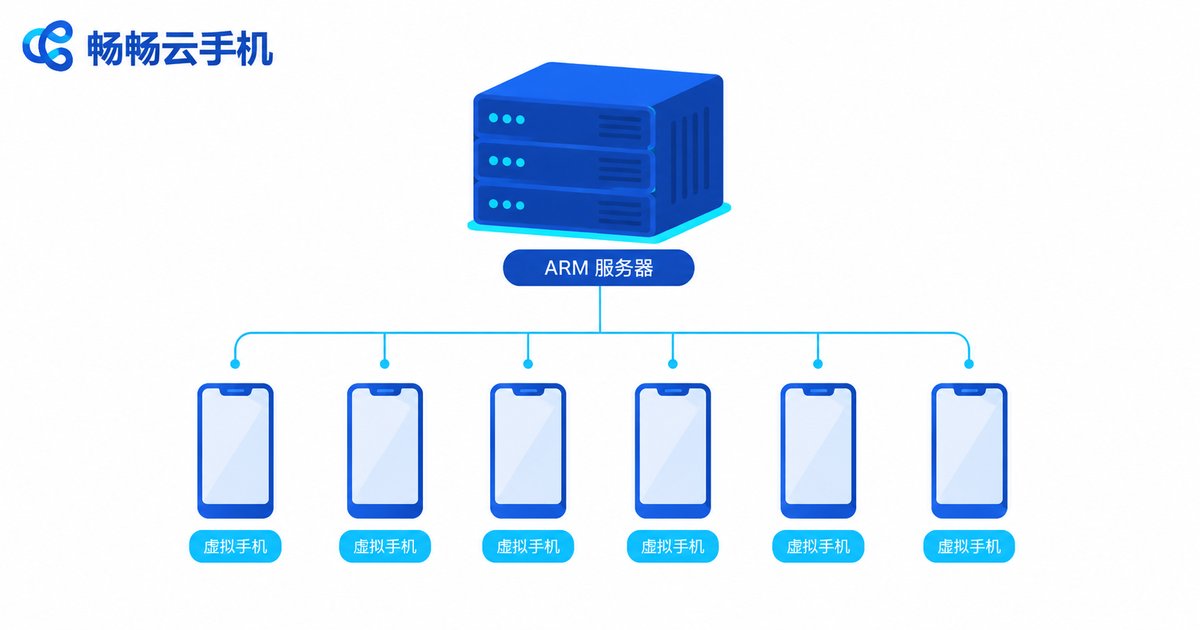
The first cornerstone of cloud phone technology is virtualization. A physical ARM server is powerful, and running just one Android system on it would be a waste. A virtualization layer sits above the hardware and splits CPU, memory, storage and network resources into many portions — each one becoming a complete, isolated virtual phone.
These virtual phones are fully isolated from one another: each has its own Android system, its own device identity and its own app data. A failure in one does not affect the others. Think of a building divided into independent apartments — each with its own locks and utility meters.
Core Technology #2: ARM Architecture — The “Native DNA” of Cloud Phones
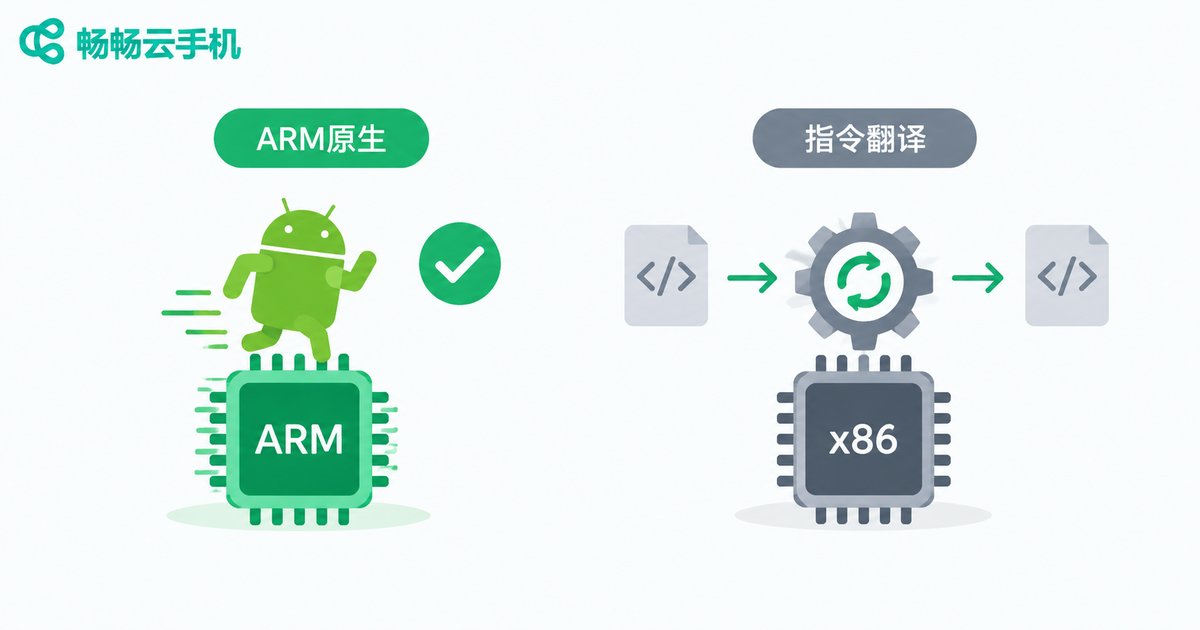
The second key element is the ARM architecture. Nearly all smartphone chips are built on the ARM instruction set. When cloud phones run on ARM servers, Android can execute natively on the cloud hardware — no instruction translation required.
This is a sharp contrast with traditional PC emulators: an emulator runs on x86 hardware, where Android instructions must pass through a translation layer. That causes performance loss, and some apps misbehave when they detect a non-genuine device. On an ARM-based cloud phone, apps see a “real phone,” delivering noticeably better compatibility and stability.
The Journey of a Single Tap: How a Cloud Phone Works
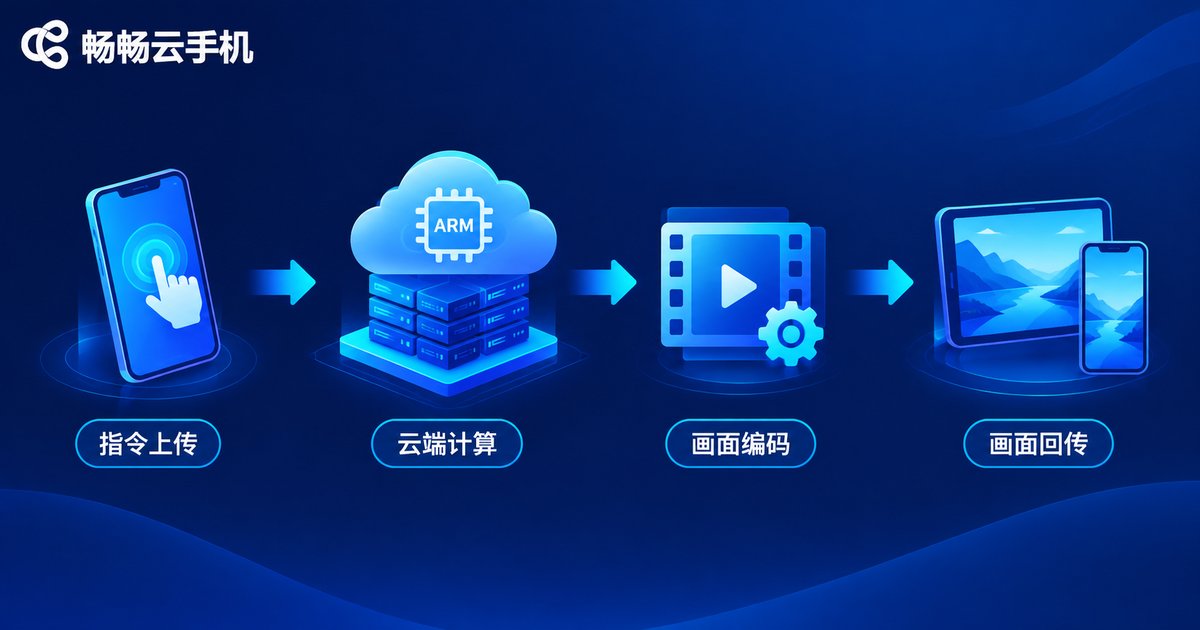
What happens behind the scenes when you tap a cloud phone screen? The process breaks down into four steps:
1. Command upload: your touch input is compressed into commands and sent over the network to the data center;
2. Cloud computing: the virtual phone on the ARM server receives the command and handles all the heavy lifting — game rendering, app logic and more;
3. Frame encoding: the result is encoded into a live video stream in real time;
4. Stream return: the video stream travels back to your device, typically with latency of just tens of milliseconds.
It resembles watching a livestream — but in reverse. You are not just watching; every input you make instantly changes the state of that phone in the cloud.
Cloud Phone vs. Real Phone vs. Emulator: A Quick Comparison
| Dimension | Cloud Phone | Physical Phone | PC Emulator |
|---|---|---|---|
| Where it runs | ARM servers in the cloud | Locally | Local x86 computer |
| Architecture compatibility | Native ARM, excellent | Native ARM | Instruction translation, occasional issues |
| 24/7 availability | Yes, no local battery drain | Device must stay on, heats up | Depends on PC staying on |
| Batch management | Manage many phones easily | Requires buying devices | Limited by local performance |
Want to Try It Yourself? We Recommend ChangChang Cloud Phone
Now that you understand the principles, why not experience it firsthand? ChangChang Cloud Phone (ccloudphone) is a cloud phone service built on ARM architecture and virtualization: Android apps run in the cloud, supporting app hanging and multi-phone management, while your local device only handles input and display. For device configurations and plan details, visit the official ChangChang Cloud Phone website and choose what fits your needs.
FAQ
Q: What is the real difference between a cloud phone and an emulator?
The key difference is architecture. A cloud phone runs natively on ARM servers, while an emulator runs on x86 hardware and relies on instruction translation — resulting in higher performance overhead and weaker app compatibility.
Q: Does a cloud phone require a fast network?
Since the screen is delivered as a video stream, network quality directly affects the experience. A regular home broadband or 4G/5G connection is generally enough; the more stable the network, the lower the latency.
Q: Does a cloud phone keep running after I go offline?
Yes. The cloud phone runs on cloud servers. As long as you do not shut it down, apps and tasks keep running in the cloud even when your local device is offline — which is exactly why it suits idle, long-running tasks.
Q: Is my data safe on a cloud phone?
Reputable providers give each virtual phone an isolated environment, with data stored in the data center. Choose an established service such as ChangChang Cloud Phone, and always safeguard your account credentials.


