

Cloud Phone Stress Testing: Multi-Instance Count, Concurrent Tasks, and Resource Limits
Why Cloud Phones Need Stress Testing
Most people meet cloud phones through one simple question: how many app windows can a single cloud device really run at the same time? You cannot answer that by guessing, and a spec sheet will not tell you either. You have to measure it.
Stress testing delivers three things: the peak ceiling, the stable range, and the moment when things break and why. The peak tells you what is theoretically possible, the stable range tells you what you dare to run, and the crash scene tells you whether you can diagnose a problem quickly.
Multi-Instance Count: Running Many Is Not the Same as Running Steadily
The ceiling on multi-instance count is rarely set by the cloud phone software itself. It is set by how resources are shared. Two instances with the same 4-core, 8 GB spec can behave very differently: one runs 20 lightweight apps steadily, the other starts fighting itself at 8.
The estimate is simple if you break it into three parts:
- Memory: resident memory per instance x instance count + peak headroom + system reserve (roughly 15% to 20%).
- CPU: watch the average, but also watch short spikes. If spikes stay above 80% of total cores, reduce the count.
- IO: installs, screenshots, screen recording, and log writes all stack up and often become the bottleneck before CPU does.
Record your instance count in three bands: comfort (average CPU below 50%), usable (50% to 75%), and danger (persistently above 80%). Run daily operations in the first two bands and keep the danger band for short batch jobs only.
Concurrent Tasks: What Actually Happens in That One Minute
Multi-instance is a space problem. Concurrency is a time problem. The minute when everything launches at once is the part people forget to test.
Common sources of concurrency pressure include bulk cold starts, scripts firing simultaneously, bulk screenshots or OCR, bulk uploads and downloads, and bulk app installs or updates.
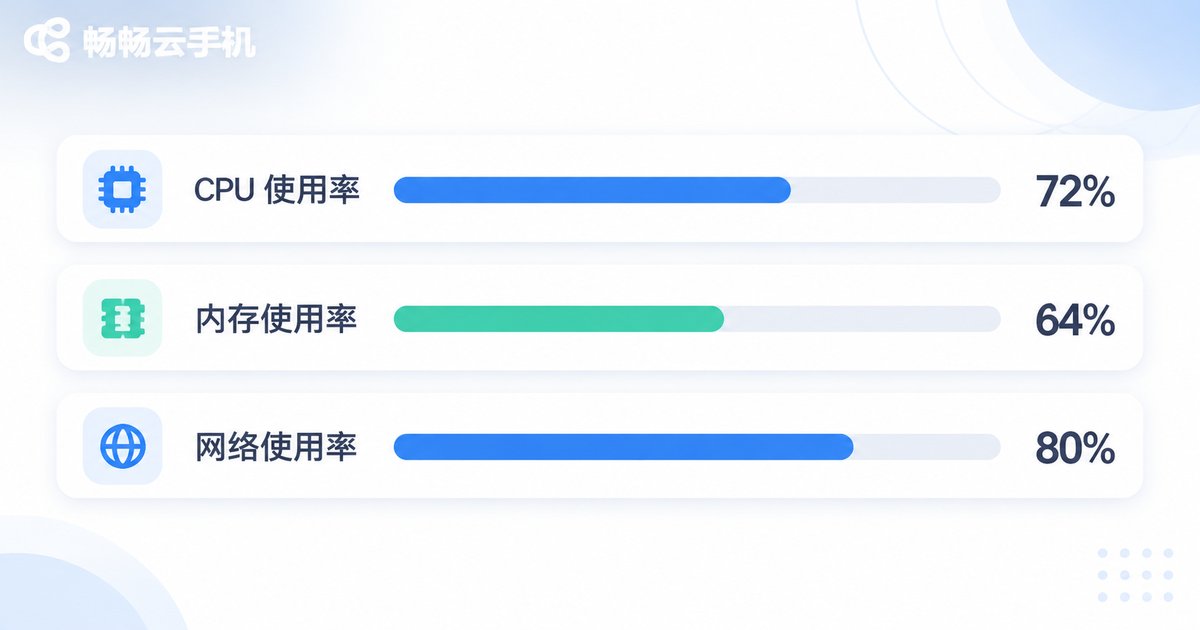
The most damaging of these is the cold start storm: 20 instances pull up an app in the same second, CPU saturates, disk reads queue, network handshakes pile up, and the result is that everything slows down rather than a few instances failing. That is why a real test needs staggered parameters, such as launching one instance every 3 seconds, then watching how the metrics move.
Resource Limits: The Four Red Lines
A stress test report without these four sets of numbers is basically not a report. Here is how each one behaves when it saturates, and how to tune it:
| Resource | Typical symptom when saturated | Metrics to watch | Tuning direction |
|---|---|---|---|
| CPU | Input lag, stuttering frames | Average and peak utilization | Run fewer instances, stagger launches |
| Memory | Apps killed by the system and reloaded later | Available memory, process reclamation count | Limit background apps per instance |
| Storage IO | Slow installs, laggy screenshots | Write latency, IO wait time | Reduce screenshot and recording frequency, move logs out |
| Network bandwidth | Upload and download timeouts, failed handshakes | Up and down utilization, connection count | Batch downloads, avoid heavy parallel requests to one source |
A practical check order: first see whether CPU is pinned, then whether memory is being reclaimed frequently, and finally look at IO and bandwidth wait times. Most lag traces back to the first two.
A Reusable Stress Testing Workflow
You do not need complicated tooling. You need a stable process and comparable data. This four-step method works as-is:
Step 1, build a baseline. Run a single instance idle for 10 minutes and record stable CPU, memory, and network values as your reference point.
Step 2, ramp up. Increase instances in steps of 5, 10, 15, and 20, running each level for 10 minutes and checking whether metrics enter the danger band.
Step 3, add concurrency. On your stable level, layer in scripts, screenshots, and downloads, then watch where response time starts to bend.
Step 4, record the knee point. Find the count where error rates start rising and latency starts doubling. That is your practical ceiling.
If you need to trigger actions in bulk from the command line, write it like this and keep the interval:
# Stagger app launches across 20 instances, 3 seconds apart
for i in $(seq 1 20); do
  adb -s cloud-$i shell monkey -p com.demo.app -c android.intent.category.LAUNCHER 1
  sleep 3
done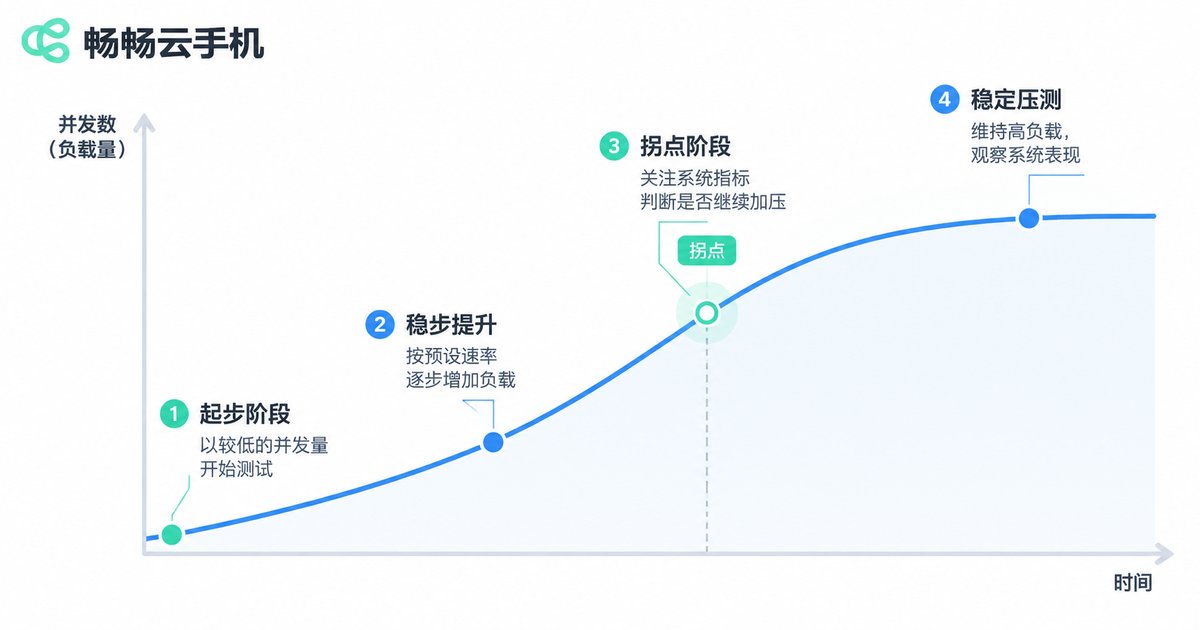
Practical Ways to Push the Ceiling Higher
With identical hardware specs, two operations can differ by more than 30% in usable instance count. A few changes pay off immediately:
- Stagger launches: change bulk starts to one instance every 2 to 5 seconds and watch the peak flatten out.
- Cut screenshot frequency: screenshots and recording are hidden IO hogs. Capture at key checkpoints instead of on a timer.
- Serialize heavy tasks: queue downloads, installs, and updates instead of competing with business scripts.
- Ship logs out: push logs to external storage to reduce local writes.
- Mix specs: run lightweight work on lower-spec multi-instance setups and heavy work on higher-spec, fewer-instance setups. A mixed deployment usually costs less.
Why ccloudphone Fits Stress Testing Workflows
In testing and multi-instance operations, what makes ccloudphone useful is that it pairs multi-instance support with bulk management: instances can be reviewed and operated together from a console, specs are selected on demand, and the platform suits starting with a small batch, confirming your own stable band, and then scaling gradually.
For exact plans and configurations, please refer to the official website. A good habit is to run the four-step workflow above on a few instances first, get your own knee-point data, and only then decide how far to scale. That is cheaper and far more controllable than opening everything at once.

Frequently Asked Questions
Q: Is a higher multi-instance count always better?
No. Past the stable band, per-instance latency rises noticeably and real output drops. Find the comfortable band first, then talk about scale.
Q: How long should a stress test run to be valid?
Run each level for at least 10 minutes and cover one complete business action (launch, execute, upload, exit). A short burst score is not enough to judge stability.
Q: CPU is not maxed out, so why is it still laggy?
Usually memory is being reclaimed frequently, or storage IO is queuing, or bandwidth is saturated. Check CPU, memory, IO, and bandwidth in that order.
Q: Do concurrent tasks always cost more than running more instances?
It depends on the task. High-frequency actions such as bulk cold starts and bulk screenshots often cost more than simply adding instances, so test them separately.
Q: How do I know whether it is a resource issue or a script issue?
Run the same script on a single instance. If one instance is fine and many are not, it is likely resources. If one instance also fails, check the script logic and its wait times first.


