
Does a Cloud Phone Take Up Your Real Device's Storage? App Size and Cache Usage Explained
The Short Answer: A Cloud Phone Does Not Use Your Real Device's Storage
When people first encounter cloud phones, they almost always ask the same question: "If I install apps on a cloud phone, will it eat up my real phone's storage?" Here is the direct answer: a cloud phone itself does not take up any storage on your real device.
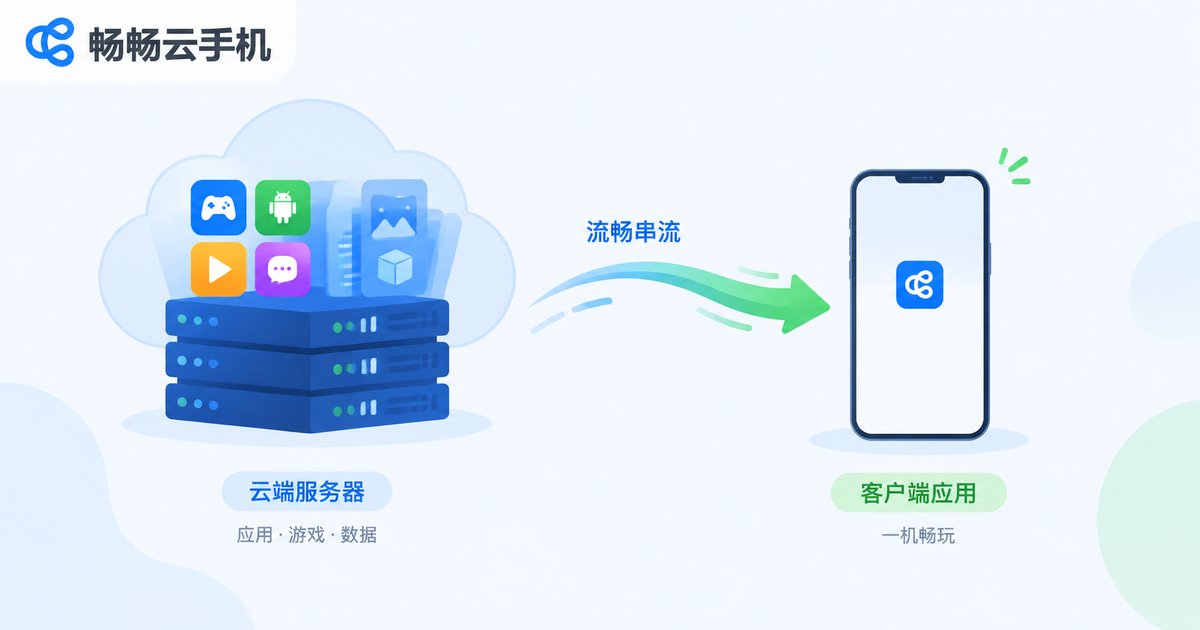
A cloud phone is not an emulator installed on your handset. It is a real Android device running on servers in a remote data center. Its operating system, every app you install, and all the cache and data generated while running are stored entirely on cloud servers. Your real phone handles only one job: displaying the cloud phone's screen in real time and sending your touch commands back.
A quick clarification: when people say a phone's "memory", they usually mean storage (ROM) — the space for apps, photos and videos — while RAM is a different thing, and we will cover both below. For now, remember the core conclusion: even if you install dozens of large games on your cloud phone, the available space on your real device will not shrink by a single byte.
What Actually Takes Up Space on Your Real Phone? Only Two Things
Since the cloud phone itself uses no local storage, what on your real device is related to it? Mainly two parts:
1. The cloud phone client app: This is the entry app you use to connect to your cloud phone. Its size is similar to an ordinary app, usually a few dozen to just over a hundred MB — a completely normal footprint.
2. Streaming cache files: The cloud phone's screen is streamed to your real device over the network in real time. To keep operations smooth and the picture stable, the client keeps some temporary cache locally. This usually amounts to a few dozen to a few hundred MB, can be cleared anytime with one tap, and will not grow without limit.
Apart from these two items, everything else about the cloud phone — the system, app packages, game data packs, chat history, downloaded files — lives entirely in the cloud and has nothing to do with your real device's storage.
One Table Says It All: Installed Locally vs. Installed on a Cloud Phone
| Item | Installed on Real Phone | Installed on Cloud Phone |
|---|---|---|
| App installation package | Uses real device storage | Stored on cloud servers |
| App runtime cache | Uses real device storage, needs regular cleaning | Stays in the cloud, never touches your phone |
| Large game data packs | Several GB each, fills your phone fast | All in the cloud, zero local usage |
| Chats and downloaded files | Pile up, hard to clean | Stored in the cloud, easy to organize |
| Actual real-device footprint | App size + cache + data | Only the client app + a little streaming cache |
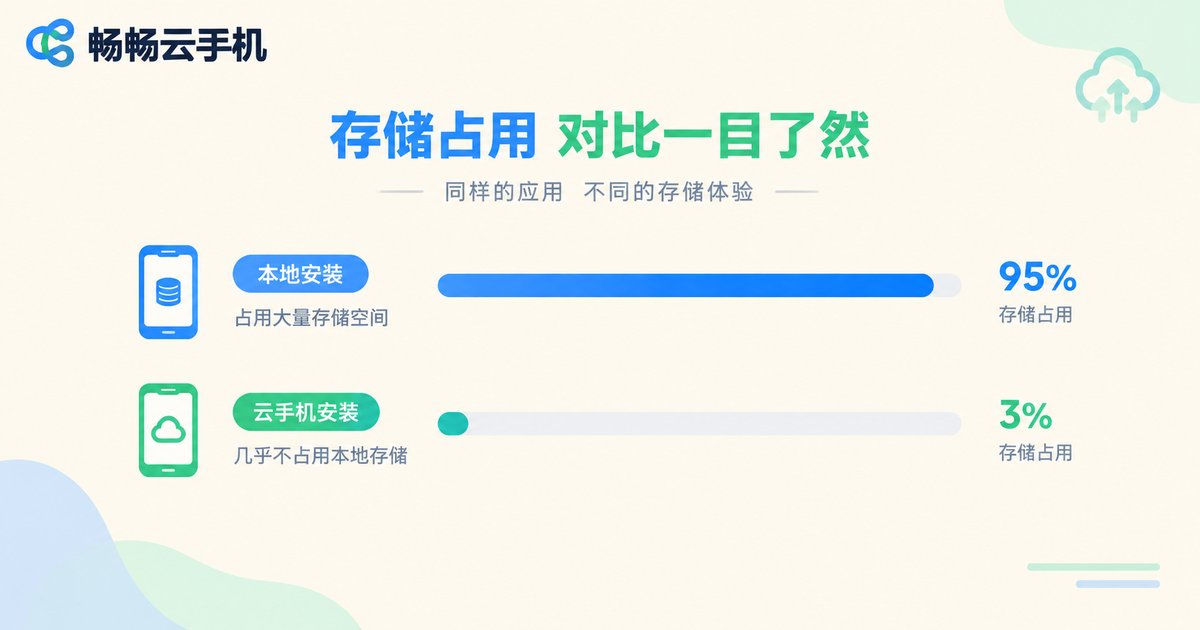
The table makes it intuitive: the same multi-GB game costs you several real gigabytes when installed locally, but on a cloud phone your real device only carries a lightweight client.
Will Streaming Cache Keep Piling Up?
This is a detail many users care about. Streaming cache temporarily holds screen data so that the next connection loads faster and the picture stays stable. Its growth has a ceiling — it will not pile up endlessly like local app caches do.
If you notice the client taking up more space, the fix is simple: open the client's settings or storage management page and tap "Clear Cache". Within seconds the temporary files are wiped and space is freed. Clearing this cache does not affect anything on your cloud phone — your apps, accounts, and game progress all remain safely in the cloud.
How a Cloud Phone Lightens Your Real Device's Load
Once you understand how the storage works, the value of a cloud phone becomes clear:
A lifesaver for small-storage users: A 128GB or even 64GB phone runs out of room after two large games. Move the games into a cloud phone and your real device is instantly "expanded".
Say goodbye to constant cache cleaning: Local app caches are a bottomless pit — chat and game apps can eat tens of GB. A cloud phone moves that burden to the cloud and keeps your real device clean.
Multi-instance without extra space: Want to switch between multiple accounts? Local multi-instance means paying the app size again and again, while cloud phone instances never touch your real device's storage.
Why We Recommend ChangChang Cloud Phone (ccloudphone)
When it comes to storage management, ChangChang Cloud Phone (ccloudphone) is a dependable choice: the client is designed to be lightweight with a small real-device footprint; connections are stable and the screen streaming is smooth; cloud devices have ample performance, and all apps and game data live in the cloud, keeping your real phone light at all times.
Whether you are a small-storage user whose phone is always running out of room, or an efficiency-minded user who wants to keep work accounts and entertainment apps completely separate, ChangChang Cloud Phone delivers a "zero burden" experience on your real device.
FAQ
Q: Will apps installed on the cloud phone appear on my real phone's home screen?
No. Apps on the cloud phone exist only inside the cloud system. Your real phone's home screen shows only the cloud phone client — the two are fully isolated.
Q: Does a cloud phone use my real phone's RAM?
Only a small amount of RAM while the client is running, similar to opening an ordinary app. The cloud phone's own runtime consumption happens on cloud servers and is unrelated to your real device. It is released as soon as you close the client.
Q: How much space does the cloud phone client take on my real phone?
The client itself is usually a few dozen to just over a hundred MB. Including streaming cache, the total footprint generally stays under a few hundred MB — far less than installing a large app locally.
Q: If I clear the streaming cache on my real phone, will my cloud phone data be lost?
No. Streaming cache is only temporary screen data. Clearing it does not affect any apps, accounts, or data on the cloud phone.
Q: Do files downloaded inside the cloud phone use my real phone's storage?
No. Files downloaded on the cloud phone are stored on the cloud device. Only when you actively export a file to your real phone does it take up local storage.
Q: Is a cloud phone suitable if my real phone has very little storage?
Very much so. One of the core advantages of a cloud phone is shifting the storage burden of large apps and data to the cloud, so even a small-capacity phone can run big games smoothly.


