

How to Use Cloud Phones for Social Media Automated Marketing: Batch DM and Auto-Reply Strategies
Why Social Media Marketing Needs Cloud Phones
Anyone who has run social media operations knows one truth: a single account's reach is ultimately limited. To expand exposure and cover more target users, you often need to operate multiple accounts at the same time. But the traditional multi-device approach has obvious pain points—high hardware costs, dozens of SIM cards to maintain, and accounts scattered across devices with no way to manage them centrally.
Cloud phones run the entire mobile operating system on remote servers. With just one computer or one local phone, you can open dozens of independent cloud phone instances simultaneously. Each instance carries its own device parameters and runs almost identically to a real phone, making it difficult for social media apps to detect that it is a cloud device.
The table below compares the traditional multi-device approach with the cloud phone approach:
| Dimension | Multiple Physical Phones | Cloud Phones |
|---|---|---|
| Hardware cost | Over 1,000 yuan per device; dozens of devices cost a fortune | Monthly subscription at a fraction of the cost |
| Management | Operate device by device; low efficiency | Manage all instances from one computer |
| Uptime | Limited by battery and overheating | Online 24/7 in the cloud |
| IP / device switching | Requires physical operations | One click in the console |
Batch DMs: From Needle in a Haystack to Precision Outreach
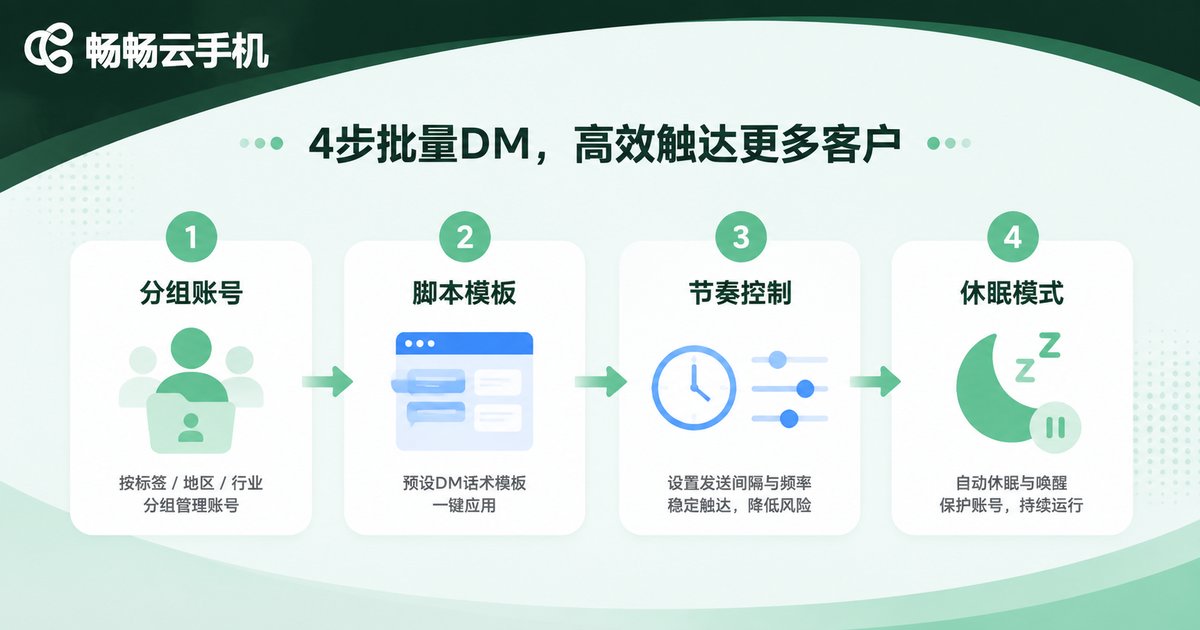
Direct messages are among the highest-converting outreach channels on social media, but sending them manually one by one is slow and exhausting. With cloud phones, you can build a batch DM workflow:
Step 1: Group your accounts. Divide accounts by target audience and script style. Each cloud phone instance logs into one account, preventing any single account from exceeding platform sending limits.
Step 2: Prepare script templates. Create 3-5 DM script variations tailored to different audience segments. Never send identical content across all accounts—platform risk-control systems are highly sensitive to duplicate text.
Step 3: Control the rhythm. This is the most critical step. Keep each account's daily DM volume within the platform's safe threshold, and add random delays between sends to mimic a real person's pace.
A simple rhythm-control logic can be expressed in pseudocode:
for account in cloud_phone_group:
    for user in target_list:
        send_dm(account, user, random_template())
        sleep(random(60, 180))  # random interval, mimicking a human
    account.switch_to_rest_mode()  # enter rest mode after sending
Auto-Reply: A 24/7 Customer Service That Never Goes Offline
When users leave comments or send inquiries, responding hours later means their interest has already cooled. That is where auto-reply delivers value: responding within the golden minutes when user interest peaks.
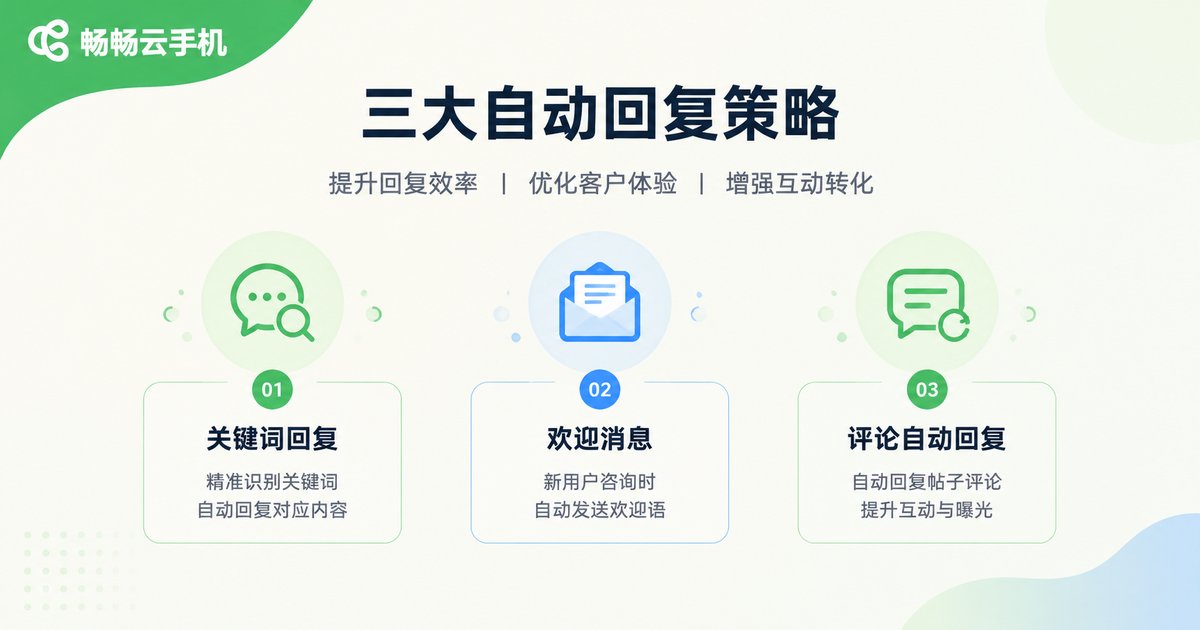
There are three common auto-reply strategies:
1. Keyword replies. When an incoming DM contains keywords such as price or purchase inquiries, the system automatically sends a preset product introduction with a purchase link.
2. Welcome messages. New followers automatically receive a welcome DM that guides them to pinned content or invites them to join a community.
3. Comment auto-replies. Automatically replying to frequently asked questions boosts engagement metrics while letting other viewers see the answers directly.
Keep in mind that auto-reply copy should be refreshed regularly. If a user receives the exact same reply three times in a row, the experience suffers. Review reply data weekly and replace scripts with low click-through rates.
Account Matrix: Manage Dozens of Accounts from One Computer
The real power of cloud phones lies in matrix operations. You can assign dozens of cloud phone instances to different goals: some for content publishing, some for DM outreach, and some for comment-section engagement.
Because all instances run in the cloud, your marketing actions continue even after you shut down your computer. The next morning, open the console to see the running status and data summary of every account and adjust your strategy at any time.
Anti-Ban Tips: The Safety Boundaries of Automated Marketing
Every automated action carries risk. Cloud phones reduce device-level risk, but behavior-level risk control is still up to the operator. Here are some practical tips:
1. Warm up new accounts before marketing. Use newly registered accounts normally for one to two weeks—post content, like, and interact—to build a normal usage profile before starting marketing actions.
2. Limit per-account activity. Keep the frequency of DMs, follows, and likes within platform-allowed ranges. Slow and steady beats fast and banned.
3. Differentiate content. Accounts should vary in the content they post and the scripts they use, avoiding detection as a marketing account matrix.
4. Follow platform rules. The purpose of automation is to improve efficiency, not to send spam. Respecting users and providing value is the foundation of long-term operations.
Why We Recommend CCPhone
There are quite a few cloud phone products on the market. For social media matrix operations, we recommend CCPhone for three reasons:
First, near-real-device stability. CCPhone runs on ARM servers with strong app compatibility. Social media apps run smoothly, and long-running sessions stay connected without dropping.
Second, powerful batch management. It supports running multiple instances simultaneously with group management, and the console enables efficient batch operations—exactly what matrix operations require.
Third, flexible billing. Open instances on demand and add capacity as your business grows, without a large upfront hardware investment.
FAQ
Q: Can cloud phones be detected by social media platforms?
Cloud phones provide independent device parameters, so at the device level they look identical to real phones. But platform risk control looks beyond devices to behavior patterns, so operation rhythm and content quality matter just as much.
Q: How many accounts can one cloud phone run?
It is recommended to log into only one account per cloud phone instance. This keeps the device-to-account mapping natural and minimizes risk.
Q: Will batch DMs be flagged as spam?
Any platform will restrict accounts that send too frequently, repeat identical content, or receive many user reports. Controlling frequency, differentiating content, and targeting only relevant audiences are the keys to reducing risk.
Q: If my local network goes down, will marketing tasks be interrupted?
No. Cloud phones run on remote servers, so a local network outage or powering off your device does not affect the cloud instances.
Q: Is matrix operation suitable for beginners?
Start with one or two accounts to validate your workflow, scripts, and conversion path before scaling up.


