

How to Achieve Single Window Single IP on Cloud Phones: Independent Network Exit and Proxy Pool Auto-Assignment
What Is Single Window Single IP and Why It Matters
Single window, single IP means every independent window (instance) inside a cloud phone gets its own dedicated network exit IP, fully isolated from all other windows: window A goes through IP-A, window B through IP-B, with zero overlap.
This matters enormously in multi-account operations. When multiple accounts share one IP, platform risk-control systems can easily link them together through that IP, and if one account runs into trouble, the others may be dragged down with it. With an independent IP per window, every account looks like it runs on a separate physical device over a separate network, which greatly reduces association risk.
Typical scenarios include cross-border e-commerce with multiple stores, social media account matrices, multi-instance gaming, app testing and data collection. All of them demand far stricter IP isolation than simple multi-opening.
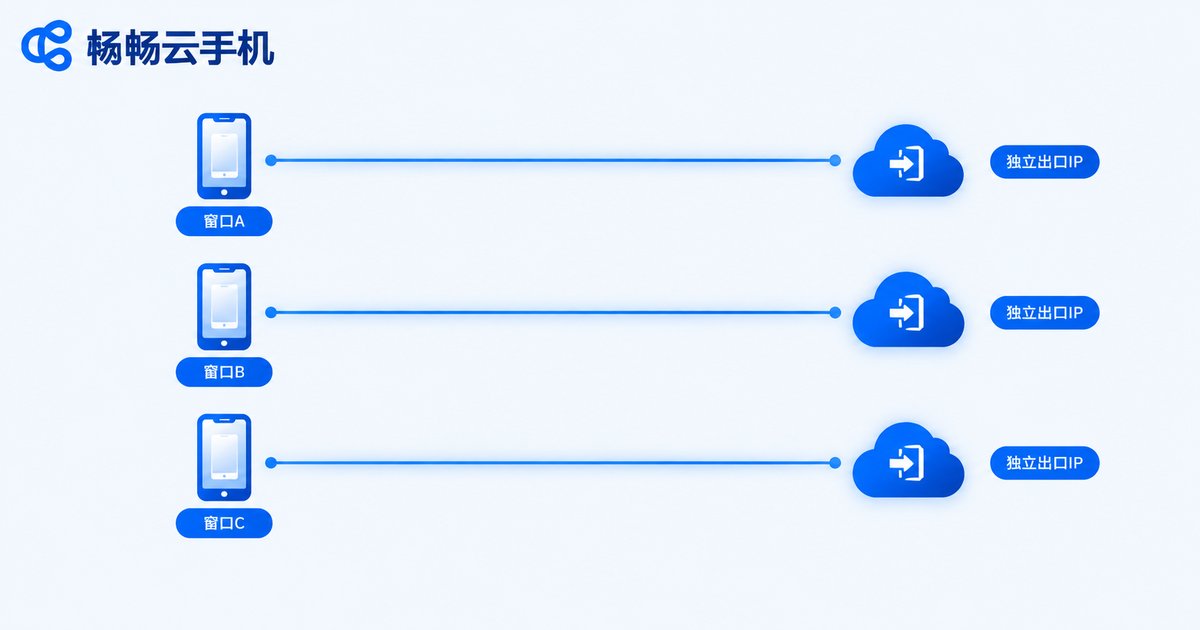
Mechanism One: Independent Network Exit
The independent network exit is the first layer of isolation. The core idea: on the cloud phone platform's server cluster, every cloud phone instance is bound to a dedicated network channel, and all of its traffic can only enter and leave through that channel.
Technically, the platform uses virtualization to assign each instance its own virtual network adapter and routing rules, then connects this internal channel to a dedicated exit IP. As a result, even when dozens of cloud phones run on the same physical server, they present different IPs to the outside world.
The advantages of this approach are high stability and low latency: exit resources are exclusive to each instance, so windows never compete for the same line. The drawback is a relatively higher cost, which makes it best suited for core accounts that demand maximum stability.
Mechanism Two: Proxy Pool Auto-Assignment
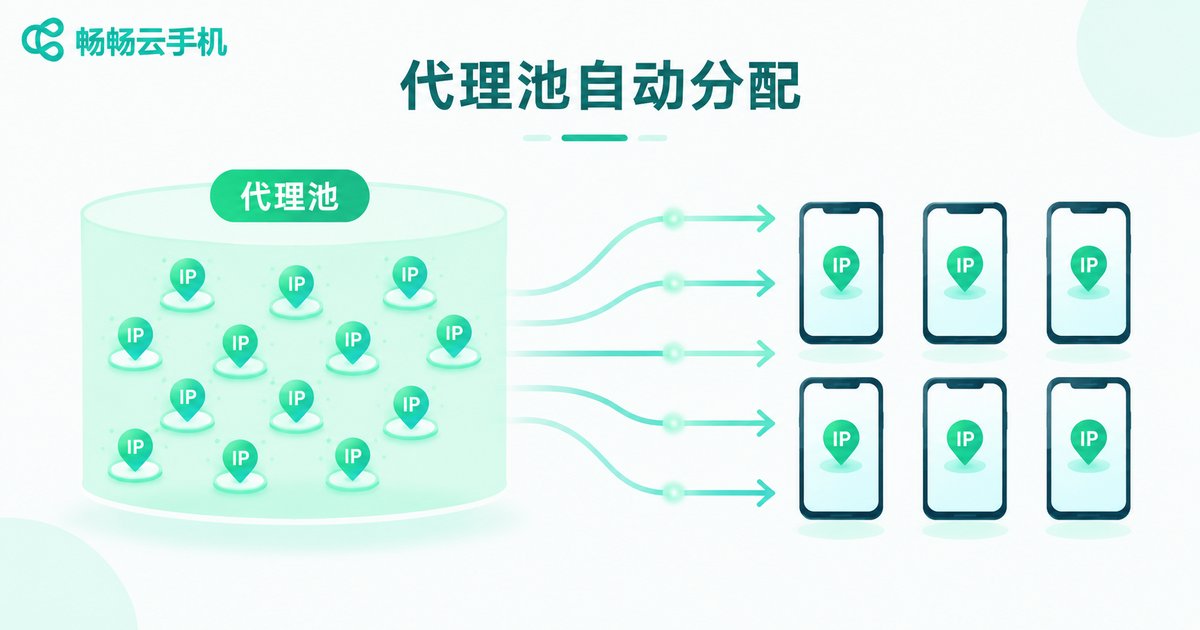
Proxy pool auto-assignment is the second layer of capability and the key to operating at scale. The platform pre-connects a large number of IP resources into a proxy pool, then automatically assigns IPs from the pool to each cloud phone window according to defined strategies.
Three common assignment strategies:
1. Fixed binding: each window binds one dedicated IP at creation and keeps it long term, ideal for mature accounts that need strong IP stability.
2. Scheduled rotation: window IPs are automatically rotated on a set cycle (daily or weekly), suitable for businesses that constantly need fresh IPs.
3. Failover switching: when an IP fails or degrades, the system automatically pulls a backup IP from the pool, keeping the business running without interruption.
The proxy pool approach offers abundant IP resources and strong scalability, supporting hundreds or even thousands of windows online at the same time. With automatic assignment, operators barely need to manage IPs by hand.
Which Approach to Choose? One Table Says It All
| Dimension | Independent Network Exit | Proxy Pool Auto-Assignment |
|---|---|---|
| IP ownership | Exclusive to each instance | Pooled resources, assigned by policy |
| Stability | High, dedicated line | Depends on IP quality and switching policy |
| Cost | Higher | Lower, easy to scale |
| Best for | Core long-term accounts | Bulk accounts and matrix operations |
| Management | Manual planning required | Automatic, nearly maintenance-free |
In practice, the two approaches are often combined: core accounts run on independent exits for stability, while bulk accounts run on the proxy pool for scale. The two complement each other well.
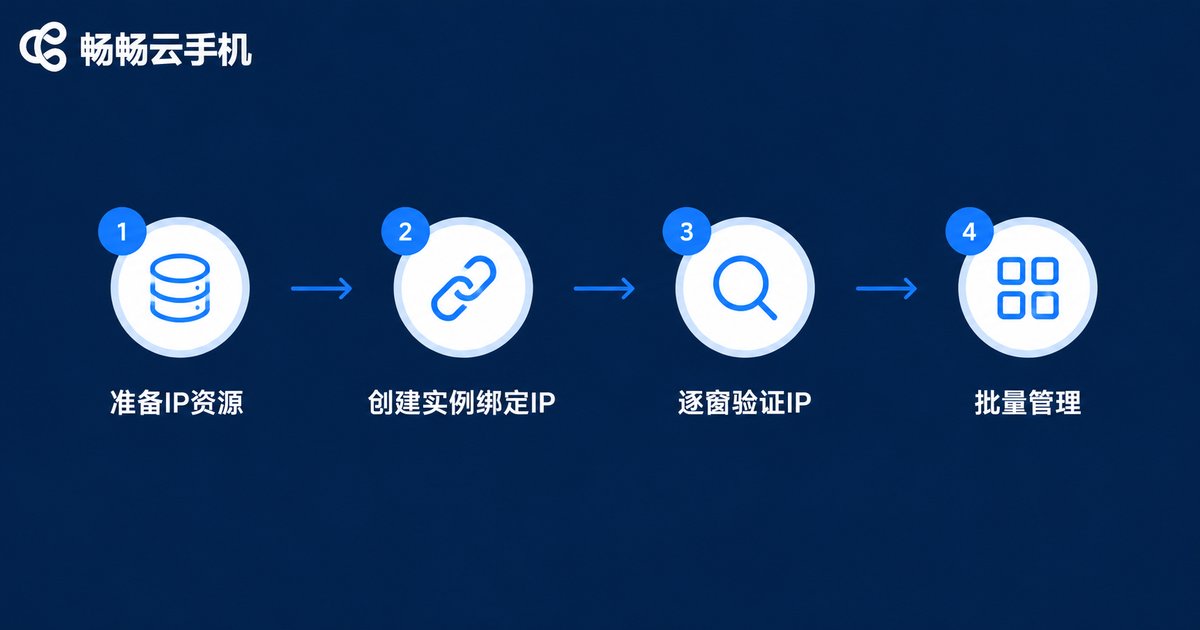
Four Steps to Implement It
Step 1: Prepare IP resources. Estimate how many IPs your business needs, and prioritize clean, high-reputation IP resources. Avoid low-quality IPs that have been heavily used by many accounts.
Step 2: Create instances and bind IPs. Batch-create instances in the cloud phone console and select the single-window-single-IP mode. The system will automatically assign an independent IP to each window from the proxy pool and complete the binding.
Step 3: Verify IP window by window. Open an IP lookup page inside each cloud phone window and confirm that every window shows a different IP in the expected region before logging into any accounts.
Step 4: Roll into batch management. Manage all windows through the cloud phone's batch-control features, and set different IP policies for different business groups to simplify ongoing maintenance.
Pitfall Guide: Three Mistakes to Avoid
Pitfall 1: Caring about IP quantity but not quality. IPs that have been heavily used by many accounts carry a poor reputation. Even with one IP per window, association risk remains. Always check the source and quality-control mechanism of the IP resources.
Pitfall 2: Frequently changing the IPs of mature accounts. Established accounts are sensitive to IP changes, and constant switching may itself trigger risk control. Keep mature accounts on fixed binding and apply rotation mainly to newly created accounts.
Pitfall 3: IP region mismatching the account profile. If an account's registration info says City A but the login IP shows City B, that inconsistency is a risk-control red flag. Match IP regions to account information whenever possible.

How to Choose a Cloud Phone Service
Not every cloud phone supports true single-window-single-IP. When evaluating options, focus on three things: whether it supports instance-level independent network exits, whether it provides an auto-assignable proxy pool, and the quality and regional coverage of its IP resources.
If you are looking for an all-in-one solution, take a look at ChangChang Cloud Phone (ccloudphone). It lets you batch run and manage Android apps in the cloud without buying piles of physical devices. Data stays isolated between windows, and together with batch-control capabilities it can noticeably cut the device and management costs of multi-account operations. For the latest feature list and plan details, please refer to the official ChangChang Cloud Phone website.
FAQ
Q1: What is the difference between single window single IP and ordinary multi-opening?
Ordinary multi-opening only runs multiple app windows on one device, and all windows usually share the same exit IP. Single window single IP assigns each window its own IP with full network-level isolation, greatly reducing association risk.
Q2: Can a cloud phone window change its IP later?
Yes, but do it with care. Switching makes sense for new accounts or when IP quality degrades. For long-running mature accounts, frequent IP changes may trigger risk control, so fixed binding is recommended.
Q3: Does single window single IP completely prevent account association?
IP isolation is the most important layer, but not the only one. Device parameters, behavior patterns and registration details also need to differ. Combining multiple layers keeps association risk to a minimum.
Q4: What if the proxy pool runs out of IPs?
Reputable platforms continuously replenish IPs and retire failed ones. When choosing a service, check the pool size, refresh frequency and replenishment mechanism to avoid IP shortages during peak periods.


