

What Happens Without Dedicated Proxies on Cloud Phones: ASN and TCP Fingerprint Clustering Risks of Shared Datacenter Links
Bottom line first: the risk hides in one word - shared
Many users spin up cloud phones and start running their business straight through the datacenter's default network exit. On the surface every instance is an independent device, but in a platform's risk-control database they all leave through the same datacenter, the same link, the same exit IP. The more accounts you run, the more this shared everything adds up: same IP, same ASN, same fingerprint, same rhythm - until the whole batch is clustered into one group where one strike takes everyone down. This article explains in plain language what happens without dedicated proxies, and how to turn every cloud phone into a truly independent network identity.
ASN: the datacenter's ID card, the first thing risk control checks
An ASN (Autonomous System Number) is like the household registration of an IP range. Residential broadband IPs belong to consumer ISP ASNs, while datacenter IPs belong to hosting ASNs. When a risk-control system receives a connection, checking the ASN is step one: is this traffic from an ordinary home user, or from a batch of servers?
The problem: when dozens of cloud phones share one datacenter exit, they share not only the same exit IP but usually the same C-segment and the same ASN. To the platform, that is a neat row of sibling accounts with batch characteristics written all over them.

TCP fingerprints: how you get recognized without any cookies
Beyond the IP, the network layer leaks plenty of detail: initial TTL, TCP window size, MSS, IPID behavior, packet timing patterns. Together these form a TCP fingerprint - determined by the OS kernel and the network path, hard to fake and easy to compare.
Cloud phones from the same batch usually run the same image with the same kernel parameters, over the same datacenter link, so their TCP fingerprints are nearly identical. Without a single cookie, a platform can cluster these sessions together purely from traffic characteristics. What happens after clustering? One account gets flagged and the whole cluster is punished; registration environments look identical, so batch registration is assumed; perfectly synchronized actions get labeled as automation scripts.
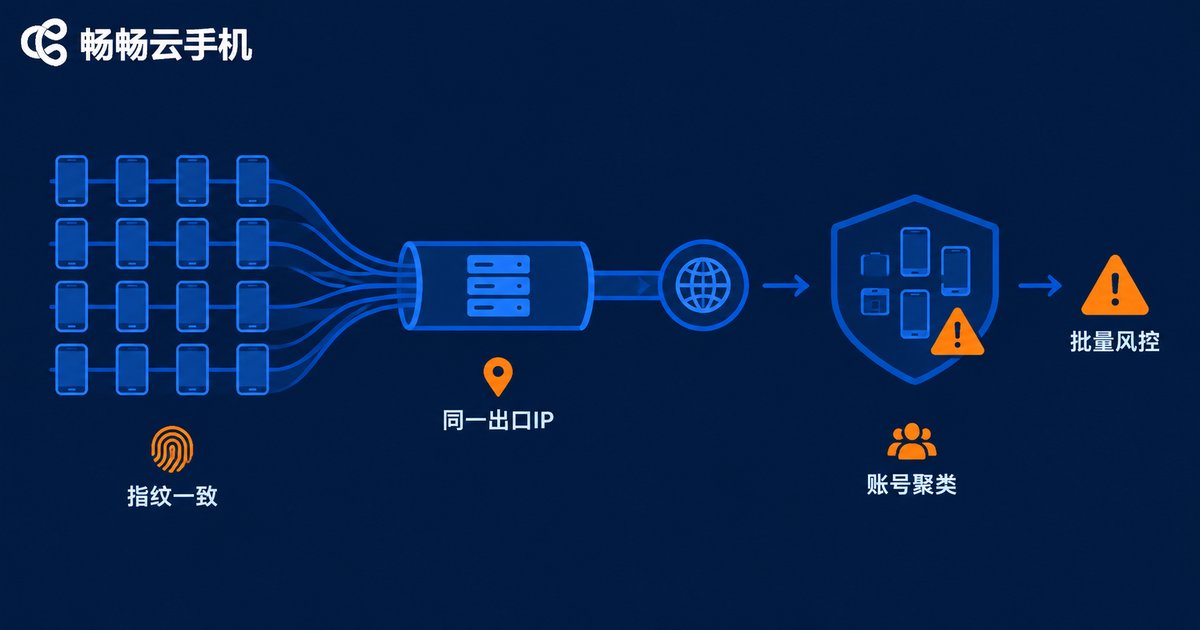
Four stacked risk layers: how a shared link exposes you step by step
| Risk layer | Shared datacenter link behavior | How risk control sees it |
|---|---|---|
| IP layer | Dozens of accounts on one exit IP | Multiple accounts per IP, direct association |
| ASN layer | Same datacenter ASN, same C-segment | Obvious batch datacenter pattern |
| Fingerprint layer | Nearly identical TCP parameters and timing | Same-template device group |
| Behavior layer | Synchronized logins and action rhythm | Automation and group-control suspicion |
These layers stack: no matter how much you customize device parameters, as long as everyone squeezes through the same datacenter link, the IP-layer and ASN-layer correlation cannot be erased. That is why so many people get banned again after switching devices - the device changed, the exit did not.
The fix: one device, one IP - network isolation with dedicated proxies
Binding a dedicated proxy means assigning every cloud phone its own exclusive exit line: one device, one IP - never mixed, never reused, never shared with others. Each device then has its own exit IP, ASN, C-segment and path characteristics, so clustering loses its foundation and your accounts turn from beads on one string into unrelated individuals.
When choosing a cloud phone service, check whether it supports per-device network configuration. With ChangChang Cloud Phone (ccloudphone), you can pair each cloud phone with its own dedicated proxy line for one-device-one-IP isolation, and combine it with core cloud phone capabilities such as multi-instance management, so that device isolation and network isolation are both covered. For exact configuration entry points and supported features, refer to the official ccloudphone website.
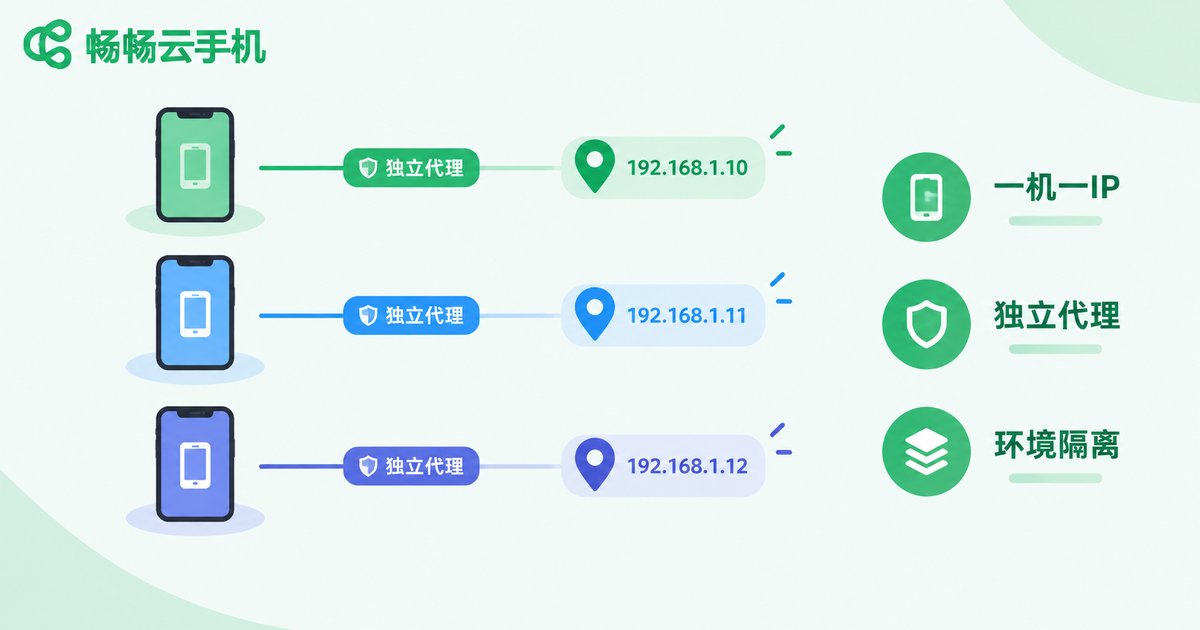
Practical checklist: what to get right after binding dedicated proxies
1. One device, one IP, fixed binding. Each cloud phone maps to its own dedicated line. Do not let device A use it today and device B tomorrow; frequent line switching is itself an anomaly signal.
2. Choose clean IP ranges. Pick exclusive lines that have not been heavily abused. Even a dedicated IP from a burned range carries the bad records left by its previous users.
3. Keep environment parameters consistent. IP location, timezone and language must match each other. An IP in one city with the device timezone set to another still triggers environment-mismatch flags.
4. Stagger activity. Even with network isolation done, dozens of devices going online at the same second and acting in the same rhythm still cluster at the behavior layer. Give every device its own schedule.
5. Warm up new environments. After binding a dedicated proxy, do not jump straight into intensive operations; let accounts run steadily in the new network environment for a while first.
FAQ
Q: Will cloud phones definitely get banned without dedicated proxies?
Not instantly, but risk scales with volume. With few accounts and light activity you may be fine for a while; once volume grows, same-ASN same-exit-IP clustering turns bans into whole-batch events.
Q: How do shared proxies differ from dedicated proxies?
A shared proxy puts many users on one line, so other people's behavior on that IP drags you down. A dedicated proxy serves only your single device - a clean, traceable environment.
Q: Is binding a dedicated proxy enough?
Not quite. Keep bindings stable, choose clean IP ranges, match timezone and language to the IP location, and stagger behavior naturally. Network isolation and behavior isolation must go together.
Q: How do I use dedicated proxies with ChangChang Cloud Phone?
Configure an independent network line for each cloud phone when managing your devices to achieve one-device-one-IP operation. For exact features and setup steps, refer to the official ccloudphone website.


