
Cloud Phone Setup Speed Test: How Big Is the Time Gap From Ordering to Ready to Use?
Why Setup Speed Deserves a Real Test
For most first-time cloud phone users, the first impression is not picture quality or smoothness — it is how long you have to wait from placing an order to actually using the device. If you suddenly need several devices running for game automation or a short-video account matrix, or you must have your account environment ready before an event starts, a few minutes can be the difference between being ready to work and waiting anxiously.
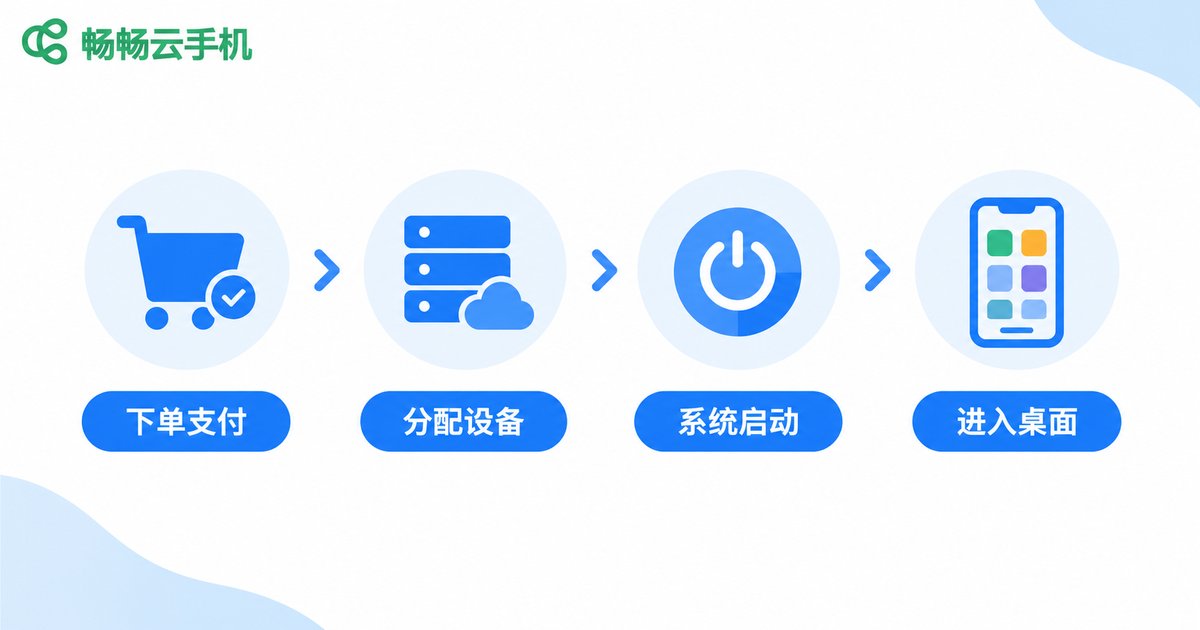
So we ran a full provisioning speed test, recording every step from clicking order and completing payment to the cloud phone booting into its home screen and responding smoothly to touch.
Test Method: How We Timed It
To keep the data meaningful, we standardized the timing: the start point was the moment the order was confirmed and payment completed; the end point was when the cloud phone screen lit up, entered the system home screen, and responded smoothly to taps, swipes, and opening an app.
Tests were run on a regular home broadband connection over Wi-Fi, once during off-peak daytime hours and once during evening peak hours, covering both single-device and batch provisioning, with results averaged over multiple runs.
Results: Where the Time Actually Goes
A single-device setup breaks down into four stages:
| Stage | Average Time | Notes |
|---|---|---|
| Order confirmation and payment | Under 10 seconds | Choose a plan, pay, virtually no waiting |
| Device allocation and initialization | 20-40 seconds | The platform prepares a brand-new cloud phone for you |
| System boot to home screen | 30-60 seconds | Like a phone booting up, loading system and launcher |
| Total (order to usable) | About 1-3 minutes | Ready to use within minutes under normal conditions |
As you can see, the real time cost is not the ordering process but device allocation and system boot. These two stages depend on the platform's scheduling capability and data-center resources — and that is exactly where cloud phone providers differ.
Does Batch Provisioning Slow Things Down?
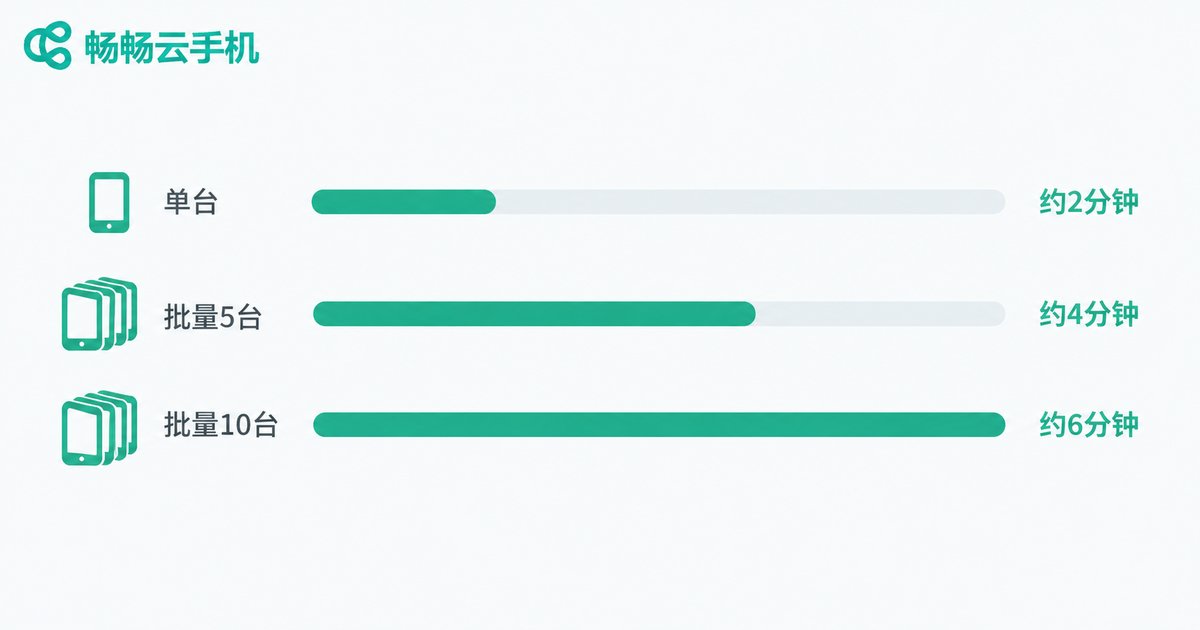
We also tested batch scenarios: provisioning 5 and 10 devices at once. Results show batch provisioning is not simply twice the time — the platform allocates devices in a queue. All 5 devices were ready within about 4 minutes, and 10 devices took around 6 minutes. For multi-device users this is perfectly acceptable. A practical tip is to provision in batches: start the first 5, get them working, then add the rest while the first ones are already running, so overall efficiency is not affected.
Four Key Factors That Affect Setup Speed
Why can some people start using a cloud phone in 1 minute while others wait longer? It mostly comes down to four things:
1. Data-center capacity: during peak hours, when the device pool is tight, allocation may queue up; platforms with ample resources assign devices almost instantly.
2. System image and pre-installed content: the more pre-installed apps and heavier the system customization, the slower the first boot.
3. Your local network: bandwidth and latency affect how quickly the screen streams in; provision over stable Wi-Fi when possible.
4. Peak-hour timing: 8-11 PM is the busiest window; provisioning off-peak is usually faster and more stable.
Three Tips to Speed Things Up
Decide your configuration before ordering: know how many devices and which plan you need so the checkout flow goes through in one go.
Provision off-peak: daytime working hours or early morning mean shorter queues and more stable allocation speed.
Keep your network stable: do not switch networks during provisioning and first boot, so the screen stream does not stall and restart.

Buying Advice: Make Setup Speed Part of Your Decision
Setup speed may seem like a matter of minutes, but it reflects a platform's resource reserves and scheduling capability. When choosing a cloud phone, treat the provisioning experience as an important criterion. Services like ChangChang Cloud Phone (ccloudphone) offer a simple checkout flow and smooth device allocation — from order to home screen usually takes just a few minutes, which is friendly to both multi-device users and time-sensitive tasks. Visit the ChangChang Cloud Phone official website to learn more, start with a small-scale trial, and then decide whether to scale up.
FAQ
Q: How long does it take from ordering a cloud phone to actually using it?
Under normal conditions, provisioning and booting into the home screen takes about 1-3 minutes. Batch provisioning takes somewhat longer depending on the number of devices, but stays within a few minutes overall.
Q: Why is provisioning sometimes slower than usual?
Most likely you hit a peak usage window and device allocation is queuing, or your local network is fluctuating and slowing the screen stream. Try a different time slot or a more stable connection.
Q: Does provisioning 10 devices at once slow down each device?
Batch provisioning allocates devices one by one, so each device waits slightly longer. But you can work while waiting: start tasks on the devices that are ready first — overall efficiency is not affected.
Q: What should I do after entering the cloud phone home screen for the first time?
Sign in to your accounts and install your frequently used apps over a stable network first, then move on to multi-instance or automation tasks for a smoother experience.


