

Which Cloud Phone Region Has the Lowest Latency? Node and Business Matching Tips
Why Do Region and Node Matter So Much for Cloud Phones?
When people try a cloud phone for the first time, the biggest difference they notice is usually not image quality or processing speed, but latency. The same cloud phone feels responsive and smooth with the right node, and sluggish and frustrating with the wrong one.
A node is simply the data center location where your cloud phone actually runs. Every tap travels over the network to that data center, and the screen content travels back. The shorter this round trip, the lower the latency, and the closer the experience feels to a real phone.

Where Does Latency Come From? Distance Is Not the Only Factor
Many people assume high latency simply means the server is too far away, but four factors are actually at play:
1. Physical distance: signals take time to travel. As a rough rule, every extra 1,000 km adds about 10-30 ms of base latency.
2. Route quality: over the same distance, a direct backbone route can be twice as fast as a detoured one, which is why some cross-province nodes beat poorly connected local ones.
3. Server load: during evening peak hours, congested bandwidth pushes latency up. Nodes with ample capacity stay far more stable.
4. Your own network: home Wi-Fi and 4G/5G signal strength stack on top of the total latency, so always test from the network you actually use every day.
The Core Rule: Put the Node Where Your Business Is
Choosing a region comes down to one sentence: keep the cloud phone as close as possible to the people or business that actually use it. The table below shows typical latency estimates by node distance; real numbers always depend on local network conditions:
| Node Location | Typical Latency | Best For |
|---|---|---|
| Local / same-province node | 10-40 ms | Real-time PvP games, live interaction, any tap-sensitive tasks |
| Neighboring province node | 30-60 ms | Daily social apps, short-video browsing, most everyday apps |
| Cross-province node | 50-90 ms | Idle and incremental games, background tasks, multi-account matrices |
| Cross-region / overseas node | 100 ms and above | Overseas platform operations, cross-border e-commerce, latency-insensitive work |
For example, if you are in Guangdong playing a reaction-heavy mobile game, pick a Guangdong or South China node. If you run a short-video account matrix where posts are scheduled in advance, a stable and reliable node matters more than chasing the lowest possible latency.
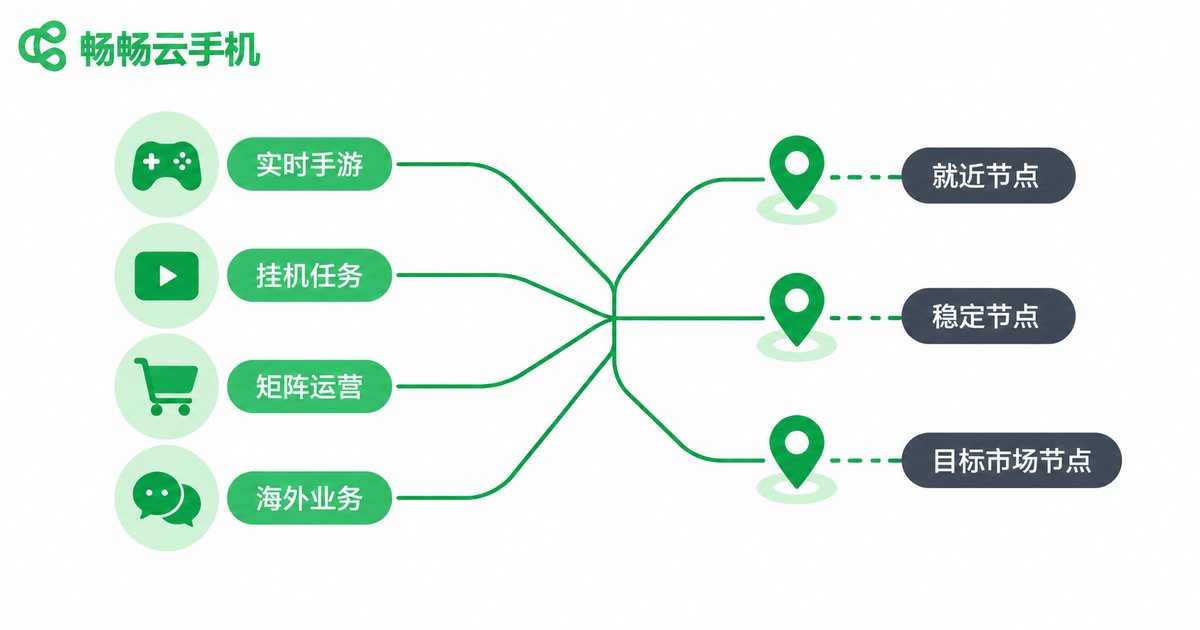
Node Matching Tips by Business Scenario
Real-time mobile gamers: latency decides how every tap lands. Choose a node in your own or a neighboring province, keep it under 50 ms, and your skills will fire exactly when you press.
Idle game players: these tasks only need the cloud phone to stay online. Stability and uptime matter far more than raw speed, so pick a reliable node instead of the nearest one.
Short-video and social media matrices: account stability and batch management efficiency come first. Stick to a fixed node for the long term and avoid frequent changes that alter the account environment.
Cross-border e-commerce and overseas business: choose a node close to your target users or the platform's servers, so accounts look like normal local usage and risk-control friction stays low.
Multi-account studios: keep one batch of devices on the same node for easy management, and spread different clients' workloads across nodes to avoid single-point pressure.

ccloudphone: Flexible Multi-Node Selection
When it comes to node choice, ccloudphone offers multiple node lines. You can pick the right one when creating a cloud phone based on your business needs, and re-plan later as your business evolves, without being locked into a single region.
For users who manage many devices, ccloudphone supports multiple cloud phones running simultaneously with unified management, so idle tasks, multi-opening, and matrix operations all happen in one dashboard. For the latest node coverage, check the official ccloudphone website, or simply create one device and let real experience decide.
Three Steps to Pick Your Lowest-Latency Node
Step 1: Define your scenario. Be clear about what the cloud phone is for and where it will be used from. This decides whether you need a local node or a specific region.
Step 2: Match the node to the scenario. closest node for real-time control, stable node for idle work, target-market node for overseas business. Use the matching table above.
Step 3: Test in real conditions. after creating the cloud phone, spend a few minutes on your usual network watching smoothness and response, and test a second node if needed. Real data never lies.
FAQ
Q: Is a closer node always lower in latency?
Usually yes, but not absolutely. Route quality and server load matter too. A well-optimized cross-province node can sometimes beat a congested local one, so always trust real tests.
Q: How many milliseconds of latency feels smooth?
Under 80 ms, daily use feels natural. Under 50 ms works well for real-time games. Above 120 ms, most people notice a clear lag in response.
Q: What if I picked the wrong node when creating a device?
When your business changes, you can create a new cloud phone on a different node line. Confirm your node before heavy batch operations such as bulk logins or profile edits, and avoid switching midway.
Q: Why does latency rise at night on the same node?
Evening peak hours push more traffic through the network, so routes and bandwidth get congested. Nodes with ample capacity keep the fluctuation smaller.
Q: How should I choose a node for overseas business?
Stay close to your target users and the platform's servers so accounts sit in a stable local environment. Check node coverage on the official ccloudphone website, test small, then scale up.


