

Cloud Phone Multi-Instance Tutorial: Run Multiple Legitimate Business Accounts on One Device
Why Business Accounts Need Multi-Instance
E-commerce sellers rarely run just one shop account. Local-service teams juggle several customer-service accounts, and social media operators often manage a dozen accounts across their matrix. Cramming all of them into one physical phone means endless switching — and if that device is lost or breaks down, every account's login state and data are at risk.
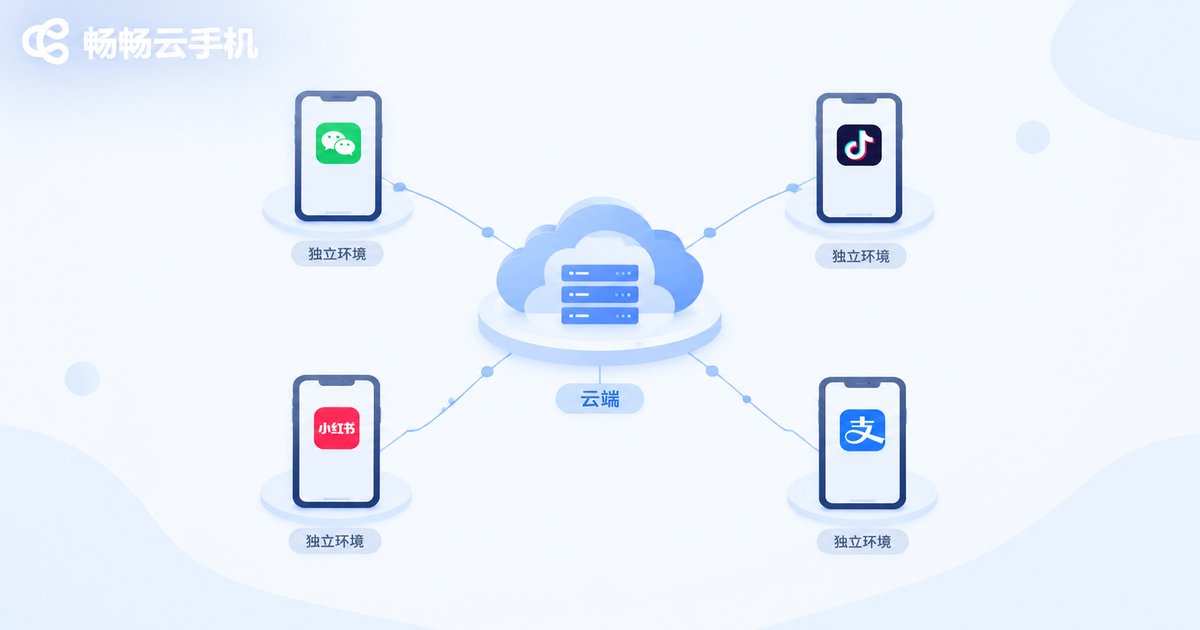
Cloud phone multi-instance is built for exactly this scenario: run multiple isolated phone environments at the same time on a single device, with a different business account logged into each one — all online simultaneously, none interfering with the others.
What Is Cloud Phone Multi-Instance?
A cloud phone is a virtual smartphone running on cloud servers, with its own operating system, storage, and runtime environment. Multi-instance simply means running several cloud phones at the same time, installing apps and logging into a different business account on each — just like operating multiple real phones in parallel.
It is fundamentally different from repeatedly logging out and switching accounts on one phone. Multi-instance is about staying online and running in parallel: account A is taking orders, account B is answering customer inquiries, account C is publishing content — and none of them ever has to wait.
| Aspect | Switching accounts on one phone | Cloud phone multi-instance |
|---|---|---|
| Simultaneous online | Only one account at a time | Multiple accounts online in parallel |
| Data isolation | Shared storage, data easily mixed | An independent environment per instance |
| Device risk | Losing the phone affects every account | Data lives in the cloud and survives device changes |
| Teamwork | One person, one phone, taking turns | Team members can manage different instances |
What to Prepare Before You Start
1. Map out your needs: count how many legitimate business accounts you have and which apps each one needs, then decide how many cloud phone instances to create.
2. Keep every account compliant: multi-instance is just a tool. All accounts should be real business accounts registered through official channels, operated in line with each platform's rules.
3. Organize your credentials: sort out login details and verification methods in advance so the setup process goes smoothly.
4. Pick the right cloud phone service: not every cloud phone handles parallel instances smoothly, so confirm the multi-instance capability and management features before committing.
Cloud Phone Multi-Instance Tutorial: 5 Steps
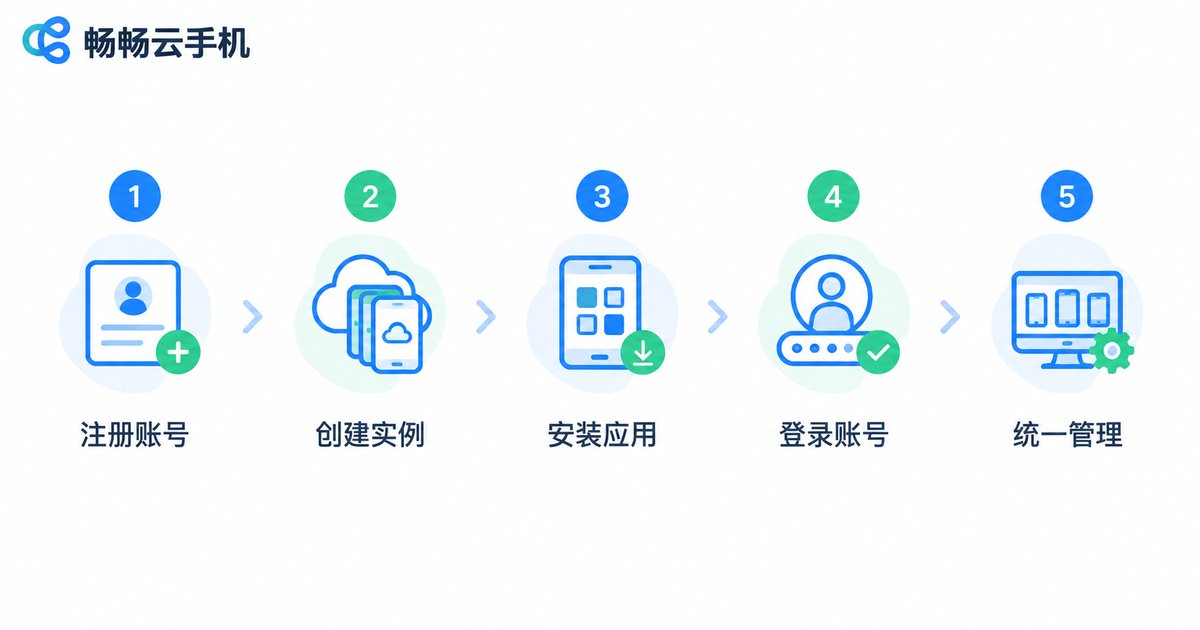
Step 1: Register and log in to the cloud phone platform. Taking ChangChang Cloud Phone (ccloudphone) as an example, open the official website or app, complete registration, and enter the device management dashboard.
Step 2: Create multiple cloud phone instances. Provision as many cloud phones as your business requires — each instance behaves like a separate phone in the cloud.
Step 3: Install your business apps on each instance. Open each instance and download the e-commerce, social, or office apps you need, just as you would on a normal phone.
Step 4: Log into a different business account on each instance. Stick to the 'one account per instance' principle: a single business identity per cloud phone keeps the environment clean and the account secure.
Step 5: Manage everything from one dashboard. Use the multi-instance management interface to switch between cloud phones quickly and handle messages and tasks in batches — one device now runs your entire business.
Best Practices for Multi-Account Operations
Compliance always comes first. Multi-instance technology itself is neutral. Use it for legitimate business operations only — never for fake orders, bulk fake registrations, or automated cheating. Otherwise you risk losing your accounts and facing real consequences.
Keep one account per instance. Avoid frequently switching between different identities on the same cloud phone. A stable account-to-environment binding helps every account stay healthy over the long run.
Back up your data. Export and back up important materials regularly. The cloud is reliable, but good habits are always the last line of defense.
Why We Recommend ChangChang Cloud Phone
Among the many cloud phone products available, ChangChang Cloud Phone (ccloudphone) is particularly friendly to multi-instance scenarios and easy for individuals and small teams to get started with:
· Multiple cloud phone instances run in parallel with smooth switching;
· Each instance has an independent environment, keeping account data isolated;
· Convenient device management and batch operations make multi-account work effortless;
· Devices can be managed from both the web and mobile, so you can work anytime, anywhere.
If constant account switching is wearing you down, visit the ChangChang Cloud Phone official website to learn more and choose a plan that fits the scale of your business.
FAQ
Q: Will multi-instance cloud phones be flagged as a violation by platforms?
Multi-instance is a neutral technology. As long as you log in with real, properly registered business accounts and follow each platform's operating rules, normal business use is fine. Never use multi-instance for fake traffic or cheating.
Q: How many accounts can one cloud phone hold?
We recommend one business identity per cloud phone — 'one account per instance'. When you need more accounts, simply add more instances.
Q: Does multi-instance demand a powerful local device?
Not at all. All the computing happens in the cloud, so any computer or phone with a stable internet connection will do — even older hardware.
Q: If I switch to a new computer, is my cloud phone data still there?
Yes. Cloud phone data is stored in the cloud, independent of your local device. Log back in from the new device and everything is exactly where you left it.
Q: Which apps does ChangChang Cloud Phone support?
Common e-commerce, social, and office apps can all be installed and run inside the cloud phone. For the exact supported list, refer to the official ChangChang Cloud Phone documentation.


