
Cloud Phones: Why Mobile Isolation Cannot Settle for Desktop Emulation — Decoding Platform Risk-Control Signal Differences
1. What Mobile Isolation Really Means: Every Account Should Look Like an Independent Real Phone
Anyone running matrix accounts, multiple stores, or multi-instance gaming knows one rule: platforms do not mind that you have many accounts; they mind that those accounts look identical to the same device. Mobile isolation means every account runs in an independent, clean environment that fully matches the fingerprint of a real phone. To cut costs, many operators settle for an Android emulator on a PC, only to see fresh accounts get throttled, challenged, or banned within days. That is not bad luck. Desktop emulation leaves behind a trail of signals that risk-control systems can identify at a glance.
2. What Signals Do Platform Risk-Control Systems Actually Collect?
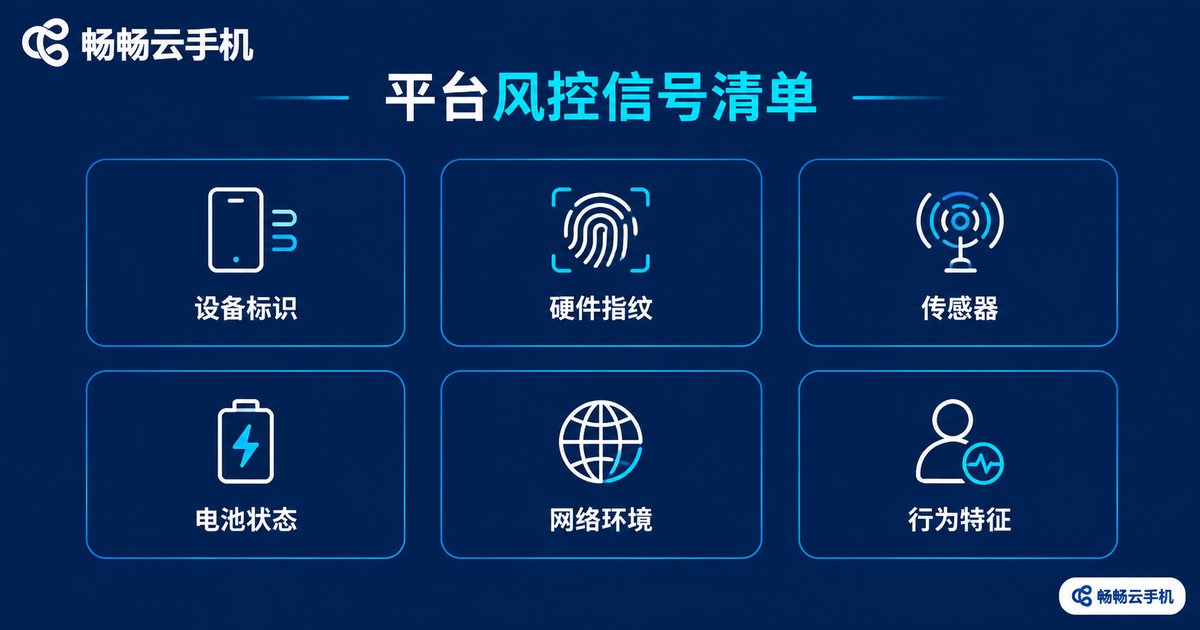
Leading e-commerce, social, short-video, and gaming platforms continuously collect device and environment data across registration, login, and daily use. The core signals fall into six layers:
Device identifiers: whether IMEI, Android ID, serial number, and MAC address are genuine and whether they are reused across accounts.
Hardware fingerprints: whether CPU architecture, GPU renderer strings, screen resolution, and pixel density add up to a plausible phone.
Sensors: whether accelerometer, gyroscope, and magnetometer data show realistic physical fluctuation.
State data: whether battery level, charging status, and signal strength change naturally over time.
Network: whether the IP belongs to a data center, residential, or mobile network, and whether base-station data matches.
Behavior: whether touch paths, swipe speed, and typing rhythm resemble a real human.
Risk-control systems cross-validate all of these. Genuine identifiers, natural sensor data, and a clean network read as a normal user; a few contradictory dimensions are enough to flag the whole environment as suspicious.
3. Five Structural Weaknesses of Desktop Emulation
Emulators run Android apps on x86 PCs through instruction translation, and that design makes it very hard to pass as a real phone:
1. Wrong CPU architecture. Real phones use ARM; emulators run x86 with binary translation, producing systemic deviations in runtime behavior and performance curves.
2. GPU renderer gives it away. Many emulators report desktop GPU names or generic renderer strings that contradict a phone identity.
3. Missing or too-perfect sensors. PCs have no real motion sensors, so emulators return empty data or flawless noise-free curves that no real device produces.
4. Battery state betrays you. Desktops have no battery, so the level stays at 100% forever or the API is missing entirely; a real phone is almost never at a constant full charge.
5. Emulator traces in system fields. System properties retain markers such as qemu, generic, or test-keys, which amount to self-identification for risk control.
Each flaw alone might be patched by tweaking parameters, but risk control performs contradiction detection across signals: you can fake the GPU string yet not the CPU architecture, and you can fake the battery yet not the sensor noise. The more contradictions, the lower the credibility of the environment.
4. Signal Differences at a Glance
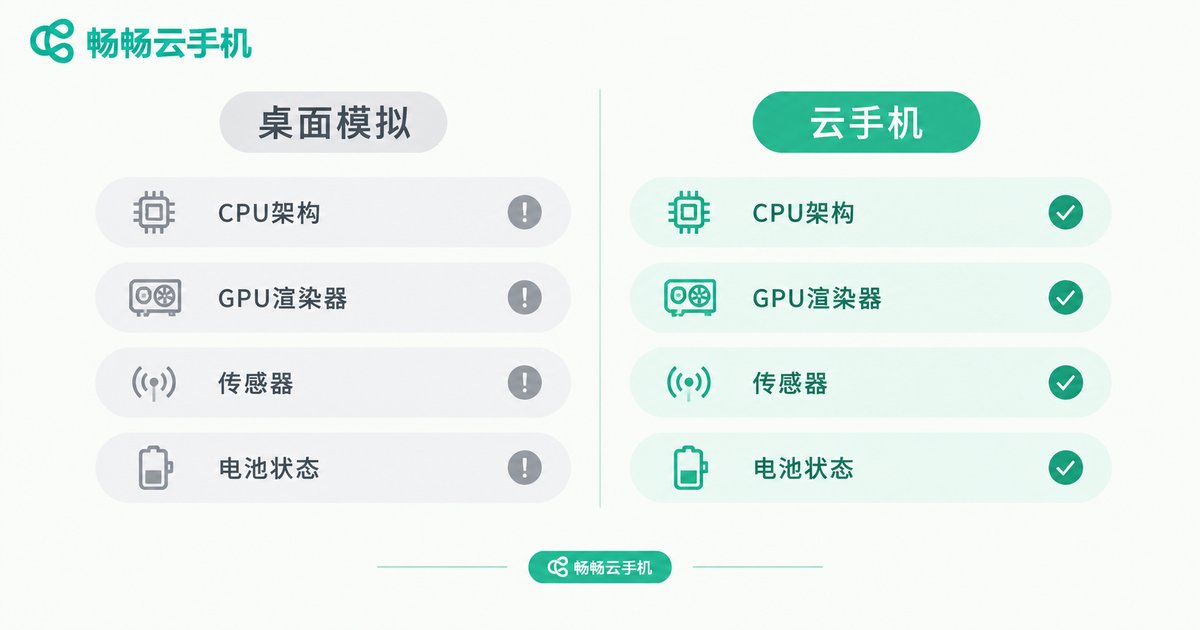
| Risk-Control Signal | Desktop Emulation | Cloud Phone |
|---|---|---|
| CPU architecture | x86 with translation | Native ARM |
| GPU renderer | Desktop GPU or generic string | Mobile-grade GPU profile |
| Sensor data | Missing or noise-free fakes | Realistic fluctuation |
| Battery state | Constant 100% or no API | Natural battery changes |
| System fields | Emulator traces remain | Standard device fingerprint |
| Multi-account isolation | Shared PC environment, easy to link | Independent device instances |
5. How Cloud Phones Isolate: Every Instance Is a Real Phone in the Cloud
Cloud phones take a fundamentally different approach: instead of emulating a phone on a PC, they run genuine Android phones in cloud data centers. Every cloud phone is an independent device instance with its own system environment, storage, and device fingerprint, so accounts are separated at the infrastructure level.
For operators this means three things. Authenticity: ARM architecture plus complete mobile system components present risk control with what looks like an ordinary phone. Thorough isolation: an issue on one instance does not spread to others, and replacing a device is as simple as switching to a new phone. Efficient management: all devices sit on one dashboard, so bulk operations and remote monitoring replace a desk full of physical handsets.
6. Buying Advice: Choose Cloud Phones Built on Real Device Architecture
If you run multi-account businesses that demand long-term stability, evaluate three things: whether the service is built on ARM real-device architecture, whether every device is independently isolated, and whether bulk management tools are provided. ChangChang Cloud Phone (ccloudphone), for example, uses a cloud real-device architecture that gives every instance an independent Android environment with unified multi-device management, well suited to matrix operations, multi-instance gaming, and multi-store management where environment authenticity matters most. Plan details are available on the official site at ccloudphone.com.
In one sentence: isolation is not about looking like many phones; it is about every single one surviving the risk-control signal check. Desktop emulation saves small money while gambling your account assets; cloud phones deliver real-device-grade isolation and keep you in control.
FAQ
Q: Can parameter tweaking on an emulator fool risk control?
It may help briefly, but risk control cross-checks hundreds of dimensions. Deep contradictions in CPU architecture, sensor noise, and battery state remain, so the long-term risk stays high.
Q: What is the essential difference between a cloud phone and an emulator?
An emulator translates Android on a PC; a cloud phone is a real-device-grade Android instance running in a cloud data center. One is software simulation, the other is a hardware-level environment.
Q: How many accounts should one cloud phone carry?
Best practice is one business entity per cloud phone. The more independent the environments, the lower the cross-account linkage risk.
Q: If my local network drops, are my cloud accounts affected?
No. Cloud phones keep running in the cloud. A local disconnection only hides the screen temporarily; tasks and data resume once you reconnect.


