

2026 Cloud Phone Live Stream Clarity Optimization: Resolution and Bitrate Settings Guide
Why Is Cloud Phone Live Stream Quality Often Not Clear Enough?
Many people using cloud phones for live streaming run into the same problem: even with a high-spec cloud phone, the live video still looks blurry, laggy, or loses detail. The issue is often not the cloud phone's performance, but an unmatched resolution and bitrate combination. Cloud phone video goes through encoding, streaming, platform transcoding, and viewer-side decoding. If parameters are mismatched at any stage, the final image quality suffers.
This article avoids complex jargon and focuses on practical thinking: in 2026's network environment and live platform rules, how should you set resolution, bitrate, and frame rate for cloud phone live streaming to get a cleaner and more stable picture?
First, Understand the Relationship Between Resolution and Bitrate
Think of live video as a painting: resolution determines the canvas size, and bitrate determines how fine the brush is. The larger the canvas, the more paint (bitrate) you need; without enough paint, the image becomes blurry. Likewise, high bitrate with low resolution won't make the picture clearer—it just wastes bandwidth.
A simple rule of thumb: bitrate (kbps) ≈ resolution pixels × frame rate × motion complexity factor ÷ 1000. You don't need exact calculations in practice, but remember: higher resolution, higher frame rate, and more motion all require more bitrate.
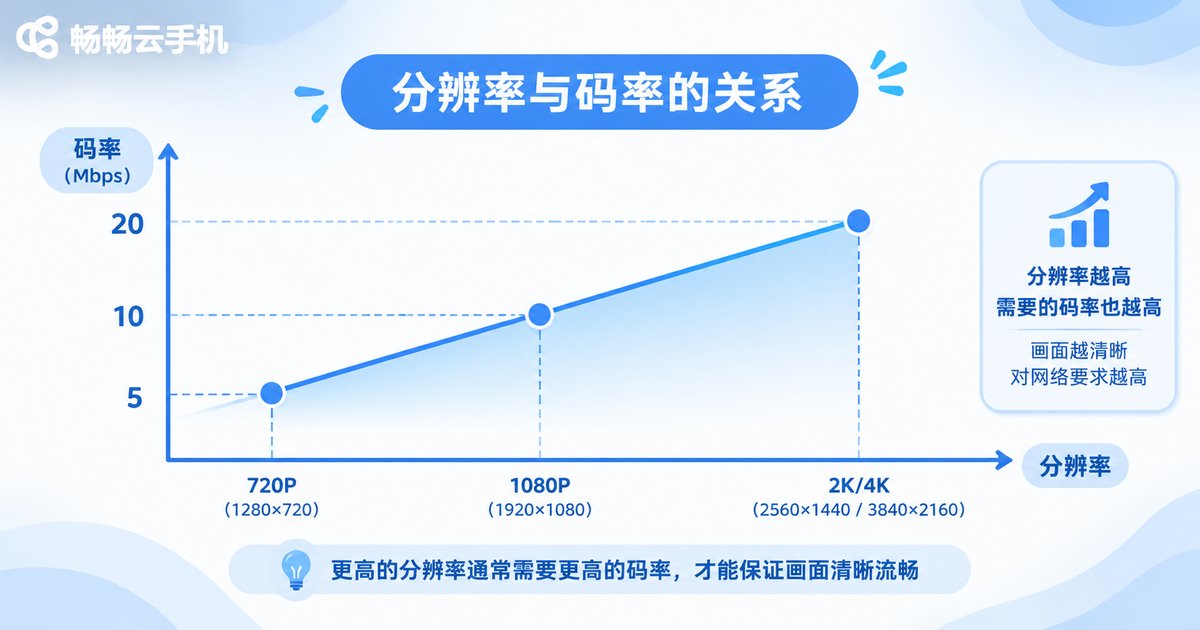
Resolution Settings: Higher Is Not Always Better
When choosing resolution for cloud phone live streaming, first check the live platform's limits and your viewers' devices. In 2026, mainstream platforms have clear limits on streaming resolution; exceeding them causes platform compression and actually reduces quality. Here are common recommendations:
| Streaming Scenario | Recommended Resolution | Notes |
|---|---|---|
| Mobile game streaming | 1280×720 or 1920×1080 | 720p is smooth enough; 1080p needs higher bitrate support |
| E-commerce live selling | 1280×720 | Focus on product detail; 720p with higher bitrate is more practical |
| Outdoor/mobile streaming | 960×540 or 1280×720 | Network fluctuates; lower resolution is more stable |
| Desktop/tutorial streaming | 1920×1080 | Text and charts require higher resolution for readability |
For most cloud phone live streamers, 1280×720 is a sweet spot: good platform compatibility, low bandwidth pressure, and clear enough picture. If your network is stable, consider upgrading to 1080p.
Bitrate Settings: Dynamic Is Smarter Than Fixed
Bitrate is the core of clarity optimization. Many cloud phone streaming tools default to fixed bitrate, but fixed bitrate can cause pixelation during fast motion and waste bandwidth during static scenes. A smarter approach is variable bitrate (VBR), letting the encoder adjust automatically based on scene complexity.
Here are reference bitrate ranges for different resolutions (using H.264 as an example):
| Resolution | Recommended Bitrate Range | Use Case |
|---|---|---|
| 960×540 | 1500–2500 kbps | Mobile networks, low-bandwidth environments |
| 1280×720 | 2500–4000 kbps | Most live streaming scenarios |
| 1920×1080 | 4500–7000 kbps | High-quality gaming, desktop streaming |
If you use H.265 encoding, bitrate can be reduced by about 30%–40% at the same quality, but confirm both the platform and viewers support it. For cloud phone streaming, prioritize stable uplink bandwidth before gradually increasing bitrate rather than maxing it out at once.
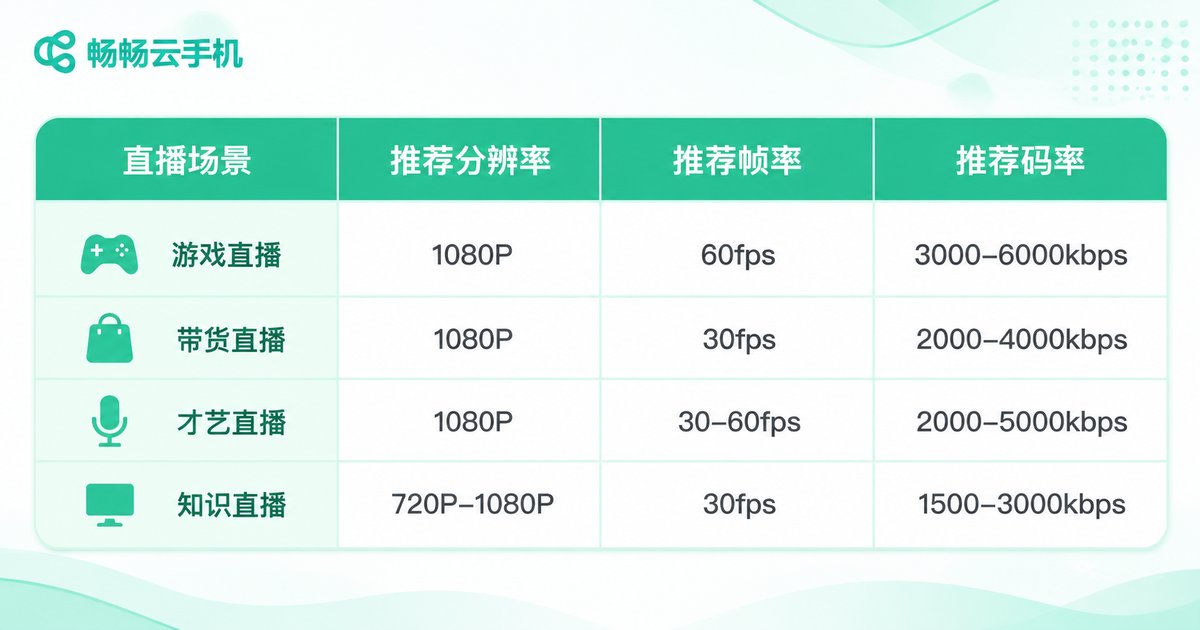
Frame Rate and Encoder: Don't Ignore These Two Variables
For frame rate, 30fps suits most live streaming scenarios, while 60fps is better for fast-motion games. However, higher frame rate demands more bitrate. If bandwidth is limited, lower the frame rate to preserve resolution rather than the other way around.
For encoder choice, cloud phones typically offer software and hardware encoding. Hardware encoding uses less cloud phone CPU and suits long streaming sessions; software encoding offers more quality tuning but demands more performance. In practice, start with hardware encoding for stability, then fine-tune bitrate based on visual results.
Ccloudphone's Practical Approach to Live Stream Clarity
ccloudphone provides cloud Android instances for live streaming, app background running, and similar scenarios. For clarity optimization, users should start with network speed testing: test the uplink bandwidth from the cloud phone instance to the live platform, then choose a resolution and bitrate combination based on that bandwidth. The ccloudphone console shows instance network status to help judge whether current bandwidth supports your target quality.
Before streaming, close unnecessary background apps inside the cloud phone to reduce CPU and network usage. Keep resolution, bitrate, and frame rate matched—avoid mismatches like "high resolution + low bitrate" or "low resolution + ultra-high bitrate." ccloudphone does not restrict specific streaming software, so users can adjust parameters in the tools they are familiar with.

Frequently Asked Questions
Q: Is 1080p always clearer than 720p for cloud phone streaming?
Not necessarily. Without enough bitrate, 1080p gets compressed more severely and may look worse than 720p. Resolution and bitrate must match.
Q: Is higher bitrate always better?
No. Bitrate exceeding uplink bandwidth causes streaming lag and dropped frames; exceeding platform limits triggers re-compression. Start from the lower-middle of the recommended range within your bandwidth.
Q: Why is the picture clear when static but blurry when moving?
This is a typical sign of insufficient bitrate. Motion requires more bitrate. Enable variable bitrate (VBR), or slightly lower resolution/frame rate for more stable motion.
Q: Should cloud phone streaming use H.264 or H.265?
First confirm platform and viewer compatibility. H.264 offers the best compatibility; H.265 saves bandwidth at the same quality, but some platforms or older devices may not support it.
Q: Is ccloudphone suitable for long-duration live streaming?
ccloudphone provides cloud instances suited for long online sessions such as streaming and background running. For specific instance configurations and network performance, refer to the official website and run a short test before going live.


