

What Is Excellent Cloud Phone Latency? A Selection Guide for Control Command RTT Under 50ms
What Is Control Command Round-Trip Time (RTT)?
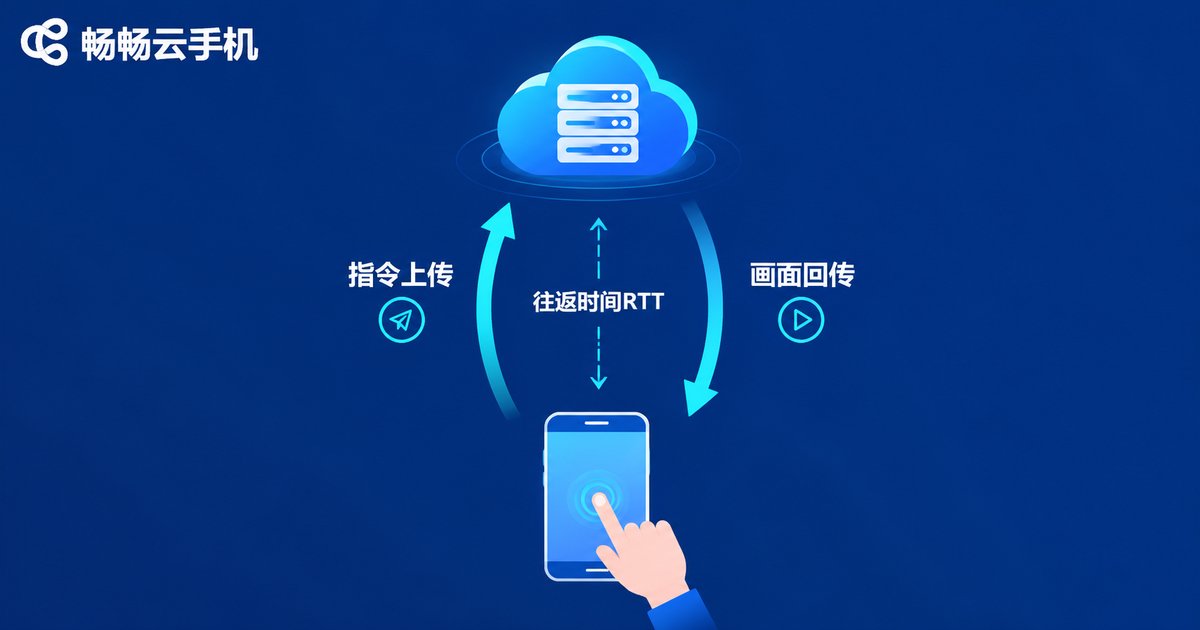
Every tap and swipe you make on a cloud phone becomes a control command that travels up to a remote cloud server; the server processes it and streams the latest video frame back to your screen. The total time for this round trip is the control command round-trip time (RTT)—what most people simply call latency.
The lower the RTT, the closer your screen follows your fingers. The higher it climbs, the more you feel inputs landing late—skills whiffing, movement drifting. That is why latency is the first metric to judge any cloud phone by.
How Many Milliseconds Count as Excellent? The Grading at a Glance
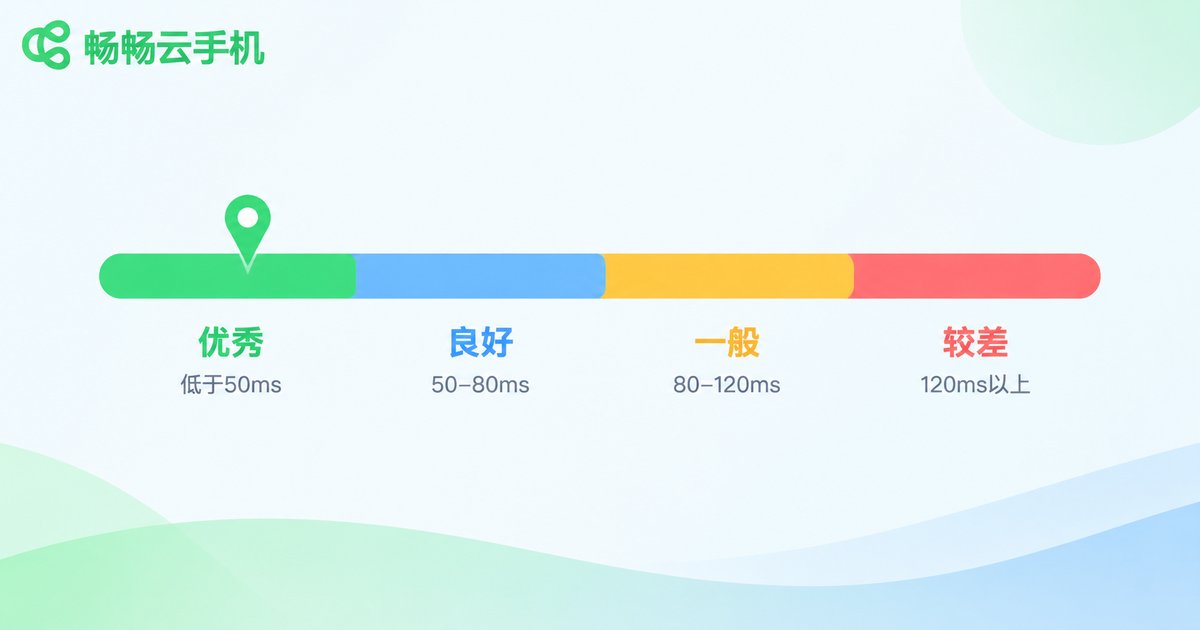
Based on extensive hands-on testing, cloud phone latency falls into roughly four tiers:
| RTT Range | Experience Level | Best Suited For |
|---|---|---|
| Under 50ms | Excellent (esports grade) | Cloud gaming, competitive play, real-time interaction |
| 50-80ms | Good | Everyday use, mainstream mobile games |
| 80-120ms | Average | AFK and managed tasks |
| Above 120ms | Poor | Noticeable stutter, unresponsive controls |
The conclusion is simple: a control command RTT under 50ms is the benchmark for excellent cloud phone latency. At this level, input and on-screen feedback are nearly in sync, and even precise moves like recoil control or skill combos feel smooth.
Why 50ms Is the Critical Threshold
Humans typically need more than 100 milliseconds just to react to something they see, and the perception threshold for input feedback is even lower. When RTT stays within 50ms, the whole chain—command upload, cloud processing, video streaming back—is compressed into one-twentieth of an eye blink. Finger and screen essentially move together; players call this a responsive feel.
Past 80ms, the delay becomes obvious; past 120ms, shooters and racing games are practically unplayable. So when choosing a cloud phone, do not obsess over cores and RAM on the spec sheet—first confirm whether its latency can hold steady around the 50ms mark.
Four Key Factors That Determine Latency
1. Physical distance and node layout: the farther you are from the cloud server, the longer data takes to travel. More node cities and closer nodes mean a lower latency baseline.
2. Network route quality: between the same two points, a premium BGP multi-line route can be twice as fast as the ordinary public internet—and the gap widens during evening peaks.
3. Encoding and transmission efficiency: saving a few milliseconds at each stage of capture, encoding, transport, and decoding adds up to a perceptible difference; low-latency services optimize deeply at the protocol level.
4. Server performance and load: underpowered or oversold servers introduce queuing delays, which show up as latency that jumps around.
Test Your Cloud Phone's Real Latency in Three Steps
Step 1: open a speed test tool inside the cloud phone to check the baseline network RTT;
Step 2: play the most demanding game you use and focus on whether aiming and skill release feel responsive;
Step 3: test once at midday and once during the evening peak, then compare stability. A stable sub-50ms result is true excellence; wild swings point to mediocre route quality.
Selection Tips for Sub-50ms Latency
To keep latency under 50ms, check these five items before you commit:
1. Node coverage: prefer providers with data centers in multiple cities and nearby-node connection options;
2. Route optimization: confirm whether BGP multi-line or dedicated route optimization is used and whether latency holds at peak hours;
3. Frame rate and bitrate: high frame rate output with adaptive bitrate makes video feedback more immediate;
4. Packet loss resilience: packet loss directly causes stuttery input, so look for anti-loss mechanisms;
5. Test first: hands-on measurement beats any spec sheet—experience the latency before deciding.

ChangChang Cloud Phone: Low Latency as a Core Experience
Among cloud phone services, ChangChang Cloud Phone (ccloudphone) treats low latency and stability as core experiences worth polishing: nearby-node access combined with continuously optimized transmission links keeps control command RTT at a low level, whether you are actively cloud gaming or running multiple AFK instances.
It also supports multi-instance and long-duration online sessions with few disconnects and steady latency—especially friendly for users who need to stay online around the clock. For the latest node list and plan details, visit the official ChangChang Cloud Phone website (ccloudphone), and measure the latency yourself before deciding.
FAQ
Q: Is 50ms latency high for a cloud phone?
No. A control command RTT within 50ms already meets the excellent (esports-grade) standard; everyday gaming and operations feel virtually instant.
Q: Why is the same cloud phone fast by day and slow at night?
Evening peak congestion on the public internet adds transmission time—this is normal. If the swings are extreme, the route quality is mediocre; switch to a node with dedicated route optimization.
Q: What is the difference between latency and bandwidth?
Bandwidth decides image clarity and loading speed; latency decides response speed. They are independent—more bandwidth cannot fix high latency, so evaluate them separately.
Q: My local network is poor—will switching cloud phones fix the latency?
Only partially. Server-side optimization cuts cloud-side time, but your local Wi-Fi quality and ISP route also affect RTT. Compare wired, Wi-Fi, and 5G connections to locate the bottleneck.


