

Which Cloud Phone Region Has the Lowest Latency? Node Location and Business Matching Guide
Why Node Location Determines How Smooth Your Cloud Phone Feels
Many first-time cloud phone users wonder the same thing: why does the same cloud phone feel instant and silky for some people, while others notice a visible lag between tapping and seeing a response? Beyond the hardware specs of the cloud phone itself, the geographic location of the node (the data center region where your cloud phone runs) is often the biggest variable.
The way a cloud phone works is simple: your taps travel to the data center, a server there runs the apps for you, and the screen is streamed back to your device in real time. Every millisecond of that round trip is what we call latency. The closer the node and the better the route, the shorter the round trip and the more responsive everything feels.
Where Does Latency Come From? Three Legs of Every Request
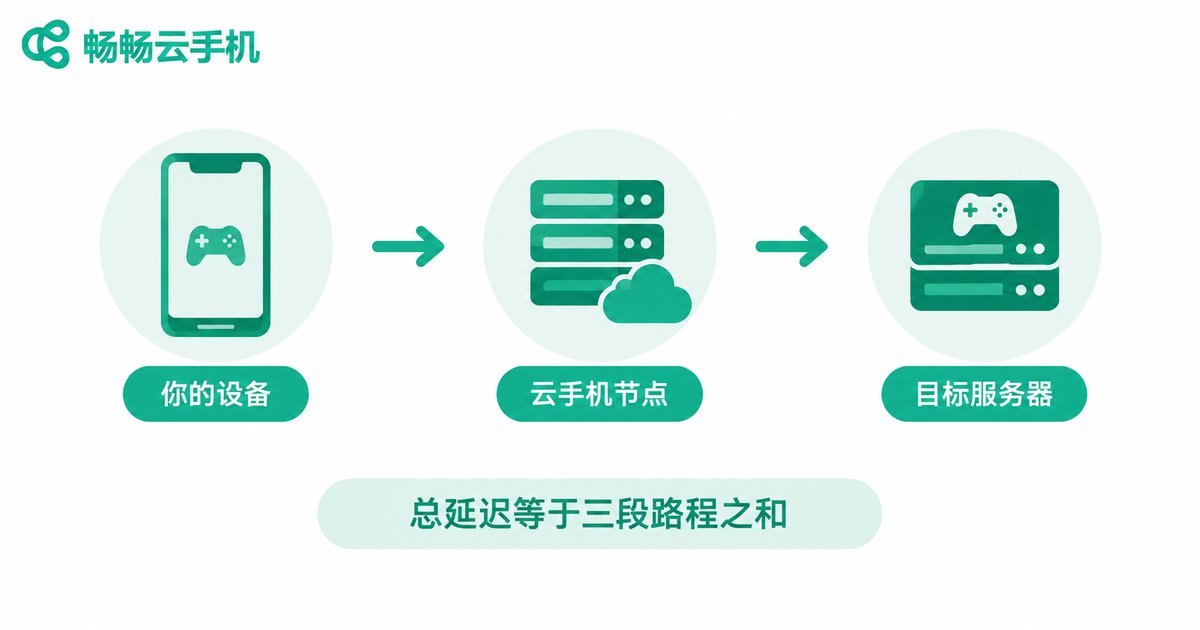
Many people assume latency only depends on “how far the data center is from me.” In reality, every request travels three legs:
Leg 1: You → cloud phone node. This depends on the physical distance and network route between you and the data center. If you are in Beijing and the node is in North China, this leg is naturally fast; a node thousands of kilometers away will push latency up.
Leg 2: Cloud phone node → target server. If you play games, game servers are organized by region; if you run apps, their backends live in fixed locations. The closer the node is to those target servers, the faster your actual business responds.
Leg 3: Processing inside the node. Data center network quality, bandwidth congestion, and peak-hour load all add delay on this leg.
The key takeaway: total latency ≈ your delay to the node + the node’s delay to the target server + node processing overhead. Choosing a node is not simply “pick the closest one” — it means keeping all three legs short.
Which Node Should You Choose for Each Business Scenario?
Once you understand where latency comes from, the logic becomes clear: first ask how latency-sensitive your workload is, then find out where the target servers are. Use this table as a quick reference:
| Scenario | Latency sensitivity | Node recommendation |
|---|---|---|
| Playing mobile games (competitive, MMO) | Very high | Pick a domestic node close to your game’s server region — for example, an East China node for East China servers |
| Keeping multiple accounts online / idle farming | Low | Prioritize stability and uptime; a node near you makes occasional manual operation easier |
| Live streaming, real-time interaction | High | Choose a nearby node with strong network quality, and watch upstream bandwidth |
| Running apps for users in a specific region | Medium | Keep the node close to your target audience so activity looks natural on the network |
| Bulk app testing, automation tasks | Low | Latency matters little; focus on node stability and task success rate |

For example, if you are in Shanghai and mainly play domestic mobile games, an East China node will usually feel steadier than one in South or North China. But if your main need is keeping a batch of accounts online with occasional logins, a 20–30 ms difference is almost imperceptible — in that case, stability matters more than absolute latency.
Three Steps to Find Your Lowest-Latency Node
Theory aside, here is a practical three-step test:
Step 1: Check the node list and latency labels. Reputable cloud phone services label each node with its region or reference latency. Take Changchang Cloud Phone (ccloudphone) as an example — when evaluating, browse its node coverage first and shortlist two or three candidates close to both you and your target servers.
Step 2: Test with your real workload, not just numbers. The same 50 ms feels completely different in a competitive match versus scrolling a video feed. Run your actual scenario on each candidate node — join a game, open your everyday apps, swipe around for a few minutes — and let your hands decide.
Step 3: Re-test during peak hours. 8–11 p.m. is peak network time; some nodes are fast by day and congested at night. Always re-test in the evening to confirm latency and smoothness hold up.
Beyond the Latency Number: Three More Things to Watch
Packet loss and stability: an average of 40 ms with random spikes to 300 ms feels worse than a steady 80 ms. A flat latency curve matters more than a pretty average.
Flexibility to switch nodes: your business may change over time. A provider with multiple switchable nodes saves you a lot of trouble later.
Picture quality at peak times: whether the stream drops quality or stutters in the evening is another reliable signal of node quality.
If you are still comparing cloud phone providers, put Changchang Cloud Phone (ccloudphone) on your shortlist and evaluate its node coverage, latency, and peak-hour stability against your own scenario before deciding.
FAQ
Q: Is the closest node always the lowest latency?
Not necessarily. Your distance to the node is only one leg. If the node is far from your target server (for example, the game’s region server), total latency can be higher than a slightly farther, better-placed node.
Q: What latency counts as smooth?
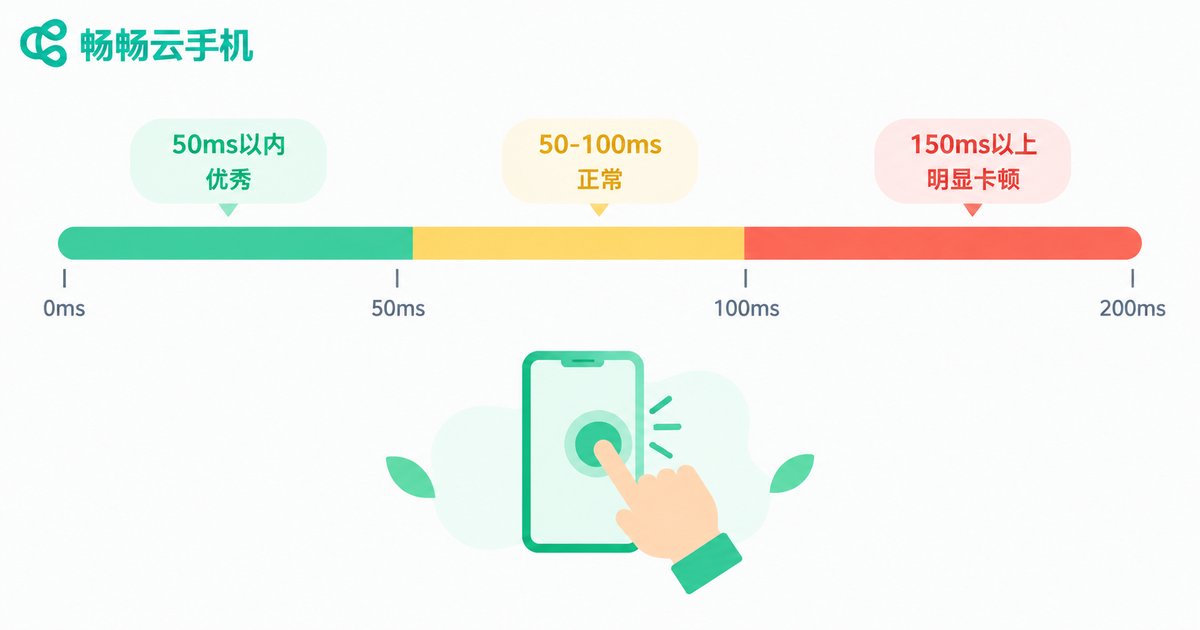
As a rule of thumb: under 50 ms is excellent and feels instant; 50–100 ms is normal and fine for daily use and most games; above 150 ms, input lag becomes clearly noticeable in games.
Q: Can I switch nodes if I picked the wrong one?
Most cloud phone services allow changing or reselecting nodes, but policies differ. Confirm how node switching works before committing to long-term use.
Q: Do idle accounts need the lowest latency?
No. Idle farming and multi-account presence are not latency-sensitive. Focus on stability, uptime, and automatic reconnection instead.
Q: How do I choose a node for overseas markets?
The core rule is proximity to the target: keep the cloud phone node close to your target users or the region where the platform operates, so responses are faster and network behavior looks natural.


