

What Is It Like to Control 100 Phones from One Computer? 2026 Cloud Phone Group Control + Batch Multi-Instance Tutorial
What Is Cloud Phone Group Control?
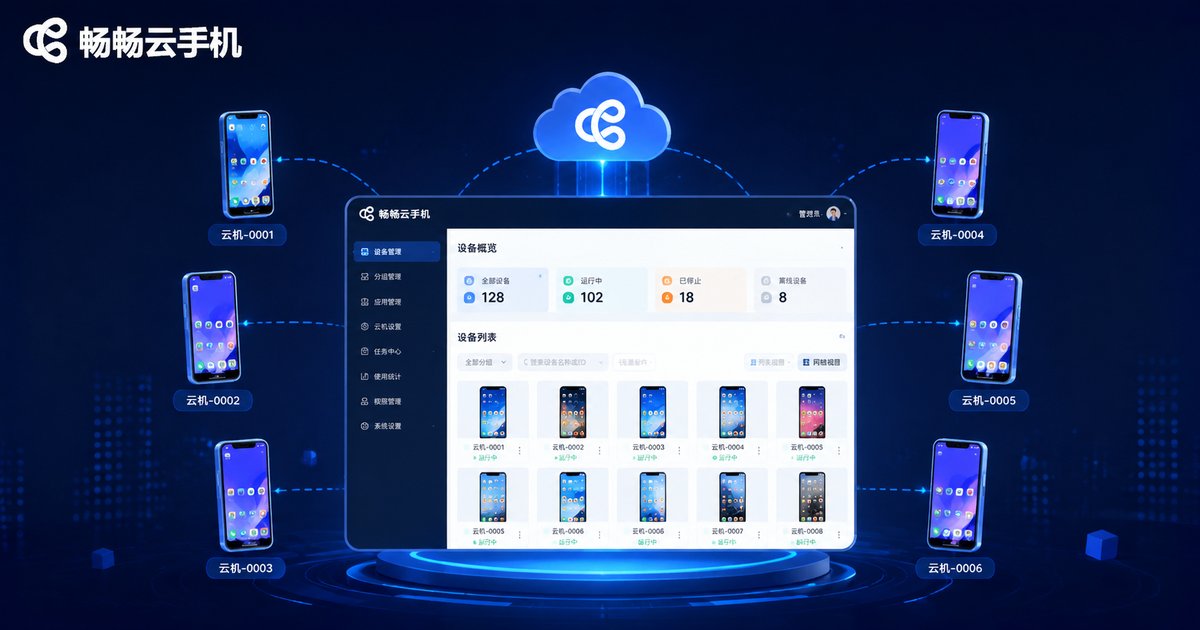
Cloud phone group control lets you sit at one computer while managing and operating hundreds of "phones" at the same time through cloud-based virtual phone technology. These phones are not physical devices—they are virtual phone instances running on cloud servers. You can view real-time screens of all phones on your computer and issue commands through the group control system, making 100 phones execute identical operations simultaneously—one tap, a hundred devices respond.
Compared with the traditional "phone wall" (mounting dozens or hundreds of real devices on racks and connecting them to a computer via USB cables), cloud phone group control completely removes hardware constraints: no phone purchases, no server rooms, no cable maintenance. Open the client and you can run large-scale operations anytime, anywhere.
Three Pain Points of the Traditional "Phone Wall"
In the past, teams that needed to manage phones in bulk typically built a "phone wall": purchasing large numbers of real devices, configuring multi-port USB hubs, installing cooling equipment, and hiring staff to keep watch. The upfront investment is enormous, ongoing costs are equally staggering, and worse still—
High hardware failure rates: With hundreds of phones running 24/7, screen degradation, battery swelling, and loose ports are everyday occurrences. One frozen device can interrupt the entire task chain.
Staggering operational costs: Electricity, repairs, space, and labor pile up—the larger the scale, the heavier the burden.
Poor scalability: Scaling from 100 to 200 devices means buying 100 more phones and expanding the server room—long cycles, heavy decisions.
Cloud phone group control moves all of this to the cloud: devices are maintained by the service provider, and you simply provision instances on demand—scaling up takes just minutes.
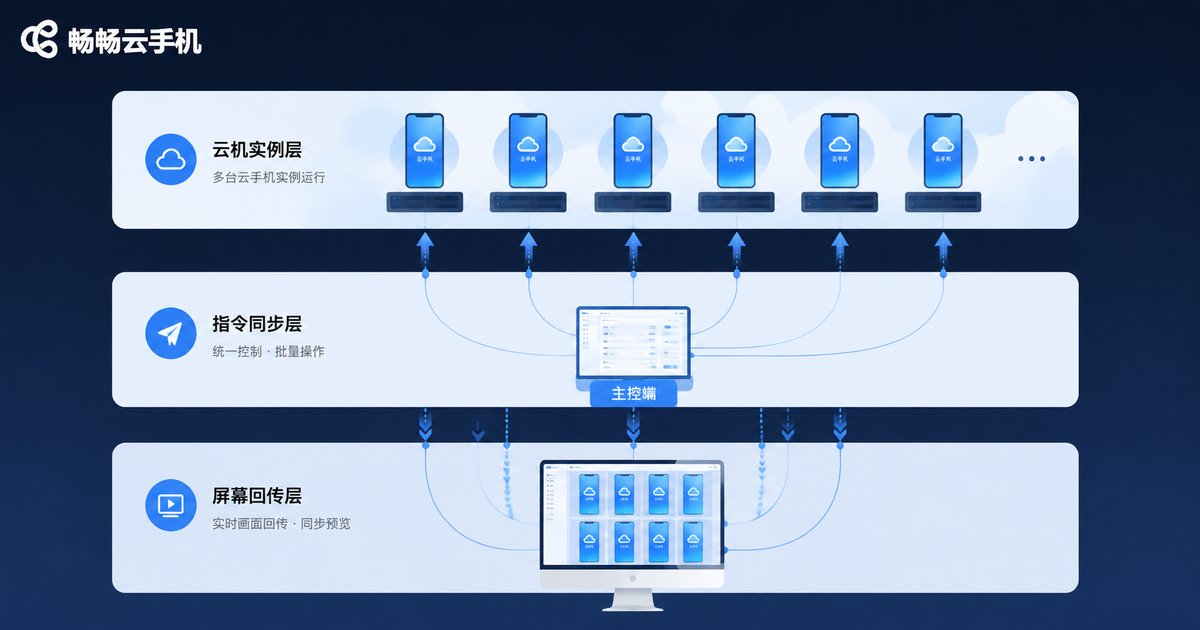
Core Principles: A Three-Layer Architecture
Why can one computer command 100 phones at once? The technical architecture of cloud phone group control can be summarized in three layers:
Cloud instance layer: Each "phone" is a virtual instance deployed on ARM servers, with an independent Android system and unique device parameters, fully isolated from one another.
Command synchronization layer: The group control system mirrors your actions on the master console (taps, swipes, text input) to all selected instances in real time—one action, a hundred devices execute.
Screen streaming layer: All phone screens are streamed back to your computer, and you can switch between single-screen, 4-grid, 9-grid, or full wall mode for a complete overview.
Thanks to streaming transmission and command compression, even when controlling 100 phones simultaneously, latency stays manageable and visuals remain smooth. Moreover, all computing happens in the cloud—your computer only displays screens and sends commands, placing almost no demand on local hardware.
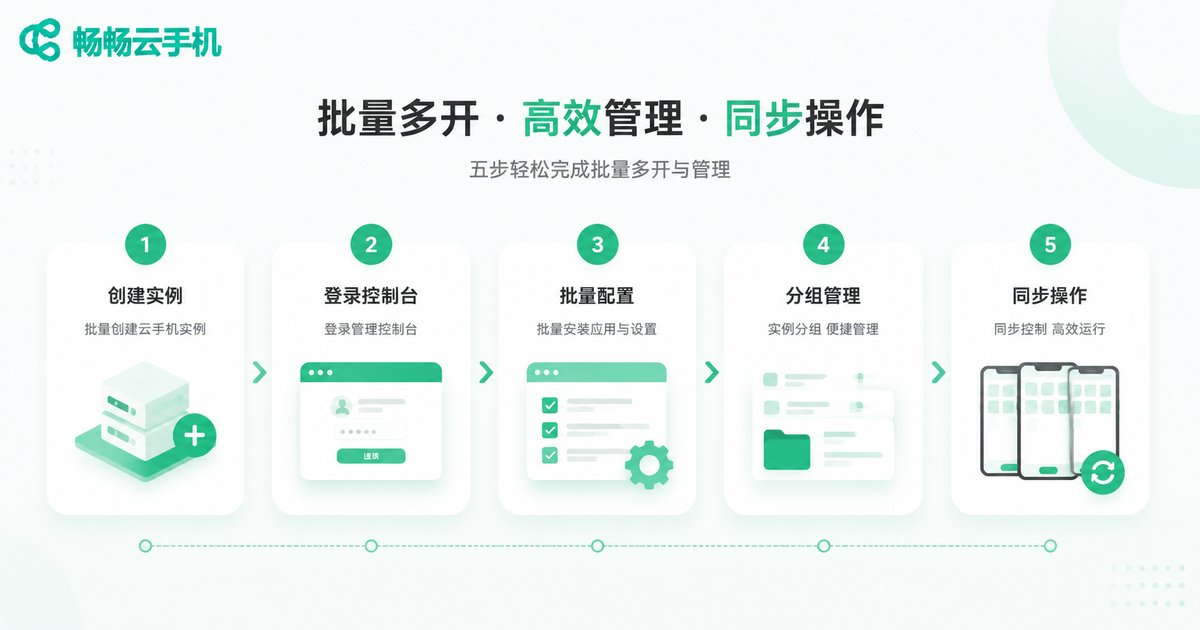
Batch Multi-Instance Tutorial: Build Your Group Control Matrix in Five Steps
Here is the standard workflow for batch multi-instance setup, using ChangChang Cloud Phone (ccloudphone) as an example (specific features are subject to the official website):
Step 1: Provision cloud phone instances. Register an account, enter the console, choose device specifications based on your business needs, and provision your cloud phone instances in bulk. New instances are typically deployed within minutes.
Step 2: Log in to the group control console. Open the group control client or web console on your computer, log in with the same account, and all provisioned instances will automatically appear in your device list.
Step 3: Batch configure environments. Use one-click new-device or batch device-reset features to assign unique device parameters to each cloud phone, avoiding duplicate environment fingerprints; then use bulk installation to deploy required apps across all instances at once.
Step 4: Group management. Organize devices into groups based on business needs—such as "e-commerce group," "content group," and "testing group"—with different task strategies for each group.
Step 5: Synchronized control. Select target devices, enable sync mode, and any action performed in the master window will be mirrored across all selected devices in real time. Repetitive tasks can be handed to automation scripts for scheduled batch execution.
Where Is Group Control Used? Four Typical Scenarios
E-commerce operations: Multi-store management, bulk product listing, and customer service—synchronized operations multiply efficiency.
Content matrices: Media teams running multiple accounts get an independent environment for each account, with batch publishing and unified management via group control.
App testing: Development teams test apps in parallel across different device models and OS versions, quickly spotting compatibility issues.
Game studios: Multi-account idle farming and batch daily quests—one computer manages the entire "game farm."
Physical Phone Wall vs. Cloud Phone Group Control
| Dimension | Physical Phone Wall | Cloud Phone Group Control |
|---|---|---|
| Upfront investment | High—bulk device purchases | Low—on-demand instances |
| Scaling method | Buy devices, expand space | One-click console scaling |
| Operational costs | High—power, repairs, labor | Low—provider-managed maintenance |
| Device failures | Self-troubleshooting, hardware swaps | Quick instance resets |
| 24/7 operation | Heavy heat and wear stress | Continuous stable cloud running |
| Remote collaboration | Bound by space and cabling | Log in from anywhere |
How to Choose a Reliable Cloud Phone Platform
With many cloud phone services on the market, focus on four dimensions when choosing:
Stability: Do instances run reliably 24/7 with solid disaster recovery mechanisms? Independence: Does each cloud phone have genuinely unique device parameters and a clean environment? Group control completeness: Does it support bulk installation, synchronized operations, automation scripts, and group management? Support responsiveness: Can you get quick technical assistance when problems arise?
ChangChang Cloud Phone (ccloudphone) deploys its cloud phone instances in cloud data centers maintained by a professional team. Users simply provision instances on demand, making it suitable for teams and individuals who need scalable mobile device management. Specific features and specifications are subject to the official website.
FAQ
Q: Can one computer really control 100 phones smoothly?
A: Yes. All cloud phone computing happens on cloud servers—your computer only displays screens and sends commands, so local hardware requirements are minimal. With grouping and batch control features, even larger fleets stay organized.
Q: What is the difference between cloud phones and emulators?
A: Emulators simulate Android environments on your computer, sharing local hardware—multi-instance counts are limited and environment fingerprints are easily detected. Cloud phones run on real ARM servers in the cloud, with each instance having independent parameters, and multi-instance counts are virtually unlimited by local hardware.
Q: Is group control complicated? Can beginners handle it?
A: Mainstream platforms feature visualized group control interfaces. The core workflow is simply "select devices—perform action—sync to all." With grouping and script features, beginners can get up to speed quickly.
Q: Is cloud phone data secure?
A: Reputable platforms use instance-isolated architectures, keeping each cloud phone's data independent. Choose a provider with robust security mechanisms and manage permissions carefully for important accounts.


