

Cloud Phone Feature Map: A Complete Guide from Basic Operations to Multi-Instance Management
Why You Need a Feature Map for Cloud Phones
Most people's first encounter with a cloud phone involves just one or two features: running a game, keeping an app online, or parking an account somewhere. After a while they discover the same tool also hides batch installation, synchronized operations, device grouping and scheduled tasks. The features were always there — nobody told them where to look, which one to learn first, or how the pieces connect.
This article organizes cloud phone capabilities into a five-layer map, ordered from the shallowest to the deepest: basic operations, device management, multi-instance handling, network and performance, and finally automation. Use it to check which layer you are standing on right now and what to add next.
Layer One: Basic Operations — Treat the Cloud Phone as a Real Phone
This layer is the starting point for everything else, and the one most people skip. A cloud phone is essentially an Android device running in the cloud, and you operate it through a client window. So the three fundamentals are: boot it, install apps, and get your data in.
There are usually three ways to install an app: download it directly from a built-in app market, upload a local installation package, or migrate from an existing device. The upload route is genuinely useful, because some utility apps simply are not listed in any market. File transfer is just as frequent: screenshots, screen recordings, importing and exporting documents and images all come up far more often than beginners expect.
Then there is the input method. Touch control and keyboard-mouse mapping decide how comfortable the whole thing feels. Users who type all day can drive a cloud phone like a computer, while touch-first users keep their existing habits without relearning anything.
Rule of thumb: if you can boot a device, install an app and move a file without hesitation, you have cleared layer one.
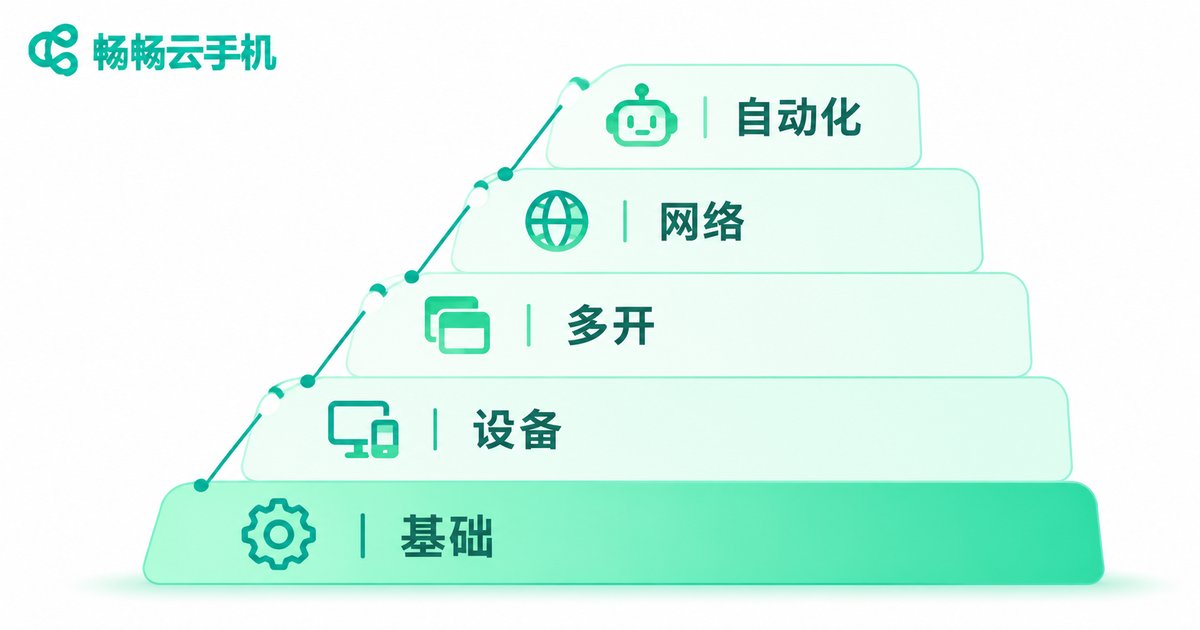
Layer Two: Device Management — From One Device to Many
Once you need more than a single device, management becomes the bottleneck. The core question this layer answers is: how do you keep many devices under control instead of clicking through them one by one.
Typical features include device grouping, batch power on and off, batch app installation and batch configuration changes. Grouping looks trivial but makes a huge difference: put devices with the same purpose into one group and every later action can be executed at the group level, which saves time on an exponential scale. Past a certain device count, working without groups is close to impossible.
The other underrated feature is synchronized operation. Turn it on and your taps, swipes and typing on the master device are mirrored to every other device in the same group. Any workflow that repeats the same steps benefits from this almost immediately.
Layer Three: Multi-Instance Management — The Real Barrier to an Account Matrix
Multi-instance is the most talked-about capability of cloud phones, but many people stop at the idea of opening lots of them. What actually determines usability is isolation and accountability after the instances exist.
Isolation means each instance keeps its app data, login state and cache separate. If two devices share a storage pool, or can read each other's files, the value of running multiple instances drops sharply. Accountability means you can always tell which device maps to which account, what state it is in, and whether anything looks wrong.
In practice, keep a simple mapping sheet: device ID, account purpose, group, current status. It does not need to be elaborate, but it keeps you sharp when the device count reaches the dozens, so you do not tap the wrong device, log into the wrong account, or run the wrong flow.
Layer Four: Network and Performance — The Foundation Under Everything
No matter how many features exist, stuttering video and delayed input ruin the experience. This layer is invisible most of the time, but it is the foundation the previous three layers stand on.
Configuration choice comes first. Different workloads have very different requirements: lightweight app multi-instance work cares about how many instances you can run, not how powerful each one is, while anything involving graphics rendering leans much harder on GPU and memory. Choose too high and you waste resources, choose too low and everything lags — pick according to actual use.
On the network side, the metrics that matter are latency and stability. Both the video stream and your input travel over the network, so any fluctuation shows up directly in how the device feels. Resolution and frame-rate settings follow the same logic: maximum clarity and maximum responsiveness are usually a trade-off, so choose per scenario rather than chasing both.
Layer Five: Automation and Batch Tasks
Reaching this layer means you already have the first four under control. Automation solves repetitive labor: scheduled starts, timed execution, and running preset flows in bulk.
One caveat — automation is not automatically better when it is more complex. Plenty of needs are already covered by grouping plus synchronized operation, and there is no reason to jump straight to scripts. Exhaust the simple options first, then consider the heavier ones; your error rate will be lower and troubleshooting far easier.
The Five-Layer Map at a Glance
| Layer | Core Features | Problem It Solves | Difficulty |
|---|---|---|---|
| 1. Basic operations | Boot, install apps, file transfer, input mapping | Can I actually use it | ★ |
| 2. Device management | Grouping, batch power control, batch install, synchronized operation | How do I manage many devices | ★★ |
| 3. Multi-instance | Instance isolation, account mapping, status visibility | How do I avoid account mix-ups | ★★★ |
| 4. Network and performance | Configuration choice, latency, resolution and frame rate | Does it feel smooth | ★★★ |
| 5. Automation | Scheduled tasks, batch flows | How do I cut repetitive work | ★★★★ |
A Map Beats a Feature List
Once you have read through all five layers, you will notice that the features themselves are not mysterious. What is hard is knowing their order. Get basic operations solid first, then device management, then multi-instance, and only then automation. Reverse that order and you will stall in the middle, blame the tool, and miss the fact that the sequence was the problem.
ccloudphone brings these capabilities into a single console: cloud-hosted Android instances, grouped multi-device management, app multi-instance, synchronized operation and batch tasks all live in one interface, so you are not switching between tools. For the actual configurations and how to use them, check ccloudphone.com and then plan your learning order against this feature map.

Frequently Asked Questions
Q: How is a cloud phone different from an emulator on my own computer?
A cloud phone runs on cloud servers, so it does not consume your local device's performance or storage and does not require your device to stay powered on. An emulator runs on your own machine and stops when the computer shuts down.
Q: Do multiple instances interfere with each other?
Proper multi-instance setups isolate each instance, giving every one its own app data and login state. That assumes a solution that supports instance isolation, plus a clean record of which device maps to which account.
Q: Which layer should a beginner start with?
Go in order. Make sure you can boot, install apps and transfer files reliably, then try grouping and batch actions, and only then expand instance count or move toward automation. Skipping ahead to raw quantity usually ends in a management mess.
Q: How do I stay organized once the device count grows?
Two habits do most of the work: group devices by purpose, and maintain a device-to-account mapping sheet. Neither takes long, and both save a lot of troubleshooting later.
Q: Do I need automation scripts?
Not necessarily. If grouping plus synchronized operation already covers your repetitive actions, keep using the manual approach. Automation only pays off when the repeated flow is stable, fixed in steps, and high in volume.


