
Is Cloud Phone Data Safe? Cloud Container Isolation and Pixel Streaming Explained
The Short Answer: Data in the Cloud May Be Safer Than Data in Your Pocket
Many people feel uneasy the first time they hear about cloud phones: my apps and data will live on a server owned by someone else—is that really safe? In fact, the opposite is true. Security was built into the cloud phone architecture from day one. Apps run in isolated containers in the cloud, data stays in the data center, and your local phone only displays the screen and passes along your taps. This 'data never touches the ground' design actually greatly reduces the risk of privacy leaks. Let's break the mechanism down in plain language.
What a Cloud Phone Really Is: Your Apps Run in a Data Center
A cloud phone is not a physical device—it is a virtual Android device running in a cloud data center. The apps you install, the accounts you log into, your chat history and game progress are all stored on servers in the data center.
When you open a cloud phone app on your local device, what you see is the live screen of that virtual phone in the cloud—much like remotely controlling another phone. Your local device only does two things: it sends your taps and swipes up, and streams the screen frames back down. With that in mind, the security mechanisms below become easy to understand.
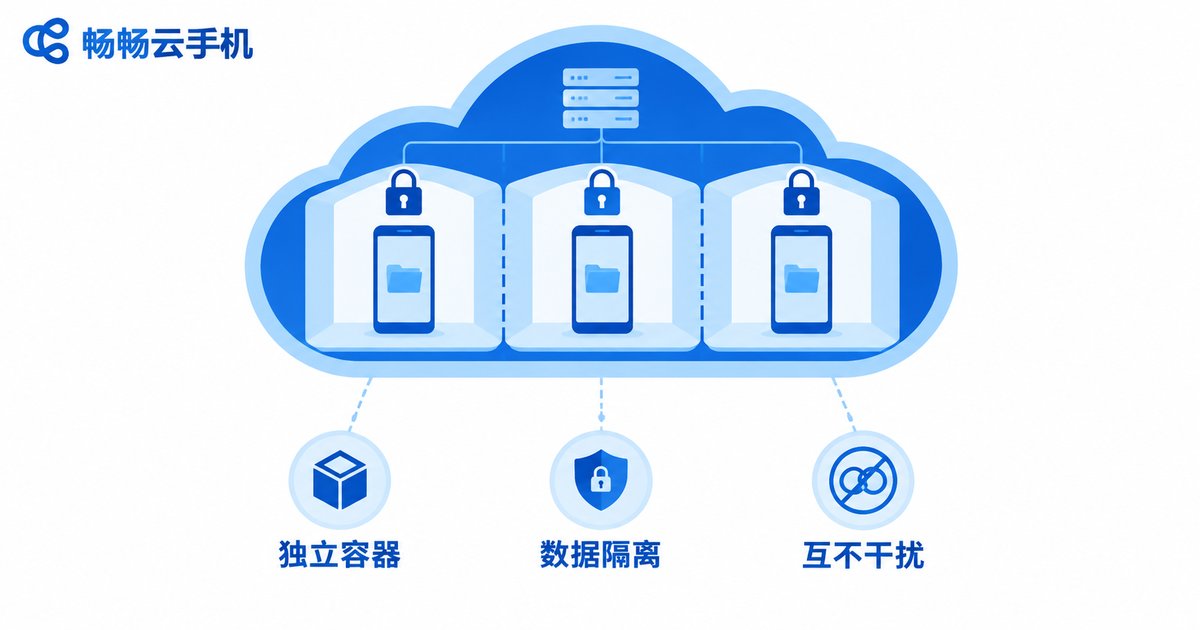
Cloud Container Isolation: Every Cloud Phone Is an Independent Vault
Cloud phones use container-based isolation. Think of the data center as an office building, where each cloud phone is a room with its own lock:
Storage isolation: every cloud phone has its own storage space. Your app data and account information are fully separated from other users' instances—invisible to each other and unable to interfere.
Runtime isolation: each cloud phone runs in its own system environment. If an app misbehaves in one instance, it does not affect the neighboring ones.
Permission isolation: apps inside a cloud phone can only access data within that container. They cannot read the photos, contacts, or files on your local phone. This is fundamentally different from installing apps locally—many privacy leaks happen precisely because local apps demand excessive permissions.
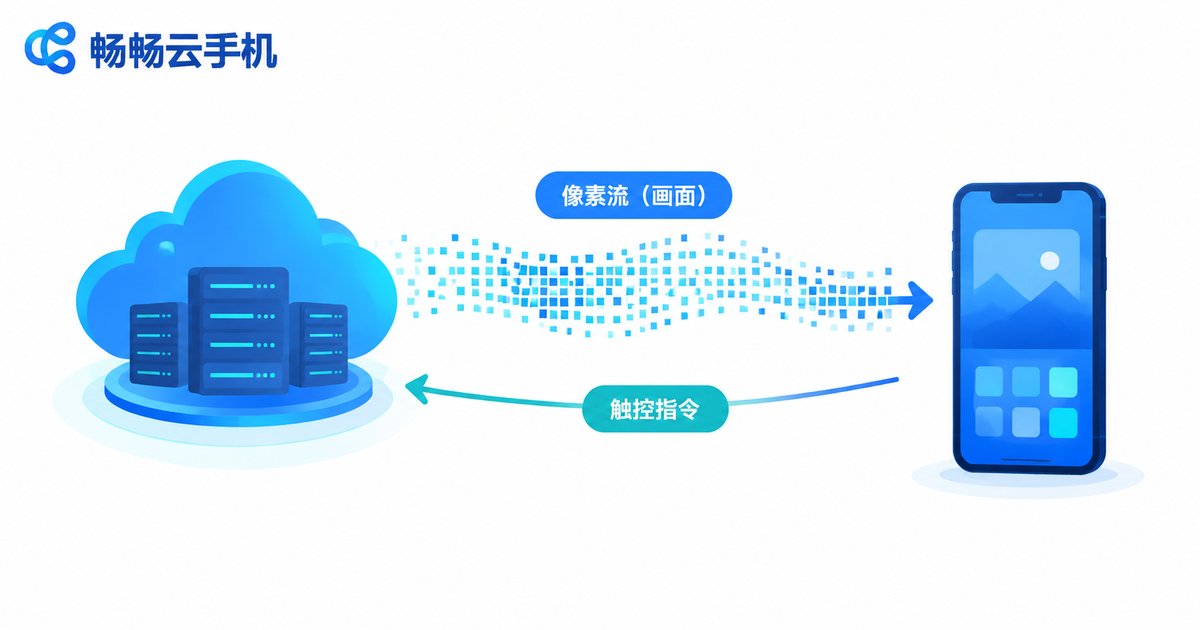
Pixel Streaming: What You See Is a Picture, Not Data
This is the most elegant part of the architecture. The link between your device and the cloud uses a pixel streaming (video stream) approach: the cloud renders the virtual phone's screen in real time, compresses it into a video stream, and sends it to your display; your touch actions are uploaded as commands and executed in the cloud.
The whole process is like watching a live broadcast—only pixel frames travel over the wire, while the app's real data, credentials, and files stay in the cloud and are never downloaded to your local device.
What does this mean in practice? Even if your local phone is lost, infected, or borrowed by someone else, that person only gets access to a screen view. The core data inside your cloud phone remains safely stored in the data center.
Cloud Phone vs. Local Apps: Security Compared at a Glance
| Dimension | Local App Installation | Cloud Phone |
|---|---|---|
| Where data is stored | Local device | Cloud data center |
| App permission reach | Can read local photos, contacts, etc. | Limited to the cloud container |
| Risk if phone is lost | Local data may be exposed | Data stays in the cloud; no local copy |
| Multi-account management | Data easily mixed up | Isolated instances by design |
ccloudphone: Security Built Into the Architecture
Take ccloudphone (畅畅云手机) as an example: it adopts exactly the 'cloud container + pixel streaming' architecture described above. When you run apps or host accounts on ccloudphone, your data is stored in your cloud instance, while the local device serves purely as a display and control terminal. For users who need to run multiple accounts side by side or keep apps online for long periods, instance-level isolation means different accounts never interfere with each other—easier to manage and greater peace of mind.
Three Things You Can Do Yourself
Architecture provides the foundation; good habits complete the picture:
First, protect your platform account. Your cloud phone login is the first lock on the door—use a strong password and change it regularly.
Second, back up important data periodically. Data centers have solid disaster-recovery mechanisms, but regularly exporting what matters to you never hurts.
Third, install apps from trusted sources. Inside your cloud phone, prefer official app stores or reputable sources to reduce risk at the root.
FAQ
Q: Can the cloud phone provider see my account passwords?
Cloud phone instances are isolated from one another, and your app data lives in its own container. That said, choosing a reputable provider is always the first principle—read the platform's privacy and data security documentation carefully.
Q: If I lose internet connection, will my cloud phone data be lost?
No. Data is stored on cloud servers. Losing connection only means you temporarily cannot see the screen; once you are back online, everything is exactly as you left it.
Q: Cloud phone or emulator—which is safer?
An emulator runs on your local computer, so data still resides locally. A cloud phone keeps data in the data center with no local copy, and instances are isolated from each other—giving it the edge in data isolation.
Q: Is it safe to keep my game account on a cloud phone?
Container isolation keeps game data stored independently, separate from your local device. For extra safety, also enable the game's built-in account protection—belt and suspenders.


