
Will Cloud Phone Data Be Lost If You Forget to Renew? Data Retention After Expiration
Will Your Data Vanish the Moment Your Plan Expires?
Many users worry: if I forget to renew my cloud phone, will my game accounts and app data be wiped instantly? In most cases, no—data is not deleted right away. When a plan expires, most cloud phone services don't destroy your data immediately. Instead, the device enters a retention period (also called a grace period). During this window, your data stays safely in the cloud, and as long as you renew in time, everything is restored exactly as it was.
Keep in mind, though, that “not deleted immediately” doesn't mean “kept forever.” Once the retention period ends, the system may release the device resources and your data will be cleared for good. The key is knowing how long the retention period lasts and renewing before it runs out.
How Long Is the Retention Period After Expiration?
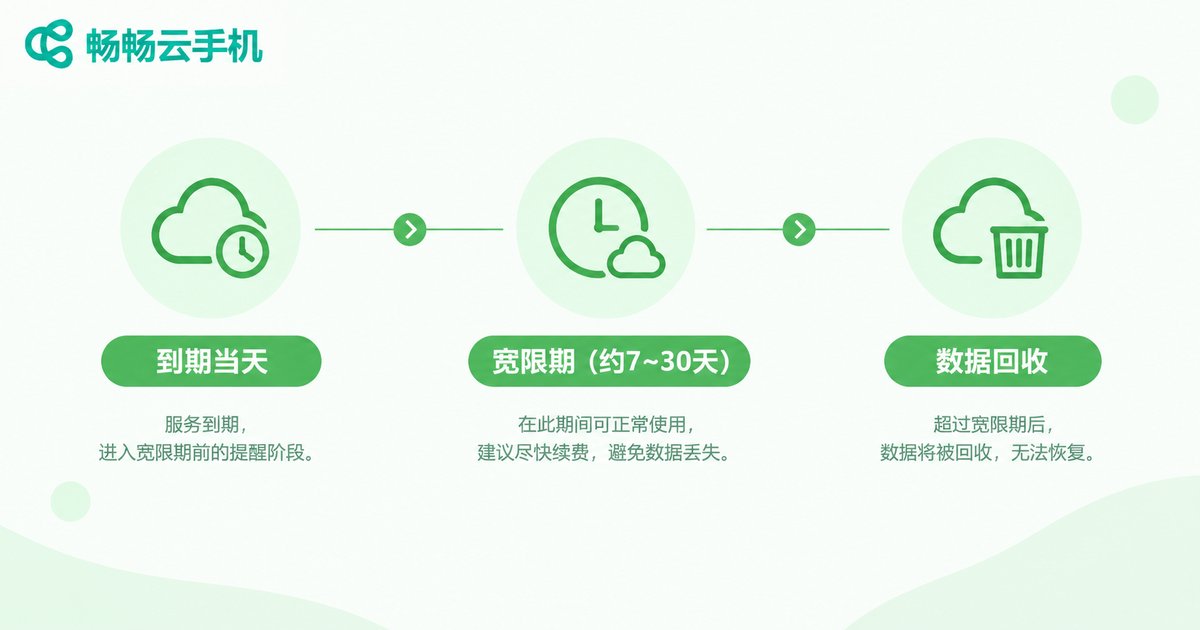
Policies vary between providers, but common industry practice looks roughly like this (always check your provider's official terms):
| Stage | Typical Duration | Data Status |
|---|---|---|
| Expiration day | Plan end date | Service paused, data fully retained |
| Grace/retention period | About 7–30 days | Data kept; renewal restores access |
| Resource recycling | After retention ends | Data may be wiped permanently |
As you can see, there is usually a buffer between expiration and actual data deletion. But this window is not a guarantee—some services may release device resources sooner. Don't treat the retention period as a safe-deposit box; renewing early is always the safest move.
Which Types of Data Are Affected?
Data on a cloud phone falls into several categories, and they are affected differently:
1. App and game data: If your game progress is tied to the game publisher's account system or cloud saves (as with most mobile games), your progress survives even if the cloud phone is reset—just log back in. Local saves, however, may be deleted along with the device data.
2. Files stored on the cloud phone: Photos, videos, and installation packages saved in the device storage count as device data and are usually cleared after the retention period.
3. Login states and auto-running tasks: After expiration the device shuts down, so idle-farming and multi-instance tasks stop, and login sessions expire—you'll need to sign in again after renewing.

How to Avoid Losing Data to a Forgotten Renewal
Instead of scrambling after expiration, get ahead of it with these habits:
1. Turn on auto-renewal: If you use the service long-term, auto-renewal prevents interruptions caused by forgetting to pay manually.
2. Set a renewal reminder: Add a calendar alert 3 days before expiration to give yourself a buffer.
3. Back up important data regularly: Export key files and account info to local storage or another cloud periodically—double insurance brings peace of mind.
4. Choose a provider with clear data policies: For example, ChangChang Cloud Phone (ccloudphone) offers stable cloud storage and a data retention mechanism after expiration. Check the official website or contact support for the exact retention length—renew within the window and your data is restored, so you can idle-farm and multi-run with confidence.

Already Forgot to Renew? Here's How to Recover
If you realize your plan has expired, don't panic—handle it in this order:
Step 1: Log in to the ChangChang Cloud Phone website or app as soon as possible to check your device status and confirm whether you are still within the retention period.
Step 2: Renew within the retention period. Your data is usually restored as-is, with apps and files intact.
Step 3: If the retention period has already passed, the data may have been cleared and you'll need to set up the environment again. Take it as a lesson: enable auto-renewal or reminders so it doesn't happen twice.
FAQ
Q: How long is cloud phone data kept after expiration?
Common retention periods range from 7 to 30 days, depending on the provider. Check the official terms or ask support before your plan expires.
Q: Will my data be 100% restored after renewal?
As long as you renew within the retention period, data and settings are typically preserved exactly as they were. After the period ends, data may be wiped and cannot be recovered.
Q: Will my game accounts be lost if the cloud phone expires?
If progress is bound to the game publisher's account system (cloud saves), the account itself is unaffected—just log in again. Local saves may be deleted along with the device data.
Q: How can I completely avoid forgetting to renew?
Auto-renewal plus a calendar reminder is the most effective combo. Also back up important data regularly to minimize losses even if something unexpected happens.


