

Cloud Phone Automation Tasks: Scheduled Execution, Failure Retry, and Human Intervention
Why Cloud Phones Depend on Automation Tasks
When you move an Android phone to the cloud, the biggest change is not the smaller screen. It is that the device can stay online 24 hours a day, seven days a week. But if that cloud device just sits there quietly, it is no different from a phone that has been switched off. What really determines output is what it is doing while you sleep.
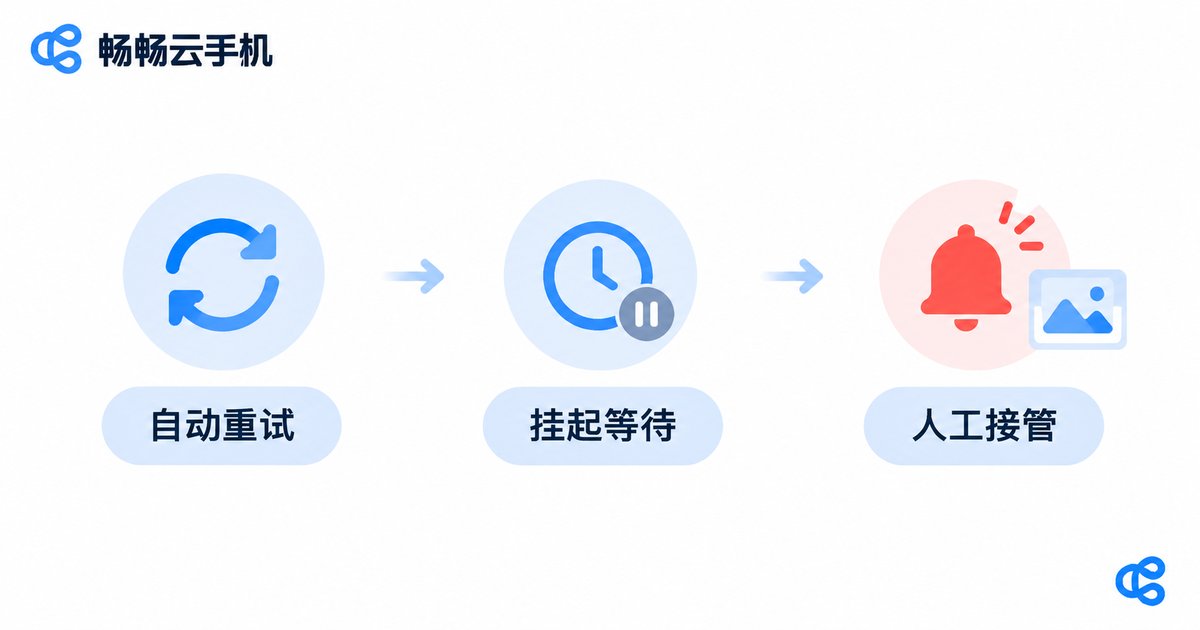
Check-ins, daily sign-ins, bulk uploads, scheduled publishing, page health checks, daily data collection — these jobs have clear rules, high repetition, and a low cost of error. They are made for automation. And a dependable automation setup is never just 'it runs'. It needs three pillars: scheduled execution, failure retry, and human intervention. Remove any one of them and the whole flow will quietly break at 3 a.m. one day.
Scheduled Execution: Make Tasks Fire at the Right Moment
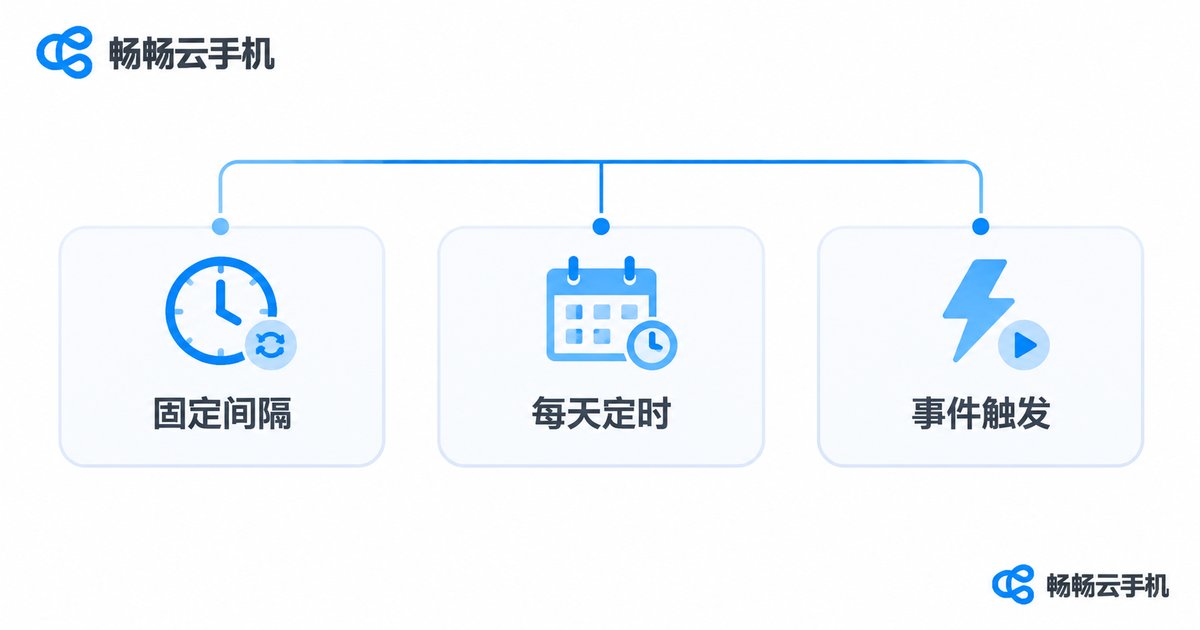
Scheduled execution answers the question of when. In real projects there are three common trigger types, each with its own strength:
| Trigger type | Best for | Common pitfall |
|---|---|---|
| Fixed interval | Polling a page every 10 minutes, checking messages | A task that runs longer than the interval piles up |
| Daily fixed time | 8 a.m. sign-in, 10 p.m. data summary | Timezone mismatch shifts the real run time |
| Event trigger | Running step two right after step one succeeds | Downstream tasks silently skip when upstream fails |
The most common syntax is a cron expression. A few lines cover most scheduling needs:
# Run the sign-in task once at 08:00 every day
0 8 * * *      task: sign-in

# Check page health every 30 minutes
*/30 * * * *   task: health-check

# Summarize last week on Monday at 09:00
0 9 * * 1      task: weekly-report
Three issues are worth handling up front:
Timezone. Most cloud servers default to UTC while your business rhythm is designed in local time. Confirm which timezone your scheduler uses before deployment, or your morning sign-in task will run in the afternoon.
Task duration. If a task takes 12 minutes and the interval is set to 10 minutes, tasks stack up until device resources are exhausted. Set a maximum execution time for every task and treat overruns as failures that enter the retry path.
Concurrency limits. A single cloud phone can only focus on one thing at a time. Batch tasks should queue, not push five scripts onto one device at the same moment.
Failure Retry: Absorb Transient Errors Before They Reach a Human
Most cloud phone task failures are not caused by buggy code. They are caused by a shaking environment: a brief network drop, an element that loaded half a second late, a captcha that suddenly appeared, or memory pressure that cleared the app in the background. A single rerun usually restores everything.
So step one is not increasing the retry count. Step one is splitting errors into retryable and non-retryable groups:
| Error type | Typical signal | Suggested action |
|---|---|---|
| Retryable | Network timeout, element not found, blank page | Back off and retry automatically, up to 3 times |
| Conditionally retryable | Rate limiting, expired session | Wait or re-login first, then retry once |
| Non-retryable | Account restricted, manual verification required, bad data format | Stop immediately and escalate to a human |
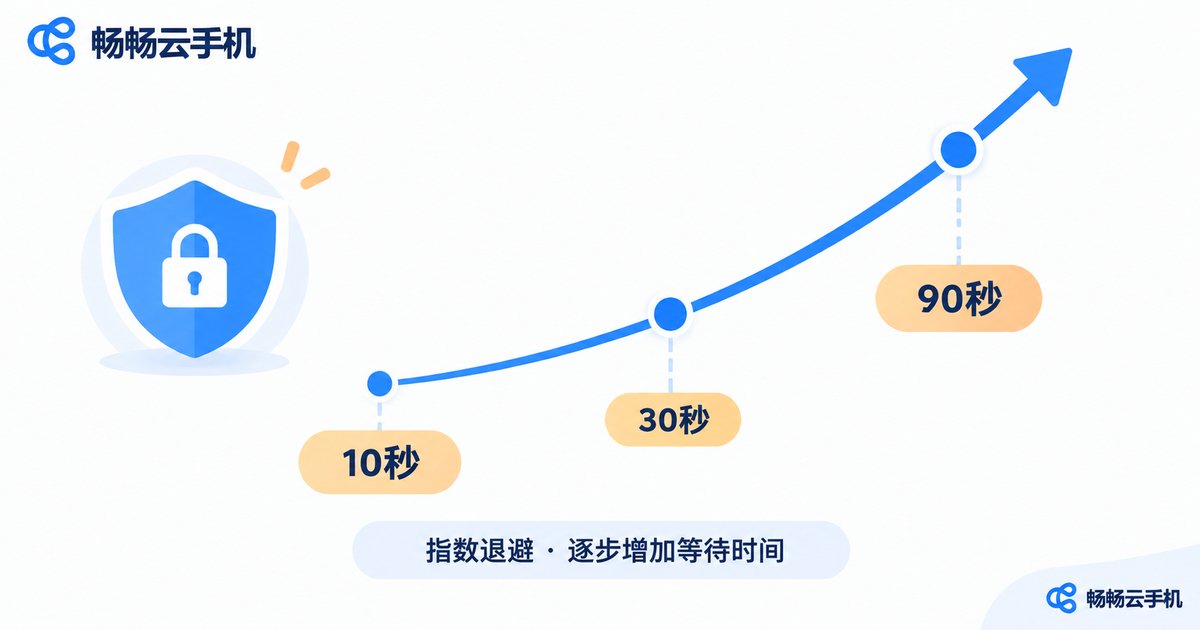
Retrying should not be a blind loop either. Use exponential backoff: wait 10 seconds after the first failure, 30 seconds after the second, 90 seconds after the third. This gives the environment time to recover without hammering the same device into rate limits.
retry:
  max_attempts: 3
  backoff: exponential      # 10s -> 30s -> 90s
  retry_on:
    - NETWORK_TIMEOUT
    - ELEMENT_NOT_FOUND
  give_up_on:
    - ACCOUNT_BLOCKED
    - CAPTCHA_REQUIRED
One easily overlooked detail: idempotency. If a submit task actually succeeded the first time but the acknowledgement never arrived, a blind retry becomes a duplicate submission. For any write operation, check the current state before retrying — this one step saves hours of manual data cleanup later.
Human Intervention: When a Person Is Needed, Wake Them Properly
The goal of automation was never to remove people. It is to put people where they matter most. When retries are exhausted, or the error cannot be fixed automatically, the system should do three things: stop, preserve evidence, and wake someone up.
Stop means the task moves into a suspended state instead of continuing to pile failed requests onto the same device. Preserve evidence means saving a screenshot, the page structure, the current step number, and the last few log lines at the moment of failure — this is what decides whether human intervention takes two minutes or two hours. Wake someone up means routing the alert to the person who will actually act on it, with enough context attached.
A practical escalation policy looks like this:
| Level | Trigger condition | Who handles it |
|---|---|---|
| Info | Single failure, retry succeeded | No action, log only |
| Warning | Same task failed 3 times in a row | On-call reviews the next day |
| Alert | Same device exceeded the daily failure threshold | Immediate notification, human takes over |
| Circuit breaker | Many devices failed at the same time | Pause all tasks of that type automatically |
The circuit breaker level is especially worth adding. When ten devices all report the same error within one minute, the problem is almost never the devices. It is a page redesign or a policy change. The correct move is to brake for the whole fleet, not to keep retrying a thousand times.
Putting It Together on ccloudphone
ccloudphone runs Android devices in the cloud, so shutting down your laptop or losing your local network does not interrupt the tasks. For long-running unattended scenarios, a few things are genuinely useful:
Always-on execution. Scheduled tasks live on the cloud device and still fire at 8 a.m. even when your laptop lid is closed.
Batch management. Multiple devices are managed together, so one task definition can be rolled out to a device group instead of being configured by hand, one device at a time.
Open interfaces. You can wire task scheduling into your own system and receive success, failure, and duration results back, which makes centralized retry and alerting much simpler.
Process records. Screen activity and logs from the run are available for review, so when a person steps in they can see the exact moment of failure instead of guessing.
For specific capabilities and integration details, refer to the official website and pick a configuration that matches your task volume.

Frequently Asked Questions
Q: A scheduled task did not run at the expected time. What is the usual cause?
Check the timezone setting first — that is the most common reason. Next, confirm the scheduler is not paused. Finally, check whether the previous run is still occupying the same device. Following this order usually locates the problem within five minutes.
Q: The task still fails after 3 retries. Should I raise the limit to 10?
Generally no. Retries exist to cover environment jitter, and jitter usually clears within one or two attempts. Three consecutive failures more often point to a structural problem such as a redesigned page or an abnormal account state. More retries only waste time and amplify risk. Stopping and alerting is the better move.
Q: Will human intervention happen so often that it becomes more work than doing it manually?
If you get flooded with alerts, the error grading is usually wrong: sending every failure as an instant alert drowns the person on call. Downgrade retry-succeeded failures to log entries and only push notifications for consecutive failures and fleet-wide failures. Alert volume drops sharply.
Q: What is the difference between running automation on a cloud phone and running a script on a local phone?
Stability is the core difference. A local phone locks its screen, drops its network, and gets its resources taken by other apps, and nobody knows when the task dies. A cloud device stays running, and with logs and alerts a failure can be recorded, retried, and caught by a human. That is what makes long-term unattended operation possible.
Q: How much effort does it take to build the whole thing?
For a single device and a single task, one cron entry and a retry switch is enough. The real investment goes into error grading, alert routing, and idempotency checks. Those three do not decide whether a task can run — they decide whether you can safely leave it alone.


