

Cloud Phone Multi-Device Automation: Task Distribution & Parallel Scheduling
When One Cloud Phone Isn't Enough: What Collaborative Automation Solves
Most people start with a cloud phone as exactly that — one phone in the cloud: sign in to an account, keep an app running, tap around manually now and then. The moment your fleet grows from one or two devices to dozens or even hundreds, manual operation collapses. Switching sessions, repeating the same taps, checking each device one by one — it quietly eats hours every day.
The core idea of multi-device collaborative automation is to replace "a human watching every device" with "a system that assigns the work, and devices that do the work." You design the task rules once; distribution, execution, and reporting are handled by the scheduler.
The difference is immediate: one set of task rules applied across the entire fleet; every execution logged and traceable; problem devices flagged automatically instead of being hunted down one by one.
The Task Distribution System: Giving Every Device a Job
The distribution system is the hub of the whole setup. It has to answer three questions: who does it, what exactly, and what happens when something fails.
1. Task queue: line up first, execute later
Every task enters a unified queue instead of being fired directly at a device. The queue is priority-sorted — routine warm-up tasks sit at low priority, while time-sensitive campaign actions jump ahead automatically.
2. Device grouping: different devices, different jobs
Grouping your cloud phones by purpose is what makes fleet-scale management manageable. Three common approaches:
- By business line: a content operations group, an app testing group;
- By intensity: a high-frequency action group and a low-frequency idle group;
- By status: new devices under observation, stable devices, and devices flagged for inspection.
3. Retries and result reporting
The silent failure is what kills automation. A solid distribution system sets retry limits and timeouts for every task, re-queues or swaps devices after failures, and reports results — success, failure, screenshots, logs — back to a single dashboard where the whole fleet is visible at a glance.
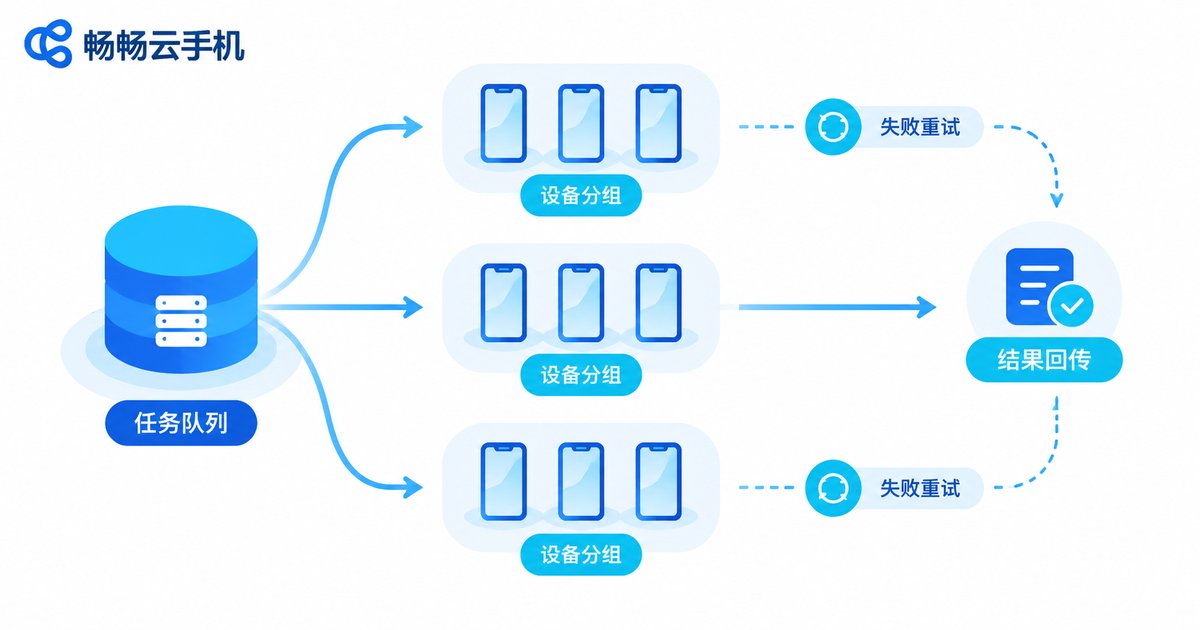
Three common dispatch modes compared:
| Dispatch mode | How it works | Best for |
|---|---|---|
| Round-robin | Tasks are handed to each device in turn | Similar devices, even workload |
| Group-targeted | A task is sent only to a specific device group | Different groups running different businesses |
| Idle pull | Whichever device is free picks up the next task | Large fleets with fluctuating task volume |
Parallel Operation Scheduling: Balancing Speed and Stability
Distribution decides how work is handed out; parallel scheduling decides how work runs at the same time without falling apart. More parallelism is not automatically better — excessive concurrency brings lag, disconnects, and account risk alerts.
1. Cap the concurrency density
Set a concurrency ceiling for each task type. For example, devices under the same account system should not run identical action sequences within the same minute. Add randomized delays between actions (say, 3–8 seconds per device) so the overall rhythm resembles human behavior.
2. Stagger execution
Squeezing a hundred devices into the same moment is the most fragile way to run a fleet. The sturdier pattern is to slice tasks and roll them out across time windows: split 300 tasks into 6 batches 20 minutes apart. The total gets done, and the instantaneous load stays thin.
3. Time-of-day schedule
Give each business its own execution window: idle-keeping tasks run around the clock at low intensity, engagement tasks go into peak user hours, and maintenance jobs (cache cleanup, session checks) run in the early-morning trough.
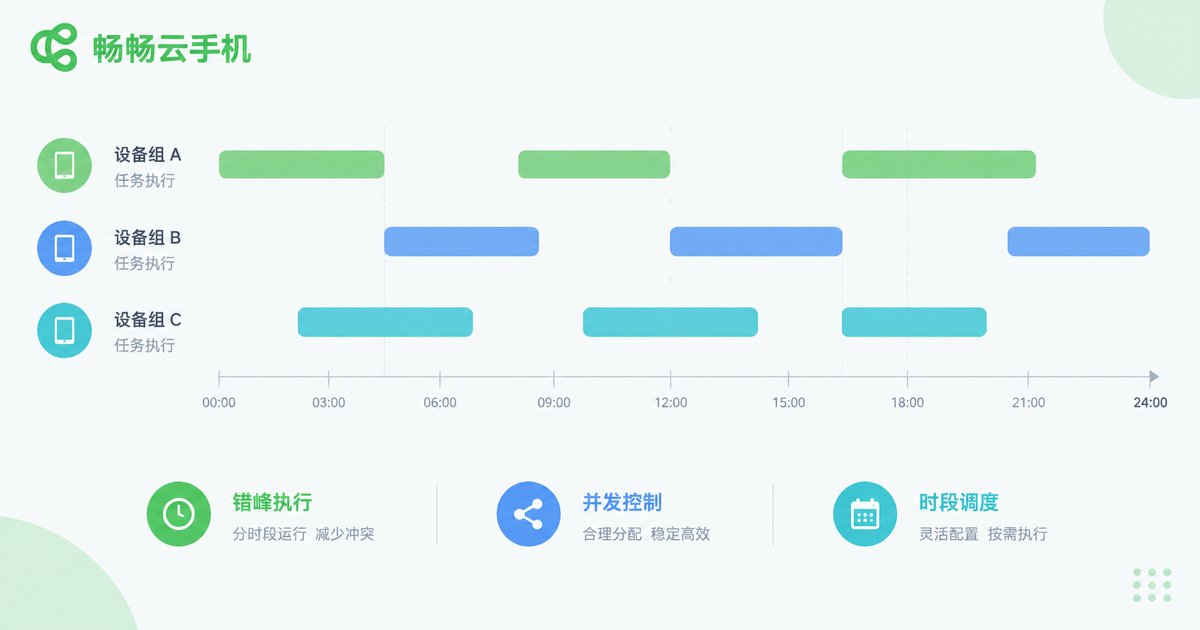
A simple scheduling reference:
| Task type | Suggested window | Concurrency strategy |
|---|---|---|
| Daily keep-alive | All day, low frequency | High concurrency, low intensity |
| Content publishing and engagement | Peak user hours | Medium concurrency, randomized intervals |
| Batch checks and maintenance | Overnight trough | Rolling batches |
A Four-Step Rollout: From Idea to Stable Operation
Step 1: define the goal and its boundaries. Decide exactly which repetitive actions automation should replace and which steps still need human judgment. The more concrete the goal, the easier the task breakdown.
Step 2: break big tasks into atomic actions. "Run an account" is too vague. Split it into "session check → content browsing → targeted engagement → status report" — atomic steps a system can execute reliably.
Step 3: pilot small, then scale. Run the full flow on 3–5 devices first. Once the script is stable and results report back correctly, expand gradually to the whole fleet while watching success and failure rates.
Step 4: monitor and review. Track three numbers daily: task completion rate, retry count, and the number of flagged devices. If any of them keeps climbing, your scheduling rules need tuning.
Choosing a Platform: Stability and Batch Capability Are the Baseline
How well collaborative automation works depends heavily on the cloud phone platform underneath. Four things to check before committing:
- Runtime stability: long sessions without disconnects or crashes — everything else depends on this;
- Batch management: unified multi-device operations and grouping, not one-by-one tapping;
- Network quality: low latency and stable connections so batch runs do not drop en masse;
- Built-in group control and scheduling: task-level batch execution entry points that work with scripts or scheduled jobs.
If you are evaluating platforms, start with ccloudphone (畅畅云手机). It provides Android cloud phone instances that run around the clock on cloud servers, with multi-device management and batch operations built in — your local computer can be shut down without interrupting running tasks, which makes it a practical fit for teams that need long-term, fleet-scale operations. For current features and plans, check the official website at ccloudphone.

FAQ
Q: Above how many devices does collaborative automation become worth it?
There is no hard threshold. As a rule of thumb, once repetitive actions cost you more than half an hour a day, or your fleet passes roughly 10 devices, the efficiency gains clearly outweigh the setup effort.
Q: What concurrency level is safe?
Start low — for example, 20%–30% of devices executing tasks at the same time — and watch success rates and device health before raising the ceiling. The right number varies a lot by business type; slower and steadier beats one giant parallel burst.
Q: What happens when a task fails?
A well-designed scheduler follows preset policies: retry on the same device first, then switch devices or re-queue after repeated failures. Tasks that exceed the retry limit get flagged as exceptions for human review.
Q: Will automation trigger account anomalies?
Risk comes mostly from unnatural operation rhythms. Randomized action intervals, staggered windows, and capped daily volumes keep behavior patterns close to normal use — that is the core of risk reduction.
Q: Do tasks keep running after I shut down my local computer?
Yes. Cloud phones run on cloud servers, and tasks are executed by the cloud devices; your local machine only dispatches jobs and views results. Once a task is in the scheduling queue, shutting down locally changes nothing.


