

Cloud Phone ARM Boards vs Virtualization: An In-Depth Comparison of Device Authenticity
When shopping for a cloud phone, product pages usually highlight core counts and RAM but rarely tell you whether the underlying architecture is an ARM board or virtualization. Yet this is exactly what determines device authenticity—how much your cloud phone looks like a real phone in the eyes of apps and risk-control systems. This article breaks it down.
First, the Basics: What Are ARM Boards and Virtualization?
Anyone new to cloud phones quickly meets these two terms. They sound technical, but the idea is simple.
The ARM board approach means packing real phone motherboards—ARM-architecture chip boards—into server racks. Every cloud phone you connect to runs on genuine phone hardware with a real ARM processor and a real GPU, as if the phone in your hand had been moved into a data center.
The virtualization approach is different: Android instances are simulated on x86 servers through virtualization technology. The CPU is not a phone chip at all, Android runs on a virtual layer, and much of the hardware information is simulated.
Here is an analogy: an ARM board is like parking a real car in your garage, while virtualization is like building an identical replica. Both can drive, but the difference shows the moment they hit the inspection line.
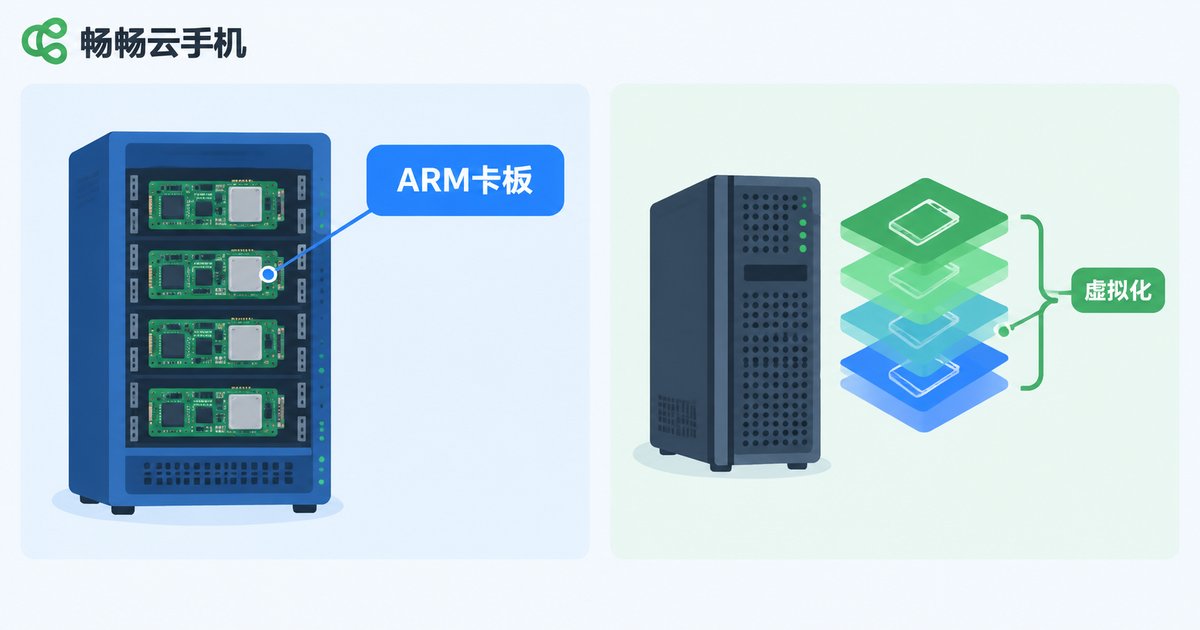
Device Authenticity: Where the Gap Really Lies
Whether a cloud phone works well depends on whether apps treat it as a real device or an emulator. Three factors matter most.
First, native CPU architecture. Mainstream apps are built for ARM chips. ARM board cloud phones execute native ARM instructions, so apps run directly without translation. Virtualization solutions run on x86 servers and rely on an instruction translation layer, which can cause some apps to crash, lag, or conclude that this is not a phone at all.
Second, genuine hardware fingerprints. A real device's IMEI, sensors, battery, and baseband data come naturally from the hardware. In virtualized environments, these details are generated by the virtual layer, and the traces are easy to expose. Games and finance apps with strict risk control actively scan these signals to judge device authenticity.
Third, natural system behavior. On real hardware, rendering, scheduling, and power behavior match a physical phone. Virtualized environments may show abnormal resolutions, missing sensors, or GPU rendering quirks that professional detection can easily spot.

Key Differences at a Glance
| Dimension | ARM Board | Virtualization |
|---|---|---|
| CPU architecture | Native ARM chips | x86 server plus instruction translation |
| Device fingerprint | Hardware-based and genuine | Virtually generated, easily flagged |
| App compatibility | High, mainstream apps run directly | Some apps crash or get detected |
| Gaming risk control | Behaves like a real phone | Often judged as an emulator |
| Long uptime | Independent hardware, no interference | Shared resources, mutual impact |
What the Gap Means in Real Use
Gaming with peace of mind. Many mobile games run dedicated emulator detection. Once flagged, you may be matched into separate lobbies or even blocked from logging in. A cloud phone with high device authenticity feels much closer to the phone in your hand.
Safer multi-account operations. For anyone running accounts, bans are the biggest fear. If a platform's risk control reads a virtualized environment's device traits as abnormal, account risk rises sharply; a genuine device environment greatly reduces that hidden danger.
Worry-free long uptime. A core value of cloud phones is staying online around the clock. With ARM boards, each instance runs its own system on independent hardware, avoiding the one-lags-all-lag interference—more stable for long-running tasks.
How to Pick a Cloud Phone That Feels Truly Real
Do not judge a cloud phone by price and spec numbers alone. Get clear on three things: is the underlying architecture a real ARM board or virtualization? Are device parameters (model, system version) genuine and verifiable? Do the apps and games you rely on actually run well?
If you are comparing options, put Changchang Cloud Phone (ccloudphone) on your shortlist. Visit the official website for product details, sign up and test the smoothness and compatibility yourself, then decide based on your own needs. What fits your workflow is what truly works.

FAQ
Q: Is an ARM board cloud phone the same as an emulator?
No. An emulator simulates Android with an x86 chip on your own computer, while an ARM board cloud phone runs on real ARM phone hardware in a data center—the device authenticity is fundamentally different.
Q: Are virtualized cloud phones completely unusable?
Not necessarily. For light usage with low demands on device authenticity, virtualization can cover basic needs. But for gaming, account operations, and other risk-control-sensitive scenarios, the ARM board approach is clearly safer.
Q: How can I tell whether a cloud phone runs on real ARM hardware?
Install a hardware info tool inside the cloud phone and check whether the CPU architecture is ARM and whether device information looks complete and natural. You can also contact customer service or read the official technical documentation.
Q: If my local internet drops, will tasks on the cloud phone keep running?
Yes. Cloud phones run in remote data centers, so tasks continue in the cloud even when your connection drops. Log back in to check progress anytime.


