

What Is an ARM Physical Board in Cloud Phones? How Server Virtualization Works
What Exactly Is an ARM Physical Board in a Cloud Phone?
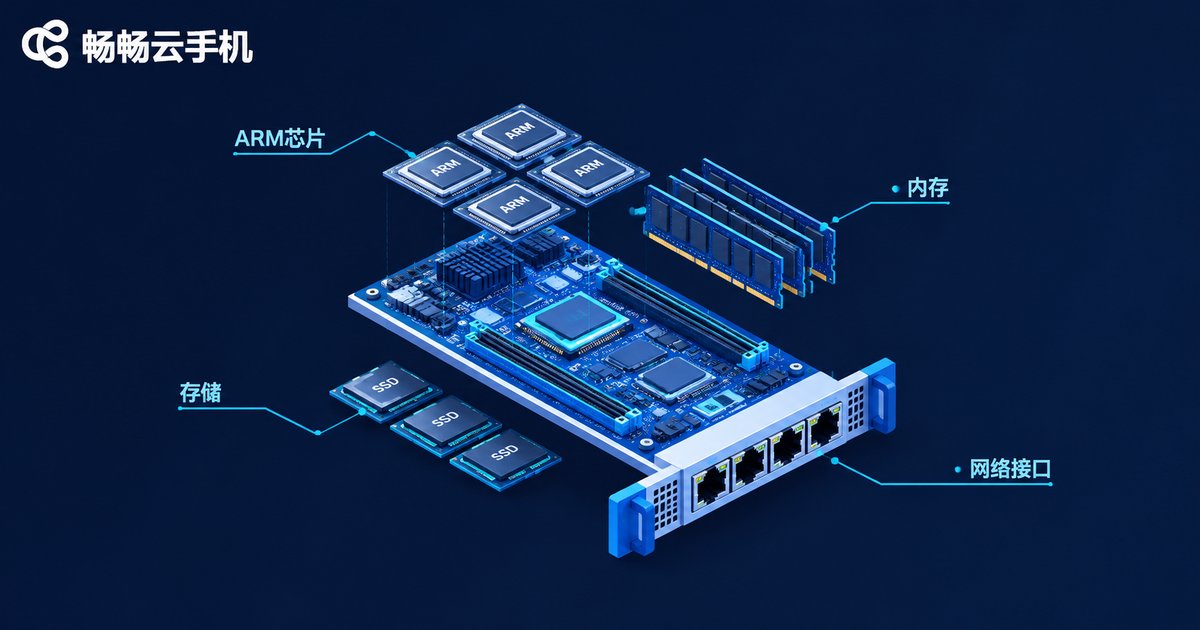
In simple terms, an ARM physical board is a circuit card that packs multiple smartphone chips onto a single board. It condenses a phone's core hardware — processor (SoC), memory, and storage — into a standard-sized card that slots into server racks in a data center. One board can carry several or even dozens of ARM chips, and each chip runs its own complete Android system independently.
If a traditional phone is a 'detached house', an ARM board is an apartment building: the whole building (the board) sits in a server room, and every unit (a chip) is an independent Android system that never bothers its neighbors. Every cloud phone you open in CCloudPhone (ccloudphone) corresponds to one of these real 'units'.
What's Inside an ARM Board?
Don't be fooled by its plain look — an ARM board is essentially a 'phone motherboard without the screen and battery'. It has four key parts:
1. ARM SoC chips (the brain). SoC stands for 'System on a Chip': CPU and GPU integrated into one chip that runs Android and renders game graphics. The number of chips on a board directly decides how many cloud phones a server can power at once.
2. Memory and storage. Each chip gets its own RAM and storage for apps and game data, so every cloud phone keeps an independent 'desktop' with no overlap.
3. Network module. The board connects through the data center's high-speed network, streaming the screen to you while sending your taps and swipes back to the cloud.
4. Power and cooling. Dozens of chips running together generate serious heat, so racks use industrial fans and temperature control to keep boards stable 24/7.
Server Virtualization: How One Server 'Splits' Into Dozens of Cloud Phones
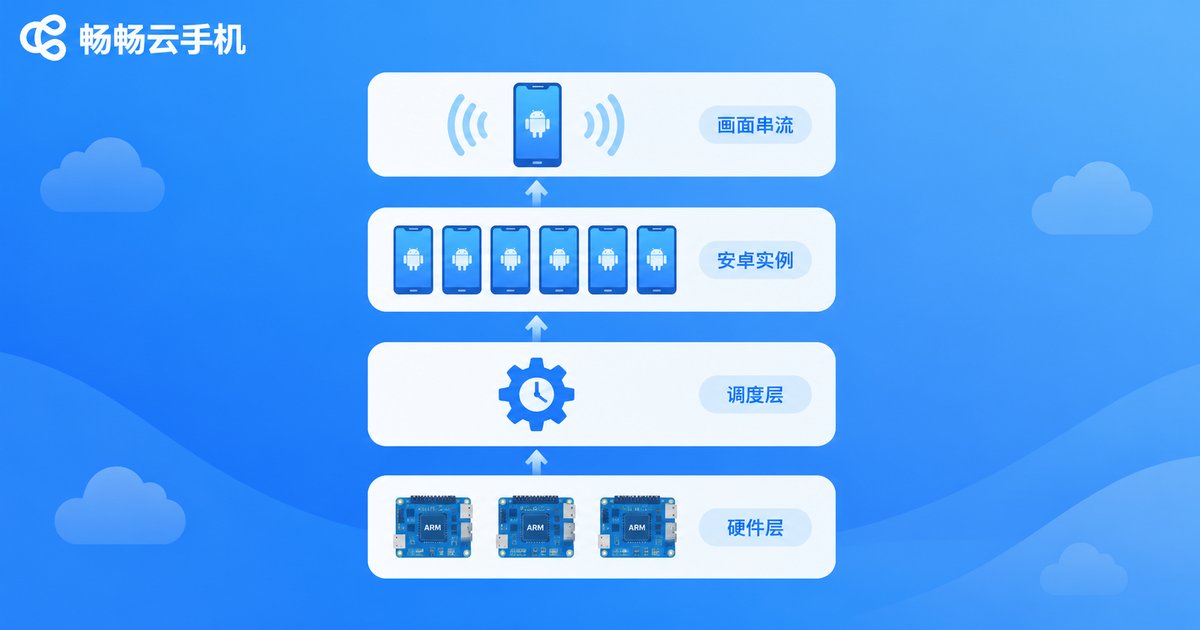
Many people assume cloud phones are 'simulated' by software. Mainstream ARM cloud phone solutions are the opposite — every cloud phone runs on a real ARM chip. Virtualization simply divides and conquers:
Step 1: Hardware layer. Servers in the data center are filled with ARM physical boards — the source of all computing power.
Step 2: Scheduling layer. A scheduling system assigns each ARM chip to a user session, monitors workloads in real time, and balances resources during peak hours.
Step 3: Android instance layer. Each chip runs an independent Android environment with its own apps and data — just like a real phone.
Step 4: Streaming layer. The cloud phone's screen is encoded and streamed to your device, while your controls travel back to the cloud. The round trip usually takes just tens of milliseconds, feeling close to a real device.
ARM Native vs. x86 Emulation: What's the Difference?
There are two technical routes to building cloud phones: the ARM native solution (ARM physical boards) and the x86 solution (running Android emulators on standard server chips). The key difference: Android is designed for ARM chips, so the ARM approach runs it natively, while the x86 approach must translate instructions and loses performance along the way.
| Aspect | ARM Physical Board | x86 Emulator |
|---|---|---|
| Compatibility | Native Android, highly compatible | Instruction translation, some apps may glitch |
| Performance | Close to a real phone, smooth and stable | Performance loss, struggles under heavy load |
| Power & density | Multiple chips per board, high efficiency | Limited instances per server |
| Long-term stability | Built for 24/7 uptime | Thermal throttling under sustained load |
That's why the first thing to check about any cloud phone service is whether it runs on native ARM hardware — it directly determines how smooth and stable your experience will be.
Why ARM Boards Excel at Multi-Instance Workloads
The most typical cloud phone use case is running many instances at once: multi-account game grinding, studio operations, and bulk app testing. ARM boards have a natural advantage here — each cloud phone gets a dedicated real chip, so dozens of instances run side by side with far less resource contention. Combined with centralized cloud management, you can batch-control dozens or even hundreds of cloud phones as easily as using one — far more efficient than stacking physical phones on a desk.
Choose a Cloud Phone Built on Real ARM Hardware
As you can see, the cloud phone experience depends mostly on the underlying hardware and virtualization scheduling. CCloudPhone (ccloudphone) is built on a native ARM architecture, giving every cloud phone dedicated computing power in the cloud, with centralized multi-instance management and long hours of stable uptime. Whether you are grinding games or running accounts in bulk, just sign up on the CCloudPhone official website or app, and even beginners can create their first cloud phone in minutes.
FAQ
Q: How is an ARM physical board different from a regular server?
Regular servers mostly use x86 chips for general-purpose computing. ARM boards carry smartphone-grade chips that run Android natively, designed for mobile workloads like cloud phones, with better compatibility and energy efficiency.
Q: Is a cloud phone a virtual machine? Will it lag like an emulator?
With the ARM approach, each cloud phone runs on a real chip rather than being software-emulated, so it feels close to a real phone. Only heavy network fluctuations cause brief visual delay.
Q: How many cloud phones can one server run?
It depends on the number of boards and the chip density per board. One chip maps to one cloud phone — the more boards a server holds, the more instances it can run, with the scheduler allocating power automatically.
Q: If I power off my cloud phone, is my game data safe?
Yes. Your data lives in dedicated cloud storage; powering off only releases computing resources. Boot it up again and your apps, accounts, and data are exactly as you left them.
Q: Do I need a powerful device to use a cloud phone?
No. All computing happens in the cloud — your device only displays the screen and sends inputs, so an ordinary phone or computer works fine.


