
Cloud Phone App Cloning vs. System-Level Dual Apps: A World of Difference in Risk Control
Introduction: The Fatal Misconception in Multi-Account Operations
In multi-account operations, game AFK, or community management, many people use the built-in or third-party "app cloning" feature for convenience. However, when you find your accounts frequently banned or restricted, you might not realize that app cloning and system-level dual apps are entirely different in the eyes of risk control. Platform risk control systems are highly sensitive; ordinary cloning operations are essentially "running naked" in front of them.
App Cloning: A "Fake Dual" That Deceives Only Yourself
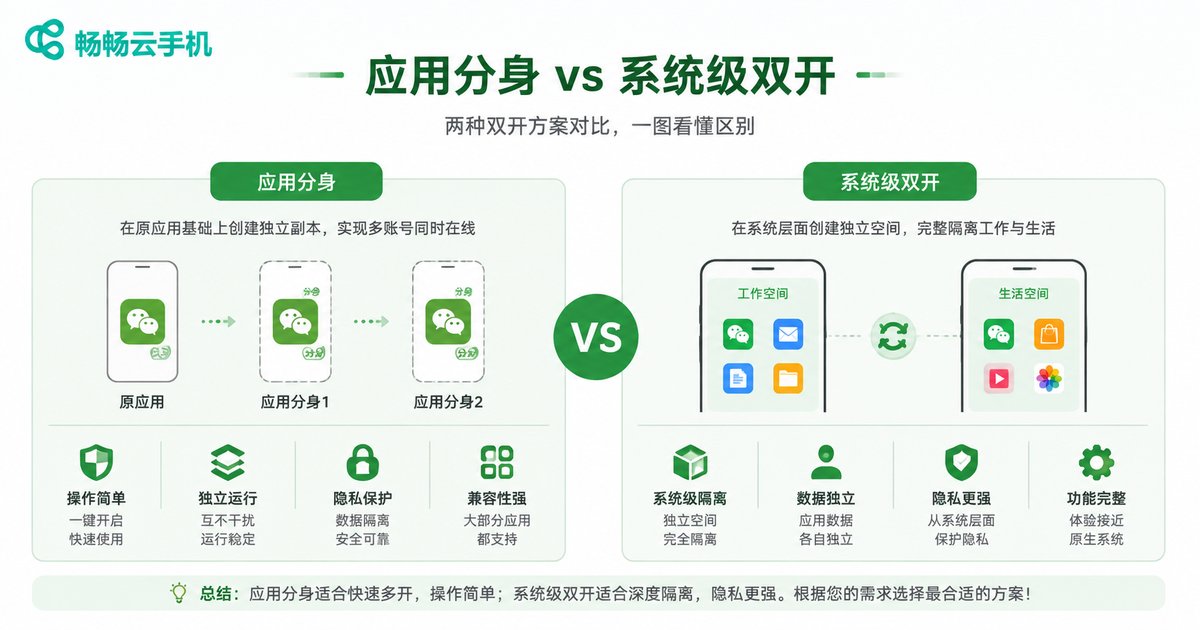
App cloning (or app twin) essentially duplicates the app's running environment within the same operating system. Although they look like two independent icons, at the underlying system level, they share extremely critical information:
- Identical Device Fingerprints: Hardware info like IMEI, MAC address, and Android ID are exactly the same.
- Identical IP Addresses: The cloned apps all run in the same network environment.
- Shared Storage and Cache: Certain underlying cache files may cross over.
For platform risk control systems, when it detects the same device fingerprint and IP logging into multiple accounts of the same type in a short period, it immediately triggers an alarm, flagging it as "batch account farming" or "black/gray market activity," making a ban only a matter of time.
System-Level Dual Apps: "Physical Isolation" via Cloud Phones
True system-level dual apps are achieved through cloud phone technology. Taking ccloudphone as an example, it doesn't just clone an app locally; it allocates a complete, independent virtual phone on a cloud server.
Each ccloudphone has:
- Independent Device Fingerprint: Unique IMEI, phone model, and Android ID, with zero interference.
- Independent IP Network: Different network environments can be configured for each cloud phone, completely breaking IP associations.
- Independent System Environment: Complete isolation from the underlying system to storage space, just like using multiple real physical phones.
In the eyes of the risk control system, multiple accounts running on ccloudphone look like real users distributed across different regions and devices, completely unable to detect that they are operated by the same person.
Core Differences: A World Apart from a Risk Control Perspective
| Dimension | App Cloning | ccloudphone (System-Level Dual Apps) |
|---|---|---|
| Device Fingerprint | Identical | Independent and authentic |
| IP Address | Shared network | Configurable independent network |
| Underlying System | Shared OS | Independent virtual OS in the cloud |
| Risk Level | Extremely high (easily flagged as batch control) | Extremely low (indistinguishable from real users) |
How to Achieve Safe Multi-Accounting with ccloudphone?
ccloudphone provides a perfect solution for multi-account operations. Users simply open the ccloudphone app on their local device to manage multiple independent virtual phones in the cloud. Whether installing apps, nurturing accounts, or batch managing, each cloud phone maintains the purest independent environment. Because the computing power is in the cloud, it not only provides excellent anti-ban effects but also enables 24/7 offline AFK, completely freeing up local phone performance and battery.
FAQ
Q: Will the system-level dual apps of ccloudphone be detected as a virtual machine by apps?
A: No. ccloudphone uses deep anti-detection technology. Its underlying environment is highly consistent with real physical phones, and mainstream app risk control systems cannot identify it as a cloud phone or virtual machine.
Q: How many accounts can I run simultaneously using ccloudphone?
A: You can purchase multiple cloud phone instances based on your needs. One cloud phone corresponds to one independent system and account, and the quantity is entirely determined by your operational scale.
Q: Do I need ROOT access on my real phone to use ccloudphone?
A: Not at all. All operations of ccloudphone run in the cloud. Your local phone does not need ROOT; you just need to install the app to connect and use it safely and risk-free.


