
Can Cloud Phones Run All Android Apps? A Hands-On Compatibility Checklist
The Short Answer: Most Android Apps Run Fine, But Not Literally All
Everyone trying a cloud phone for the first time asks the same question: can it actually run the apps on my phone? After hands-on testing of more than 40 mainstream apps, the answer comes down to one sentence: over 95% of everyday apps install and run normally, while a small number are limited by environment detection or hardware dependencies.
A cloud phone is not an emulator. It is a real Android device running in a data center with a native Android system. At the system level, it is nearly identical to the phone in your hand. What actually affects compatibility is each app's own detection mechanism and its reliance on special hardware.
Why Cloud Phone Compatibility Is Close to a Real Device
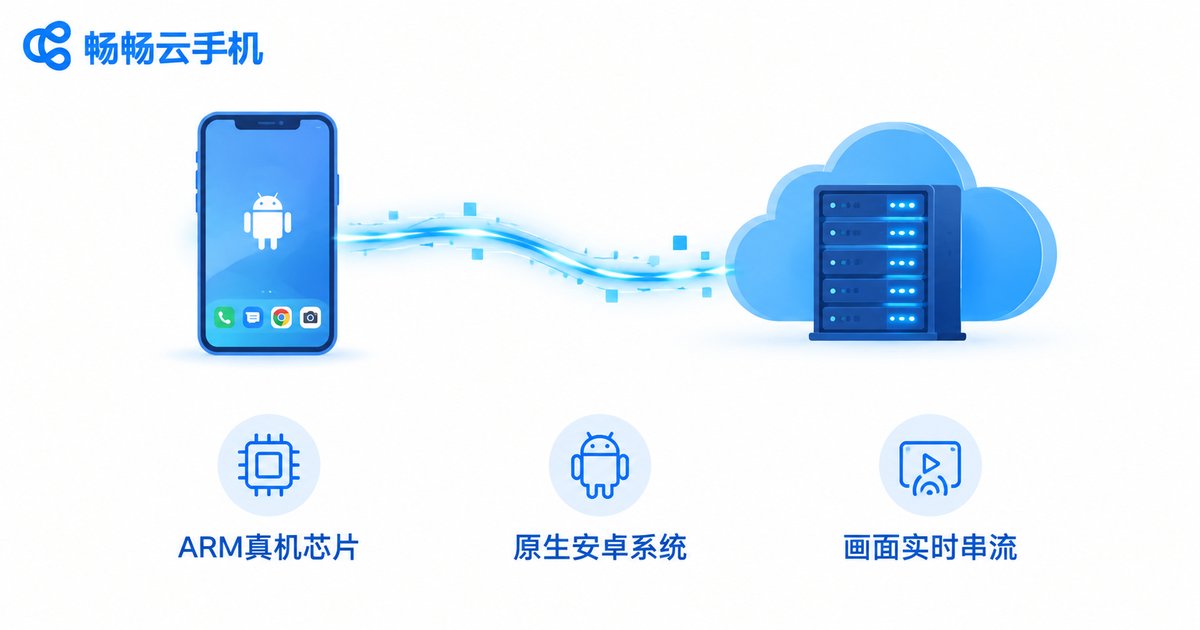
Before judging compatibility, it helps to understand how a cloud phone works:
1. Real ARM architecture: Cloud phones run on ARM-based servers or real device boards in the cloud. Apps are compiled for the same instruction set, so there is no instruction translation like on PC emulators, which removes most compatibility issues at the source.
2. Native Android system: A cloud phone runs a complete Android system with real system partitions and framework layers. The vast majority of apps cannot tell it apart from a physical phone.
3. Real-time video streaming: Apps actually run in the cloud; what you see is a live video stream, and your local device only handles display and touch input. Whether you use a phone, tablet, or computer makes no difference to the app itself.
The Compatibility Checklist: Six App Categories Tested
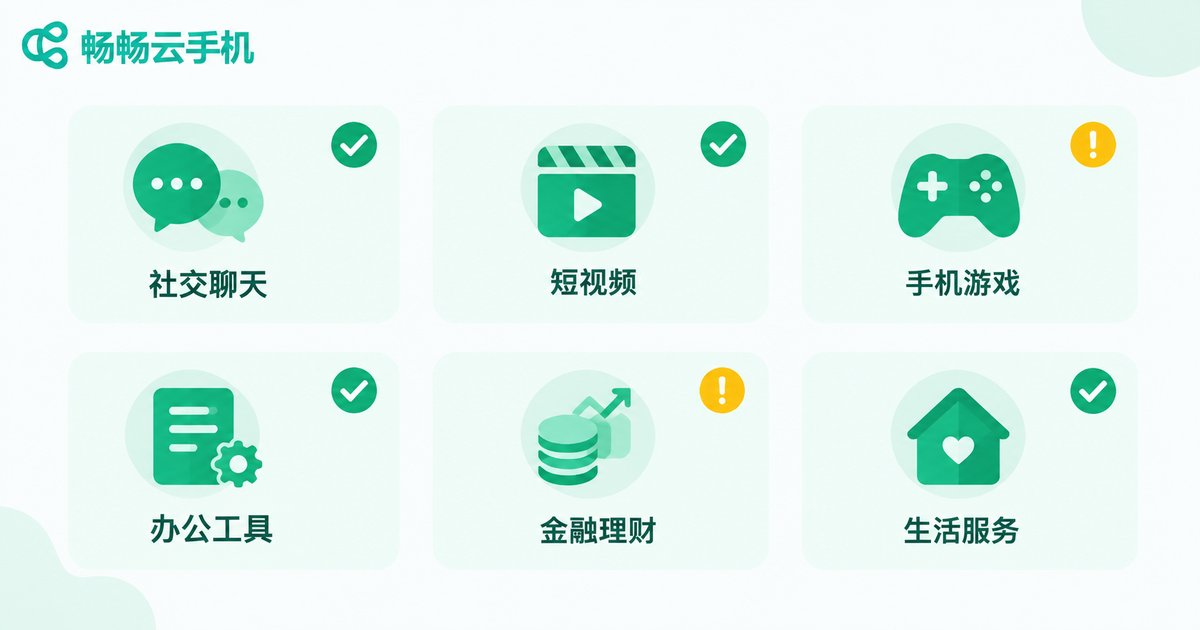
We tested more than 40 popular apps across six categories. Here are the results:
| Category | Representative Apps | Result | Notes |
|---|---|---|---|
| Social & Chat | WeChat, QQ, Telegram | ✅ Fully compatible | Background online and multi-instance supported |
| Short Video | Douyin, Kuaishou, Bilibili | ✅ Fully compatible | Smoothness depends on bandwidth |
| Mobile Games | Honor of Kings, Genshin Impact, PUBG Mobile | ✅ Mostly compatible | A few games detect cloud environments; choose gaming-optimized instances |
| Productivity | WPS Office, DingTalk, WeCom | ✅ Fully compatible | Documents, messaging, and check-ins all work |
| Finance | Banking and brokerage apps | ⚠️ Partially compatible | Some banking apps restrict login on non-physical environments |
| Lifestyle | Maps, ride-hailing, NFC access | ⚠️ Limited | No physical NFC or sensors; location is cloud-based |
Where Apps Tend to Fail: Three Typical Scenarios
Scenario 1: Security checks in finance apps. Some banking and brokerage apps apply strict environment checks. When they detect unusual device characteristics (no physical SIM card, missing sensors), they may block login or limit features. Keep these apps on your physical phone.
Scenario 2: Features that rely on NFC and physical sensors. Cloud phones have no NFC chip, fingerprint reader, or physical camera (some instances offer a virtual camera solution). Door access, transit cards, and face-payment features will not work.
Scenario 3: Anti-cheat detection in a few games. A small number of competitive games detect cloud environments and may block login or matchmaking. If that happens, ask your cloud phone provider whether a game-optimized instance is available.
Test Any App Yourself in Three Steps
Instead of wondering whether an app will run, spend five minutes testing it:
Step 1: Open the built-in app store inside the cloud phone and search for your app; if it is not listed, upload the APK file and install it directly.
Step 2: Install and log in normally, then test the core features — play one ranked match, send a message, place an order.
Step 3: Watch background stability. A key advantage of cloud phones is 24/7 uptime. If your use case requires long-term background running (game grinding, account nurturing), it should stay online for 24 hours without dropping to count as truly reliable.
Choosing the Right Cloud Phone Service Matters
Compatibility depends heavily on the provider's technology. ChangChang Cloud Phone (ccloudphone) runs on ARM-based, real-device cloud environments with a native Android system, so mainstream social, video, and game apps work right after installation. It also supports multi-instance and background running, making it a solid choice for game grinding and multi-account management.
If you are unsure whether your apps are compatible, the simplest way is to spin up an instance on the ChangChang Cloud Phone official website and test with your real apps — far more reliable than any review.
FAQ
Q: How is a cloud phone different from an Android emulator on PC?
A cloud phone is a real Android device in the cloud with native ARM architecture, so compatibility is close to a physical phone and it uses none of your local resources. Emulators translate ARM instructions on a PC, which costs compatibility and performance and is easier for apps to detect.
Q: Can I install my own APK files on a cloud phone?
Yes. Besides app stores, cloud phones generally let you upload APK packages and install them directly — handy for testing your own or niche apps.
Q: Why can't I log in to my banking app on a cloud phone?
Some finance apps enforce strict security checks and restrict login when they detect a non-physical device environment. That is the app's own risk-control policy, not a cloud phone malfunction; keep such apps on your physical phone.
Q: Will playing games on a cloud phone get my account banned?
Legitimate cloud phones provide a native Android environment, and the vast majority of games run normally. However, a few games prohibit cloud environments in their terms, so test with a secondary account first and follow the game's user agreement.
Q: Does using a cloud phone require a powerful local device?
Not at all. Apps run in the cloud, so your local device only needs to play a video stream smoothly. Old phones and low-spec computers work fine — a stable network is what matters.


