
Which Large Models Do Cloud Phone AI Automation Frameworks Support? Qwen3-VL Integration and Intent Recognition Principles
1. Cloud Phone AI Automation Frameworks: Letting Large Models See and Operate the Phone
Traditional mobile automation scripts rely on fixed coordinates and recorded paths, and they share one fatal weakness: the moment the UI changes, the script breaks. Cloud phone AI automation frameworks take a different approach — every screenshot is fed to a vision-language model (VLM), which understands the screen like a human and decides where to tap and what to type next. The cloud phone plays the role of a cloud-based Android device that stays online around the clock: it does not occupy local hardware and is unaffected when your local PC goes offline or sleeps, making it a natural fit for unattended AI automation.
The entire loop has four steps: screenshot → model understanding → action output → execution on the cloud phone, repeated until the task is done. This architecture sets three hard requirements for the model: it must understand images, it must localize elements, and it must follow structured output rules. Those requirements directly determine which models a framework can support.
2. Which Large Models Are Supported? Three Categories in One Table
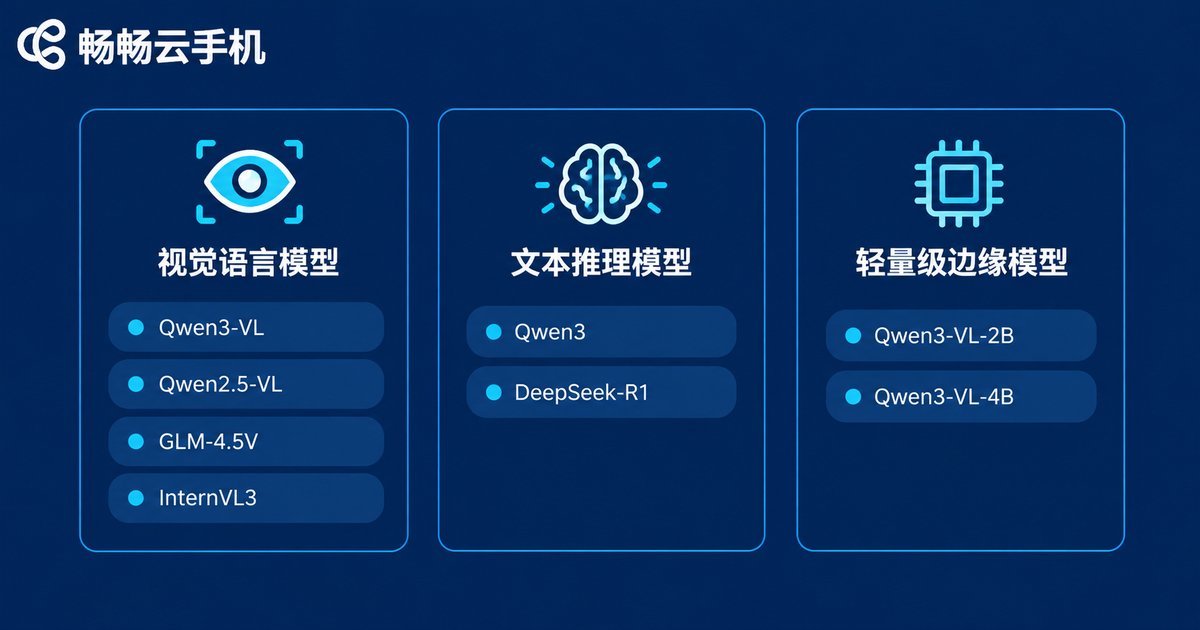
Mainstream cloud phone AI automation frameworks organize model support into three routes:
| Model Type | Representative Models | Role in Automation | Deployment |
|---|---|---|---|
| Vision-language models (VLM) | Qwen3-VL, Qwen2.5-VL, GLM-4.5V, InternVL3 | Understanding screenshots, locating elements, deciding taps | Cloud API or self-hosted |
| Text reasoning models | Qwen3, DeepSeek-R1, GLM series | Task decomposition, multi-step planning, intent recognition | Cloud API or self-hosted |
| Lightweight edge models | Qwen3-VL-2B/4B and other small variants | Low-latency local real-time inference | Local GPU or edge devices |
The VLM is the eyes of automation, and the reasoning model is the brain; the two can be combined so the VLM handles perception while the reasoning model handles planning. If your tasks are repetitive operations inside a single app, one Qwen3-VL is enough. For complex cross-app workflows (for example “open the app → search → compare prices → place the order”), running a VLM together with a reasoning model is recommended.
3. Why Qwen3-VL Is a Top Pick for Cloud Phone Automation
1. Native GUI understanding: Qwen3-VL is specifically optimized for UI screenshots and can output bounding-box coordinates directly. Tap localization needs no extra OCR or object-detection model, which means a shorter pipeline and fewer failure points.
2. Strength in Chinese scenarios: UI copy, button semantics, and colloquial instructions on Chinese apps (such as “like this video and save it to favorites”) are all in Chinese, and the Qwen family understands Chinese intent noticeably better.
3. Full size range, flexible deployment: Open-source versions span from 2B and 4B up to 235B. Short on VRAM? Run a smaller size. Chasing accuracy? Go bigger. You can also simply call the cloud API, keeping the barrier to entry low.
4. Stable structured output: Automation frameworks require actions to be returned in strict JSON format. Qwen3-VL is reliable in instruction following and format stability, which markedly reduces task interruptions caused by parse failures.
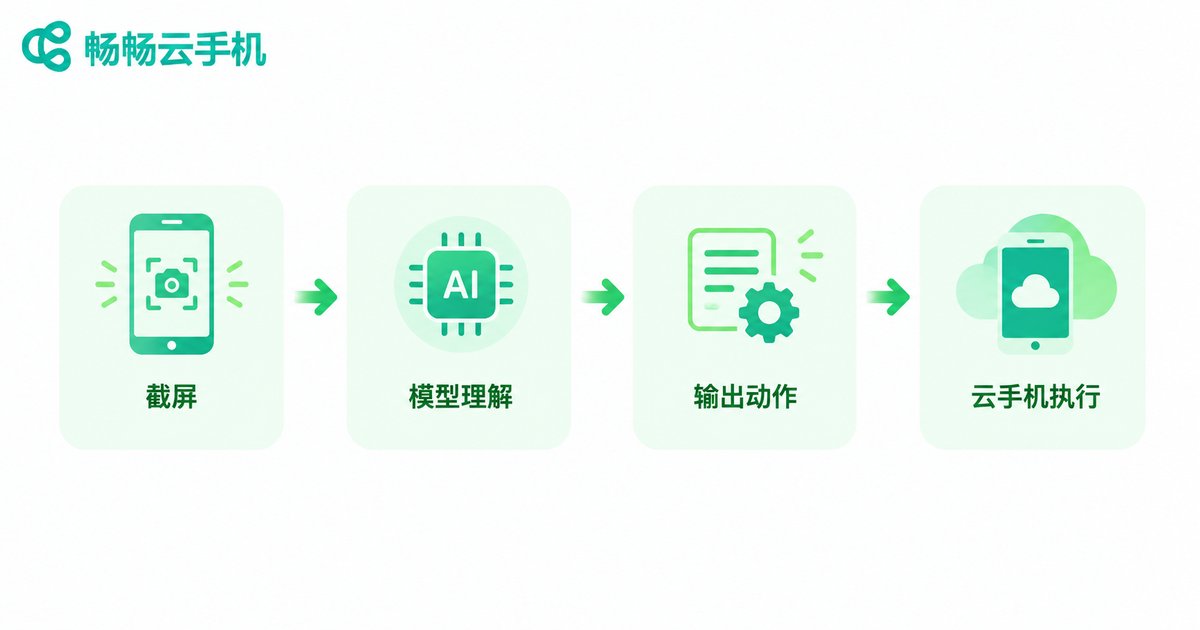
4. Qwen3-VL Integration in Practice: A Four-Step Loop from Screenshot to Action
The minimal Python example below shows the flow: capture the cloud phone screen → Base64 encode → call Qwen3-VL → parse the action → execute on the cloud phone.
import base64, json, requests

API = 'https://dashscope.aliyuncs.com/compatible-mode/v1/chat/completions'
KEY = 'your-api-key'

def get_action(png_path, instruction):
    img = base64.b64encode(open(png_path, 'rb').read()).decode()
    prompt = ('You are an Android automation assistant. Look at the screenshot, follow the user instruction, '
              'and output only one JSON object containing action (tap/swipe/input/back) plus coordinates or text. No extra explanation.')
    body = {
        'model': 'qwen3-vl-plus',
        'messages': [{'role': 'user', 'content': [
            {'type': 'image_url', 'image_url': {'url': 'data:image/png;base64,' + img}},
            {'type': 'text', 'text': prompt + ' User instruction: ' + instruction}
        ]}]
    }
    r = requests.post(API, json=body, headers={'Authorization': 'Bearer ' + KEY})
    return json.loads(r.json()['choices'][0]['message']['content'])

action = get_action('screen.png', 'open display brightness in Settings')
# The parsed result looks like: {'action': 'tap', 'x': 540, 'y': 1200}
# Send the coordinates via ADB or the cloud phone control API, then go back to step one and loop
For production use, add three more pieces: an action executor (translating tap/swipe/input into commands the cloud phone can run), loop and stop conditions (stop when the task is done or a maximum step count is reached), and fallback handling (retry or degrade automatically when model output fails to parse). With these solid, automation tasks can run unattended for long hours.
5. How Intent Recognition Works: Turning One Sentence into an Executable Action Sequence
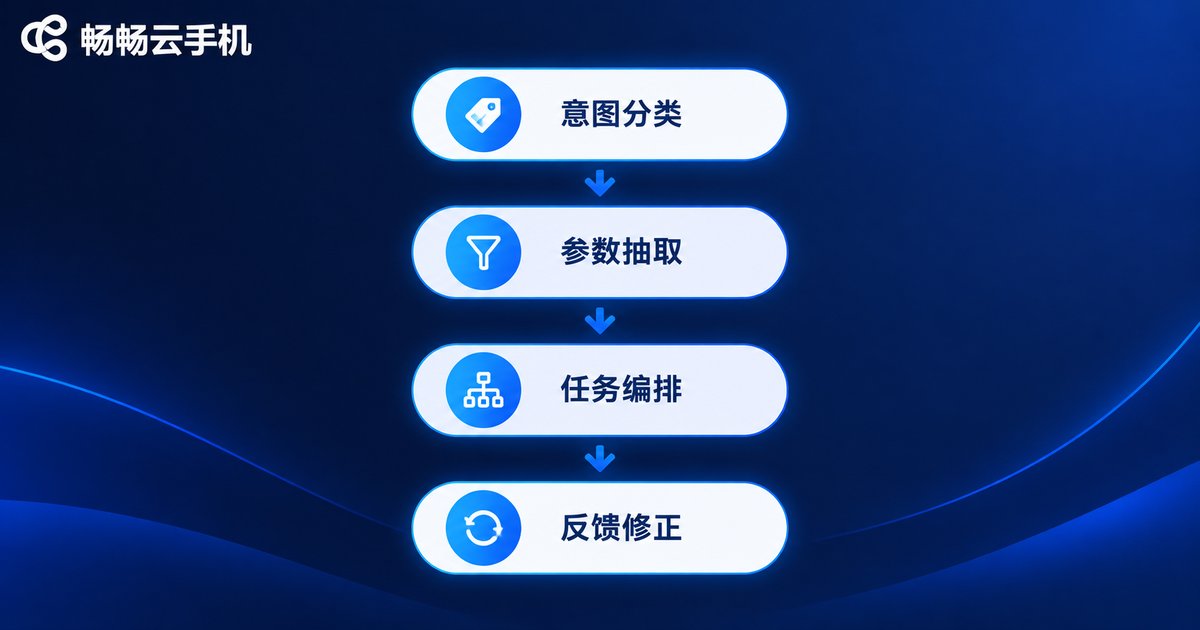
Users typically type a natural-language request such as “sign in for me at 8 a.m. every day”. The processing pipeline has four layers:
Layer 1 — Intent classification: decide which task family the request belongs to: sign-in, posting, data collection, or message reply. In practice, a prompt asks the model to output a fixed intent label; with few-shot examples, accuracy can be very high.
Layer 2 — Parameter extraction: fill key information such as time, target, and frequency into templates. “Every morning at eight” maps to a cron-style schedule, while “sign in for points” maps to the target app and page path.
Layer 3 — Task orchestration: expand intent plus parameters into an action sequence, forming a plan like “launch app → locate the sign-in button → tap → screenshot to confirm → close app”. Complex tasks are further decomposed into state machines with branches and retries.
Layer 4 — Feedback correction: after each step, the new screenshot goes back to the model to verify whether the action took effect. If an ad pops up, close it first; if the button is missing, scroll and search again. This closed loop is exactly why AI automation tolerates UI changes far better than legacy scripts.
A practical intent-recognition prompt skeleton looks like this:
system_prompt = '''You are a phone task planner. Available intents: sign_in, post, collect, reply.
First output intent, then params (app, time, target, etc.), then a list of steps.
If information is missing, output intent as clarify and state what the user should provide.'''
6. Landing It on ccloudphone: A Stable Environment Is the Foundation of Automation
No matter how smart the model is, it needs an always-online, clean-state phone to execute actions. ccloudphone provides cloud-based real Android environments, supports running many cloud phones in parallel, and keeps tasks alive even when your local computer is shut down. Combined with the AI automation framework above, you get round-the-clock operation: the model plans, the cloud phones execute, and you review the results. In multi-instance scenarios, the same intent-recognition pipeline can run across many cloud phones to scale task throughput horizontally. For environment details and access options, visit the official ccloudphone website.
FAQ
Q: Can I use cloud phone AI automation without coding skills?
Yes. Many frameworks now offer low-code or conversational configuration — describe the task in plain language and the framework handles intent recognition and action orchestration. Coding is mainly for advanced users who want to customize executors.
Q: Do I have to buy a GPU to run Qwen3-VL?
Not necessarily. Small open-source versions can be self-hosted, or you can simply call the official API and pay per use. Personal automation workloads are light, so the API route is very affordable; large-scale enterprise concurrency is where self-hosting starts to make sense.
Q: What if intent recognition keeps misunderstanding my request?
Three fixes: add few-shot examples of your business scenarios to the prompt; make vague instructions concrete (change “handle it for me” into “open XX app and sign in”); and enable a clarify mechanism so the model asks follow-up questions when information is missing instead of guessing.
Q: What advantages does a cloud phone have over physical device farms for AI automation?
Cloud phones do not depend on physical hardware, support multi-instance deployment and centralized management, keep running when your local PC is off, and can reset their environment at any time — ideal for long-running background tasks. Physical device farms remain irreplaceable when real SIM cards and sensors are required. Choose based on your business needs.
Q: Can one framework connect to multiple large models at the same time?
Yes, and it is recommended. A common design uses a VLM such as Qwen3-VL for perception and a reasoning model for planning and intent recognition; simple tasks go to small models to save cost, while complex tasks automatically switch to larger models — dynamic routing by task difficulty.


