
What Is a Cloud Phone AI Agent? Automate Cross-App Tasks in the Cloud with Natural Language
What Exactly Is a Cloud Phone AI Agent?
In simple terms, a cloud phone AI Agent is an intelligent assistant running on a cloud-based Android phone. You tell it what to do in plain natural language, and it understands your intent, breaks the goal into steps, opens the right apps, taps, types, and submits — completing the entire task automatically in the cloud.
Traditional cloud phones solve the problem of moving Android into the cloud: apps stay online around the clock without consuming your local resources. An AI Agent takes this one step further, turning the cloud phone from passive hosting into active execution. Instead of tapping the screen step by step, you simply describe the outcome you want.
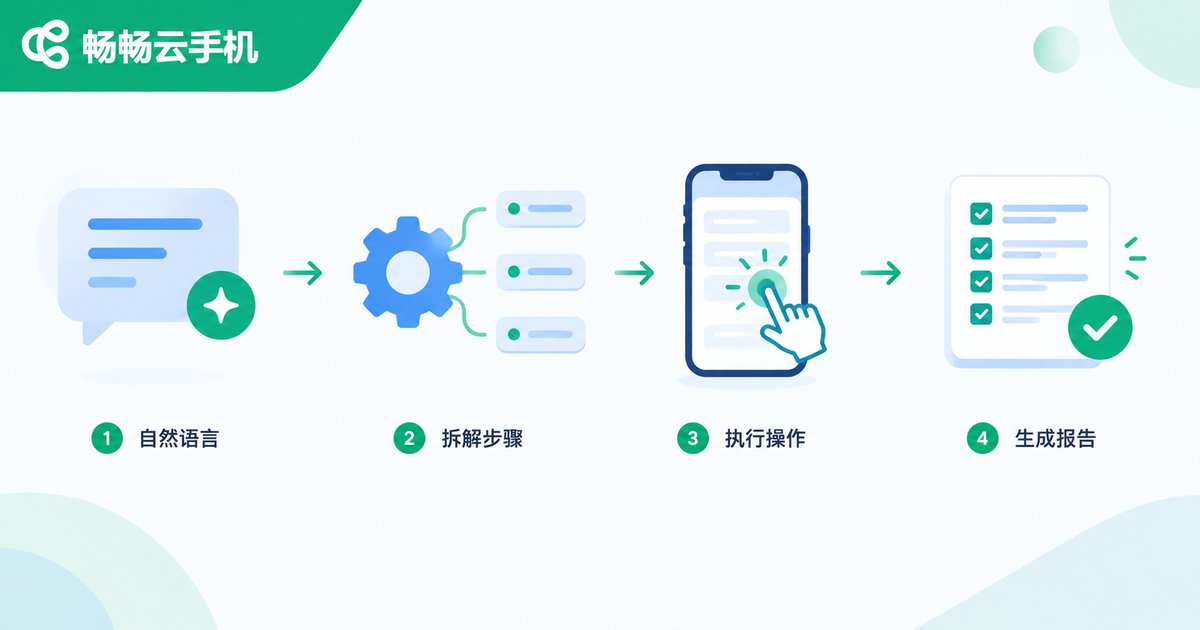
How Natural Language Becomes Automated Actions
A single instruction such as reply to all unanswered messages every morning at eight roughly goes through four stages:
1. Intent understanding: parsing your natural language to clarify the goal and constraints;
2. Step decomposition: breaking the goal into concrete actions such as opening apps, locating screens, and tapping controls;
3. Cloud execution: running each action inside the cloud phone and handling pop-ups or exceptions automatically;
4. Result reporting: summarizing outcomes after completion, with failed steps retried or flagged for your review.
Because the whole workflow runs in the cloud, it does not depend on your local phone being on — even if your phone is powered off in your pocket, tasks in the cloud phone still execute on schedule.
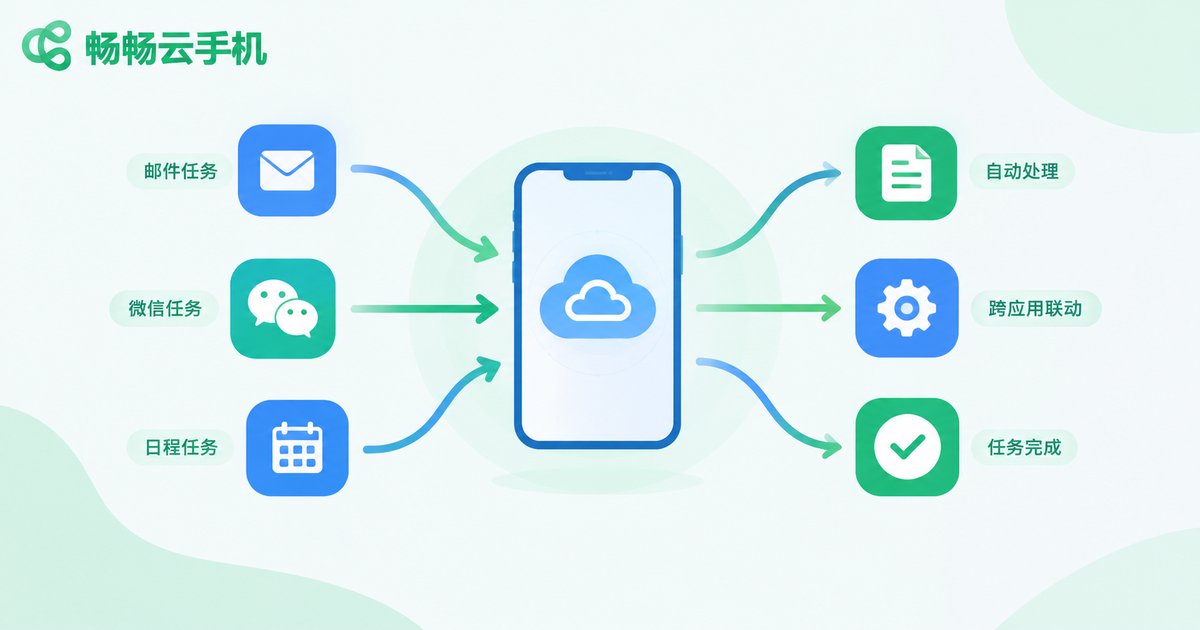
Cross-App Tasks: Where AI Agents Deliver Real Value
Automation within a single app is nothing new. The hard part is cross-app work: one task often requires relaying across multiple apps. For example:
Content distribution: prepare material in one app, then automatically switch to other platforms to publish;
Information aggregation: open multiple news or market apps on a schedule and compile key content into one digest;
E-commerce operations: listing, repricing, and replying to customers across several back-office apps;
Gaming and daily idle tasks: check-ins, daily quests, and reward claims completed automatically on plan.
Doing this manually means constant app switching and copy-pasting — time-consuming and error-prone. Hand it to a cloud phone AI Agent and it becomes a single instruction.
| Dimension | Manual Operation | Cloud Phone AI Agent |
|---|---|---|
| Execution | Manual step-by-step tapping | One natural language instruction |
| Availability | Depends on local phone being on | Cloud online 24/7 |
| Cross-app switching | Frequent switching, error-prone | Automatic handoff |
| Bulk tasks | One device at a time | Parallel across cloud phones |
| Local resource usage | High | Nearly zero |
Why the Cloud Phone Is the Ideal Home for AI Agents
An AI Agent needs an Android device that is always online, stable, and easy to replicate at scale — exactly what cloud phones are built for. Cloud phones run in data centers with uninterrupted power and network connectivity, so tasks never stop because of a dead battery or a powered-off phone. Each cloud phone is an isolated environment, ideal for multiple accounts and parallel tasks. Your local phone only sends instructions and reviews results, while all the heavy lifting happens in the cloud.
Run Your Cloud Automation on ccloudphone
If you want to experience cloud-based automation, ccloudphone is worth considering. It provides a cloud Android environment where apps can stay online around the clock without draining your local device. You can manage your cloud phones anytime via the web or the client, handing long-running tasks to the cloud while your local phone stays light and carefree.
Paired with AI Agent tools that support automation, ccloudphone can act as your around-the-clock cloud executor: you send the instruction, the task completes itself inside the cloud phone, and you simply review the results. For the latest plans and features, please refer to the official ccloudphone website.
FAQ
Q: Do I need coding skills to use a cloud phone AI Agent?
No. Its core appeal is natural language driven automation — describe the task the way you would speak to a person, no code or scripts required.
Q: Will tasks still run if my local phone is off?
Yes. Tasks run in the cloud. As long as the cloud phone is online, your local device being off or offline makes no difference.
Q: Is cross-app automation safe?
A cloud phone is an isolated environment, keeping account data separate from your local phone. Choose a reputable service, keep your credentials safe, and test sensitive workflows on a small scale first.
Q: Can one cloud phone run multiple automation tasks at once?
Tasks can be queued or run in parallel depending on the tool and cloud phone configuration; for multi-account scenarios, prepare multiple cloud phones.
Q: Which devices can access ccloudphone?
ccloudphone provides a cloud Android environment accessible via the web and clients; check the official website for the current list of supported platforms.


