
How Does Cloud Phone AFK Work? Cloud Background Running Explained
Where Exactly Does Cloud Phone AFK Happen?
When people first hear about cloud phone AFK (idle farming), the usual question is: if the phone is not in my hand, can games and apps really keep running? The answer is yes. The essence of cloud phone AFK is moving the entire Android system into a cloud data center — your apps do not run on the device in your hand, but on a cloud Android instance inside a server rack. Your local phone is just a remote control and a display.
The Core Principle: Apps Run on Cloud Android Instances
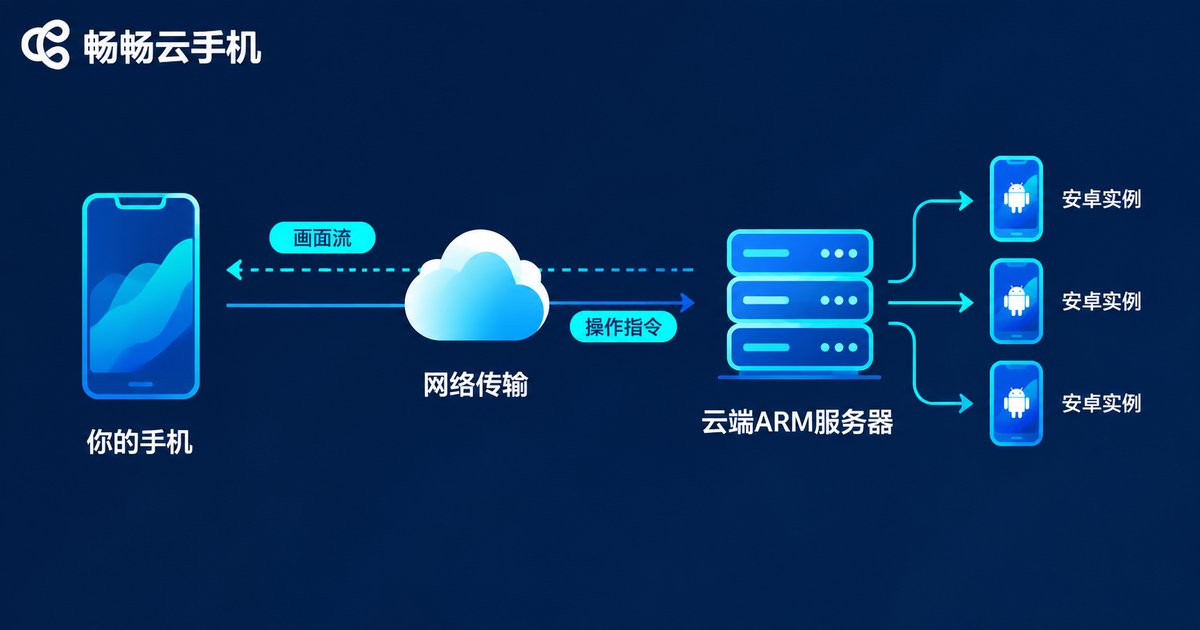
The provider deploys large numbers of ARM-based servers in its data centers, then uses virtualization to slice each physical server into multiple isolated Android instances. Every instance runs a complete Android system with its own device identity, so the experience feels almost identical to a real phone.
When you connect to a cloud phone, the instance's screen is encoded into a live video stream and sent to you, while your touch commands are relayed back to the cloud. It works like a remote desktop, specially optimized for Android and mobile networks to keep latency low.
Why Tasks Keep Running After You Log Off
This is the core value of cloud AFK. Because app processes, game logic and scheduled tasks all happen on the cloud server, your local device is merely a viewing window. Once your character is parked in a dungeon with auto-battle on, you can close the app, lock your screen or even power off your phone — the cloud instance keeps fighting, looting and clearing dailies. Log back in from any device the next day and your rewards are settled as usual. Local network drops and device changes never interrupt the cloud side.
The Complete Pipeline of Cloud Background Running
Step 1: install and set up the target app inside your cloud phone, for example enabling auto-battle or scheduled tasks. Step 2: once the task loop is running, disconnect your local session. Step 3: the cloud instance keeps running — rendering, computing and syncing data all happen in the data center. Step 4: reconnect from any phone or PC anytime to check progress and rewards.
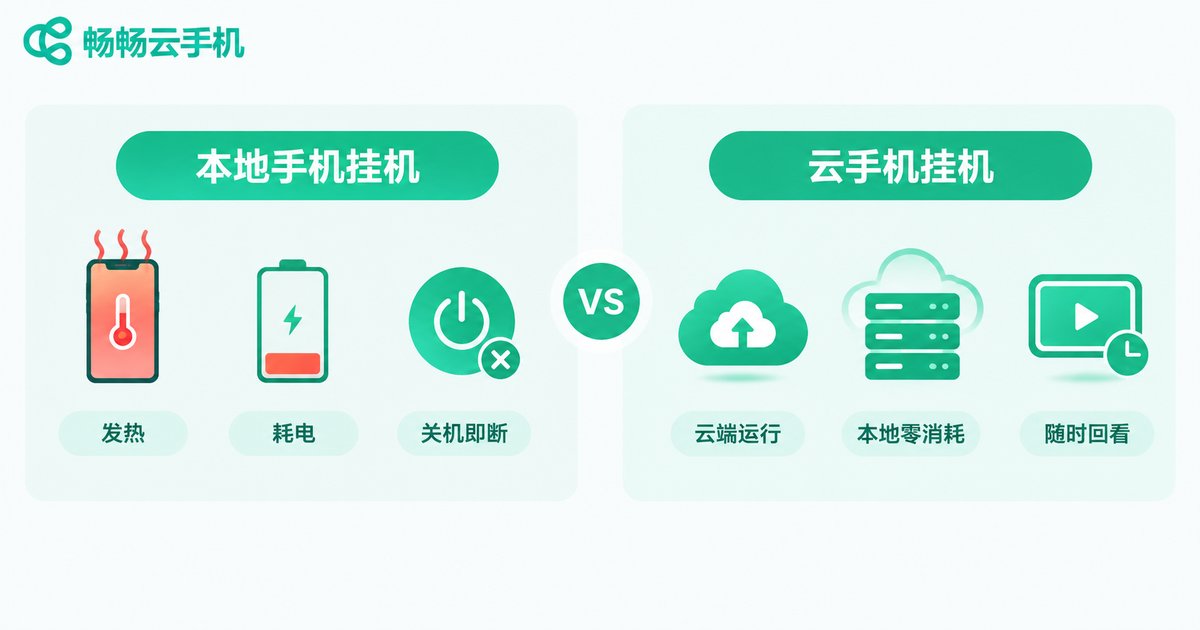
Here is how local AFK compares with cloud phone AFK:
| Item | Local Phone AFK | Cloud Phone AFK |
|---|---|---|
| Where it runs | Your own device | Cloud Android instance |
| Local power off / offline | Tasks stop | Cloud keeps running |
| Heat and battery | Heavy load, hot and draining | Near-zero local cost |
| Number of sessions | Limited by one device | Manage many cloud phones |
| Device wear | Battery and hardware aging | Zero local wear |
What Keeps AFK Sessions Stable?
Long, stable sessions rely on data-center-grade infrastructure rather than luck: redundant power and multi-line networks that are far more reliable than home broadband; instance watchdogs that automatically restart or migrate failed instances to minimize downtime; true background execution that never depends on your screen; and unified multi-device management so one console watches every cloud phone at once.
Which Scenarios Fit Cloud Phone AFK Best?
Daily quests and resource farming, check-ins and event rewards, apps that must stay online for long periods, centralized multi-account management — anything that needs to stay online but does not need you watching belongs in the cloud.

Put Your AFK in the Cloud with ChangChang Cloud Phone
For a hassle-free start, try ChangChang Cloud Phone. It offers cloud Android instances you can use right after signing up, with unified management of multiple cloud phones — a solid fit for AFK players and multi-account users. For available configurations and plans, please refer to the official ChangChang Cloud Phone website.
Hand the repetitive online hours to the cloud and give your time back to real life — that is the biggest change cloud phone AFK brings.
FAQ
Q: Do I need to keep my local phone on during AFK?
No. Tasks run on the cloud instance; your local device can be locked, closed or powered off. Just log back in whenever you want to check progress.
Q: Does AFK consume my mobile data?
Only while you are connected and streaming the screen. Once you disconnect, the cloud keeps running and no local data is used.
Q: Do tasks keep running after the cloud phone is powered off?
Keep the instance online while AFK — powering an instance off pauses its computing. Your data and progress are stored in cloud storage, so everything resumes after the next boot. For long sessions, keep the instance running and simply disconnect locally.
Q: How many accounts can one cloud phone handle?
Each instance is one isolated Android environment, so one main account per instance is the most stable. Open multiple cloud phones for multi-account management.
Q: Is cloud phone AFK safe?
Yes, with a reputable provider. Instances are isolated from each other and account data stays in the cloud. Always follow the terms of service of your games and apps.


