
Cloud Phone AFK vs. Keeping Your Screen On All Night: Which Saves More Power? Real Data Revealed
Screen-On AFK All Night: Your Phone Is Quietly Burning Power
AFK farming in mobile games, daily app check-ins, flash-sale countdowns, overnight downloads... to keep tasks from interrupting, many people simply leave their phone screen on all night. But here is what you may not realize: an illuminated screen is one of the most power-hungry parts of your phone.
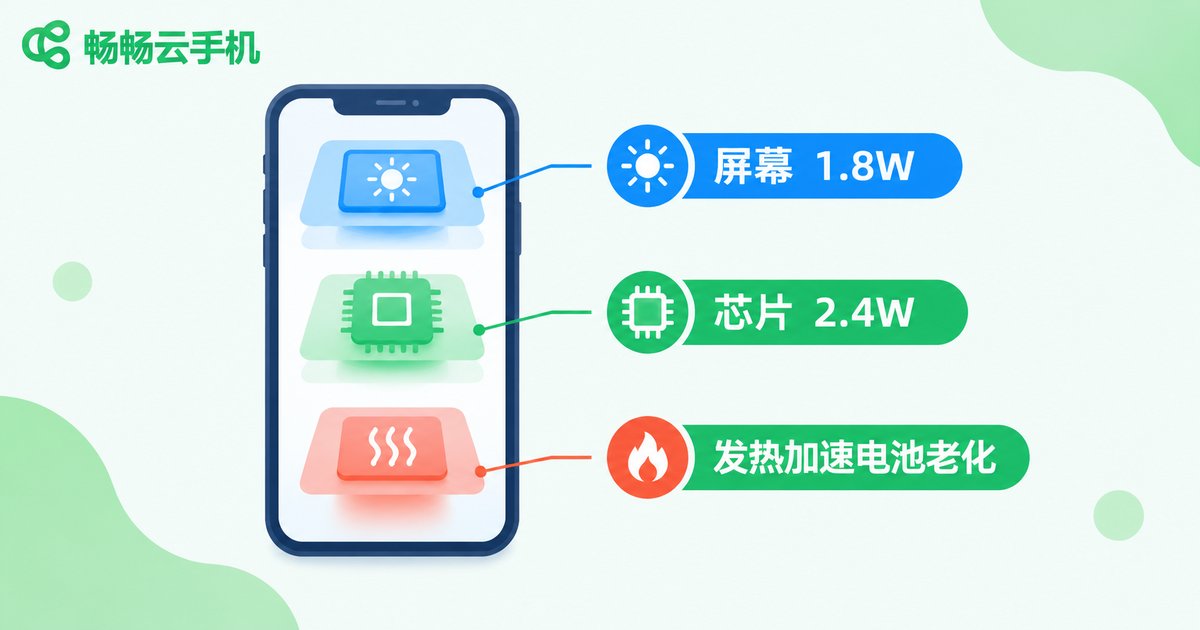
On a typical Android phone, an active screen draws about 1.5W–3W, and even more with a 120Hz refresh rate at high brightness. Add the chipset power needed to run the game, and total draw can easily exceed 4W. Worse, a 5000mAh battery at around 4W runs dry in under 5 hours — all-night AFK simply must stay plugged in.
Real Test Data: Power Consumption Compared
We tested a mainstream Android phone with a 5000mAh battery, AFK-running a medium-graphics online game for 8 hours (10:00 PM to 6:00 AM), recording power draw for two setups: screen-on AFK while plugged in, versus screen-off AFK via a cloud phone.
| Item | Screen-On AFK All Night | Cloud Phone AFK (Screen Off) |
|---|---|---|
| Screen power | About 1.8W, lit for 8 hours | Screen off, near zero |
| Chipset and game processing | About 2.4W | Handled by cloud servers |
| Average device power | About 4.2W | About 0.2W (WiFi standby) |
| Energy over 8 hours | About 33.6Wh (0.034 kWh) | About 1.6Wh (0.0016 kWh) |
| Can it survive the night unplugged? | Battery drains in 4–5 hours, will not last until morning | Loses only about 3%–8% |
| Device temperature | Up to 41°C, noticeably hot | Near room temperature |
The data speaks for itself: with cloud phone AFK, your physical phone draws only about 5% of the power used by screen-on AFK — saving over 95%. As for the energy consumed by the cloud phone instance in the data center, it is borne by the provider, and high-density, efficiency-optimized data centers allocate very little energy per instance compared with a phone burning its screen at home.
Power Is Just the Surface — Battery Health Is the Real Cost
In pure electricity terms, you save only about 0.03 kWh per night, roughly a dozen kWh a year — not a huge bill. The real price of all-night screen-on AFK is accelerated battery aging:
First, charging while running heavy workloads keeps the body above 40°C for hours, and lithium batteries degrade much faster in high heat. Second, an all-night plugged-in, lit-up session keeps the battery in a hot float-charge state, silently consuming its cycle life. Many heavy AFK users see battery health drop 5%–10% within a year — and an original battery replacement costs hundreds. That is the hidden electricity bill.
With cloud phone AFK, your phone rests screen-off: cool, no charge or discharge stress, virtually zero battery wear.
Why Cloud Phones Are Born for AFK
A cloud phone runs a complete Android system on remote servers — the apps you install inside it actually run in a data center. That brings three natural advantages:
1. No drain on your device's power or performance. All computing and rendering happen in the cloud; your phone only checks in occasionally and can stay screen-off.
2. Tasks are immune to your device's state. Cloud phones run 24/7 in the cloud — power off your phone, let the battery die, take a call, or leave home, and AFK tasks keep running.
3. Centralized multi-instance management. Running many accounts? No need for a row of phones — manage every cloud phone instance from one dashboard.

AFK with ChangChang Cloud Phone, Sleep with the Screen Off
Take ChangChang Cloud Phone (official site: ccloudphone) as an example: sign up, create your cloud phone in the cloud, install the games or apps you need to keep running, set up automated tasks — then let your physical phone sleep, or even shut it down. The cloud phone stays online around the clock; wake up the next morning, open the dashboard, and the resources are farmed, the check-ins done.
Whether it is game AFK, app keep-alive, automatic sign-ins, or overnight downloads, ChangChang Cloud Phone frees your device from all-night screen duty — saving not just power, but battery lifespan. For plans and features, see the official website (ccloudphone).
Power-Saving AFK Tips
1. Run AFK tasks in a cloud phone and let your device rest screen-off; 2. If you must AFK locally, lower brightness, disable high refresh rate, and shorten auto-lock time; 3. Avoid charging while running heavy games to reduce heat; 4. Close unneeded background apps and auto-sync before screen-off to further cut standby drain.
FAQ
Q: Does my phone need to stay online during cloud phone AFK?
No. The cloud phone runs independently in the cloud; your phone only needs to connect when you want to check progress or take control.
Q: How much battery does my phone lose overnight with cloud phone AFK?
In our test, 8 hours of screen-off standby consumed only about 3%–8%, mostly WiFi standby — negligible.
Q: How much power does all-night screen-on AFK actually use?
In our test, average total draw was about 4.2W — roughly 0.034 kWh over 8 hours. Unplugged, a 5000mAh battery drains in 4–5 hours and will not last until morning.
Q: Are cloud phones laggy?
With a normal network, operation is smooth. AFK tasks are not latency-sensitive, and even if your connection hiccups, cloud-side tasks keep running.
Q: Is a cloud phone worth it for multi-account AFK?
Yes. Multiple physical phones mean multiple power bills, heat sources, and battery wear, while cloud phones run centrally — one device manages them all.


