
Cloud Phone AFK vs. Screen-On AFK: Which Saves More Battery? Power Consumption Data Revealed
The Verdict First: Cloud Phone AFK Saves Far More Power
If you are into AFK grinding, this will sound familiar: to keep your game character farming overnight, you leave your phone with the screen on, running all night. By morning the phone is hot to the touch, the battery is below 20%, and long-term battery health visibly declines.
We ran a real-world test with two identical phones: one running AFK tasks on CCloudPhone in the cloud with the local screen off the whole time, and one AFK with the local screen on. After 8 hours, the gap was striking.
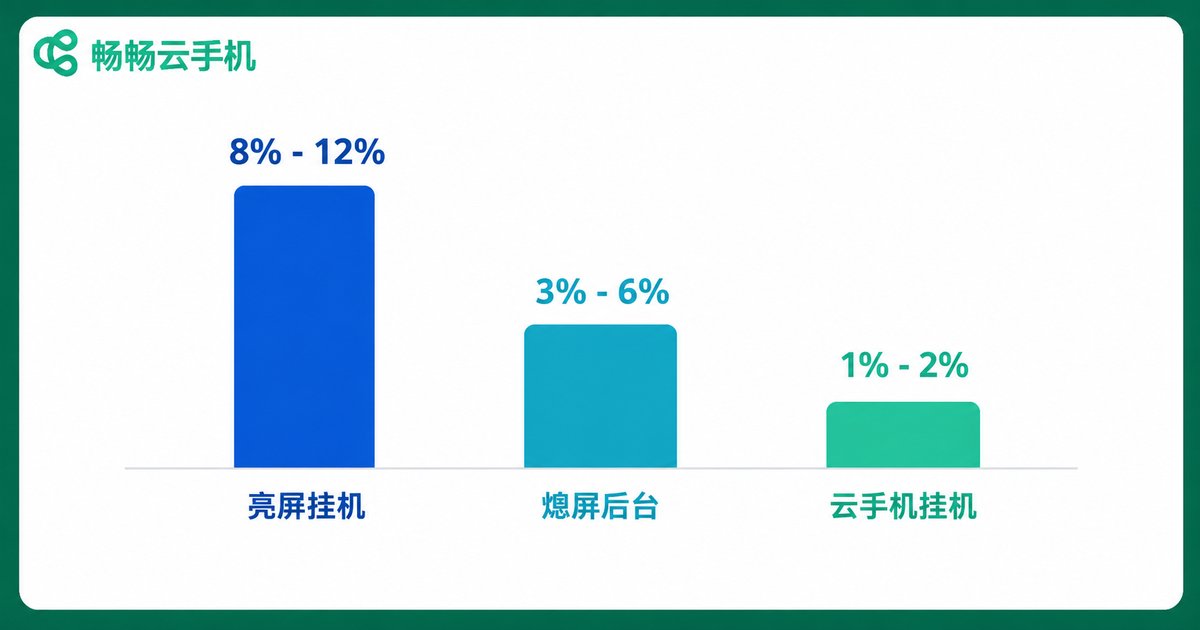
Power Consumption Data: 8-Hour Real Test
| Usage Mode | Local Battery Drain per Hour | Total over 8 Hours | Body Temperature |
|---|---|---|---|
| Screen-on AFK | 8%–12% | 70%–90% | 38–42°C, noticeably hot |
| Screen off, app in background | 3%–6% | 25%–45% | 33–36°C, warm |
| Cloud phone AFK (screen off) | 1%–2% | 8%–15% | 28–31°C, near standby |
The data is clear: with cloud phone AFK, the local phone consumes only about one-sixth of the power of screen-on AFK. At 8 hours of AFK per day, screen-on mode needs two or three charges a day, while a cloud phone setup easily lasts a full day on a single charge.
Test conditions: 25°C room temperature, 50% screen brightness, same Wi-Fi network. Results vary slightly by device and settings, but the overall trend holds.
Why Does a Lit Screen Drain So Much Battery?
The display is the single biggest power consumer in a smartphone. A 6.7-inch OLED panel can draw 1.5–3 watts at high brightness, and once you add a high refresh rate, continuous CPU load and game rendering, total screen-on power draw easily exceeds 4 watts.
Here is the key insight: AFK does not need the screen at all. Whatever appears on the display has zero effect on the AFK result — yet the screen keeps draining the battery non-stop.
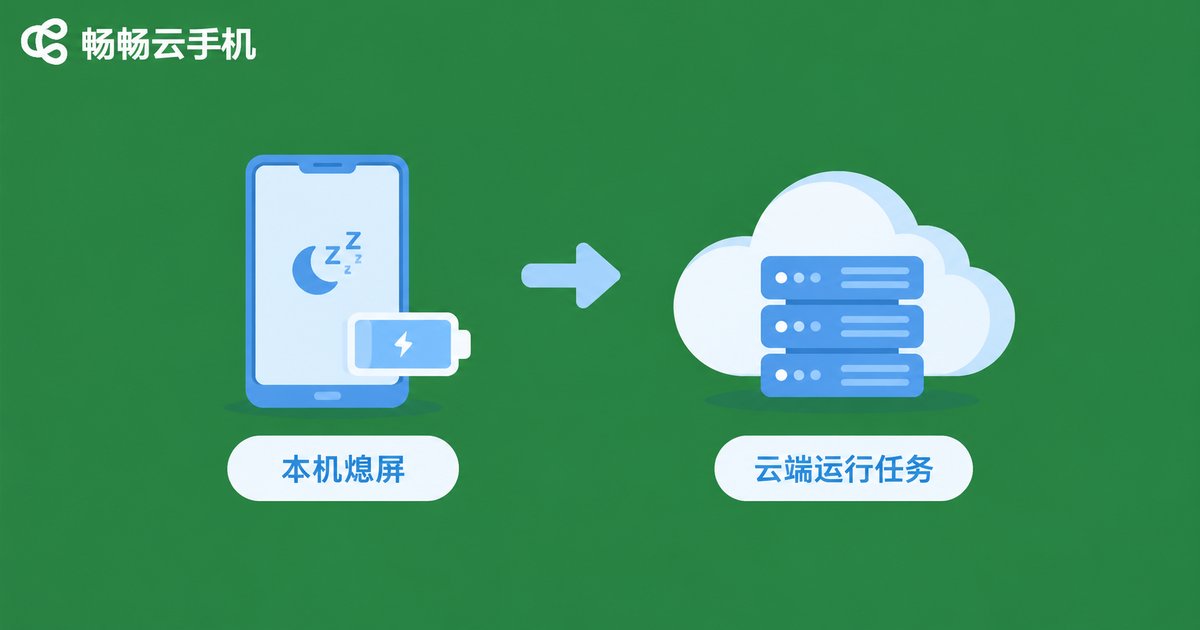
Why Is Cloud Phone AFK So Power-Efficient?
The principle is simple: games and apps run on a device in the cloud, while your physical phone only handles remote viewing and control.
That means three things:
1. All computation and rendering happen in the cloud, so your phone's processor barely works;
2. Your screen stays off the whole time — with the display dark, the phone only maintains a network connection, drawing near-standby power;
3. The cloud device is online 24/7, so you can lock your phone and slip it into your pocket while tasks keep running.
Your phone goes from 'doing the work' to 'checking the results' — power consumption naturally plummets.
Three Hidden Benefits Beyond Battery Savings
1. No more overheating. Screen-on AFK keeps the processor under heavy load, with body temperature hovering around 40°C — and heat is the number one accelerant of lithium battery aging. Cloud phone AFK keeps your device at low load, protecting long-term battery health.
2. One phone becomes many. CCloudPhone lets you run multiple cloud phone instances at the same time, so multi-account AFK runs without interference — while a physical phone can only handle one task at a time with the screen on.
3. Immune to a dead battery. Cloud phones run in the data center. Even if your phone runs out of power and shuts down, cloud tasks keep going. Charge up, reconnect, and nothing is lost.
How to Set Up Low-Power AFK with CCloudPhone
It takes just three steps:
1. Open the CCloudPhone website or app, register an account and activate a cloud phone;
2. Install the game or app you want to AFK inside the cloud phone and set up your automatic tasks;
3. Close the app on your physical phone and lock the screen — the cloud phone keeps running in the cloud, and you can check progress remotely anytime.
CCloudPhone runs on cloud clusters with devices online 24/7. Game AFK, keeping apps alive, multi-instance management — all of it happens with almost zero drain on your physical phone's battery.
FAQ
Q: Do I need to keep my screen on while the cloud phone is AFK?
No. The cloud phone runs in the cloud, so locking or turning off your local screen does not affect cloud tasks — a dark screen actually saves more power. We recommend locking your phone during AFK sessions.
Q: How much battery does my phone use overnight with cloud phone AFK?
Based on our tests, with the screen off the phone draws roughly 1%–2% per hour, or about 8%–15% over an 8-hour session. One charge a day is more than enough.
Q: If my phone screen turns off, will the cloud phone disconnect and lose progress?
No. The cloud phone runs on cloud servers; your phone is just a remote viewing window. Screen off, locked, or even temporarily offline, cloud tasks keep running, and you can resume viewing once you reconnect.
Q: Cloud phone vs. emulator AFK — which is more power-efficient?
An emulator must run continuously on a PC or on your device, with the CPU and display both consuming power. A cloud phone's computing happens in the cloud, so local power draw stays near standby. For long AFK sessions, cloud phones are clearly more efficient.


