

2026 Cloud Phone Ad Campaign Management Efficiency: Grouping and Data Organization
Why Ad Campaign Management Needs a Grouping Layer
Once an ad team starts to scale, the same problem shows up: accounts grow faster than people do. Devices, accounts, creatives and reports end up mixed together, and finding one number means opening three spreadsheets while switching accounts means logging in from scratch. That is not an execution problem — it is a missing layer of organization.
In 2026, cloud phones are no longer just a tool for running accounts. More teams treat them as the management foundation for ad campaigns. What separates teams that use them well from the rest is rarely device performance — it is whether accounts and data were grouped first.
Where the Mess Usually Comes From
Mixed accounts: multiple platform accounts logged in on the same device make switching error-prone, and when something breaks it is hard to tell which step caused it.
Scattered creatives: the same creative runs on three platforms and five campaigns, yet there is no single standard for comparing how it performed.
Data you cannot trace back: reports are exported daily, but account and campaign names change every week, so last week's numbers no longer match this week's grouping.
All three share one trait: they are structural problems, not bidding technique problems.
Grouping Is a Unit of Work, Not a Folder
Many teams stop at filing accounts into folders by platform, which is effectively not grouping at all. A grouping that actually works needs three properties:
First, stable boundaries — it should not need rearranging every time a new account is added.
Second, consistent naming — group names should map one-to-one to report fields.
Third, operable as a whole — you can batch start, batch capture and batch sync files in one action.
The third one matters most. The value of grouping ultimately has to land on 'one action affects a whole set of devices'. Otherwise it is just a label for people to look at.
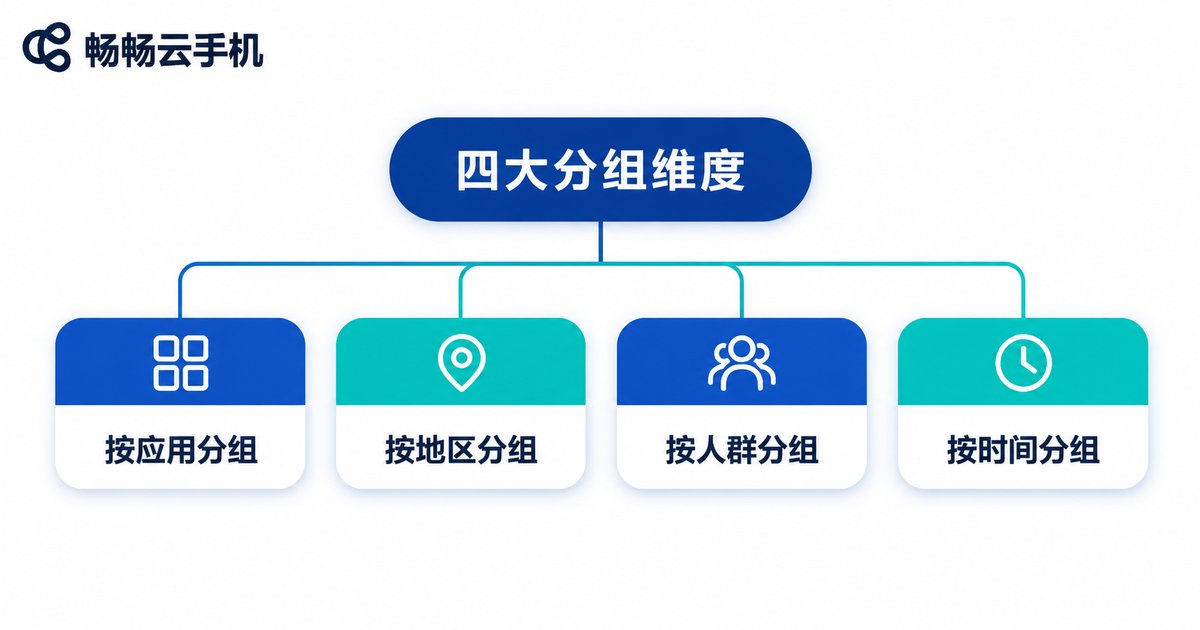
Four Grouping Dimensions That Actually Work
You can use these one at a time or stack them. Start with two and add more once the routine is stable.
1. Group by ad platform
Accounts on the same platform share the same operation path, so switching stays consistent and problems are easier to isolate.
2. Group by account lifecycle
Split new registrations, steady runners and accounts under observation. New accounts need more frequent attention, stable ones can be checked less often — that stops your time from being spread evenly across everything.
3. Group by project or client
Agency teams need this layer most. Clients stay separated, and handovers have clear boundaries.
4. Group by creative and landing page
When one creative set runs across platforms, let the same device group carry it, so conversion data is actually comparable.
One rule of thumb: keep group names under three levels. The deeper the hierarchy, the less anyone wants to maintain it — and the grouping sheet turns into a document nobody reads.
Data Organization: Make Every Group Produce a Comparable Number
Grouping answers 'where things live'; data organization answers 'how to compare'. Fix one weekly sheet and keep only these columns:
| Field | Purpose | Recommended standard |
|---|---|---|
| Group name | Maps to the device group | Identical to the cloud phone group name |
| Account count | Calculate output per account | Actual active count for the week |
| Spend | Cost baseline | Same currency, same settlement day |
| Conversions | Performance baseline | State the attribution window |
| Cost per group | Side-by-side comparison | Spend ÷ conversions |
Keep the sheet small — a table you can finish every day is worth more than a perfect one you abandon. For most teams the problem is not that reports are too simple, it is that there are too many fields and filling stops after three days.
One more trick: bake the group name into your account naming rule, for example a group prefix plus a sequence number. Then any raw export from any platform can be re-aggregated with the same rule — no manual reconciliation.
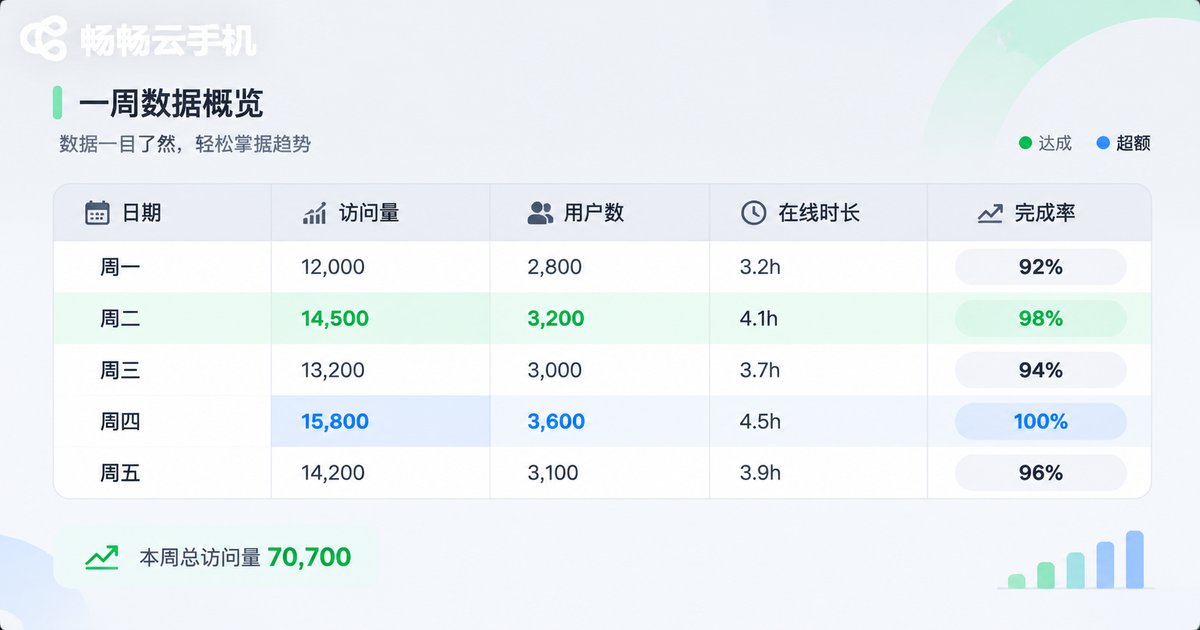
Connecting Groups and Data with ccloudphone
A grouping system only works if you can execute it, and doing it by hand device by device does not scale. ccloudphone runs Android devices in the cloud, with a one-to-one relationship between account and device, grouped management and batch operations — which is exactly the 'unit of work' idea above.
In practice, the low-effort path looks like this:
Create the groups in the cloud phone console first, naming them exactly after the campaigns in your ad platform so there is no translation step.
Then run batch operations per group — install the same set of apps across a batch of new accounts and apply the same environment configuration, instead of repeating it device by device.
Finally export and reconcile per group, putting device groups and campaign data on the same sheet so you can see at a glance which group spends the most and which converts the least.
Because the devices run in the cloud and do not occupy local machines, managing dozens of devices at once is workable at the operational level. What really caps efficiency is still how well you grouped and how clearly you defined your data standards.

Before and After Grouping
| Task | Without grouping | With grouping |
|---|---|---|
| Adding 10 accounts | Configure one by one, easy to miss steps | Batch configure the whole group at once |
| Locating a problem account | Memory and screenshots | Narrow down by group |
| Weekly data rollup | Manual reconciliation, inconsistent standards | Group name is the field — aggregate directly |
| Handing over to a colleague | Verbal explanation | The grouping sheet is the manual |
The gain does not come from any single feature — it comes from doing fewer repeated judgments. Grouping makes that judgment once, and every later action reuses it.
FAQ
Q: How fine-grained should grouping be?
A: Start with what you can maintain. Five to eight groups per person is realistic; beyond that, group names start to blur.
Q: Can I change a group while accounts are running?
A: Yes, but pick a fixed window — Monday, for example — so mid-week renames do not break your data matching.
Q: Should group names and data table fields match?
A: Strongly yes. Inconsistent naming is the number one reason data fails to line up later.
Q: Do small teams need grouping too?
A: Once you pass ten accounts, it pays off. Grouping costs once and keeps paying back.
Q: What does a cloud phone offer over local devices for group management?
A: Devices run in the cloud, groups are an organizational unit at the system level, batch operations and unified configuration are more direct, and you are not limited by local hardware count. ccloudphone is built around exactly this product shape.


