
Do 8-Core 16GB Cloud Phone Specs Matter? A Deep Dive into What Really Causes Lag
8-Core 16GB: Real Muscle or Just Paper Specs?
Open almost any cloud phone product page and you will see 8-core 16GB splashed across the banner. Many users assume: more cores and more RAM must mean a smoother experience. Reality often disagrees — two services both labeled 8-core 16GB can feel completely different, one buttery smooth, the other a slideshow. Specs are the foundation of smoothness, but they are not the whole story. Let's take the real causes of cloud phone lag apart, layer by layer.
First, Understand How Cloud Phone Frames Reach Your Screen
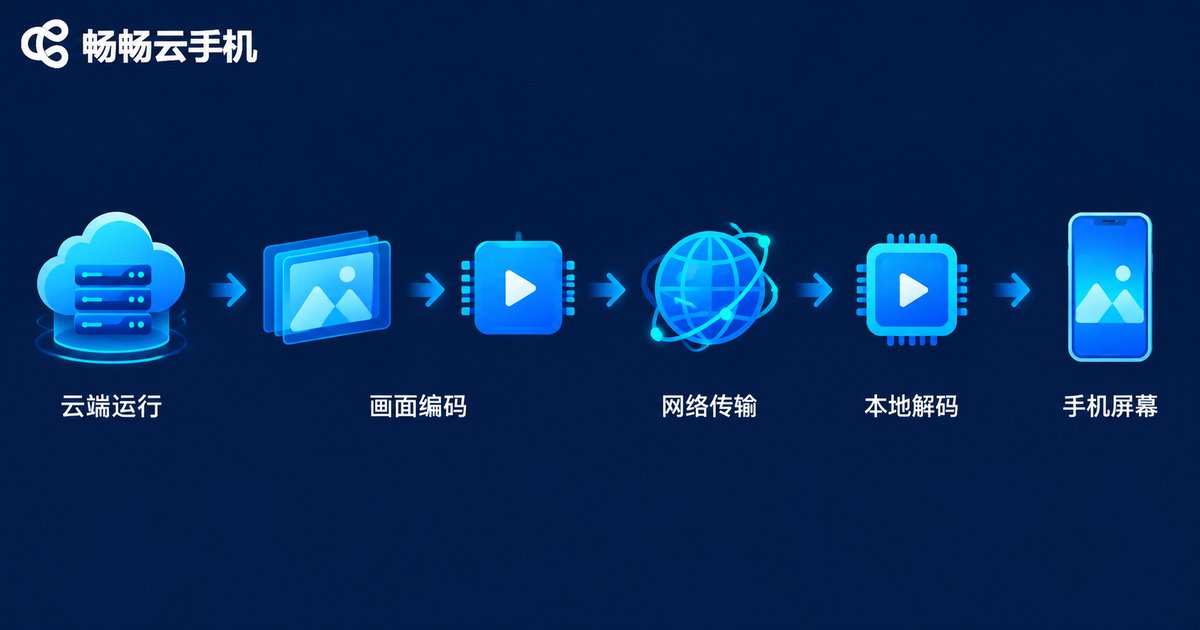
A cloud phone is not the device in your pocket — it is a real Android device running in a remote data center. Every tap you make and every frame you see travels through a complete pipeline:
Cloud execution → Rendering → Video encoding → Network transmission → Local decoding → Your screen
If any link in this chain stumbles, you feel one thing: lag. And 8-core 16GB only guarantees the first link — cloud execution.
The Six Real Causes of Cloud Phone Lag
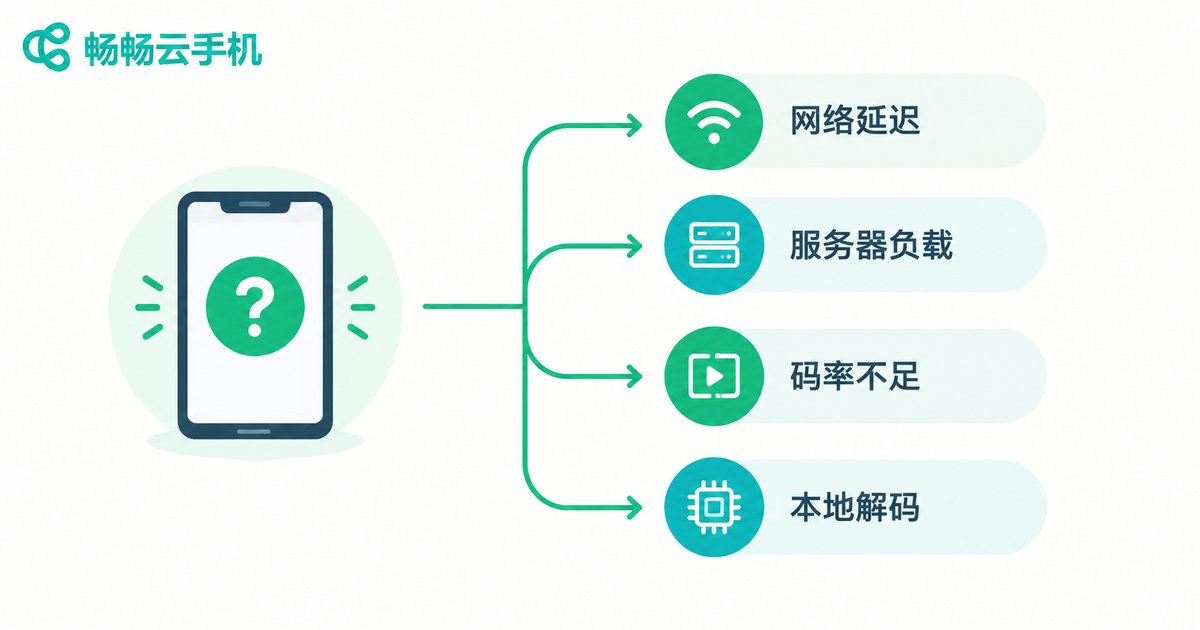
1. Network latency and insufficient bandwidth
The most common culprit. A cloud phone is essentially a live video stream that demands solid upload and download capacity. Weak Wi-Fi, cross-carrier routing, and evening peak congestion all push latency up.
2. Server overselling and high load
If a provider stretches one physical host across too many users, CPU and RAM get contested. The symptom: smooth at off-peak hours, sudden frame drops when everyone logs on.
3. Compressed bitrate — blurry, jumpy video
To save bandwidth, some services aggressively lower the video bitrate. The result is a muddy picture and visible frame skipping during fast scrolling — not a performance issue, but a transmission shortcut.
4. Weak local decoding
Your own phone must decode the incoming stream. Older devices struggle with high-resolution streams, and once they heat up and throttle, lag appears instantly. No cloud upgrade can fix this.
5. Heavy app workloads
Demanding 3D games and dozens of multi-open automation sessions consume resources on a completely different scale. Running heavy tasks on a light configuration guarantees stutter.
6. Distant server nodes
The farther the data center, the longer the round trip. Connecting to a far-away node adds inherent delay and a noticeable remote-control feel.
Self-Check Table: Which Kind of Lag Is Yours?
| Symptom | Most Likely Cause | How to Verify |
|---|---|---|
| Blurry picture, frame skips when scrolling | Bitrate compression or low bandwidth | Run a speed test, try another network |
| Delayed response after tapping | High latency or distant node | Check latency figures, switch nodes |
| Laggy only at peak hours | Server load or overselling | Compare different time slots |
| Local phone heats up, other apps lag too | Weak local decoding | Test with another local device |
| Lag appears as multi-open count rises | Insufficient config or concurrency | Reduce instances step by step |
Beyond Specs: What Really Matters When Choosing a Cloud Phone
Once you understand why lag happens, the buying logic becomes clear. Besides raw numbers like 8-core 16GB, focus on:
Node coverage and scheduling: whether nearby nodes exist and whether traffic is intelligently routed at peak times.
Resource allocation policy: at the same price, how resources are actually allocated matters more than paper specs.
Adaptive encoding: whether bitrate adjusts dynamically to network conditions instead of a one-size-fits-all setting.
Stability and uptime: for automation scenarios, long-term reliability beats occasional peak performance.
Support responsiveness: when something breaks, fast human support defines the real experience.
Respect the Specs, but Trust Real Tests
So, do 8-core 16GB specs matter? Yes — but they are only the entry ticket. True smoothness is the combined result of cloud hardware, network quality, server load, and your local device. If you are shopping for a cloud phone service, consider putting ChangChang Cloud Phone (ccloudphone) on your shortlist; its current configuration plans and node details are subject to what is shown on its official website. The smarter approach: define your scenario first — heavy gaming or multi-account automation — then run a small-scale real test of latency, frame rate, and multi-open performance. Let data decide, not a spec sheet.

FAQ
Q: Is 8-core 16GB always smoother than 4-core 8GB?
Not necessarily. Specs only cap the cloud-side computing power. Poor network or heavily loaded servers will make a high-spec instance stutter, while light usage may run perfectly fine on 4-core 8GB.
Q: I have gigabit broadband — why is my cloud phone still laggy?
Fast bandwidth does not equal low latency. The cause is more likely Wi-Fi instability, cross-carrier routing, server load, or bitrate policy. Use the self-check table above to locate the bottleneck.
Q: How do I tell if the lag comes from my local phone?
If your device also heats up and stutters when playing local HD videos or running other apps, local decoding is the bottleneck. Testing with another device confirms it quickly.
Q: What configuration do I need for multi-open automation?
Multi-open consumes CPU and RAM almost linearly. Estimate per-instance usage times the number of instances, add headroom, and confirm the provider's concurrency policy.
Q: Any quick ways to reduce cloud phone latency?
Use 5GHz Wi-Fi or a more stable connection, choose a geographically closer node, avoid peak evening hours, and close bandwidth-hungry apps on your local device.


