

How Often Should You Reset Cloud Phone Account Environments? Rationale and Practice of the 72-Hour Device Environment Reset Strategy
Why Accounts Get Flagged: It Starts with the Environment
Anyone who runs multiple accounts knows the scenario: an account has been carefully nurtured, then one day it gets throttled, hit with verification requests, or banned outright. The first instinct is to blame the content, but the more frequent culprit hides elsewhere—the device environment. When platforms judge whether an account is trustworthy, they look not only at what you do but at what device, what network, and what state you operate from. Once the environment shows logical contradictions or piles up anomalies, the account quietly gets flagged.
So the question 'how often should a cloud phone account environment be reset' is really asking: how do you keep every account in a clean, independent, internally consistent environment over the long run? This article breaks down the reasoning behind the 72-hour device environment reset strategy—validated by many operating teams—and shows exactly how to execute it.
First, Understand What the Device Environment Actually Includes
Many people assume changing the IP means changing the environment. It goes far beyond that. A complete device environment has at least four layers: the network layer—IP address, geolocation, carrier, and how 'clean' the IP is; the device layer—model, OS version, identifier parameters and other hardware fingerprints; the data layer—app cache, local files, cookies and other usage traces; the behavior layer—login hours, operation rhythm and frequently used in-app paths.
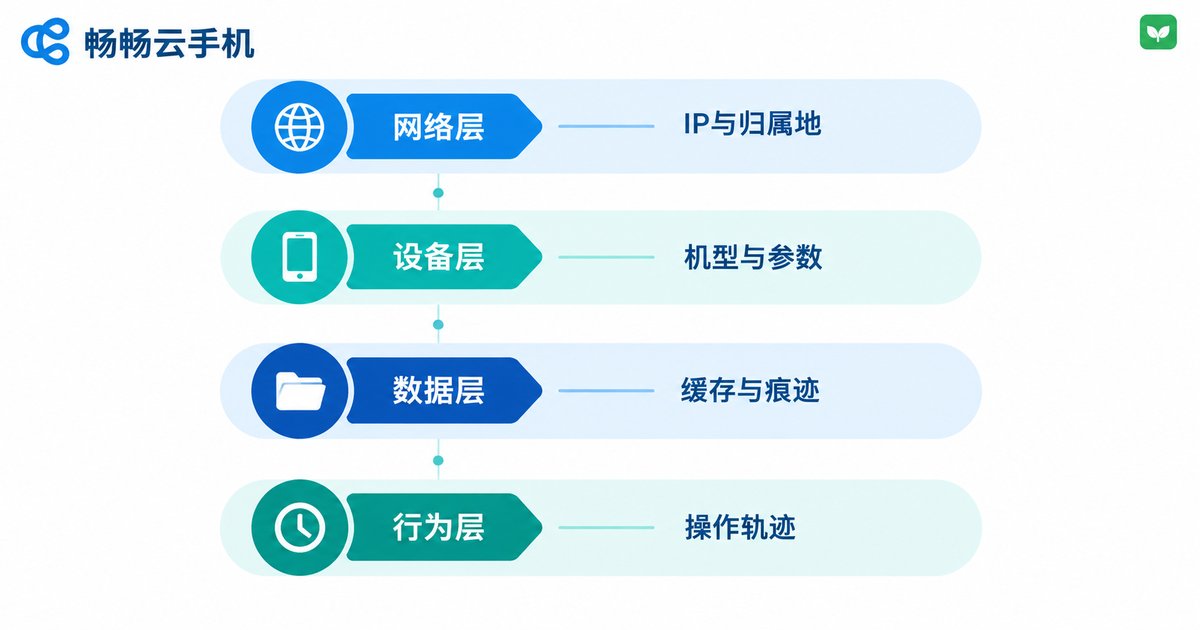
These four layers corroborate one another. If an account has always shown 'one type of device + a Hangzhou IP + evening activity' and suddenly switches to 'a different set of device parameters + a remote-city IP + late-night activity', risk control grows wary even if the content is perfectly normal. The goal of an environment reset is to periodically refresh all four layers into a new, self-consistent combination—not to change just one of them.
Why 72 Hours? Three Reasons Behind the Number
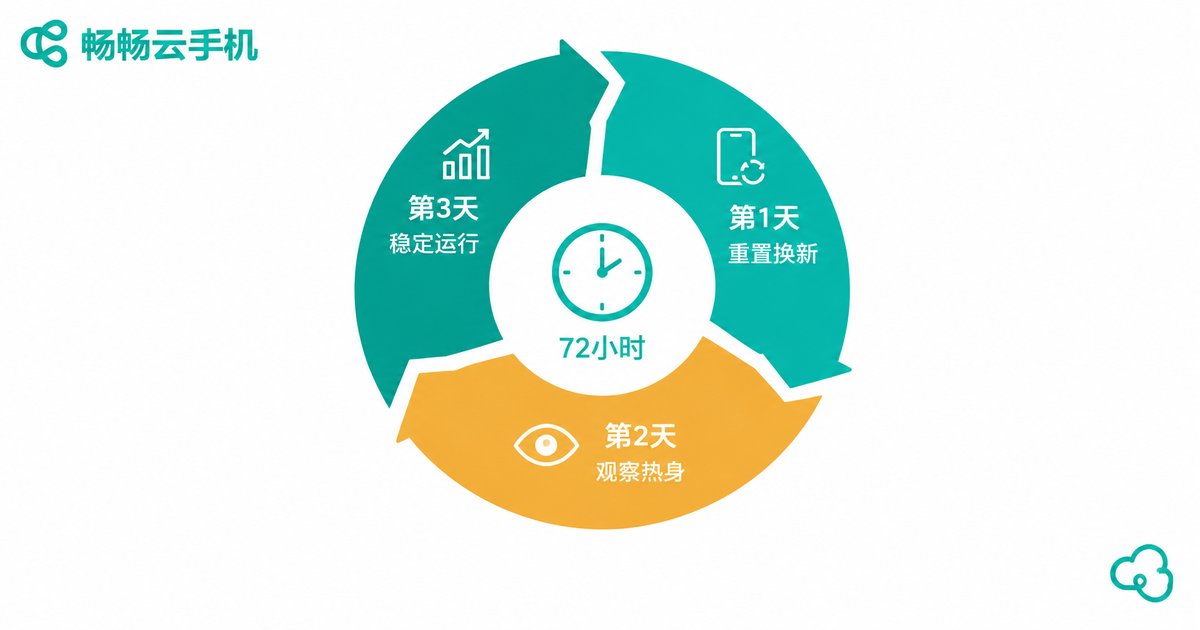
First, platform risk-control behavior analysis typically runs on rolling daily windows. Most risk models review an account's last one to three days of activity to judge whether it behaves abnormally. Resetting every 72 hours covers exactly one full analysis cycle—each time risk control 'looks back', it sees a stable, consistent sample instead of constantly shifting fragments.
Second, resetting too often is itself an anomaly signal. Real people do not change phones every day. If an account swaps device parameters every 24 hours, it starts to look like a hijacked account or scripted batch automation. The reset rhythm should stay near the upper bound of how often real people change devices—for multi-account operations, three days is the balance between keeping an environment 'fresh' and keeping it 'stable'.
Third, environments age. Cache keeps piling up, cookies accumulate, and the tenure on the same IP grows longer, making the account's correlation fingerprints increasingly obvious. A cleanup and rotation around every 72 hours clears that risk before it compounds.
Here is how different reset intervals compare in practice:
| Reset Interval | Environment Stability | Correlation Risk | Best For |
|---|---|---|---|
| 24 hours | Weak, changes too often | Low, but may trigger abnormal-change reviews | Short-term task accounts |
| 72 hours | The balance of stable and fresh | Low, risk does not accumulate | Long-term nurturing, account matrices |
| 7 days | Very stable | Starts accumulating in the later period | Low-frequency accounts |
| Never reset | Stable at first | Keeps compounding over time | Not recommended |
Reset Does Not Mean Wipe: What to Change and What to Keep
The most common beginner mistake is treating 'reset' as 'change everything at once'. Changing too much in one go is itself the most dangerous signal. The right approach is layered handling: change in every 72-hour cycle—device parameters (one-click new device), IP (rotate within the same or adjacent regions), cache and temporary files; keep consistent—account profile, bound information, app versions and the general active time window; handle carefully—login state. For accounts with low weight, log in again after a reset so the 'new device + fresh login' happens naturally instead of dragging along an old session.
In one sentence: the environment can change entirely, but the identity must stay coherent. Risk control does not fear a device change; it fears changes that are chaotic and logically inconsistent.
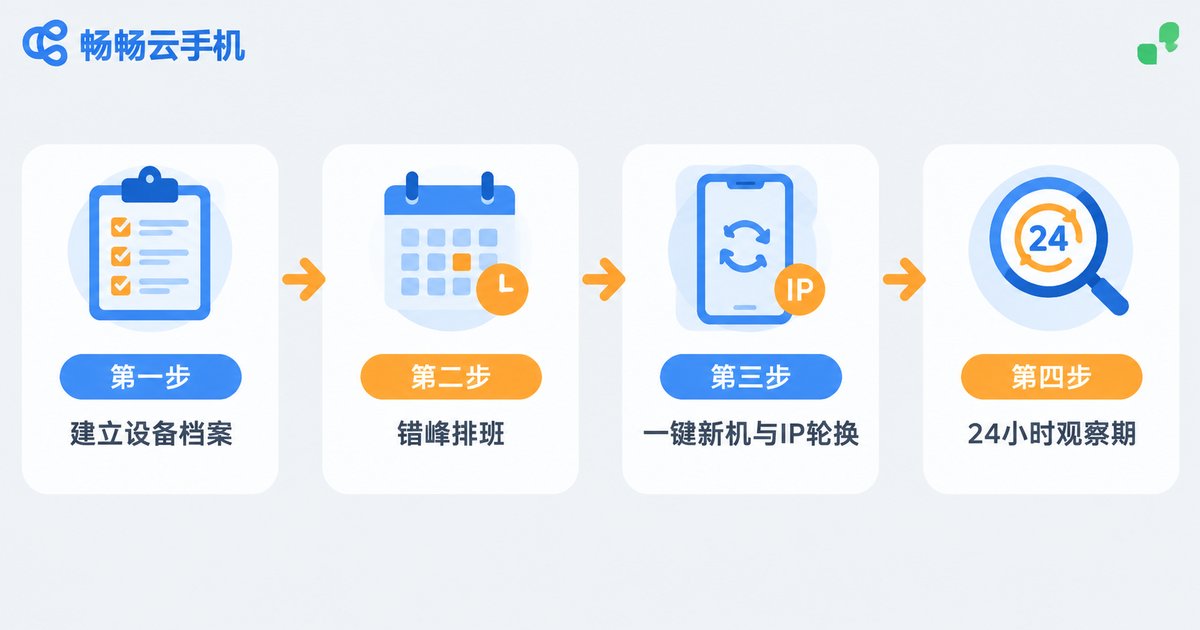
Putting the 72-Hour Strategy into Practice: Four Steps
Step 1: Build a device ledger. Record which account runs on which cloud phone, when it was last reset, and which IP region it uses. Without a ledger, there is no rhythm to speak of.
Step 2: Stagger the schedule—never reset everything together. If you run 20 cloud phones, do not reset them all within the same hour; that tells the platform 'these devices belong together'. Spread resets across different time slots within the three-day window so each device develops its own independent rhythm.
Step 3: Sync one-click new device with IP rotation. Device parameters and IP should change in the same reset to keep the 'new device on a new network' logic consistent; rotate IPs within the same or neighboring regions so an account is not 'in Beijing in the morning and Shenzhen in the afternoon'.
Step 4: Set a 24-hour observation window. On the first day after a reset, keep activity light—browse, tap, a little interaction—letting the new environment warm up before returning to normal intensity on day two. This single habit dramatically reduces post-reset turbulence.
With CCCloudPhone, Resetting Becomes a Routine
The strategy sounds simple; execution is the hard part—manually updating parameters and clearing cache for dozens of devices every three days is more than any team can sustain. That is why we recommend running this playbook on CCCloudPhone (ccloudphone): each cloud phone is an independent Android environment in the cloud and supports one-click device parameter changes, so resetting an environment requires no flashing or new hardware. Combined with batch management and group scheduling, multiple devices can be dispatched on plan, turning the 72-hour reset into a simple shift table. Isolated cloud environments also keep each device's cache and data fully separated, reducing correlation at the source. For teams focused on long-term account nurturing and matrix operations, handing the reset rhythm to the tool while people focus on content and data is the only sustainable way to work.
If account environment management is keeping you up at night, bring the 72-hour reset strategy into your workflow: start with three to five devices for two weeks and compare account health before and after. The results will speak for themselves.

FAQ
Q: Is 72 hours a hard rule? Must I reset exactly every 72 hours?
No. 72 hours is a field-tested balance point; anything within the 3–7 day range works, as long as you keep a fixed rhythm and stagger executions instead of letting intervals drift.
Q: After a reset, do I need to log in again?
It depends on your strategy. For the cleanest environment, log in again after resetting so 'new device + fresh login' occurs naturally. If the account is stable and carries weight, keeping the session is acceptable—just avoid high-frequency actions right after a reset.
Q: Is resetting the device the same as changing the IP?
No. Changing the IP only touches the network layer; device parameters, cache and behavior traces remain, so correlation fingerprints persist. A full environment reset updates device parameters, IP and cache together in a logically consistent way.
Q: How many devices justify the 72-hour reset strategy?
It works even with a handful of devices, but the value is most obvious at scale. Beyond 10 devices, pair it with CCCloudPhone's batch management and group scheduling—otherwise the manual cost of maintaining the rhythm gets steep.
Q: Will a reset wipe out my account?
No. An environment reset changes the 'shell'—device parameters, network and cache. Account profiles, passwords and bound information are untouched. As long as you follow 'change the environment fully, keep the identity coherent', the account itself stays safe.


