

What Is 15-Minute Billing for Cloud Phones? A Flexible Usage Cost Analysis
What Is 15-Minute Billing?
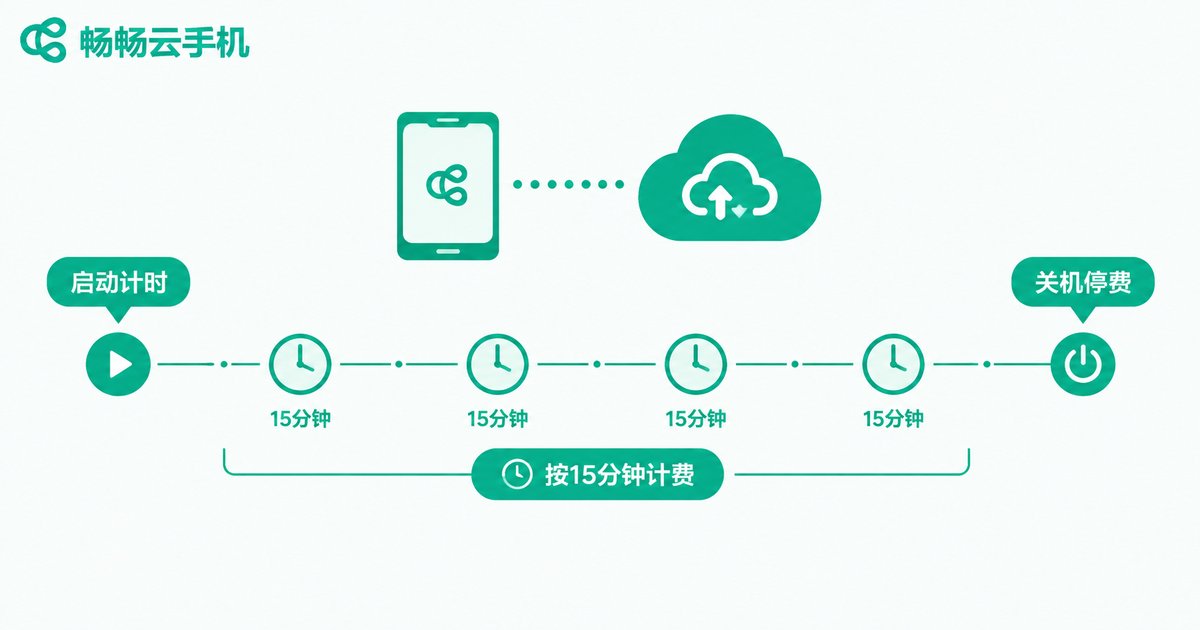
Most people know cloud phones as a monthly subscription: you pay a flat fee for 30 days of access, whether you use it every day or only twice a month. 15-minute billing takes a different approach — time is measured in 15-minute units, and you are charged only for the duration you actually use. No usage, no charge.
Think of it like a taxi meter: you pay for the distance and time you actually travel, rather than hiring the whole car for a day. For people whose usage is irregular, this model naturally saves money.
How Does the Billing Actually Work?
The logic behind this flexible model is usually simple and can be broken into three steps:
Step one, timing starts. The moment you launch your cloud phone, the system begins recording your usage. Step two, rounding up. Any fraction of 15 minutes is typically billed as one full unit — for example, 20 minutes of use is usually settled as 30 minutes (2 units). Step three, shutdown stops the clock. Close the cloud phone when you are done and billing stops immediately; idle time costs nothing.
Note that policies on background idle time vary between products: some bill by online duration, while others offer dedicated idle modes. Always read the billing terms carefully before subscribing so there are no surprises.
Pay-Per-Use vs Monthly Subscription: A Quick Comparison
| Dimension | 15-Minute Billing | Monthly Subscription |
|---|---|---|
| Billing method | By actual usage, in 15-minute units | Flat monthly fee, unlimited within the period |
| Best for | Users with scattered, irregular usage | Heavy users online for long sessions daily |
| Idle cost | Nearly zero — no usage, no charge | Charged whether you use it or not |
| Predictability | Varies with usage; watch your hours | Fixed and easy to budget |
| Flexibility | High — start and stop anytime | Low — tied to the plan cycle |
Cost Estimates for Three User Types
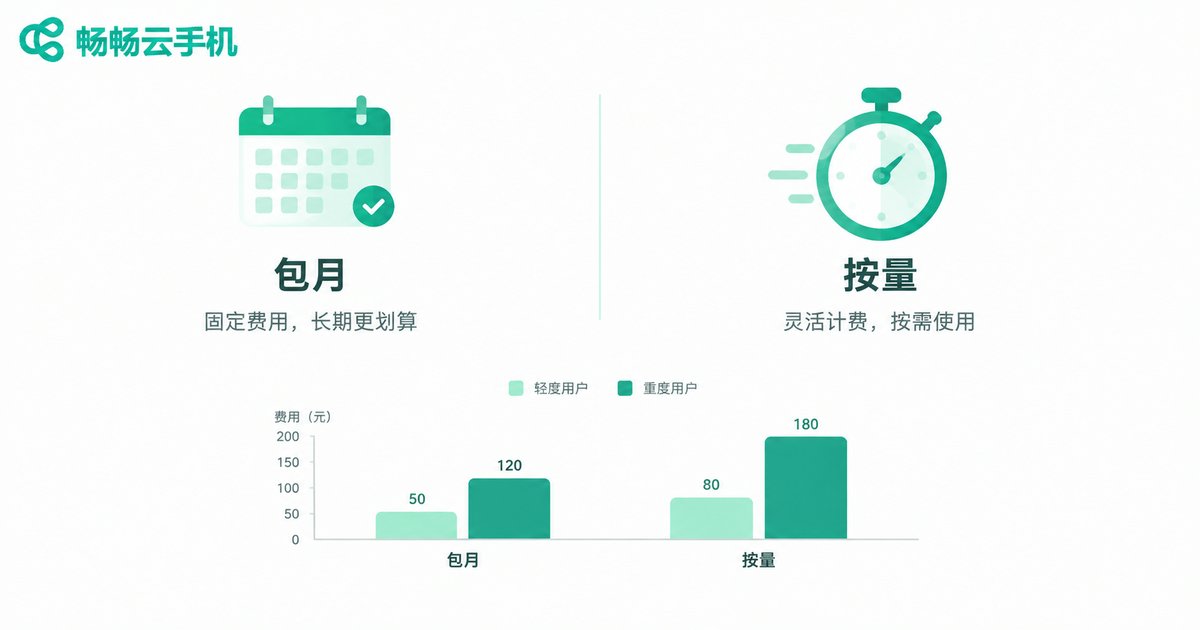
Whether pay-per-use is worth it depends entirely on your usage intensity. Here is a straightforward way to think about it (actual prices vary by platform):
Light users: 2-3 sessions a week of about half an hour, roughly 6 hours a month. With pay-per-use you pay only for those 6 hours; on a monthly plan you would be paying for 720 hours while using less than 1% of it — obvious waste.
Moderate users: 5-8 hours a week, around 30 hours a month. At this level the two options start to converge, so compare actual prices on both sides and pick the cheaper one.
Heavy users: 8+ hours of daily uptime, more than 240 hours a month. At this intensity, monthly plans are almost always the better deal, because the flat fee spreads the per-hour cost extremely thin.
In one sentence: the more scattered your usage, the more pay-per-use saves; the more continuous, the more a monthly plan is worth.
Who Benefits Most from 15-Minute Billing?
Based on the estimates above, these types of users often gain the most from pay-per-use:
Casual gamers: you do not play every day, only an hour or two when the mood strikes — a monthly plan is pure waste. Multi-account users: you occasionally need to switch devices to check messages or claim rewards, and a dozen minutes per session is enough. App testing and short-term needs: run a quick task or verify a feature, then shut down — the cost is negligible. Seasonal users: you use it intensively during events and rarely otherwise, so pay-per-use means never paying for idle periods.
Four Tips to Save Money with Elastic Usage
1. Shut down when done. The biggest enemy of pay-per-use is forgetting to close the instance. Build the habit and your bill shrinks instantly. 2. Batch small tasks. Group check-ins, reward claims, and message replies into a single login session to reduce wasted units. 3. Monthly for peak periods, pay-per-use for quiet ones. The two modes are not mutually exclusive — switch to a monthly plan in busy months and back to pay-per-use in slow ones. 4. Review your usage regularly. Spend one minute a week checking your real hours so you always know whether your current mode is optimal.

ccloudphone: Make Every Minute Count
If you are looking for a cloud phone with flexible billing that works on demand, check out ccloudphone (official site: ccloudphone.com). ccloudphone offers multiple billing options — stable plans for long-term use as well as flexible on-demand options — so you can choose based on your real usage and never pay for idle time. Whether you are a light player who logs in occasionally or a user juggling multiple devices, there is a usage pattern that fits your rhythm.
Rather than paying for hours you never use, let the billing model follow your habits. Visit the ccloudphone website, run the numbers, and see which mode suits you best — your wallet will thank you.
FAQ
Q: With 15-minute billing, do I pay for a full unit even if I only use 5 minutes?
Usually yes. This model generally uses 15 minutes as the smallest billing unit, and any fraction is rounded up to one unit. To minimize rounding waste, try to batch your tasks into fewer sessions.
Q: Does a cloud phone keep billing after shutdown?
Normally no. Billing stops when the instance is closed, and idle time costs nothing. That said, policies on background online time differ between products, so it is best to confirm the device is fully shut down after use.
Q: How do I know whether pay-per-use or a monthly plan is cheaper for me?
Track your real usage for one or two weeks, estimate your monthly hours, then multiply by the pay-per-use rate and compare with the monthly price. As a rule of thumb, if your monthly usage is below the plan's break-even point, pay-per-use wins; above it, the monthly plan is better value.
Q: What billing options does ccloudphone support?
ccloudphone offers flexible billing choices. For the latest plans and pricing, check the official website (ccloudphone.com), and pick the option that best matches your usage frequency.


