

The Hidden Cost of Cheap Cloud Phone Plans: How to Tell When Noisy Neighbor Instances Are Slowing You Down
Why Cheap Plans Come With “Noisy Neighbors”
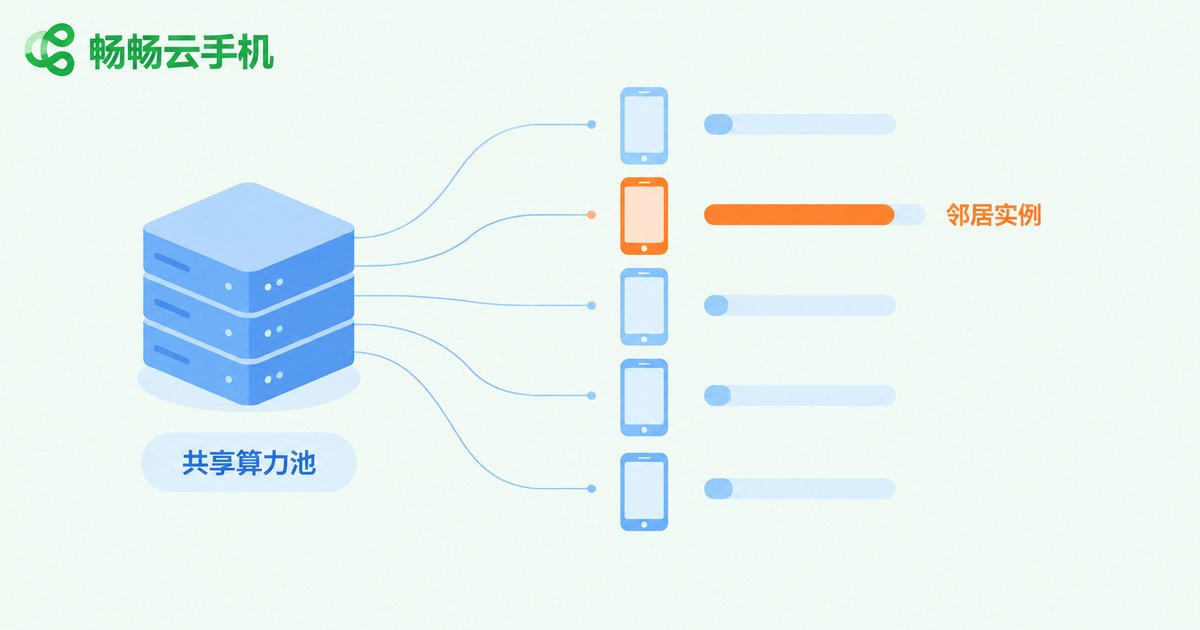
When shopping for a cloud phone, most people compare price first: for the same monthly fee, one provider offers two devices while another offers three, and the second looks like a better deal. But the biggest cost of running a cloud phone is neither storage nor bandwidth — it's CPU and GPU compute. Cheap plans are often cheap because the provider squeezes more instances onto each physical server, so every user shares the same pool of computing power.
There's nothing wrong with sharing in principle — it's like flat-sharing: as long as nobody hogs the utilities, everyone saves. But once one “roommate” starts consuming resources aggressively — running dozens of game instances or automation scripts at once — the whole household runs short, and your cloud phone starts lagging for no obvious reason. This is what the industry calls the noisy neighbor problem.
6 Telltale Signs a Neighbor Instance Is Slowing You Down
Compute contention rarely makes a cloud phone completely unusable. What you'll notice is a chronic, intermittent performance dip. The more of these signs you recognize, the more likely the lag has nothing to do with how you use it:
1. Touch response flips between instant and sluggish. Sometimes a tap registers immediately; sometimes it takes half a second, with no pattern.
2. Frame rates ride a roller coaster. A game that holds a steady 40 FPS suddenly drops into the teens, then recovers on its own.
3. Lag clusters at fixed hours. Everything crawls between 8 and 11 p.m. yet runs smoothly after midnight — exactly when overall usage peaks.
4. The more instances you open, the worse it gets. One runs smoothly, three stutter, five are unusable — the compute pool is being spread thin.
5. Frequent disconnects. Under heavy load, platforms reclaim or migrate instances, which shows up as brief connection drops.
6. Benchmark scores swing wildly. The same device scores 80,000 one day and 50,000 the next. The hardware didn't change — the neighbors did.
A 3-Step Self-Test to Confirm the Cause
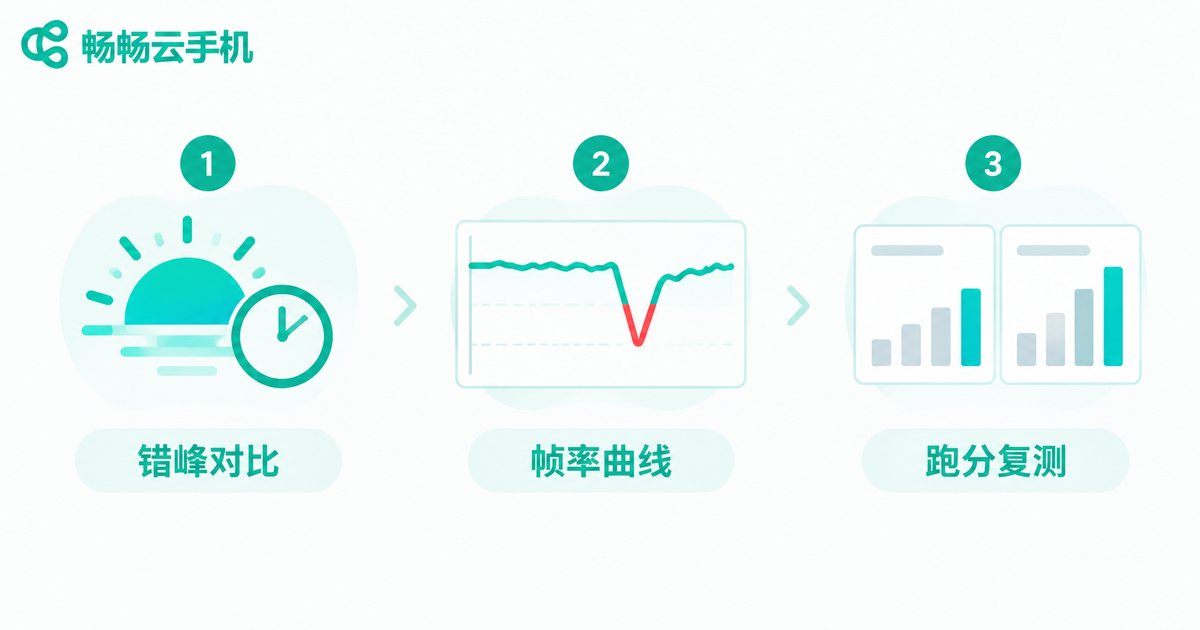
Instead of complaining on gut feeling, spend ten minutes on a simple test. These three methods separate network trouble, device trouble, and compute contention:
| Test | How to Run It | How to Read It |
|---|---|---|
| Off-peak comparison | Run the same app at 7 a.m. and again at 9 p.m., noting smoothness | Clearly worse at peak hours points to strained shared compute |
| Frame-rate curve | Play for 30 minutes straight and watch for unexplained FPS plunges | Plunges that self-recover are the classic noisy-neighbor signature |
| Repeat benchmarks | Benchmark the same instance at different hours across 3 days | Swings above 20% mean unstable compute allocation |
Rule out confounders first: speed-test your local connection and stream a video to confirm your broadband is fine, and avoid downloading or updating apps during the test. If the off-peak gap is obvious while your network stays stable, you can safely conclude that shared compute is being squeezed by neighbor instances.
Cheap Doesn't Mean Low Quality: 4 Checkpoints Before You Buy
Once you know where the hidden cost comes from, you know what to ask. Compare prices, but weigh these four points more heavily:
1. Dedicated or shared resources. Check the documentation or ask support: are CPU cores exclusively allocated or shared across instances? Dedicated costs a bit more but delivers predictable performance.
2. Background-task limits. Some providers cap per-instance usage so a single user can't drag down an entire server — a sign of responsible operations, not a drawback.
3. Instance density per server. At the same price, fewer instances per server means a bigger share of compute for you.
4. Low-friction trials. A provider that lets you try before committing makes it easy to run the off-peak test yourself.

Want Affordable and Stable? Meet ChangChang Cloud Phone
If you're after a budget-friendly cloud phone that still takes stability seriously, take a look at ChangChang Cloud Phone (official site: ccloudphone). It offers cloud-based Android devices for everyday scenarios such as idle game running, multi-account management, and keeping apps alive around the clock. Plan details and device configurations are shown on the official website — pick whatever matches your usage.
Whichever provider you choose, start small or short-term and run the off-peak test above — let the data speak; it beats any advertisement.
FAQ
Q: Are cheap cloud phones always laggy?
No. Smoothness depends on the provider's instance density and scheduling strategy, not the price tag. Some affordable plans stay fluid by keeping per-server instance counts in check — the key is verifying with an off-peak test.
Q: How do I tell a slow network from noisy-neighbor contention?
Test your local connection first. If your network is fine but the cloud phone still stutters intermittently — especially during evening peaks — shared compute contention is the likely culprit.
Q: Why is it smooth by day and laggy at night?
Evenings are peak hours. Other instances on the same physical server consume more resources, leaving less for you — the most typical symptom of shared compute.
Q: Will a pricier plan fix it?
If the higher tier offers dedicated compute or lower instance density, improvement is usually obvious. Confirm how resources are allocated before paying so you don't waste money.
Q: Where can I learn more about ChangChang Cloud Phone?
Visit the official website at ccloudphone for product and plan details, then choose a configuration that fits your use case.


