
What Can Agentic Mobile on Cloud Phones Do? Enterprise Workflow Automation and Mobile App Testing Scenarios
What Is Agentic Mobile? Letting AI Operate Phones Like a Human
In the past, automating a phone meant macro-style scripts: pre-recorded coordinates and sequences that broke the moment an interface changed. Agentic Mobile takes a completely different approach — it works like a human operator: it understands the screen, plans the steps, and taps the right buttons.
You simply describe a task in plain language, such as "every morning at 9, open this app, check new orders and summarize them into a daily report." The agent opens the app, recognizes the UI, taps, types, and verifies results on its own. Pop-up ads, moved buttons, redesigned pages — it adapts on the fly instead of getting stuck.
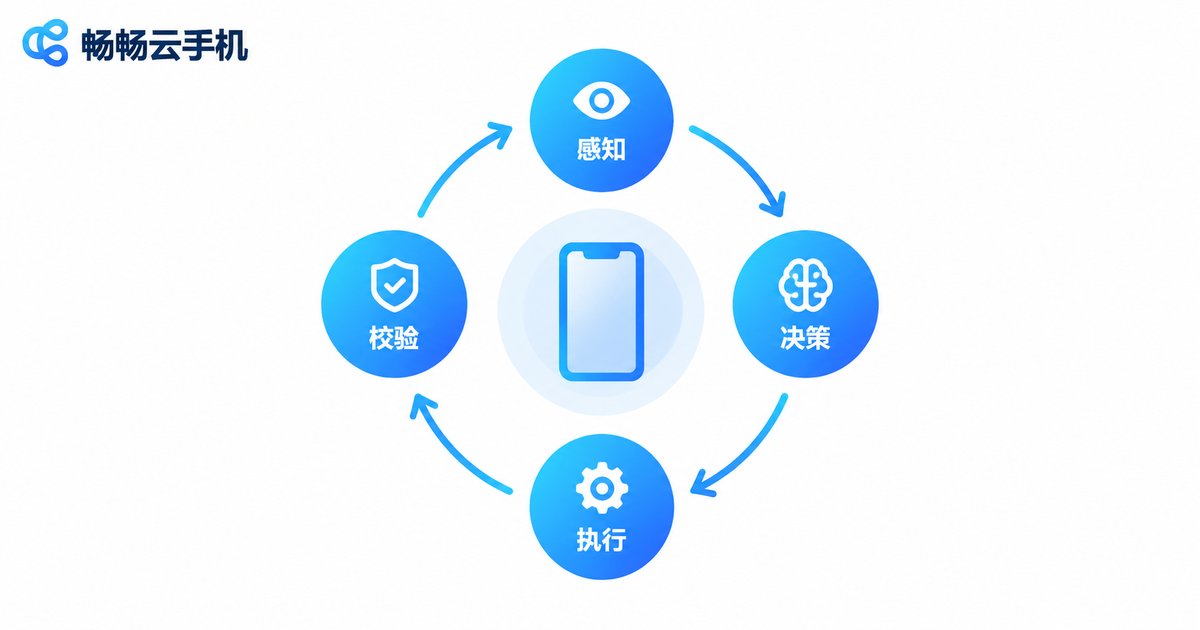
How It Works: The Perception–Decision–Action Loop
Agentic Mobile runs on a continuous loop:
1. Perception: capture the current screen and use a vision model to understand its elements and state;
2. Decision: plan the next tap or input based on the task goal;
3. Action: perform real taps, swipes, and typing;
4. Verification: check whether the result matches expectations, retry or reroute automatically if not.
| Dimension | Traditional Script | Agentic Mobile |
|---|---|---|
| UI adaptation | Fixed coordinates, breaks on redesign | Vision-based understanding, adapts to changes |
| Learning curve | Requires recording or coding scripts | Describe tasks in plain language |
| Exception handling | Pop-ups often break the flow | Recognizes and handles pop-ups automatically |
| Maintenance | Frequent manual upkeep | Greatly reduced |
Enterprise Workflow Automation: Handing Repetitive Work to AI
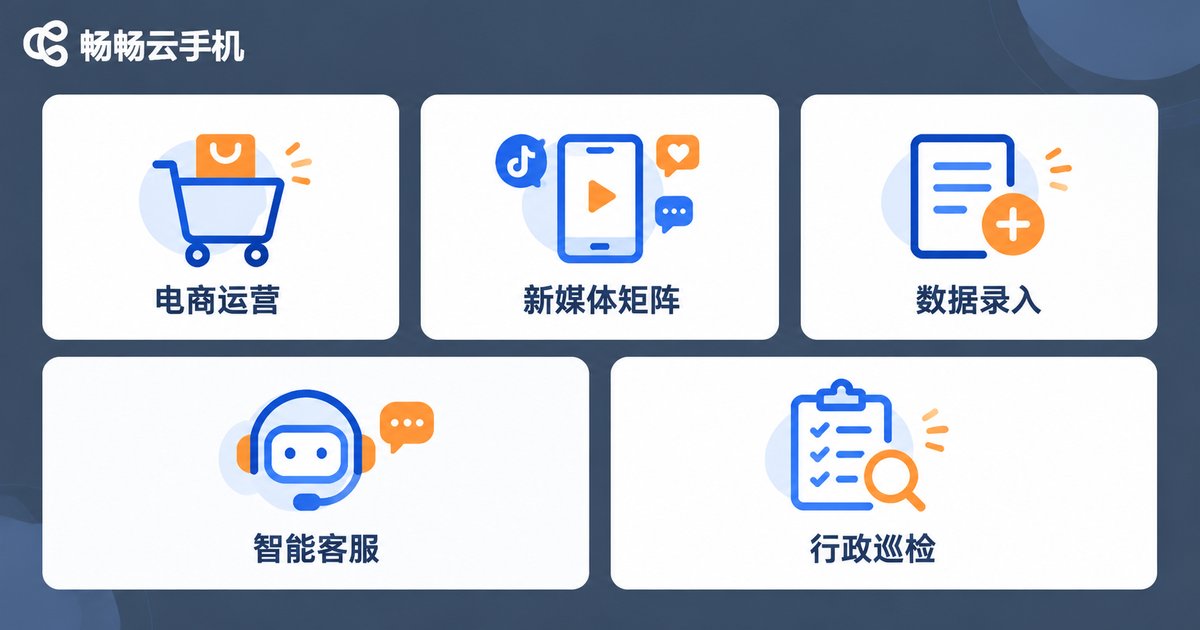
Much of a company's daily work is essentially the repetitive loop of "open an app — check — act — record," which is exactly where Agentic Mobile shines:
E-commerce operations: batch-list products, update prices and inventory, reply to buyer reviews, and follow up on order status, freeing operators from hours of repetitive tapping every day;
Social media matrix: publish content on schedule across multiple accounts, read and reply to comments, and aggregate views and follower data into automatic daily reports;
Data collection and entry: periodically capture prices, rankings, and competitor updates from industry apps and auto-fill them into internal sheets or systems, replacing manual "transcription";
Customer service: auto-reply to common questions, route tickets by rule, and cover night shifts so human agents only handle complex cases;
Admin patrols: open designated apps at fixed times daily for check-ins, sign-offs, and message confirmations, with automatic screenshots as records.
Mobile App Testing: From Manual Tapping to AI-Run Test Cases
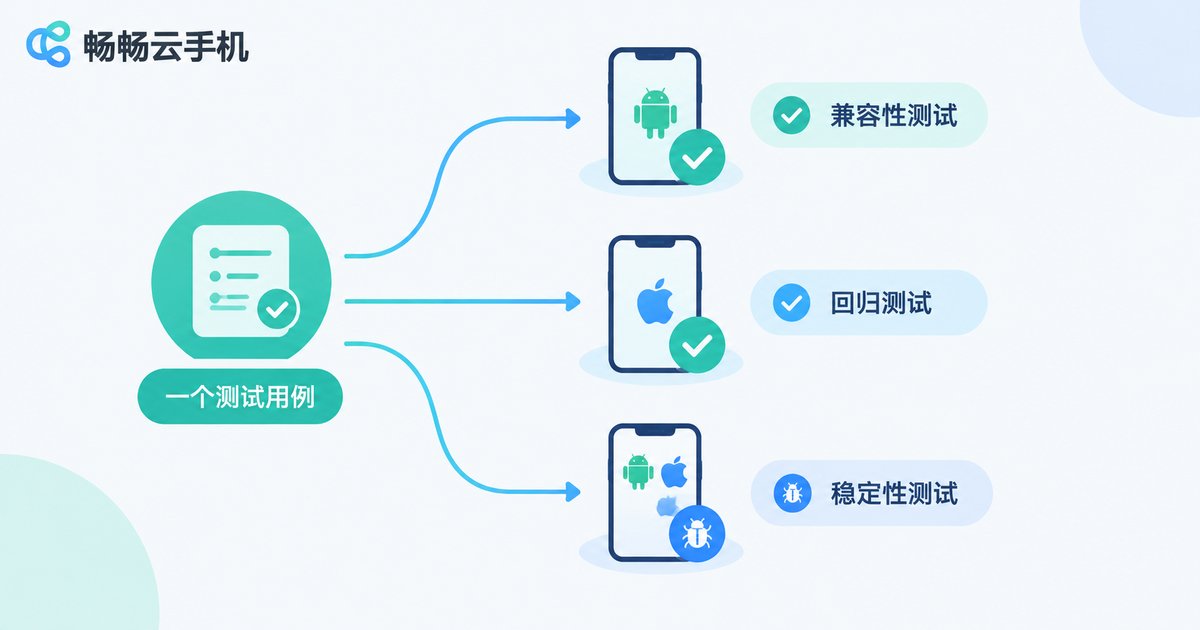
For app development and QA teams, Agentic Mobile is just as much of a productivity revolution:
UI automation testing: write test cases in plain language — for example, "log in → add to cart → place order → cancel order" — and the AI executes each step and verifies the expected result, with no complex automation code required;
Compatibility testing: distribute the same test case to dozens of cloud phones with different resolutions and OS versions in parallel to quickly expose adaptation issues;
Regression testing: automatically re-run core-path cases after every release to catch "fix A, break B" problems immediately;
Stability testing: let the AI randomly explore app pages for hours; when crashes, freezes, or blank screens occur, it captures screenshots and logs the exact path for easy reproduction;
Release patrol: after a staged rollout, automatically walk through core features on a schedule, acting as a "24/7 quality inspector."
Why Run Agentic Mobile on Cloud Phones?
Agentic Mobile needs a phone that is "always online and always ready." Building an in-house device farm is costly and wears hardware out fast, while cloud phones solve these pain points neatly:
| Dimension | In-house Device Farm | Cloud Phone |
|---|---|---|
| Hardware cost | Upfront purchase of dozens of devices | Provision on demand |
| Uptime | Depends on local power and network | Data-center grade, online 24/7 |
| Batch management | Plug in and debug one by one | Batch group control, one-click operations |
| Environment isolation | Tedious re-flashing | Independent environment per instance |
| Device wear | Fast wear from round-the-clock use | Runs in the cloud, no hardware depreciation |
CCloudPhone: The Ideal Foundation for Agentic Mobile
Among cloud phone services, CCloudPhone (ccloudphone) is an ideal foundation for Agentic Mobile workloads. It provides cloud Android instances that stay online around the clock — even when your local computer is shut down, automation and testing tasks keep running in the cloud. It also supports batch creation and group control, letting you manage dozens or hundreds of cloud instances in unison, which is perfect for scaling automation workflows and compatibility testing.
Each instance is an independent Android environment with isolated account data — ideal both for multi-account matrix operations and for giving every test task a clean, dedicated environment. Visit the CCloudPhone official website for details on features and plans.

Four Steps to Get Started
Step 1, map your workflows: identify high-frequency, rule-based, repetitive processes and prioritize the ones with the biggest automation payoff;
Step 2, prepare the environment: sign up for CCloudPhone, create cloud phone instances as needed, install the target apps, and log in with your business accounts;
Step 3, configure tasks: describe the workflow to Agentic Mobile in plain language, run a small pilot, review execution logs, and refine the description iteratively;
Step 4, scale up: once tasks run stably, replicate them across more cloud instances via batch group control and set up regular patrols, letting AI keep "working" for your business.
FAQ
Q: How is Agentic Mobile different from traditional automation scripts?
Traditional scripts rely on fixed coordinates and control paths, breaking whenever the UI changes. Agentic Mobile understands the screen visually and adapts to interface changes automatically, with far lower maintenance costs.
Q: Can I use Agentic Mobile without programming skills?
Yes. Most tasks only require describing the goal and steps in plain language; the AI plans and executes the operations itself, so business users can get started quickly.
Q: How many automation tasks can one cloud phone run?
We recommend dedicating each cloud instance to one core workflow; lightweight tasks can run in parallel. For large-scale scenarios, scale out by batch-creating more cloud instances.
Q: Is it safe to run automation on cloud phones?
Cloud instances are isolated from one another, and account data is stored independently. For sensitive business operations, we recommend dedicated instances and regular reviews of task execution logs.
Q: Which Agentic Mobile scenarios suit CCloudPhone?
From workflow automation like e-commerce operations and social media matrices to app compatibility, regression, and stability testing, everything can run long-term and stably on CCloudPhone's cloud Android instances. See the official website for specific capabilities.


