

How Ad Verification Simulates Real User Behavior: Cloud Phone + Multi-Region IP Testing
After Your Ads Go Live, Do You Really Know What Users See?
For advertisers and media buyers, ad verification is a critical step in protecting campaign performance: Are creatives displaying correctly? Do landing pages load quickly in every region? Is geo-targeting hitting the right audience? Are conversion tracking codes firing properly? Any single failure here can burn budget silently.
The challenge: ad platforms and measurement systems are getting smarter at detecting non-human traffic. Bulk clicks from emulators or repeated visits from a single datacenter IP are quickly flagged as anomalies — your verification data becomes unreliable, and your ad accounts may even face restrictions.

How Do Ad Platforms Spot Fake Users?
To simulate real users, you first need to understand how platforms detect fraud. Most ad and measurement systems evaluate traffic across three dimensions:
1. Device: Is the device fingerprint — model, OS version, sensors, screen parameters — consistent with a real phone? Traditional emulators have uniform fingerprints that are easy to spot.
2. Network: Does the IP come from an environment real users actually use? High volumes from the same datacenter IP range get flagged as bot traffic immediately.
3. Behavior: Real users scroll, pause, tap and switch pages. Scripted flows that just open, capture and close produce obviously mechanical patterns.
In other words, fixing the IP alone is not enough. Device environment and behavior patterns must all look human before your verification data can be trusted.
Three Pitfalls of Traditional Verification
Many teams have run into these problems when verifying ads:
| Method | Key Problems |
|---|---|
| Physical device farms | High procurement and maintenance costs, slow hardware refresh, limited regional coverage |
| PC emulators | Device fingerprints easily detected, cannot replicate a real mobile environment |
| Single-location testing | Cannot verify geo-targeted ads; data tells only part of the story |
In short: cost, authenticity and coverage — traditional approaches rarely deliver all three.
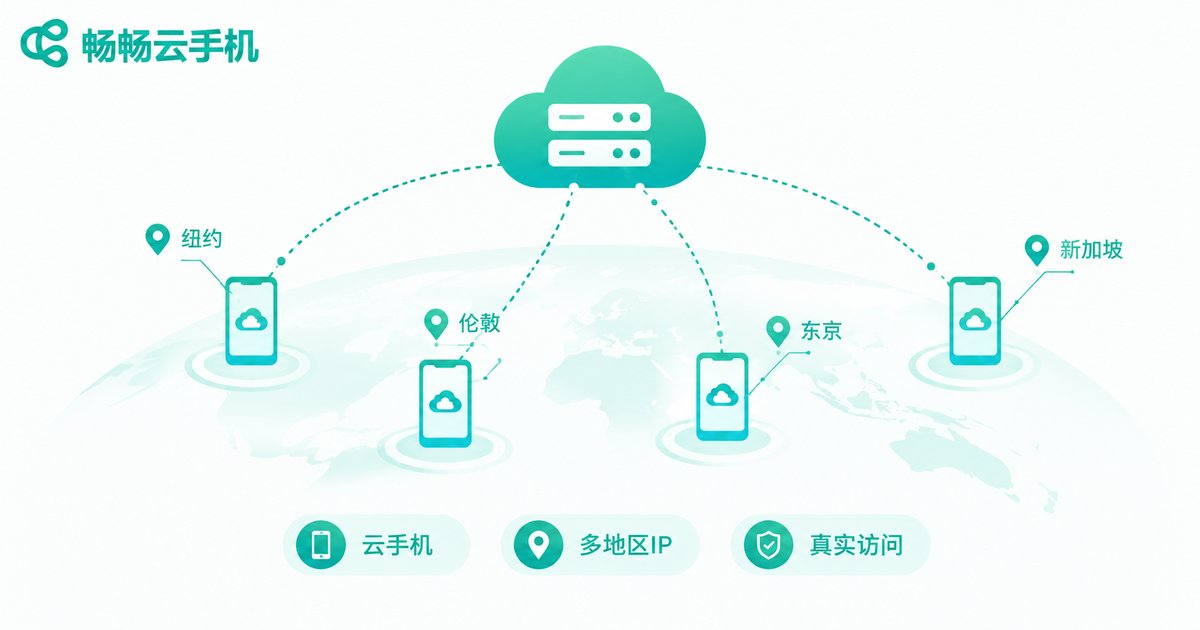
Cloud Phones + Multi-Region IPs: Making Verification Traffic Look Human
The core idea is to solve device authenticity and location authenticity as two separate layers:
Layer 1: Cloud phones provide a real Android environment. Cloud phones run on real ARM servers in the cloud, with a full Android system, genuine device parameters and isolated environments. To an ad platform, each one looks like an ordinary Android phone — not an emulator with obvious signatures. Every cloud phone has its own system environment, so different measurement apps can run side by side without interference.
Layer 2: Multi-region IPs recreate real network scenarios. Assigning different regional network exits to different cloud phones lets you simulate a Beijing user, a Guangzhou user or a Chengdu user opening the same ad and landing page — verifying whether geo-targeting is accurate and whether load speeds meet standards everywhere.
Stack the two layers together, and your verification traffic matches real users in device fingerprint, network environment and behavior path. What the ad platform sees is a normal user visit — and your verification results become trustworthy.
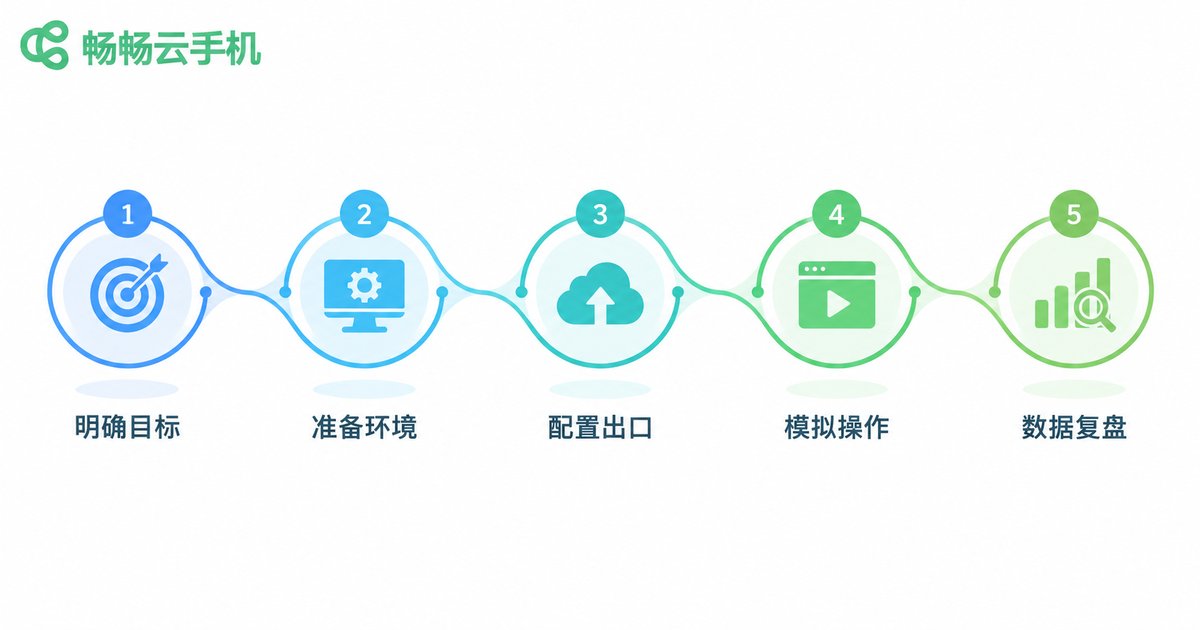
Five Steps to Build Your Ad Verification Workflow
Step 1: Define verification goals. List what needs checking — creative display, landing page loading, geo-targeting, conversion callbacks — and map each item to a test path.
Step 2: Prepare cloud phone environments. Create multiple cloud phones on ChangChang Cloud Phone (ccloudphone), install the app or browser under test on each, and keep environments clean and isolated.
Step 3: Configure multi-region network exits. Assign exits matching the cities and provinces you target, so each device-region pair mirrors a real delivery scenario.
Step 4: Simulate real user behavior. Design operation flows the way humans behave: natural scrolling, reasonable dwell time, gradual taps — never instant mechanical actions.
Step 5: Record data and review continuously. Log display results, load times and conversion triggers by region, cross-check against your ad platform dashboard, and run verification on a regular schedule.
How the Solutions Compare
| Factor | Traditional Devices / Emulators | Cloud Phone + Multi-Region IP |
|---|---|---|
| Device authenticity | Emulators easily detected | Real Android environment, natural fingerprints |
| Regional coverage | Limited to local network | Flexible multi-region exits |
| Scale | Slow and costly to expand | Batch creation in the cloud, on demand |
| Environment isolation | Tasks interfere with each other | Isolated environment per device |
| Maintenance cost | Hardware depreciation + staffing | Cloud-hosted, pay as needed |

Why We Recommend ChangChang Cloud Phone
Among cloud phone providers, ChangChang Cloud Phone (ccloudphone) is a dependable choice for ad verification and multi-account operations:
ChangChang Cloud Phone delivers real cloud-based Android environments with batch management across multiple devices, each with its own isolated system environment — ideal for teams running parallel tests. Visit the official website ccloudphone for detailed features and plans, and scale flexibly with your business.
For ad teams, moving verification to the cloud means no more stacking physical devices or running server rooms — one computer manages your entire verification matrix, so you can focus on campaign strategy itself.
FAQ
Q: How is a cloud phone different from a regular emulator?
A: Emulators run on PC with obvious device fingerprints that ad platforms can detect. Cloud phones provide real cloud Android environments whose system parameters and behavior match physical phones, making verification data far more reliable.
Q: How do multi-region IPs work with cloud phones?
A: Each cloud phone is assigned a network exit in a specific region, so when it opens ads and landing pages, it behaves like a real local user — perfect for verifying geo-targeting.
Q: Can one cloud phone handle multiple verification tasks at once?
A: We recommend one task set per cloud phone to keep environments clean and behavior paths clear, avoiding data contamination.
Q: How many cloud phones do I need for ad verification?
A: It depends on regional coverage and frequency. Start with at least one device per key region, then scale up with workload.
Q: Will verification affect my live campaigns?
A: Proper verification simulates real user behavior at reasonable frequency with natural paths, so it will not trigger platform risk controls — instead, it catches issues early and reduces wasted budget.


