

Which Cloud Phone Is the Smoothest in 2026? Key Factors and Optimization Tips
Why Do Cloud Phones Vary So Much in Smoothness?
Some cloud phones feel nearly identical to a local device, while others suffer from lag, frame drops, and noticeable touch delay. The gap is not just about internet speed.
A cloud phone is essentially an Android instance running on a remote server. Every tap you make travels through the full chain of local device → network → cloud server → video encoding → network return. A bottleneck at any point shows up directly as stutter. By 2026, with ARM cloud-native technology maturing and 5G coverage expanding, mainstream cloud phones have improved dramatically—but the gap between providers remains. To pick the smoothest cloud phone, you first need to understand what actually drives smoothness.
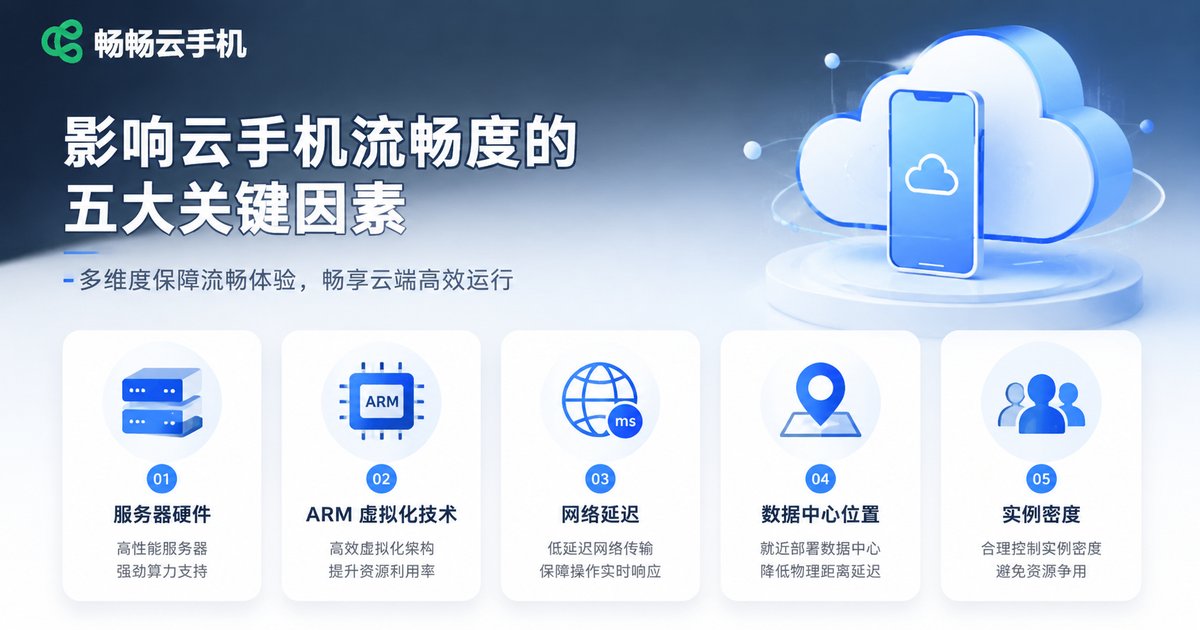
Five Core Factors That Affect Cloud Phone Smoothness
1. Server Hardware Configuration
CPU cores, memory, and GPU performance define the performance ceiling. Under-provisioned cloud phones easily drop frames and load slowly when running demanding games.
2. Virtualization Architecture
This is the most overlooked yet critical factor. Cloud phones built on ARM-native virtualization run a genuine ARM Android environment in the cloud, delivering compatibility and performance close to a real device. x86-based solutions require instruction translation, causing noticeable performance loss and more frequent game compatibility issues.
3. Network Latency and Bandwidth
Latency is the number one killer of smoothness. Below 50ms, controls feel responsive; above 100ms, you clearly feel the tapped-but-nothing-happens delay. Bandwidth affects image clarity—insufficient bandwidth leads to blurry, over-compressed video.
4. Data Center Distribution
The closer the cloud server, the shorter the round-trip time. Providers with multiple regional nodes let users connect nearby—something small providers struggle to offer.
5. Server Instance Density
How many cloud phone instances run on one physical server determines the resources each instance receives. Providers that oversell heavily see smoothness collapse during peak hours.
Here is a quick summary of how each factor affects smoothness:
| Factor | Impact on Smoothness | What You Can Do |
|---|---|---|
| Server hardware | Defines the performance ceiling | Choose configuration by use case |
| Virtualization | ARM-native is near real device; x86 translation adds loss | Prefer ARM-native cloud phones |
| Latency | Below 50ms feels best | Connect to nearby nodes, optimize local network |
| Node distribution | Affects round-trip time | Choose providers with multiple regions |
| Instance density | Overselling causes peak-hour lag | Choose providers with guaranteed resources |
How to Quickly Test Whether a Cloud Phone Is Smooth
Before subscribing, test the experience across three dimensions:
Frame rate: Open a popular game and watch whether the picture stays stable, with no smearing or tearing during fast swipes.
Touch response: Tap and swipe rapidly on the screen and feel whether there is a perceptible delay between input and on-screen feedback.
Long-run stability: Use it continuously for one to two hours and watch for gradual slowdown—this often exposes server overselling.
Cloud Phone Optimization Tips
Choosing the right cloud phone is only the first step; good usage habits matter just as much:
1. Connect to the nearest node. If your provider offers multiple regional nodes, pick the one physically closest to you to significantly reduce latency.
2. Set resolution wisely. Higher resolution puts more pressure on bandwidth and encoding. Standard resolution is enough for automation apps; enable high resolution only for gaming.
3. Limit apps per instance. More background apps mean higher memory usage. Close apps you no longer need and keep the system lightweight.
4. Clear cache and restart regularly. Long-running sessions accumulate cache files. Restarting your cloud phone and clearing cache periodically keeps it smooth.
5. Optimize your local network. Prefer stable Wi-Fi or 5G, and avoid using your cloud phone in spots with weak signal.
CCloudPhone: An Architecture Built for Smoothness
When it comes to smoothness, CCloudPhone (ccloudphone) is designed for it from the ground up:
ARM-native architecture: The cloud runs a genuine ARM Android environment with no instruction translation, delivering compatibility and performance close to a local device and more stable gameplay.
Multi-region node deployment: Users can connect to nearby cloud nodes, effectively reducing network latency for more responsive controls.
Flexible instance configurations: Choose cloud phone instances that match your scenario—multi-instance gaming, app automation, or lightweight office work.
Whether for mobile gaming, app automation, or always-on lightweight office scenarios, CCloudPhone delivers a stable, smooth cloud experience.
FAQ
Q: Does cloud phone smoothness mainly depend on internet speed?
Latency is an important factor, but not the only one. Server configuration, virtualization architecture, node distance, and instance density all matter. A cloud phone on an oversold server will lag no matter how good your network is.
Q: Can a cloud phone match the smoothness of a real device?
With ARM-native virtualization and well-placed nodes, daily use and most gaming scenarios already feel very close to a real device. CCloudPhone uses an ARM-native architecture precisely to bring the cloud experience as close to local as possible.
Q: Why does my cloud phone get laggier over time?
Three common causes: accumulated cache, too many background apps, and peak-hour server load. Clear the cache and close unused apps first; if it still lags, try switching nodes or contact support.
Q: Do automation scenarios need high-end configurations?
No. Automation apps have low performance requirements and run smoothly on standard configurations. Higher-spec instances are better suited for demanding games or multi-instance setups.


